

Python Tricks: How to Check Table Merging with Pandas
One keyword argument that saves you some frustrations
Welcome to a series of short posts each with handy Python tricks that can help you become a better Python programmer. In this blog, we will look into checking joins in Pandas.
Situation
When we work with a collection of datasets in Python, knowing how to join the tables together is crucial. We all know about INNER JOIN, LEFT JOIN, RIGHT JOIN, and FULL OUTER JOIN in SQL and how to do them in Pandas, but do you know that there is a lesser-known keyword argument called indicator?
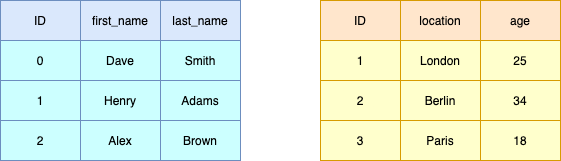
For illustrative purposes, we will be using the following tables where ID will be used as the common key between the tables for the remainder of this blog:
import pandas as pddf_left = pd.DataFrame({
"ID": [0, 1, 2],
"first_name": ["Dave", "Henry", "Alex"],
"last_name": ["Smith", "Adams", "Brown"],
})df_right = pd.DataFrame({
"ID": [1, 2, 3],
"location": ["London", "Berlin", "Paris"],
"age": [25, 34, 18],
})
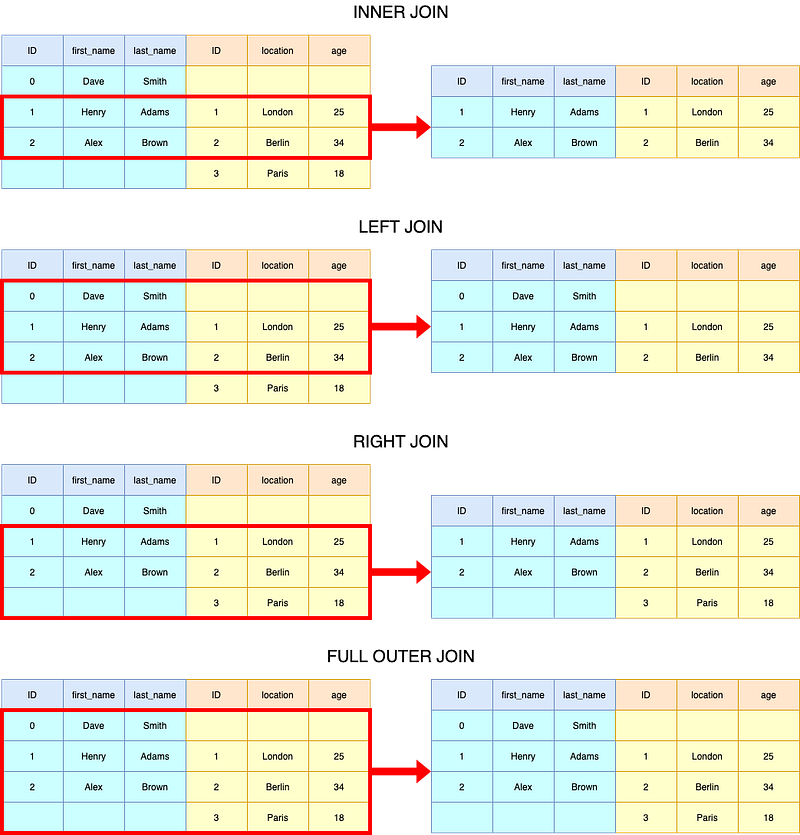
Quick Revision of SQL-like Joining Operations in Pandas
# Inner Join
df_results = df_left.merge(
    df_right,
    on=["ID"],
    how="left"
)
# Left Join
df_results = df_left.merge(
df_right,
on=["ID"],
how="left"
)# Right Join
df_results = df_left.merge(
df_right,
on=["ID"],
how="right"
)# Outer Join
df_results = df_left.merge(
df_right,
on=["ID"],
how="outer"
)
Note that we used a list as the input for the keyword argument on to showcase that it is possible to put in multiple key columns. Please feel free to use "ID" instead of ["ID"] if ID is the only key column.
Check Merge Results
Whenever you join two tables, check the resultant tables. Countless nights I tried to merge tables and thought that the join is done right (pun intended 😉) to realise that it is supposed to be left. The last thing you want is to revisit a join that you have done months ago, and that’s why when you do merges, pass indicator=True to get more information on the merge results:
# Outer Join
df_results = df_left.merge(
    df_right,
    on=["ID"],
    how="outer",
    indicator=True,
)
ID first_name last_name location age _merge
0 0 Dave Smith NaN NaN left_only
1 1 Henry Adams London 25.0 both
2 2 Alex Brown Berlin 34.0 both
3 3 NaN NaN Paris 18.0 right_onlyWith the _merge column, not only can we check the count of rows that exists in either table, but also pull out the exact rows for further quality checks. This has helped on numerous occasions understand what went wrong in the data processing pipeline.
Excluding Join / Anti-Merge
Using the _merge column, we can also easily achieve what is called left/right excluding joins and anti-merges. A left excluding join yields a table with only records from the first table that do not have a match in the second table; a right excluding join is the mirror image of it. An anti-merge is essentially the combination of a left and a right excluding join.
# LEFT EXCLUDING JOIN
df_results = df_left.merge(
    df_right,
    on=["ID"],
    how="left",
    indicator=True,
)
df_results = df_results[df_results["_merge"] == "left_only"]
ID first_name last_name location age _merge
0 0 Dave Smith NaN NaN left_onlyInstead of having to assign the interim result before selecting _merge == "left_only", we can actually achieve this using the query method of a Pandas DataFrame and drop the _merge column afterwards:
# LEFT EXCLUDING JOIN
df_results = (df_left.merge(df_right,
                            on=["ID"],
                            how="left",
                            indicator=True)
                     .query("_merge != 'both'")
                     .drop("_merge", 1))
ID first_name last_name location age
0 0 Dave Smith NaN NaN# RIGHT EXCLUDING JOIN
df_results = (df_left.merge(df_right,
on="ID",
how="right",
indicator=True)
.query("_merge != 'both'")
.drop("merge", 1)) ID first_name last_name location age
2 3 NaN NaN Paris 18# ANTI MERGE
df_results = (df_left.merge(df_right,
on=["ID"],
how="outer",
indicator=True)
.query("_merge != 'both'")
.drop("_merge", 1)) ID first_name last_name location age
0 0 Dave Smith NaN NaN
3 3 NaN NaN Paris 18.0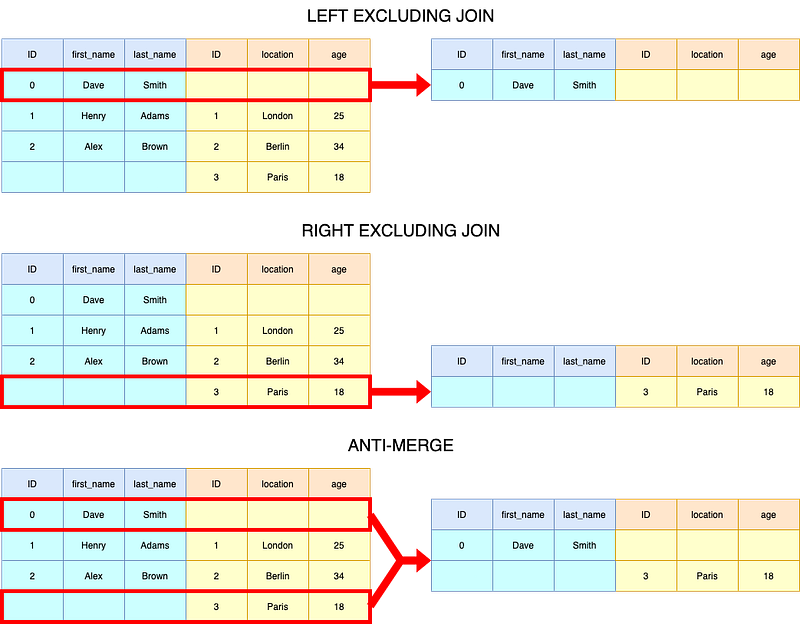
That’s about it for this blog post! I hope you have found this useful. If you are interested in other Python tricks, I have put together a list of these short blogs for you:
- Python Tricks: Flattening Lists
- Python Tricks: Simplifying If Statements & Boolean Evaluation
- Python Tricks: Check Multiple Variables against Single Value
If you want to learn more about Python, Data Science, or Machine Learning, you may want to check out these posts:
- 7 Easy Ways for Improving Your Data Science Workflow
- Efficient Conditional Logic on Pandas DataFrames
- Memory Efficiency of Common Python Data Structures
- Parallelism with Python
- Essential Jupyter Extension for Data Science Set Up
- Efficient Root Searching Algorithms in Python
If you would like to learn more about how to apply machine learning to trading & investing, here are some other posts that may be of interest:


