avataralpha2phi

Free AI web copilot to create summaries, insights and extended knowledge, download it at here

4895

Abstract

ce_sheet </span>= extract_balance_sheet(elements, <span class="hljs-keyword">balance_sheet_dates) </span> return <span class="hljs-keyword">balance_sheet</span></pre></div><div id="48f0"><pre><span class="hljs-variable">raise</span> <span class="hljs-function"><span class="hljs-title">RuntimeError</span>(<span class="hljs-string">"ERR: data retrieval error while scraping."</span>)</span></pre></div><h2 id="fb09">Extract Balance Sheet Dates</h2><p id="0739">Using XPath, the scraping is going to be extremely simple. Below are the dates that I want to extract.</p><figure id="dc58"><img src="https://cdn-images-1.readmedium.com/v2/resize:fit:800/1*00GBjilu8Yz3p-ytIucg7A.png"><figcaption>Balance Sheet Dates</figcaption></figure><p id="39d3">Using the below code I can extract them into a Python list -<code>[‘26/09/2020’, ‘27/06/2020’, ‘28/03/2020’, ‘28/12/2019’]</code></p><div id="446c"><pre><span class="hljs-keyword">def</span> <span class="hljs-title function_">_extract_balance_sheet_dates</span>(<span class="hljs-params">elements</span>): <span class="hljs-string">""" Extract budget dates to a list. Date format is dd/mm/yyyy. """</span> <span class="hljs-comment"># Extract years. Use python reg. Can also use lxml exslt</span> years = <span class="hljs-built_in">list</span>() nodes = elements.xpath(<span class="hljs-string">".//[@id='header_row']/th/span"</span>) <span class="hljs-keyword">for</span> node <span class="hljs-keyword">in</span> nodes: <span class="hljs-keyword">match</span> = re.search(<span class="hljs-string">r"\d\d\d\d"</span>, node.text_content().strip()) <span class="hljs-keyword">if</span> <span class="hljs-keyword">match</span>: years.append(<span class="hljs-keyword">match</span>.string)</pre></div><div id="44f2"><pre><span class="hljs-comment"># Extract month and day</span> month_days = <span class="hljs-built_in">list</span>() nodes = elements.xpath(<span class="hljs-string">"//[@id='header_row']/th/div"</span>) <span class="hljs-keyword">for</span> node <span class="hljs-keyword">in</span> nodes: <span class="hljs-keyword">match</span> = re.search(<span class="hljs-string">r"\d\d/\d\d"</span>, node.text_content().strip()) <span class="hljs-keyword">if</span> <span class="hljs-keyword">match</span>: month_days.append(<span class="hljs-keyword">match</span>.string)</pre></div><div id="70f0"><pre><span class="hljs-comment"># Balance sheet timestamps</span> <span class="hljs-keyword">return</span> [<span class="hljs-string">"/"</span>.join(<span class="hljs-built_in">map</span>(<span class="hljs-built_in">str</span>, i)) <span class="hljs-keyword">for</span> i <span class="hljs-keyword">in</span> <span class="hljs-built_in">zip</span>(month_days, years)]</pre></div><h2 id="823e">Extract Balance Sheet Summary</h2><p id="9378">For the balance sheet summary — <code>Total Assets,</code> <code>Total Current Assets</code>, <code>Total Current Liabilities</code>, <code>Total Liabilities</code> and <code>Total Equity</code>, I extract them into a dictionary object using the following code snippets</p><div id="060c"><pre><span class="hljs-keyword">def</span> <span class="hljs-title function_">_extract_balance_sheet</span>(<span class="hljs-params">elements, balance_sheet_dates</span>): <span class="hljs-string">""" Extract balance sheet info. """</span> nodes = elements.xpath(<span class="hljs-string">".//*[@id='parentTr']/td"</span>) balance_sheet = {} section = <span class="hljs-string">""</span> dt_index = <span class="hljs-number">0</span> <span class="hljs-keyword">for</span> node <span class="hljs-keyword">in</span> nodes: value = node.text_content().strip() <span class="hljs-keyword">if</span> <span class="hljs-keyword">not</span> is_float(value): section = value balance_sheet[section] = {} dt_index = <span class="hljs-number">0</span> <span class="hljs-keyword">else</span>: balance_sheet[section][balance_sheet_dates[dt_index]] = <span class="hljs-built_in">float</span>(value) dt_index = dt_index + <span class="hljs-number">1</span> <span class="hljs-keyword">return</span> balance_sheet</pre></div><figure id="ca1d"><img src="https://cdn-images-1.readmedium.com/v2/resize:fit:800/1*B15hz1JJEnnv5r68qB2kjQ.png"><figcaption>Balance Sheet Summary</figcaption></figure><div id="fbf9"><pre>{'Total Current Assets': {'26/09/<span class="hljs-number">2020</span>': <span class="hljs-number">143713.0</span>, '27/06/<span class="hljs-number">2020</span>': <span class="hljs-number">140065.0</span>, '28/03/<span class="hljs-number">2020</span>': <span class="hljs-number">143753.0</span>, '28/12/<span class="hljs-number">2019</span>': <span class="hljs-number">163231.0</span>},

Options

'Total Assets': {'26/09 /<span class="hljs-number">2020</span>': <span class="hljs-number">323888.0</span>, '27/06/<span class="hljs-number">2020</span>': <span class="hljs-number">317344.0</span>, '28/03/<span class="hljs-number">2020</span>': <span class="hljs-number">320400.0</span>, '28/12/<span class="hljs-number">2019</span>': <span class="hljs-number">340618.0</span>}, 'Total Current Liabilities': {'26/09/<span class="hljs-number">2020</span>': <span class="hljs-number">105392.0</span>, ' 27/06/<span class="hljs-number">2020</span>': <span class="hljs-number">95318.0</span>, '28/03/<span class="hljs-number">2020</span>': <span class="hljs-number">96094.0</span>, '28/12/<span class="hljs-number">2019</span>': <span class="hljs-number">102161.0</span>}, 'Total Liabilities': {'26/09/<span class="hljs-number">2020</span>': <span class="hljs-number">258549.0</span>, '27/06/<span class="hljs-number">2020</span>': <span class="hljs-number">245062.0</span>, '28/03 /<span class="hljs-number">2020</span>': <span class="hljs-number">241975.0</span>, '28/12/<span class="hljs-number">2019</span>': <span class="hljs-number">251087.0</span>}, 'Total Equity': {'26/09/<span class="hljs-number">2020</span>': <span class="hljs-number">65339.0</span>, '27/06/<span class="hljs-number">2020</span>': <span class="hljs-number">72282.0</span>, '28/03/<span class="hljs-number">2020</span>': <span class="hljs-number">78425.0</span>, '28/12/<span class="hljs-number">2019</span>': <span class="hljs-number">895</span> <span class="hljs-number">31.0</span>}}</pre></div><h1 id="c66b">Testing</h1><p id="8005">And here is the unit test case for the above code snippet. You can find the code from this <a href="https://github.com/alpha2phi/investplus">repository</a>.</p><div id="ce5d"><pre><span class="hljs-keyword">import</span> unittest <span class="hljs-keyword">import</span> investplus</pre></div><div id="b5f4"><pre><span class="hljs-class"><span class="hljs-keyword">class</span> <span class="hljs-type">TestClass</span>(<span class="hljs-title">unittest</span>.<span class="hljs-type">TestCase</span>):</span></pre></div><div id="7699"><pre><span class="hljs-string">"""Test case docstring."""</span></pre></div><div id="c7d7"><pre><span class="hljs-keyword">def</span> <span class="hljs-title function_">setUp</span>(<span class="hljs-params"><span class="hljs-variable language_">self</span></span>): pass</pre></div><div id="97fe"><pre><span class="hljs-keyword">def</span> <span class="hljs-title function_">tearDown</span>(<span class="hljs-params"><span class="hljs-variable language_">self</span></span>): pass</pre></div><div id="699c"><pre><span class="hljs-keyword">def</span> <span class="hljs-title function_">test_stocks</span>(<span class="hljs-params">self</span>): url = <span class="hljs-string">"https://www.investing.com/equities/apple-computer-inc-balance-sheet"</span> balance_sheet = investplus.get_stock_balance_sheet(url) <span class="hljs-keyword">assert</span> balance_sheet <span class="hljs-keyword">is</span> <span class="hljs-keyword">not</span> <span class="hljs-literal">None</span> <span class="hljs-built_in">print</span>(balance_sheet)</pre></div><h1 id="30f8">Summary</h1><p id="b493">As you can see it is very easy to scrape data using Python without using any complex framework. However, the above method will not work if the website is dynamic and requires interaction to generate the data that we want. In this case frameworks like <code>Selenium</code> will be needed.</p><p id="06b6">Do also check out the following articles.</p><div id="de56" class="link-block"> <a href="https://alpha2phi.medium.com/rpa-and-web-scraping-using-jupyter-7a9e58b0da06"> <div> <div> <h2>RPA and Web Scraping using Jupyter</h2> <div><h3>Overview</h3></div> <div><p>alpha2phi.medium.com</p></div> </div> <div> <div style="background-image: url(https://miro.readmedium.com/v2/resize:fit:320/1*DcOaReOrCpAR1EJX69xLbw.png)"></div> </div> </div> </a> </div><div id="e109" class="link-block"> <a href="https://readmedium.com/python-time-series-data-with-pandas-723cd5bf1d96"> <div> <div> <h2>Python — Time Series Data with Pandas</h2> <div><h3>Numeric, categorical and time series data are the types of data that we commonly dealt with as part of exploratory data…</h3></div> <div><p>medium.com</p></div> </div> <div> <div style="background-image: url(https://miro.readmedium.com/v2/resize:fit:320/1*N8kzr95DjXjT8IHA8O9PkA.png)"></div> </div> </div> </a> </div></article></body>

CODEX

Python: Stock Data Scraping
Photo by Annie Spratt on Unsplash

Overview

Data is the new asset! In this article, I am going through the fundamental of using Python to scrape data from the Internet for use in your data project.

There are many Python libraries for web scraping. You can use the requests library with either BeautifulSoup, lxml, or Parsel, or frameworks like scrapy, Selenium, or a combination of both for dynamic websites.

Personally, I use requests + lxml for most of my scraping needs, and only use scrapy + Selenium for certain scenarios, e.g. getting content from dynamic or interactive websites. Most of the time using a simple approach should suffice.

Below I will be using requests + lxml to scrape the stock balance sheet data, highlighted in red boxes as shown below.
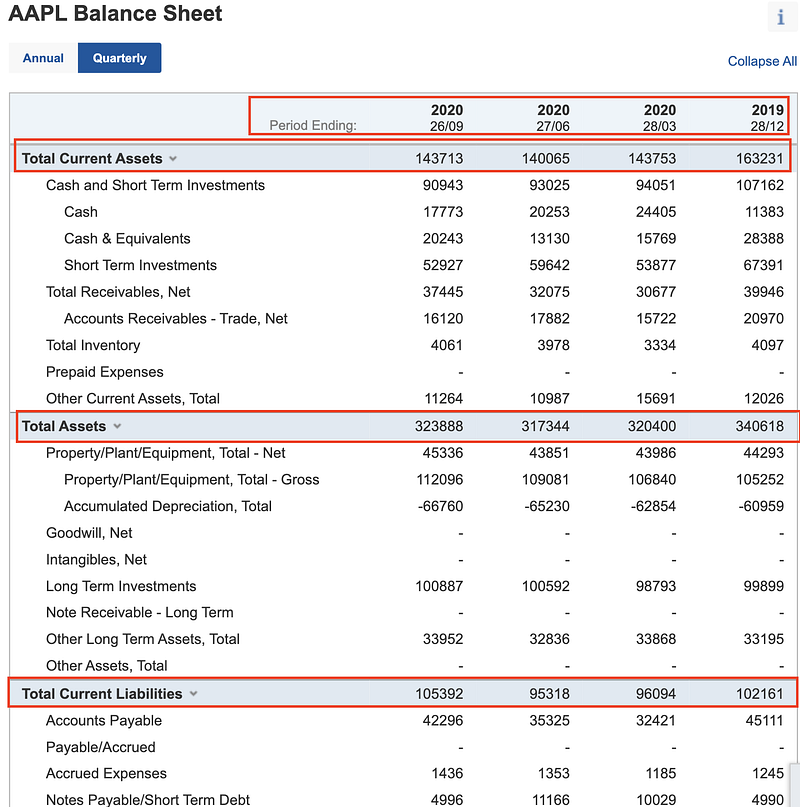
Stock Balance Sheet

XPath vs CSS Selector

There are quite a fair bit of debates regarding XPath and CSS selector, and which one is better to be used for web scraping. This article is not going to compare the two and I will just use XPath for my scraping needs.

Modern browsers like Brave, Chrome, or Edge allow us to inspect web pages and easily find out the XPath or CSS selector for a particular HTML element.

Below is a screenshot of how I get the XPath for a particular HTML element.
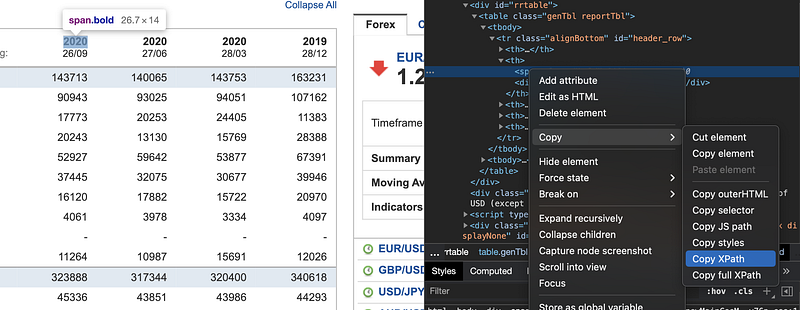
XPath for HTML Element

The Code

HTTP User Agent

For the HTTP headers, I am going to generate random user-agent. You can find the list of agents I use from the code snippet here. This is helpful if I am going to make numerous requests on the same website.

def http_headers():
    return {
        "User-Agent": random_user_agent(),
        "X-Requested-With": "XMLHttpRequest",
        "Accept": "text/html",
        "Accept-Encoding": "gzip, deflate, br",
        "Connection": "keep-alive",
    }
def random_user_agent():
    return str(random.choice(constant.USER_AGENTS))

XPath to the HTML Table

The stock balance sheet data is contained in an HTML table. To make the later selection easier, I assign the HTML table element to a variable.

def get_stock_balance_sheet(url):
    req = requests.get(url, headers=http_headers())
    if req.status_code != 200:
        raise ConnectionError(
            "ERR: error " + str(req.status_code) + ", try again later."
        )
root_ = fromstring(req.text)
    path_ = root_.xpath("//*[@id='rrtable']/table")
    if path_:
        for elements_ in path_:
            balance_sheet_dates = _extract_balance_sheet_dates(elements_)
            balance_sheet = _extract_balance_sheet(elements_, balance_sheet_dates)
            return balance_sheet
raise RuntimeError("ERR: data retrieval error while scraping.")

Extract Balance Sheet Dates

Using XPath, the scraping is going to be extremely simple. Below are the dates that I want to extract.

Balance Sheet Dates

Using the below code I can extract them into a Python list -[‘26/09/2020’, ‘27/06/2020’, ‘28/03/2020’, ‘28/12/2019’]

def _extract_balance_sheet_dates(elements):
    """
    Extract budget dates to a list. Date format is dd/mm/yyyy.
    """
    # Extract years. Use python reg. Can also use lxml exslt
    years = list()
    nodes = elements.xpath(".//*[@id='header_row']/th/span")
    for node in nodes:
        match = re.search(r"\d\d\d\d", node.text_content().strip())
        if match:
            years.append(match.string)
# Extract month and day
    month_days = list()
    nodes = elements.xpath("//*[@id='header_row']/th/div")
    for node in nodes:
        match = re.search(r"\d\d/\d\d", node.text_content().strip())
        if match:
            month_days.append(match.string)
# Balance sheet timestamps
    return ["/".join(map(str, i)) for i in zip(month_days, years)]

Extract Balance Sheet Summary

For the balance sheet summary — Total Assets, Total Current Assets, Total Current Liabilities, Total Liabilities and Total Equity, I extract them into a dictionary object using the following code snippets

def _extract_balance_sheet(elements, balance_sheet_dates):
    """
    Extract balance sheet info.
    """
    nodes = elements.xpath(".//*[@id='parentTr']/td")
    balance_sheet = {}
    section = ""
    dt_index = 0
    for node in nodes:
        value = node.text_content().strip()
        if not is_float(value):
            section = value
            balance_sheet[section] = {}
            dt_index = 0
        else:
            balance_sheet[section][balance_sheet_dates[dt_index]] = float(value)
            dt_index = dt_index + 1
    return balance_sheet
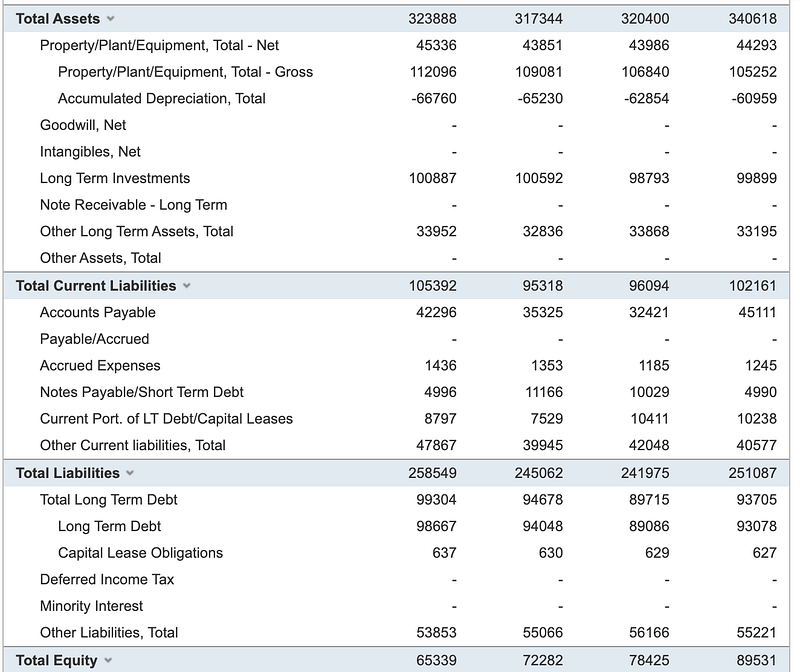
Balance Sheet Summary
{'Total Current Assets': {'26/09/2020': 143713.0, '27/06/2020': 140065.0, '28/03/2020': 143753.0, '28/12/2019': 163231.0}, 'Total Assets': {'26/09
/2020': 323888.0, '27/06/2020': 317344.0, '28/03/2020': 320400.0, '28/12/2019': 340618.0}, 'Total Current Liabilities': {'26/09/2020': 105392.0, '
27/06/2020': 95318.0, '28/03/2020': 96094.0, '28/12/2019': 102161.0}, 'Total Liabilities': {'26/09/2020': 258549.0, '27/06/2020': 245062.0, '28/03
/2020': 241975.0, '28/12/2019': 251087.0}, 'Total Equity': {'26/09/2020': 65339.0, '27/06/2020': 72282.0, '28/03/2020': 78425.0, '28/12/2019': 895
31.0}}

Testing

And here is the unit test case for the above code snippet. You can find the code from this repository.

import unittest
import investplus
class TestClass(unittest.TestCase):
"""Test case docstring."""
def setUp(self):
        pass
def tearDown(self):
        pass
def test_stocks(self):
        url = "https://www.investing.com/equities/apple-computer-inc-balance-sheet"
        balance_sheet = investplus.get_stock_balance_sheet(url)
        assert balance_sheet is not None
        print(balance_sheet)

Summary

As you can see it is very easy to scrape data using Python without using any complex framework. However, the above method will not work if the website is dynamic and requires interaction to generate the data that we want. In this case frameworks like Selenium will be needed.

Do also check out the following articles.

Python
Programming
Scraping With Python
Guides And Tutorials
Data
Recommended from ReadMedium