avataralpha2phi

Free AI web copilot to create summaries, insights and extended knowledge, download it at here

7573

Abstract

mber">5</span> <span class="hljs-keyword">Order</span> <span class="hljs-type">Date</span> <span class="hljs-number">100</span> non-<span class="hljs-keyword">null</span> <span class="hljs-keyword">object</span> <span class="hljs-number">6</span> <span class="hljs-keyword">Order</span> ID <span class="hljs-number">100</span> non-<span class="hljs-keyword">null</span> int64
<span class="hljs-number">7</span> Ship <span class="hljs-type">Date</span> <span class="hljs-number">100</span> non-<span class="hljs-keyword">null</span> <span class="hljs-keyword">object</span> <span class="hljs-number">8</span> Units Sold <span class="hljs-number">100</span> non-<span class="hljs-keyword">null</span> int64
<span class="hljs-number">9</span> Unit Price <span class="hljs-number">100</span> non-<span class="hljs-keyword">null</span> float64 <span class="hljs-number">10</span> Unit <span class="hljs-keyword">Cost</span> <span class="hljs-number">100</span> non-<span class="hljs-keyword">null</span> float64 <span class="hljs-number">11</span> Total Revenue <span class="hljs-number">100</span> non-<span class="hljs-keyword">null</span> float64 <span class="hljs-number">12</span> Total <span class="hljs-keyword">Cost</span> <span class="hljs-number">100</span> non-<span class="hljs-keyword">null</span> float64 <span class="hljs-number">13</span> Total Profit <span class="hljs-number">100</span> non-<span class="hljs-keyword">null</span> float64 dtypes: float64(<span class="hljs-number">5</span>), int64(<span class="hljs-number">2</span>), <span class="hljs-keyword">object</span>(<span class="hljs-number">7</span>) memory <span class="hljs-keyword">usage</span>: <span class="hljs-number">11.1</span>+ KB</pre></div><p id="647c">And there is no descriptive statistics provided for the object data type.</p><div id="1e79"><pre>sales_data.describe<span class="hljs-comment">()</span></pre></div><figure id="a38d"><img src="https://cdn-images-1.readmedium.com/v2/resize:fit:800/1*8ng4sK8Pqg-e17f5fuAFbw.png"><figcaption>Descriptive Statistics</figcaption></figure><p id="07f3">Let’s convert the categories to categorical data types.</p><div id="e8fc"><pre>sales_data_cats = sales_data<span class="hljs-selector-attr">[[<span class="hljs-string">"Region"</span>, <span class="hljs-string">"Country"</span>, <span class="hljs-string">"Item Type"</span>, <span class="hljs-string">"Sales Channel"</span>, <span class="hljs-string">"Order Priority"</span>]</span>]<span class="hljs-selector-class">.astype</span>(<span class="hljs-string">"category"</span>) sales_data_cats<span class="hljs-selector-class">.info</span>()</pre></div><figure id="ebbe"><img src="https://cdn-images-1.readmedium.com/v2/resize:fit:800/1*ga6XMEKdMqS1Lr5mS_6o2Q.png"><figcaption>Categorical Data Type Conversion</figcaption></figure><p id="7bf8">You can see the data type is changed to <code>category</code> now.</p><p id="dde5">Descriptive statistics are generated now. Internally the categories are now represented using the <code>codes</code> and <code>categories</code> attributes.</p><figure id="f5d6"><img src="https://cdn-images-1.readmedium.com/v2/resize:fit:800/1*DCsK7ELygbOYirp3fd0w2A.png"><figcaption>Categorical Data Type</figcaption></figure><h2 id="1a7d">Categorical Data Type Order</h2><p id="1e2b"><code>Order Priority</code> are <code>Low</code>, <code>Medium</code>, <code>High</code> and <code>Critical</code> but currently, the representation has no particular order.</p><figure id="edaf"><img src="https://cdn-images-1.readmedium.com/v2/resize:fit:800/1*auUCtnH0oDf5PnoEGyTSVQ.png"><figcaption>Order Priority — not order</figcaption></figure><p id="53a7">Let’s make sure they have a proper order (<code>L < M < H < C</code>)</p><div id="2faf"><pre>sales_data_cats<span class="hljs-selector-attr">[<span class="hljs-string">'Order Priority'</span>]</span> = sales_data_cats<span class="hljs-selector-attr">[<span class="hljs-string">'Order Priority'</span>]</span><span class="hljs-selector-class">.cat</span><span class="hljs-selector-class">.reorder_categories</span>(<span class="hljs-selector-attr">[<span class="hljs-string">'L'</span>, <span class="hljs-string">'M'</span>, <span class="hljs-string">'H'</span>, <span class="hljs-string">'C'</span>]</span>, ordered=True)</pre></div><figure id="34ac"><img src="https://cdn-images-1.readmedium.com/v2/resize:fit:800/1*THeXyop_RUSwsfgndNHSdg.png"><figcaption>Order Priority with Proper Order</figcaption></figure><h2 id="0bb3">Creating Pandas Categorical Directly</h2><p id="7481">Also, you can create a Pandas categorical type directly.</p><figure id="f01b"><img src="https://cdn-images-1.readmedium.com/v2/resize:fit:800/1*QCDALvBhx1HBxdWIXM8Ryw.png"><figcaption>Create a Categorical Type Directly</figcaption></figure><h1 id="c742">Categorical Methods</h1><p id="a9b4">Let’s continue to use the sales data for demonstration purposes.</p><figure id="4b48"><img src="https://cdn-images-1.readmedium.com/v2/resize:fit:800/1*46MuhCaChL9nfzg0Zuwo1g.png"><figcaption>Sales Data</figcaption></figure><p id="82e6">The categorical accessor can be accessed through the <code>cat</code>attribute.</p><figure id="353c"><img src="https://cdn-images-1.readmedium.com/v2/resize:fit:800/1*HwIJmp_i-xIGtnRjFKUJCw.png"><figcaption>Categorical Accessor</figcaption></figure><p id="4cde">Here are some of the operations.</p><div id="a73c"><pre>rename<span class="hljs-emphasis">categories reorder_categories add_categories remove_categories remove_unused_categories set_categories as_ordered as</span>unordered</pre></div><p id="13c8">To get the represented categories and codes.</p><figure id="9df2"><img src="https://cdn-images-1.readmedium.com/v2/resize:fit:800/1*os2w_YvG_ZglMiuUXNvtpg.png"><figcaption>Represented Categories and Codes</figcaption></figure><p id="bd55">You can add new categories, reorder or rename them or even remove unused categories. I used the <code>reorder_categories</code> previously to reorder the <code>Order Priority</code> More details available in the <a href="https://pandas.pydata.org/pandas-docs/stable/user_guide/categorical.html">Pandas user guide</a>.</p><h1 id="84f4">Categorical Encodings</h1><h2 id="f3cb">Using Pandas</h2><p id="204d">We can use the <code>pd.get_dummies</code> to perform one-hot encoding. E.g. for <code>Order</code> <code>Priority</code></p><div id="45c5"><pre>pd.get_dummies(sales_data['<span class="hljs-keyword">Order</span> <span class="hljs-title">Priority</span>'])</pre></div><figure id="a815"><img src="https://cdn-images-1.readmedium.com/v2/resize:fit:800/1*E74hJJMDTVIhaiRFTz8heg.png"><figcaption>Pandas One-Hot Encoding</figcaption></figure><h2 id="1260">scikit-learn</h2><p id="c47d">In scikit-learn, we can use <a href="https://scikit-learn.org/stable/modules/generated/sklearn.preprocessing.OrdinalEncoder.html"><code>OrdinalEnco</code>der</a>, <a href="https://scikit-learn.org/stable/modules/generated/sklearn.preprocessing.OneHotEncoder.html"><code>OneHotEncoder</code></a><code>, <a href="https://scikit-learn.org/stable/modules/generated/sklearn.preprocessing.LabelEncoder.html">LabelEncoder</a></code> , <a href="https://scikit-learn.org/stable/modules/generated/sklearn.preprocessing.LabelBinarizer.html"><code>LabelBinari</code>zer</a> and <a href="https://scikit-learn.org/stable/modules/generated/sklearn.preprocessing.MultiLabelBinarizer.html"><code>MultiLabelBinari</code>zer</a> to encode categorical data.</p><p id="5894"><b>OrdinalEnc

Options

oder</b></p><div id="4aa4"><pre><span class="hljs-attr">ordinal_encoder</span> = OrdinalEncoder()</pre></div><div id="3bd5"><pre>sales_data[<span class="hljs-string">'ordinal_encoded'</span>]= one_hot_encoder.fit_transform(sales_data<span class="hljs-string">[['Order Priority']]</span>) sales_data<span class="hljs-string">[['Order Priority', 'ordinal_encoded']]</span>.head(<span class="hljs-number">10</span>)</pre></div><figure id="8b46"><img src="https://cdn-images-1.readmedium.com/v2/resize:fit:800/1*UwFqjBB1zixy2JglsrtQjA.png"><figcaption>OrdinalEncoder</figcaption></figure><p id="720d"><b>OneHotEncoder</b></p><div id="2e3c"><pre><span class="hljs-attr">one_hot_encoder</span> = <span class="hljs-literal">On</span>eHotEncoder()</pre></div><div id="991a"><pre>encoded = one_hot_encoder.fit_transform(sales_data<span class="hljs-string">[['Order Priority']]</span>) pd.DataFrame(encoded.toarray(), columns=one_hot_encoder.categories_).head(<span class="hljs-number">10</span>)</pre></div><figure id="8115"><img src="https://cdn-images-1.readmedium.com/v2/resize:fit:800/1*4cPVJ6AZ0Y_XETzgYTSH5w.png"><figcaption>OneHotEncoder</figcaption></figure><p id="d26b"><b>LabelEncoder</b></p><p id="5485">This is normally used to encode target values.</p><div id="fffa"><pre><span class="hljs-attr">label_encoder</span> = LabelEncoder()</pre></div><div id="8409"><pre>sales_data[<span class="hljs-string">'label_encoded'</span>]= label_encoder.fit_transform(sales_data<span class="hljs-string">[['Order Priority']]</span>) sales_data<span class="hljs-string">[['Order Priority', 'label_encoded']]</span>.head(<span class="hljs-number">10</span>)</pre></div><figure id="8d19"><img src="https://cdn-images-1.readmedium.com/v2/resize:fit:800/1*5OUAEDAbdM4Vw3CHwd8Ylw.png"><figcaption></figcaption></figure><p id="c8e4"><b>LabelBinarizer</b></p><p id="5c43">This is normally used to encode target values.</p><div id="1408"><pre><span class="hljs-attr">label_binarizer</span> = LabelBinarizer()</pre></div><div id="a2b6"><pre>encoded = label_binarizer.fit_transform(sales_data['<span class="hljs-keyword">Order</span> <span class="hljs-title">Priority</span>']) pd.DataFrame(encoded, <span class="hljs-attr">columns=</span>label_binarizer.classes_).head(<span class="hljs-number">10</span>)</pre></div><figure id="ddaf"><img src="https://cdn-images-1.readmedium.com/v2/resize:fit:800/1*jUV8B0Tpfp3HWgR6yH2lSg.png"><figcaption>LabelBinarizer</figcaption></figure><h2 id="af3e">Category Encoders from scikit-learn Contrib</h2><p id="e336"><a href="https://contrib.scikit-learn.org/category_encoders/">Category Encoders </a>is a set of scikit-learn-style transformers for encoding categorical variables into numeric with different techniques.</p><p id="b7ae">To install it using <code>pip</code>.</p><div id="9353"><pre>pip <span class="hljs-keyword">install</span> -Uqq category_encoders</pre></div><p id="7a0a">There are many different techniques that you can explore</p><div id="afd9"><pre>import category_encoders as ce

encoder = ce<span class="hljs-selector-class">.BackwardDifferenceEncoder</span>(cols=<span class="hljs-selector-attr">[...]</span>) encoder = ce<span class="hljs-selector-class">.BaseNEncoder</span>(cols=<span class="hljs-selector-attr">[...]</span>) encoder = ce<span class="hljs-selector-class">.BinaryEncoder</span>(cols=<span class="hljs-selector-attr">[...]</span>) encoder = ce<span class="hljs-selector-class">.CatBoostEncoder</span>(cols=<span class="hljs-selector-attr">[...]</span>) encoder = ce<span class="hljs-selector-class">.CountEncoder</span>(cols=<span class="hljs-selector-attr">[...]</span>) encoder = ce<span class="hljs-selector-class">.GLMMEncoder</span>(cols=<span class="hljs-selector-attr">[...]</span>) encoder = ce<span class="hljs-selector-class">.HashingEncoder</span>(cols=<span class="hljs-selector-attr">[...]</span>) encoder = ce<span class="hljs-selector-class">.HelmertEncoder</span>(cols=<span class="hljs-selector-attr">[...]</span>) encoder = ce<span class="hljs-selector-class">.JamesSteinEncoder</span>(cols=<span class="hljs-selector-attr">[...]</span>) encoder = ce<span class="hljs-selector-class">.LeaveOneOutEncoder</span>(cols=<span class="hljs-selector-attr">[...]</span>) encoder = ce<span class="hljs-selector-class">.MEstimateEncoder</span>(cols=<span class="hljs-selector-attr">[...]</span>) encoder = ce<span class="hljs-selector-class">.OneHotEncoder</span>(cols=<span class="hljs-selector-attr">[...]</span>) encoder = ce<span class="hljs-selector-class">.OrdinalEncoder</span>(cols=<span class="hljs-selector-attr">[...]</span>) encoder = ce<span class="hljs-selector-class">.SumEncoder</span>(cols=<span class="hljs-selector-attr">[...]</span>) encoder = ce<span class="hljs-selector-class">.PolynomialEncoder</span>(cols=<span class="hljs-selector-attr">[...]</span>) encoder = ce<span class="hljs-selector-class">.TargetEncoder</span>(cols=<span class="hljs-selector-attr">[...]</span>) encoder = ce<span class="hljs-selector-class">.WOEEncoder</span>(cols=<span class="hljs-selector-attr">[...]</span>)

encoder<span class="hljs-selector-class">.fit</span>(X, y) X_cleaned = encoder<span class="hljs-selector-class">.transform</span>(X_dirty)</pre></div><h1 id="416d">Efficient Memory Usage</h1><p id="ec54">Lastly, using categorical data types are more efficient in terms of memory and performance.</p><figure id="d961"><img src="https://cdn-images-1.readmedium.com/v2/resize:fit:800/1*baGj3WW0hR15Tr6EFiw7QA.png"><figcaption>Memory Usage</figcaption></figure><p id="0e66">The notebook used for this article can be found <a href="https://github.com/alpha2phi/jupyter-notebooks/tree/main/nbs">here</a>.</p><p id="dde8">Do also check out the following articles.</p><div id="6526" class="link-block"> <a href="https://alpha2phi.medium.com/rpa-and-web-scraping-using-jupyter-7a9e58b0da06"> <div> <div> <h2>RPA and Web Scraping using Jupyter</h2> <div><h3>Overview</h3></div> <div><p>alpha2phi.medium.com</p></div> </div> <div> <div style="background-image: url(https://miro.readmedium.com/v2/resize:fit:320/1*DcOaReOrCpAR1EJX69xLbw.png)"></div> </div> </div> </a> </div><div id="a106" class="link-block"> <a href="https://alpha2phi.medium.com/literate-programming-using-jupyter-notebook-4c2520d71597"> <div> <div> <h2>Literate Programming using Jupyter Notebook</h2> <div><h3>Overview</h3></div> <div><p>alpha2phi.medium.com</p></div> </div> <div> <div style="background-image: url(https://miro.readmedium.com/v2/resize:fit:320/)"></div> </div> </div> </a> </div><div id="3bbb" class="link-block"> <a href="https://readmedium.com/python-time-series-data-with-pandas-723cd5bf1d96"> <div> <div> <h2>Python — Time Series Data with Pandas</h2> <div><h3>Numeric, categorical and time series data are the types of data that we commonly dealt with as part of exploratory data…</h3></div> <div><p>medium.com</p></div> </div> <div> <div style="background-image: url(https://miro.readmedium.com/v2/resize:fit:320/1*N8kzr95DjXjT8IHA8O9PkA.png)"></div> </div> </div> </a> </div></article></body>

CODEX

Python — Categorical Data with Pandas

Photo by billow926 on Unsplash

Overview

Numerical, categorical, time series, text, and geolocation data are the common data types that data scientists or analysts deal with daily. I talked about time series data with Pandas previously. In this article let’s go through categorical data.

The Basic

Normally a categorical variable takes on a limited, and usually fixed, number of possible values, with or without an order.

Represent Categories by Numeric

Let’s create a Pandas series with a range of different colors.

import pandas as pd
colors = pd.Series(['green', 'yellow', 'black','blue', 'green', 'red', 'yellow'])
print(colors)
pd.unique(colors)

As you can see, the default data type is the object.

0     green
1    yellow
2     black
3      blue
4     green
5       red
6    yellow
array(['green', 'yellow', 'black', 'blue', 'red'], dtype=object)

For efficiency and better performance, normally in analytics, we represent the values are integers.

# black = 0, blue = 1, green = 2, red = 3, yellow = 4
values = pd.Series([0,0,4,3, 2,1,1, 0, 4] * 2)
colors = pd.Series(['black', 'blue', 'green', 'red', 'yellow'])
colors.take(values)

Represent colors using numbers.

0     black
0     black
4    yellow
3       red
2     green
1      blue
1      blue
0     black
4    yellow
0     black
0     black
4    yellow
3       red
2     green
1      blue
1      blue
0     black
4    yellow
dtype: object

Categorical Data Type

In Pandas, the categorical data type is provided.

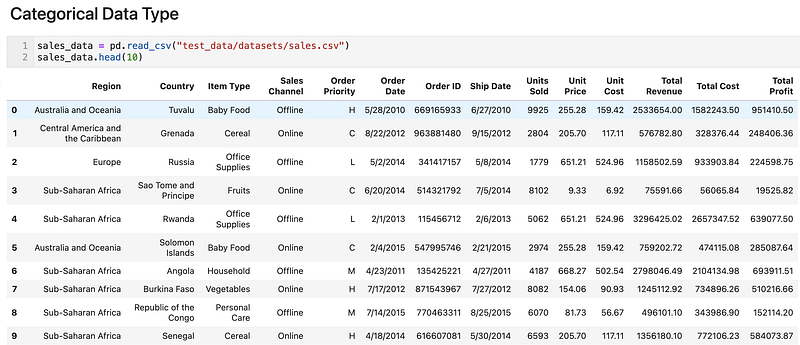
Let’s take the following sales data as an example.

sales_data = pd.read_csv("test_data/datasets/sales.csv")
sales_data.head(10)
Sales Data

Region, Country, Item Type, Sales Channel, Order Priority are all categories, and for Order Priority, the order matters. A bigger number probably indicates a higher priority.

Currently, these categories are presented as objects by default.

sales_data.info()
<class 'pandas.core.frame.DataFrame'>
RangeIndex: 100 entries, 0 to 99
Data columns (total 14 columns):
 #   Column          Non-Null Count  Dtype  
---  ------          --------------  -----  
 0   Region          100 non-null    object 
 1   Country         100 non-null    object 
 2   Item Type       100 non-null    object 
 3   Sales Channel   100 non-null    object 
 4   Order Priority  100 non-null    object 
 5   Order Date      100 non-null    object 
 6   Order ID        100 non-null    int64  
 7   Ship Date       100 non-null    object 
 8   Units Sold      100 non-null    int64  
 9   Unit Price      100 non-null    float64
 10  Unit Cost       100 non-null    float64
 11  Total Revenue   100 non-null    float64
 12  Total Cost      100 non-null    float64
 13  Total Profit    100 non-null    float64
dtypes: float64(5), int64(2), object(7)
memory usage: 11.1+ KB

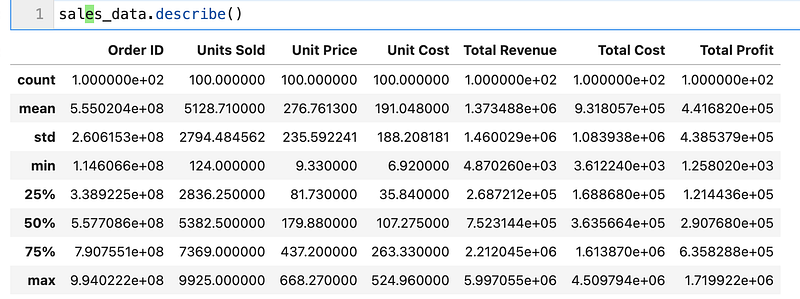
And there is no descriptive statistics provided for the object data type.

sales_data.describe()
Descriptive Statistics

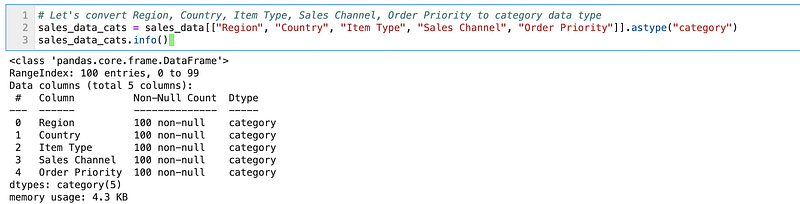
Let’s convert the categories to categorical data types.

sales_data_cats = sales_data[["Region", "Country", "Item Type", "Sales Channel", "Order Priority"]].astype("category")
sales_data_cats.info()
Categorical Data Type Conversion

You can see the data type is changed to category now.

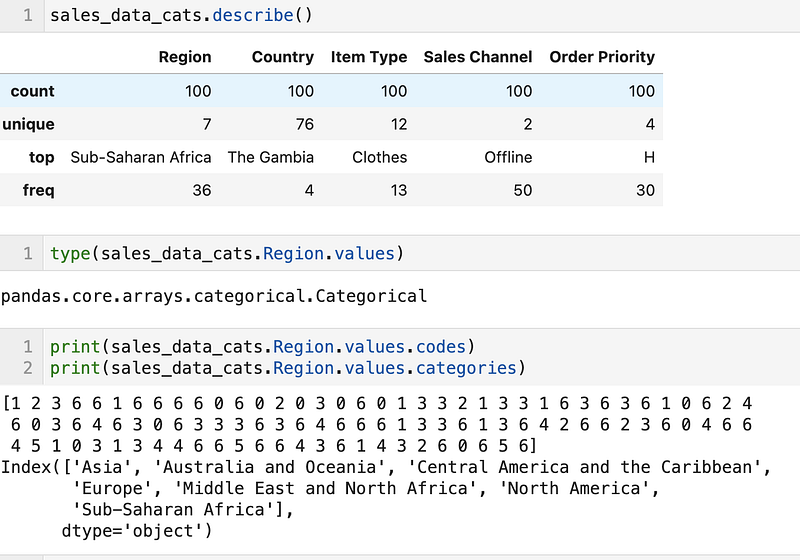
Descriptive statistics are generated now. Internally the categories are now represented using the codes and categories attributes.
Categorical Data Type

Categorical Data Type Order

Order Priority are Low, Medium, High and Critical but currently, the representation has no particular order.
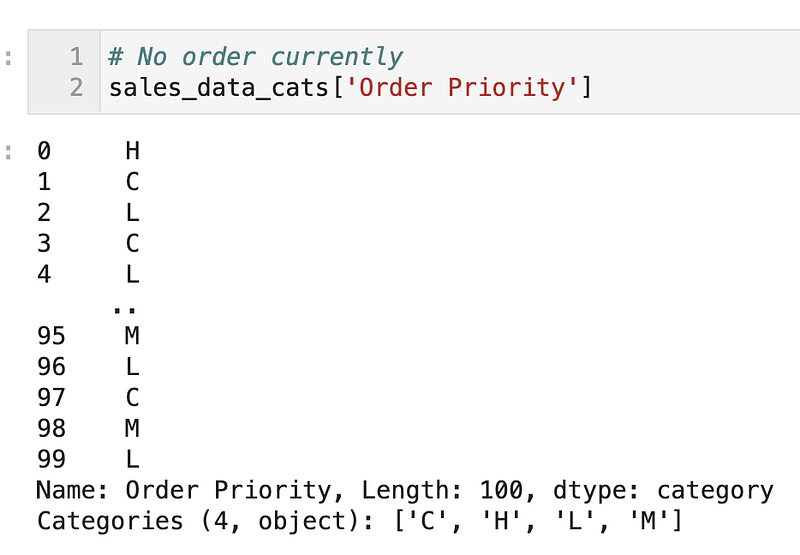
Order Priority — not order

Let’s make sure they have a proper order (L < M < H < C)

sales_data_cats['Order Priority'] = sales_data_cats['Order Priority'].cat.reorder_categories(['L', 'M', 'H', 'C'], ordered=True)
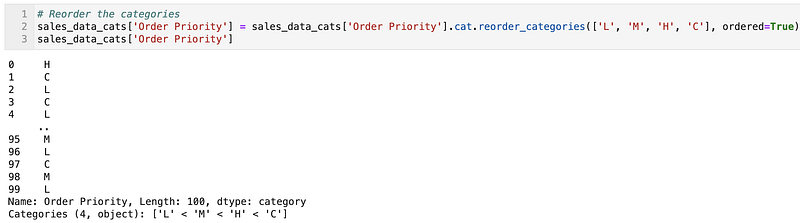
Order Priority with Proper Order

Creating Pandas Categorical Directly

Also, you can create a Pandas categorical type directly.
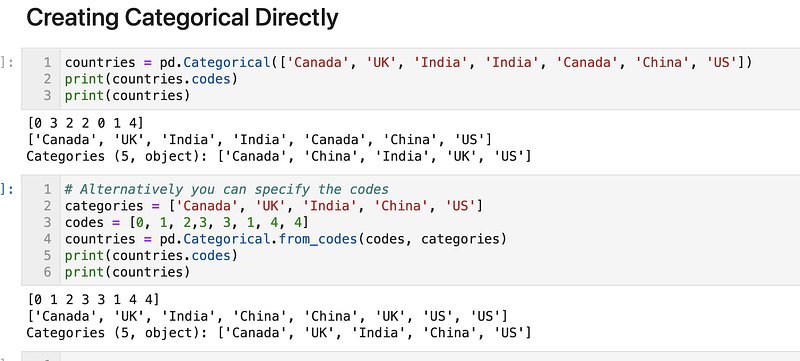
Create a Categorical Type Directly

Categorical Methods

Let’s continue to use the sales data for demonstration purposes.
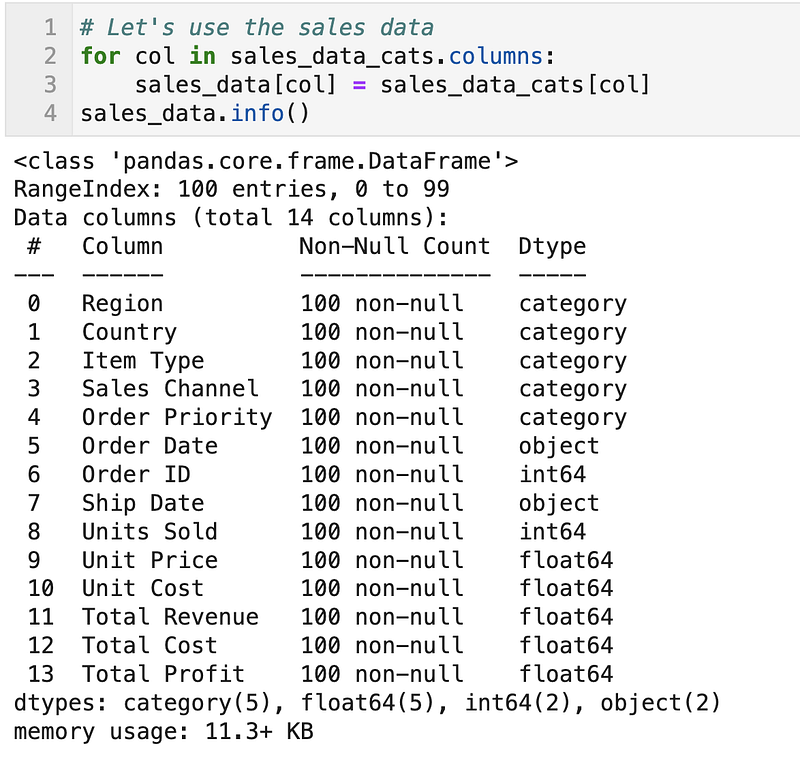
Sales Data

The categorical accessor can be accessed through the catattribute.
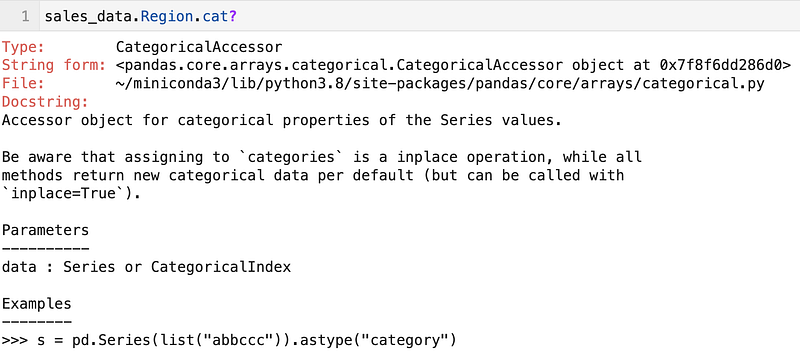
Categorical Accessor

Here are some of the operations.

rename_categories
reorder_categories
add_categories
remove_categories
remove_unused_categories
set_categories
as_ordered
as_unordered

To get the represented categories and codes.
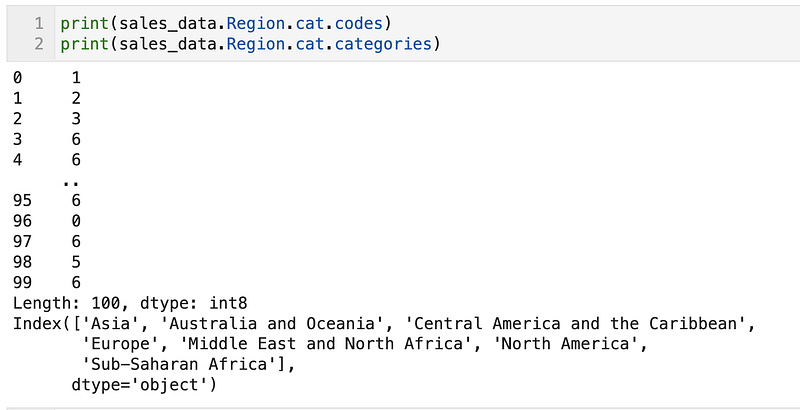
Represented Categories and Codes

You can add new categories, reorder or rename them or even remove unused categories. I used the reorder_categories previously to reorder the Order Priority More details available in the Pandas user guide.

Categorical Encodings

Using Pandas

We can use the pd.get_dummies to perform one-hot encoding. E.g. for Order Priority

pd.get_dummies(sales_data['Order Priority'])
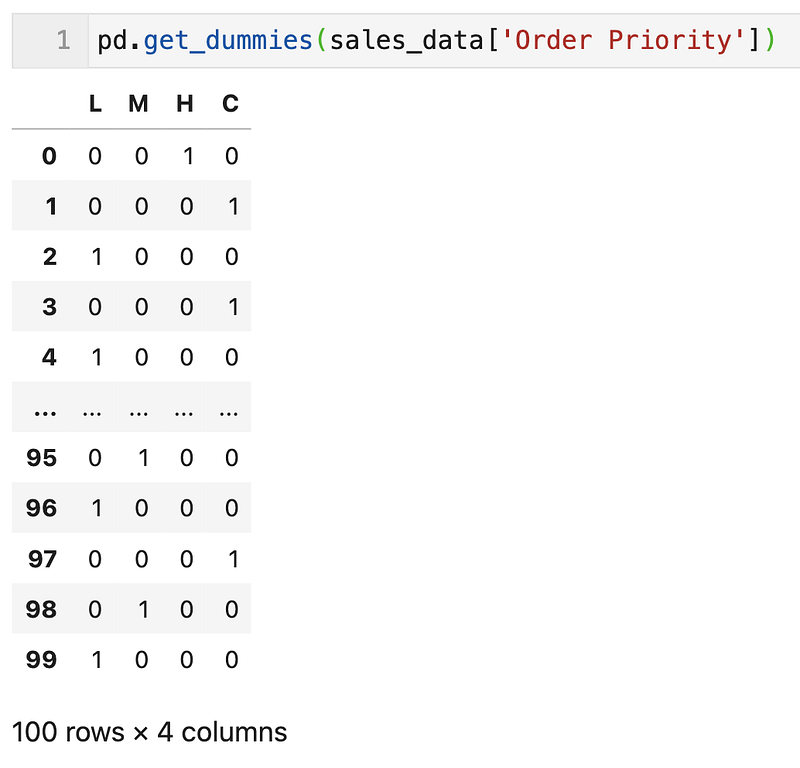
Pandas One-Hot Encoding

scikit-learn

In scikit-learn, we can use OrdinalEncoder, OneHotEncoder, LabelEncoder , LabelBinarizer and MultiLabelBinarizer to encode categorical data.

OrdinalEncoder

ordinal_encoder = OrdinalEncoder()
sales_data['ordinal_encoded']= one_hot_encoder.fit_transform(sales_data[['Order Priority']])
sales_data[['Order Priority', 'ordinal_encoded']].head(10)
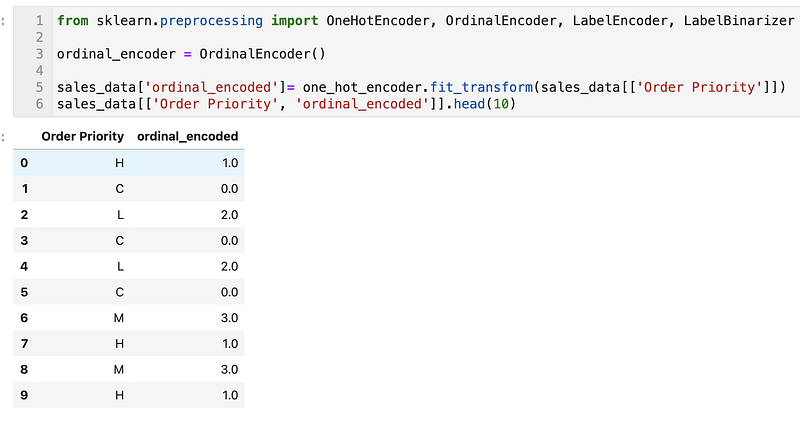
OrdinalEncoder

OneHotEncoder

one_hot_encoder = OneHotEncoder()
encoded = one_hot_encoder.fit_transform(sales_data[['Order Priority']])
pd.DataFrame(encoded.toarray(), columns=one_hot_encoder.categories_).head(10)
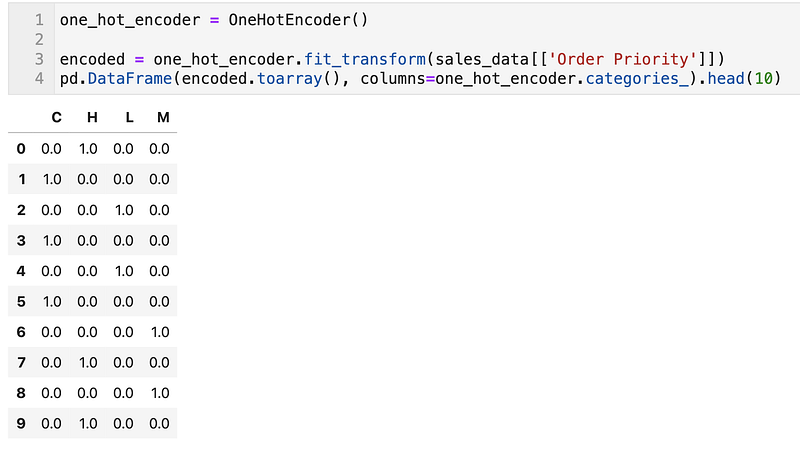
OneHotEncoder

LabelEncoder

This is normally used to encode target values.

label_encoder = LabelEncoder()
sales_data['label_encoded']= label_encoder.fit_transform(sales_data[['Order Priority']])
sales_data[['Order Priority', 'label_encoded']].head(10)
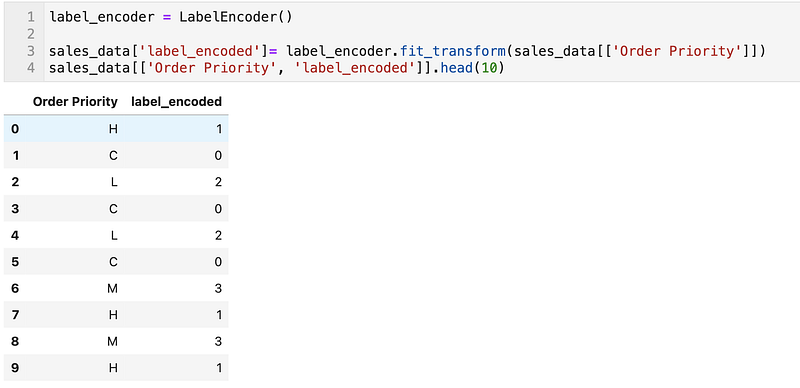
LabelBinarizer

This is normally used to encode target values.

label_binarizer = LabelBinarizer()
encoded = label_binarizer.fit_transform(sales_data['Order Priority'])
pd.DataFrame(encoded, columns=label_binarizer.classes_).head(10)
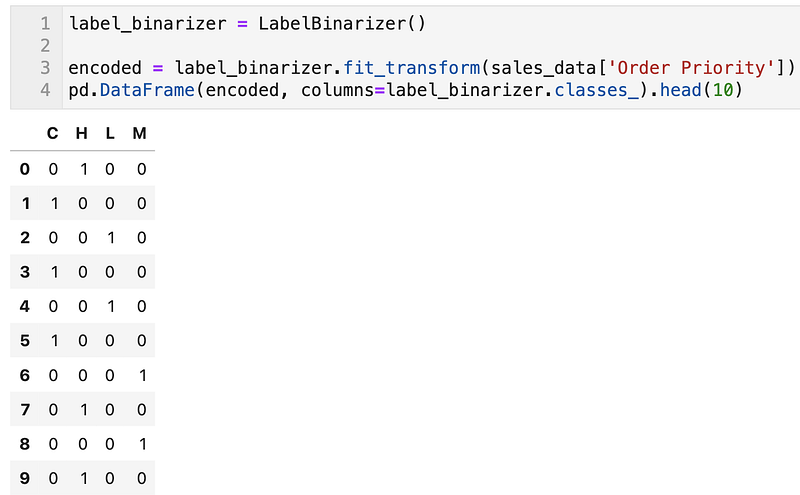
LabelBinarizer

Category Encoders from scikit-learn Contrib

Category Encoders is a set of scikit-learn-style transformers for encoding categorical variables into numeric with different techniques.

To install it using pip.

pip install -Uqq category_encoders

There are many different techniques that you can explore

import category_encoders as ce

encoder = ce.BackwardDifferenceEncoder(cols=[...])
encoder = ce.BaseNEncoder(cols=[...])
encoder = ce.BinaryEncoder(cols=[...])
encoder = ce.CatBoostEncoder(cols=[...])
encoder = ce.CountEncoder(cols=[...])
encoder = ce.GLMMEncoder(cols=[...])
encoder = ce.HashingEncoder(cols=[...])
encoder = ce.HelmertEncoder(cols=[...])
encoder = ce.JamesSteinEncoder(cols=[...])
encoder = ce.LeaveOneOutEncoder(cols=[...])
encoder = ce.MEstimateEncoder(cols=[...])
encoder = ce.OneHotEncoder(cols=[...])
encoder = ce.OrdinalEncoder(cols=[...])
encoder = ce.SumEncoder(cols=[...])
encoder = ce.PolynomialEncoder(cols=[...])
encoder = ce.TargetEncoder(cols=[...])
encoder = ce.WOEEncoder(cols=[...])

encoder.fit(X, y)
X_cleaned = encoder.transform(X_dirty)

Efficient Memory Usage

Lastly, using categorical data types are more efficient in terms of memory and performance.
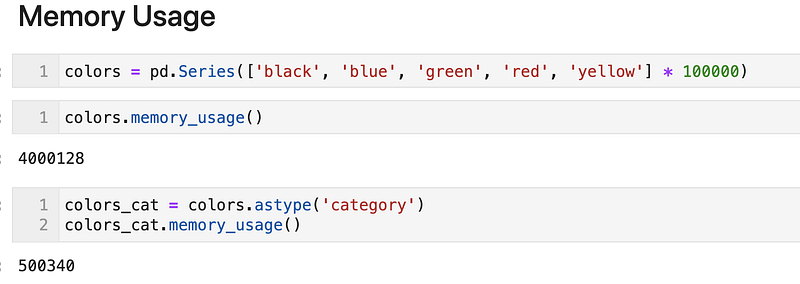
Memory Usage

The notebook used for this article can be found here.

Do also check out the following articles.

Python
Pandas
Scikit Learn
Data Science
Jupyter Notebook
Recommended from ReadMedium