avatarMartin Thoma

Free AI web copilot to create summaries, insights and extended knowledge, download it at here

6534

Abstract

specially helpful when you apply <a href="https://readmedium.com/unit-testing-in-python-mutation-testing-7a70143180d8">Mutation testing</a>.</p><p id="3f88">We also want to use our machine properly by using <a href="https://pypi.org/project/pytest-xdist/"><code>pytest-xd</code>ist</a> . Install it, execute <code>pytest -n auto</code>and your tests run in parallel!<a href="https://pypi.org/project/pytest-parallel/"><code>pytest-paral</code>lel</a>might also be worth a shot.</p><p id="bf06">The most extreme speedup is not to execute stuff you don’t need. <a href="https://github.com/anapaulagomes/pytest-picked"><code>pytest-pic</code>ked</a> executes tests that are related to unstaged files which can be way less than your complete test suite.</p><p id="83f9">Going in a different direction, we want to make sure that the algorithms have some speed behavior. With <a href="https://pypi.org/project/pytest-benchmark/"><code>pytest-benchm</code>ark</a> , we can use the <code>benchmark</code> fixture to annotate parts of a test which we want to benchmark:</p><div id="ab53"><pre>def <span class="hljs-title function_">test_argmax</span><span class="hljs-params">(benchmark)</span>: <span class="hljs-keyword">assert</span> <span class="hljs-title function_">benchmark</span><span class="hljs-params">(mpu.math.argmax, [<span class="hljs-number">1</span>, <span class="hljs-number">2</span>, <span class="hljs-number">3</span>])</span> == <span class="hljs-number">2</span></pre></div><p id="e8cd">Running <code>pytest</code> then also gives this output, where you can see three functions to which I’ve added a benchmark. Two of them test a factorization function. It should not be a surprise that factorizing 3072 takes longer than factorizing 1024, but it is always astonishing to me how quickly the numbers grow. The argmax of 3 examples is super quick, but factorization just needs way more computation:</p><figure id="b725"><img src="https://cdn-images-1.readmedium.com/v2/resize:fit:800/1*BQNaV3U0rYXTiaXJmBNMsQ.png"><figcaption>Minimum, Mean and Maximum execution time, as well as the standard deviation and the interquartile range, give you some insights into the execution time distribution. Image by Martin Thoma</figcaption></figure><h1 id="eb47">The unique ones</h1><figure id="b849"><img src="https://cdn-images-1.readmedium.com/v2/resize:fit:800/0*23ekZB3SBbonMR17"><figcaption>Photo by <a href="https://unsplash.com/@dariuscotoi?utm_source=medium&amp;utm_medium=referral">Darius Cotoi</a> on <a href="https://unsplash.com?utm_source=medium&amp;utm_medium=referral">Unsplash</a></figcaption></figure><p id="5554">Some plugins are unique and don’t fit in any of the other categories:</p><ul><li><a href="https://pypi.org/project/pytest-cov"><code>pytest-</code>cov</a> : Get a test coverage report 😍 ❤ I like to generate both, an HTML report and an output to the terminal. In some settings, an XML report is also helpful.</li><li><a href="https://pypi.org/project/pytest-socket/"><code>pytest-soc</code>ket</a> : Make certain that you don’t query anything non-local. Very nice ❤</li><li><a href="https://github.com/pytest-dev/pytest-randomly"><code>pytest-rando</code>mly</a> and <a href="https://pypi.org/project/pytest-rng/"><code>pytest-</code>rng</a>: If you use <code>random.random</code> , then the outcome depends on the random seed. This plugin changes the seed.</li><li><a href="https://pypi.org/project/pytest-random-order/"><code>pytest-random-or</code>der</a> : Execute the tests in a random order, to make sure you see when a test leaves the system in a different state.</li><li><a href="https://pypi.org/project/pytest-lazy-fixture/"><code>pytest-lazy-fixtu</code>res</a> : Use fixtures in <code>@pytest.mark.parametrize</code> .</li><li><a href="https://pypi.org/project/pytest-freezegun/"><code>pytest-freeze</code>gun</a> : Freeze time! This is one I’ve also mentioned in <a href="https://levelup.gitconnected.com/unit-testing-in-python-mocking-patching-and-dependency-injection-301280db2fed">my patching article</a>.</li><li><a href="https://pypi.org/project/pytest-leaks/"><code>pytest-le</code>aks</a> : Find resource leaks. This requires a debug-built of Python!</li><li><a href="https://github.com/tholo/pytest-flake8"><code>pytest-fla</code>ke8</a> : Run flake8 via pytest. I did that for a long time, but when I learned <a href="https://levelup.gitconnected.com/ci-pipelines-for-python-projects-9ac2830d2e38">how to use Continuous Integration pipelines</a> more effectively, I stopped it. You can still execute flake8 directly.</li><li><a href="https://pypi.org/project/pytest-mypy/"><code>pytest-m</code>ypy</a> and <code>pytest-mccabe</code>: Same story as for flake8. By the way, <a href="https://readmedium.com/type-annotations-in-python-3-8-3b401384403d">type annotations are awesome</a>! I like to have those <a href="https://towardsdatascience.com/static-code-analysis-for-python-bdce10b8d287">static code analysis tools</a> in a linter step within the CI pipeline.</li><li><a href="https://pypi.org/project/pytest-deadfixtures/"><code>pytest-deadfixtu</code>res</a> : Point out which fixtures are not used or duplicated.</li></ul><h1 id="438a">17 Specialized Plugins — You’ll know if you need them</h1><p id="2f30">The following plugins are only interesting to you if you work with the applications for which they are written. They usually provide fixtures/mocks.</p><ul><li><a href="https://pypi.org/project/pytest-cookies/"><code>pytest-coo</code>kie</a> : Supports testing of <a href="https://github.com/cookiecutter/cookiecutter">cookiecutter</a> templates.</li><li><a href="https://pypi.org/project/pytest-plt/"><code>pytest-</code>plt</a> and <a href="https://pypi.org/project/pytest-mpl/"><code>pytest-</code>mpl</a>: Provides fixtures for matplotlib.</li><li><a href="https://pypi.org/project/pytest-responses/"><code>pytest-respon</code>ses</a> : Provides fixtures for <a href="https://requests.readthedocs.io/en/master/"><code>reque</code>sts</a> .</li><li><a href="https://pypi.org/project/pytest-asyncio/"><code>pytest-asyn</code>cio</a> : Use it when you develop async functions.</li><li><a href="https://pypi.org/project/pytest-qt/"><code>pytest</code>-qt</a> : GUI development via Qt / PySide / PySide2.</li></ul><h2 id="fe54">Web Development</h2><ul><li><a href="https://pypi.org/project/pytest-djangoapp/"><code>pytest-django</code>app</a> / <a href="https://pypi.org/project/pytest-django-queries/"><code>pytest-djangoquer</code>ies</a>: Exposes tools for Django

Options

application developers to facilitate test authoring, including settings override, template tag testing, and user creation.</li><li><a href="https://pypi.org/project/pytest-flask/"><code>pytest-fl</code>ask</a> and <a href="https://pypi.org/project/pytest-flask-sqlalchemy/"><code>pytest-flask-sqlalch</code>emy</a> : Provides fixtures for running tests in transactions using Flask-SQLAlchemy.</li><li><a href="https://pypi.org/project/pytest-seleniumbase/"><code>pytest-seleniumb</code>ase</a> / <a href="https://pypi.org/project/pytest-sbase/"><code>pytest-sb</code>ase</a> / <a href="https://pypi.org/project/pytest-selenium/"><code>pytest-selen</code>ium</a></li></ul><h2 id="490b">Mocks and Fixtures for AWS</h2><ul><li><a href="https://pypi.org/project/moto/"><code>m</code>oto</a> : Mocks for boto3 — AWS stuff. I don’t exactly love this one, but it is for sure the best you can do when you want to test code that uses S3.</li><li><a href="https://pypi.org/project/pytest-aws/"><code>pytest-</code>aws</a> : Testing AWS resource configurations</li><li><a href="https://pypi.org/project/pytest-localstack/"><code>pytest-localst</code>ack</a> : Create AWS integration tests via a Localstack Docker container</li></ul><h1 id="e32d">Plugins I’m uncertain about</h1><figure id="4cfd"><img src="https://cdn-images-1.readmedium.com/v2/resize:fit:800/0*_TjwL9qWSI0YPxUk"><figcaption>Photo by <a href="https://unsplash.com/@brucemars?utm_source=medium&amp;utm_medium=referral">bruce mars</a> on <a href="https://unsplash.com?utm_source=medium&amp;utm_medium=referral">Unsplash</a></figcaption></figure><p id="2049">The following plugins sounded cool for me when I first read about them, but for various reasons, I’m uncertain if they are really a good idea:</p><ul><li><a href="https://github.com/okken/pytest-check"><code>pytest-ch</code>eck</a> : Allows multiple failures per test. At first, I loved the idea. Then I realized that this might lead to worse tests as the tests start to do many things. On the other hand, you might want to test a “workflow” once — so not a unit test, but an integration test or even an end-to-end test. But then you would also need intermediate results.</li><li><a href="https://pypi.org/project/pytest_docker_tools/"><code>pytest-docker-to</code>ols</a> and <a href="https://github.com/pytest-docker-compose/pytest-docker-compose"><code>pytest-docker-comp</code>ose</a>: I would just build the Docker image and execute the stuff in it.</li><li><a href="https://pypi.org/project/pytest-mock/"><code>pytest-m</code>ock</a> : Provides a mocker fixture which is a thin-wrapper around the patching API provided by the mock package. It reduces boilerplate code by making mock a fixture.</li><li><a href="https://pypi.org/project/pytest-spec/"><code>pytest-s</code>pec</a> , <a href="https://pypi.org/project/pytest-pspec/"><code>pytest-ps</code>pec</a> , and <a href="https://pypi.org/project/pytest-testdox/"><code>pytest-test</code>dox</a> modify the pytest output. They show what is tested. The tests should be written in such a way that they represent the software specification — so the test is against a part of the specification.</li><li><a href="https://pypi.org/project/pytest-recording/"><code>pytest-record</code>ing</a> : It should record network interactions via VCR.py, but I didn’t get it to work.</li><li><a href="https://github.com/RKrahl/pytest-dependency"><code>pytest-depende</code>ncy</a> allows you to specify which tests need to succeed for others to be able to succeed. Unit tests should be independent and dependent code should be mocked…maybe. I’m not certain about that.</li></ul><h1 id="4cd5">TL;DR</h1><p id="87a2"><code>pytest</code> is the tool of choice to run tests in Python. While it has reasonable defaults, it’s extensive plugin system lets you customize it to make it even better.</p><p id="8fa2">I love <a href="https://github.com/Teemu/pytest-sugar"><code>pytest-su</code>gar</a> and <a href="https://pypi.org/project/pytest-icdiff/"><code>pytest-icd</code>iff</a> , because they make the output of pytest easier to read. <a href="https://pypi.org/project/pytest-cov/"><code>pytest-</code>cov</a> generates line- and branch coverage and thus is a valuable tool to find spots that need better tests. The next step is to run the tests. You really don’t want to accidentally hit the production environment. This is where<a href="https://pypi.org/project/pytest-socket/"><code>pytest-soc</code>ket</a> comes into play. It just blocks everything and reports it to you. The other type of issue are long-running tests that are potentially in infinite loops.<code>pytest-timeout</code> kills those tests after the specified amount of time.</p><p id="e031">There are so many other plugins; many add fixtures for specific packages which are typically hard to test. You should now have a good idea of the many possibilities added by pytest plugins — use them!</p><h1 id="f18f">What’s next?</h1><p id="83d7">In this series, we already had:</p><ul><li>Part 1: <a href="https://readmedium.com/unit-testing-in-python-basics-21a9a57418a0">The basics of Unit Testing in Python</a></li><li>Part 2: <a href="https://levelup.gitconnected.com/unit-testing-in-python-mocking-patching-and-dependency-injection-301280db2fed">Patching, Mocks and Dependency Injection</a></li><li>Part 3: <a href="https://readmedium.com/how-to-test-flask-applications-aef12ae5181c">How to test Flask applications</a> with Databases, Templates and Protected Pages</li><li>Part 4: <a href="https://readmedium.com/unit-testing-in-python-tox-and-nox-833e4bbce729">tox and nox</a></li><li>Part 5: <a href="https://readmedium.com/unit-testing-in-python-structure-57acd51da923">Structuring Unit Tests</a></li><li>Part 6: <a href="https://levelup.gitconnected.com/ci-pipelines-for-python-projects-9ac2830d2e38">CI-Pipelines</a></li><li>Part 7: <a href="https://levelup.gitconnected.com/unit-testing-in-python-property-based-testing-892a741fc119">Property-based Testing</a></li><li>Part 8: <a href="https://readmedium.com/unit-testing-in-python-mutation-testing-7a70143180d8">Mutation Testing</a></li><li>Part 9: <a href="https://towardsdatascience.com/static-code-analysis-for-python-bdce10b8d287">Static Code Analysis</a> — Linters, Type Checking, and Code Complexity</li><li>Part 10: <a href="https://towardsdatascience.com/pytest-plugins-to-love-%EF%B8%8F-9c71635fbe22">Pytest Plugins to Love</a></li></ul><p id="3292">Let me know if you’re interested in other topics around testing with Python.</p></article></body>

Pytest Plugins to Love ❤️

My top 5 and honorable 50 out of 700+ plugins to get nicer output and faster execution
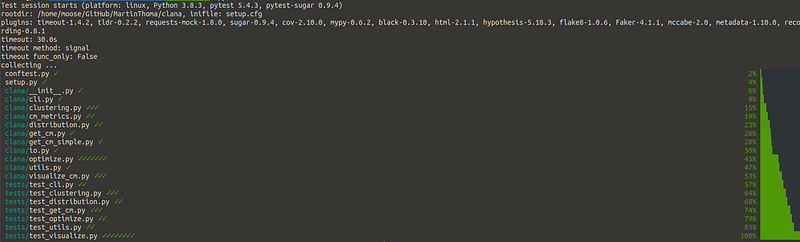
Plugins can modify and extend a lot of aspects of pylint, including how the output is done. This screenshot of a pytest run with pytest-sugar was taken by Martin Thoma.

Pytest is extensible and has plenty of plugins. You don’t need to use any of them, but you might find some very useful. I love this because you have an easy time to get started with unit testing, while still finding amazing stuff when you’re more experienced 🤩

In this article, I’ll show you examples of plugins I use and the plugins I found while writing this article. You might want to cover the basics of unit testing first or refresh testing details like fixtures.

How can I add a plugin?

All plugins presented in this article can be installed via pip . Most of them are then already active. For example, when you install pytest-sugar via

pip install pytest-sugar

You can just execute pytest and the plugin will automatically work. Others need to be used more directly. For example, after installing pytest-timeout you need to specify the timeout parameter you want to use:

pytest --timeout=1

Don’t worry, I will explain those two plugins later 🙂

How many Pytest plugins exist?

Searching on pypi.org for the trove classifier Framework :: Pytest , I found 668 packages. A stunning 1053 packages have “pytest” in the name. 461 packages have both, the name and the trove classifier.

I went through over 700 pytest-plugins for this article. I’ve jumped over plugins that consider themselves to be in planning, pre-alpha, or alpha stage. I’ve also skipped packages where I’ve seen a TODO in the readme or if the package had less than 10 stars on GitHub.

The packages I’ve found make pytest sparkle ✨, improve the speed 🏎, are specialized to specific packages, or just unique in their behavior ❄️

Last but not least, there are some plugins where I’m not sure if they are awesome or if they are a bad idea. Let’s jump right into it and have a look yourself!

Side note: Maybe you remember my side note on typo squatting? I found a fixable issue on PyPI while writing this article, hopefully improving security for the community🎉

The shiny ones

Photo by Jeremy Thomas on Unsplash

The default output of pytest is already good, but some plugins make it amazing. pytest-sugar is one of those plugins❤
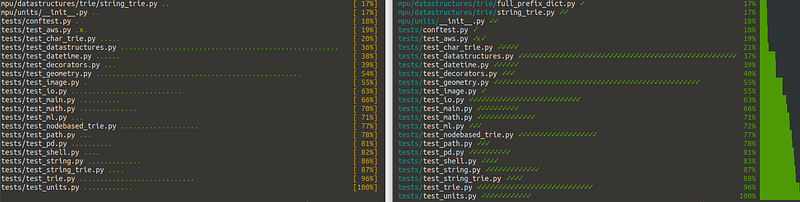
Pytest sugar changes the dots to checkmarks and the percentage to a bar. Image by Martin Thoma.

If those dots or checkmarks are too decent for you, givepytest-emoji and pytest-emoji-out a try 😃

The summary output now looks good, but the diffs between the expected value and the actual value can be improved. pytest-icdiff is a plugin I’ve only found while researching this article — and it was love at first sight 🥰❤
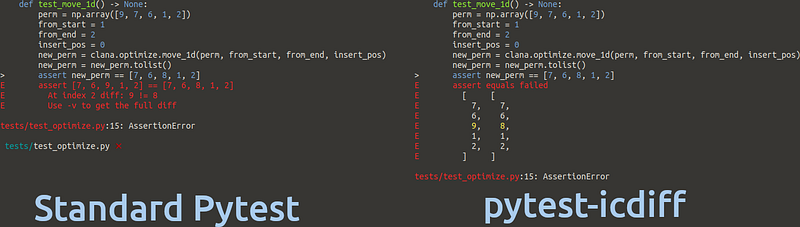
Image by Martin Thoma

Very similar is pytest-clarity — be aware, that pytest-clarity is only active when you execute pytest -vv:
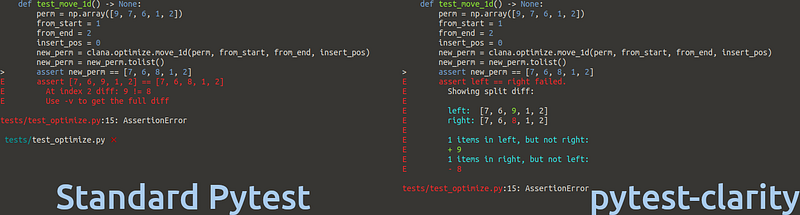
Screenshot by Martin Thoma

Once you're happy with the terminal output, you might think about getting reports in the browser. This could help once you have to have a look at many things, want to scroll and search. Then pytest-html is your friend. It generates reports like this one:
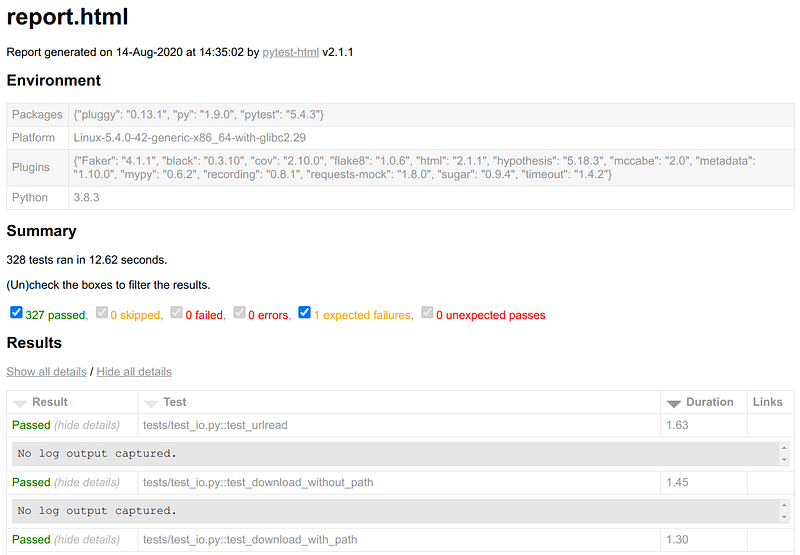
Screenshot by Martin Thoma

Now that we are happy with the output, we want to make it lightning fast!

We need speed!

Photo by chuttersnap on Unsplash

Plugins can speed things up. For example, you can make pytest fail instantly with pytest-instafail instead of executing all remaining tests. For tests which might take a long time or even result in an infinite loop in case of errors, I use pytest-timeout ❤. That is especially helpful when you apply Mutation testing.

We also want to use our machine properly by using pytest-xdist . Install it, execute pytest -n autoand your tests run in parallel!pytest-parallelmight also be worth a shot.

The most extreme speedup is not to execute stuff you don’t need. pytest-picked executes tests that are related to unstaged files which can be way less than your complete test suite.

Going in a different direction, we want to make sure that the algorithms have some speed behavior. With pytest-benchmark , we can use the benchmark fixture to annotate parts of a test which we want to benchmark:

def test_argmax(benchmark):
    assert benchmark(mpu.math.argmax, [1, 2, 3]) == 2

Running pytest then also gives this output, where you can see three functions to which I’ve added a benchmark. Two of them test a factorization function. It should not be a surprise that factorizing 3072 takes longer than factorizing 1024, but it is always astonishing to me how quickly the numbers grow. The argmax of 3 examples is super quick, but factorization just needs way more computation:

Minimum, Mean and Maximum execution time, as well as the standard deviation and the interquartile range, give you some insights into the execution time distribution. Image by Martin Thoma

The unique ones

Photo by Darius Cotoi on Unsplash

Some plugins are unique and don’t fit in any of the other categories:

17 Specialized Plugins — You’ll know if you need them

The following plugins are only interesting to you if you work with the applications for which they are written. They usually provide fixtures/mocks.

Web Development

Mocks and Fixtures for AWS

  • moto : Mocks for boto3 — AWS stuff. I don’t exactly love this one, but it is for sure the best you can do when you want to test code that uses S3.
  • pytest-aws : Testing AWS resource configurations
  • pytest-localstack : Create AWS integration tests via a Localstack Docker container

Plugins I’m uncertain about

Photo by bruce mars on Unsplash

The following plugins sounded cool for me when I first read about them, but for various reasons, I’m uncertain if they are really a good idea:

  • pytest-check : Allows multiple failures per test. At first, I loved the idea. Then I realized that this might lead to worse tests as the tests start to do many things. On the other hand, you might want to test a “workflow” once — so not a unit test, but an integration test or even an end-to-end test. But then you would also need intermediate results.
  • pytest-docker-tools and pytest-docker-compose: I would just build the Docker image and execute the stuff in it.
  • pytest-mock : Provides a mocker fixture which is a thin-wrapper around the patching API provided by the mock package. It reduces boilerplate code by making mock a fixture.
  • pytest-spec , pytest-pspec , and pytest-testdox modify the pytest output. They show what is tested. The tests should be written in such a way that they represent the software specification — so the test is against a part of the specification.
  • pytest-recording : It should record network interactions via VCR.py, but I didn’t get it to work.
  • pytest-dependency allows you to specify which tests need to succeed for others to be able to succeed. Unit tests should be independent and dependent code should be mocked…maybe. I’m not certain about that.

TL;DR

pytest is the tool of choice to run tests in Python. While it has reasonable defaults, it’s extensive plugin system lets you customize it to make it even better.

I love pytest-sugar and pytest-icdiff , because they make the output of pytest easier to read. pytest-cov generates line- and branch coverage and thus is a valuable tool to find spots that need better tests. The next step is to run the tests. You really don’t want to accidentally hit the production environment. This is wherepytest-socket comes into play. It just blocks everything and reports it to you. The other type of issue are long-running tests that are potentially in infinite loops.pytest-timeout kills those tests after the specified amount of time.

There are so many other plugins; many add fixtures for specific packages which are typically hard to test. You should now have a good idea of the many possibilities added by pytest plugins — use them!

What’s next?

In this series, we already had:

Let me know if you’re interested in other topics around testing with Python.

Programming
Software Engineering
Python
Unit Testing
Software Development
Recommended from ReadMedium