
How to Test Flask Applications
Routes, Templates, the Database and a tiny bit of load testing

As a data scientist, I need to make my models accessible. I usually deploy models with Flask. As a software engineer, I want to make sure things work as expected by unit testing them.
Unit Testing websites or web services is hard for multiple reasons: You have Code-within-Code like HTML template engines and SQL. Additionally, you have Databases as dependencies which are pretty hard to mock. In this article you will learn how to deal with those challenges in the case of the Flask web framework. I assume you have used Flask before and that you know the basics of unit testing in Python.
My Tiny Flask App
In order to make ensure correctness of the following parts, I’ve created a tiny Flask app. You can copy all files from GitHub.
The general structure is this:
example-app
├── mini_app
│   ├── __init__.py  # make the folder a package
│   ├── app.py       # contains the Flask app object
│   ├── config.py
│   ├── models.py    # SQLAlchemy
│   └── templates/
└── tests
    ├── conftest.py  # Test cfg
    └── test_app.py  # unit tests
The only file you don’t find in there is .envrc which is used with direnv to set environment variables. Its content looks like this:
export DB_HOST=localhost
export DB_DATABASE=books
export DB_USER=root
export DB_PASSWORD=you_wish
How to test Routes
Routes typically look like this in Flask:
The documentation of Flask contains Testing Flask Applications which covers this topic. It especially contains an example how to create a pytest fixture. Imagine a fixture like a way to set things up before your tests and to clean up after the test run. In this simple example, we assume that your application is a proper Python package and called flaskr . You can download an example from Github flask/examples/tutorial/flaskr . The fixture in this simple case looks like this:
pytest fixtures are a bit magical. You can give them as a parameter to the test, but you don’t have to execute it. The fixture just has to be discoverable by pytest.
The complete test then looks like this:
Instead of putting the fixture in the test directly, you can put them in tests/conftest.py. pytest will find them there and use in all tests. No need to import.
How to deal with the Database
Most web applications have a database. When running tests, you want to be certain that the tests don’t hit the production database. At the same time, you want something like a database to be there.
I assume that you are using flask-sqlalchemy. It is part of the pallets project and thus an official part of the Flask ecosystem. With that plugin, you configure your database connection via app.config["SQLALCHEMY_DATABASE_URI"] . If you override that configuration string with sqlite://, flask-sqlalchemy will create an in-memory SQLite database and use that instead of the real database. This is super fast to create and interact with (see benchmark).
You can adjust the client fixture like this:
Now you can easily run your tests against the fake database:
Note that this will become harder the more complex your data becomes and the more data you need to properly test your views.
Wait … what about testing the SQL Queries?
You might wonder now how to test the SQL queries. Testing that they work at all should not be necessary if you use SQLAlchemy. And I really recommend to use SQLAlchemy when you use Flask with a relational database. If your queries are too complex for that, you can have a look at Query Builders. Avoid using raw SQL. In most cases it should not be necessary.
Protected Routes
It’s pretty common that you have routes which are either protected by Basic Auth or need a form of login. You can essentially also set up a test account in the client fixture and login manually. This requires some work and depends on what exactly you’re doing for authentication.
Basic Access Authentication
You can provide the necessary credentials in the header within the test:
Flask Login
Flask-login is a pretty widespread plugin to handle user session management. They have a section about unit testing in which they suggest do set the configuration variable LOGIN_DISABLED to True .
Test Jinja2 Templates
Before we dive into testing Jinja2 Templates, let’s first recap a couple of things that can go wrong.
Problem 1: Empty Double Braces
You wanted to write something, got interrupted and now your template has {{}} in it. When Jinja tries to render this, you will get
jinja2.exceptions.TemplateSyntaxError: Expected an expression, got 'end of print statement'Problem 2: Data Structure confusion
You assume number is a string, but it actually is an integer:
{% for digit in number %}
    {{ digit }}
{% endfor %}
You will get a TypeError: 'int' object is not iterable
Problem 3.1: Typo in a Variable
Instead of {{ numbers }} you write {{ number }} . This is pretty bad as it actually does nothing. It is as if the variable number existed and was the empty string.
Problem 3.2: Forgetting to pass a Variable
You actually wanted to write number , but you forgot to pass it to the template. The effect is the same, but I think it’s an interesting different cause. This is what happens most often to me.
Status Code Testing
By calling a view and making sure that the assert rv.status_code == 200 you can already capture Problem 1 and 2:
For this reason, make sure that you call each route at least once.
Up to my knowledge, there is not a lot more you can do without getting creative. Let’s hope StackOverflow knows more.
Testing the Template Context
This one needed a lot of trail and error, but I finally managed to get some pytest fixtures with which you have a better control over the variables passed to the templates. I love it 😍
And this is how you can use it:
pytest-recording
pytest-recording is a pytest plugin which integrates vcr.py into pytest. There is also pytest-vcr and both plugins are not wide-spread. I think pytest-recording is better maintained as the author answered within 2 hours.
Block Network Access
This one is a potential live saver. Just decorate a test with @pytest.mark.block_network and you can be certain that everything runs locally. If something tries to make a network access, it is blocked and you get
RuntimeError: Network is disabledYou can also use pytest-socket to disable network access.
Record Network Interactions
You can decorate a test with @pytest.mark.vcr() . Run pytest --record-mode=rewrite

Load Testing
Testing Flask apps is not only about testing the used functions and routes, but also about knowing your limits. You want to know what actually breaks and when it breaks when you get tons of users.
Apache JMeter is maybe one of the most well-known applications for load testing. Being a Python user, I prefer to stay in Python and for this reason I’ll briefly present Locust. You can create a locustfile.py with this content:
Then you run
pip install locust
locust -f locustfile.py --host=https://your-website.com
It then gives output like this:
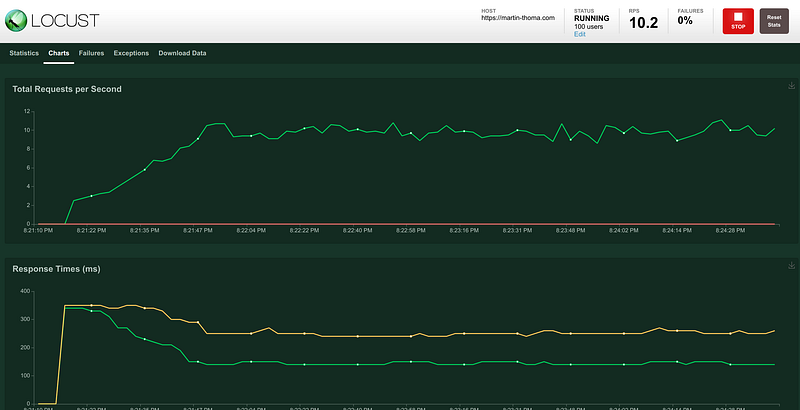
There is a lot more to make this realistic than just calling a “static” endpoint. We want the users to interact in some way. So we can define a SequentialTaskSet. At this point, I will leave it up to you to decide if you want to know more about load testing with Locust.
Maybe it’s not necessary for you.
If you have a web service live, you should have another service which regularly pings yours and checks if it is still alive. The latency of the answer can be measured and should be monitored. If you don’t expect a crazy amount of calls and if you have auto scaling enabled anyway, it’s perfectly reasonable not to run a load test. Just monitor your API behavior and act if you really need to.
What’s next?
In this series, we already had:
- Part 1: The basics of Unit Testing in Python
- Part 2: Patching, Mocks and Dependency Injection
- Part 3: How to test Flask applications with Databases, Templates and Protected Pages
- Part 4: tox and nox
- Part 5: Structuring Unit Tests
- Part 6: CI-Pipelines
- Part 7: Property-based Testing
- Part 8: Mutation Testing
- Part 9: Static Code Analysis — Linters, Type Checking, and Code Complexity
- Part 10: Pytest Plugins to Love
Let me know if you’re interested in other topics around testing with Python.


