
How to Read and Write Streaming Data using Pyspark
Spark is being integrated with the cloud data platform in the modern data world. Manipulating data with Spark became curial to any data persona like data engineers, data scientists, and data analysts.
Last time, we covered a trivial exercise in big data on reading and writing static data on Spark. The previous blog on reading and writing static data can be found here. In this article, we will cover a similar topic about using Pyspark to read and write streaming data using Spark Structured Streaming through readStream and writeStream.
In this article, we will learn:
- how to read the stream data using Pyspark
- how to sink the stream data using Pyspark
- examples on reading/writing the streaming data using Pyspark on Databricks
Basic Concepts on Streaming data
Streaming data is data that is continuously generated by different sources, and such data should be processed incrementally using stream processing techniques without having access to all of the data.
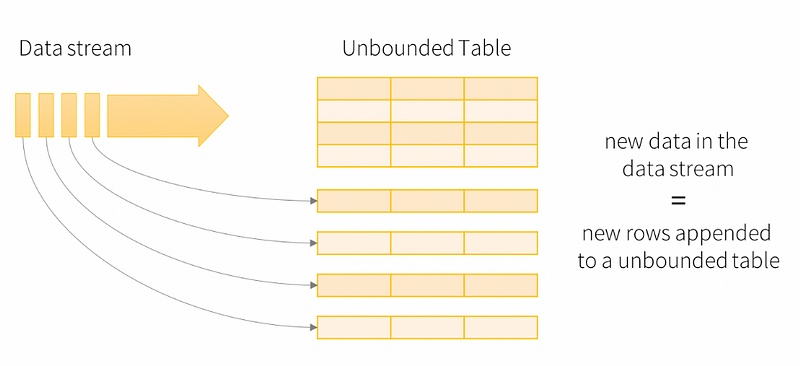
Structured Streaming is a scalable and fault-tolerant stream processing engine built on the Spark SQL engine. You can express your streaming computation the same way you would define a batch computation on static data. The Spark SQL engine will take care of running it incrementally and continuously and updating the final result as streaming data continues to arrive. The critical idea in Structured Streaming is to treat a live data stream as a table that is being continuously appended. This leads to a new stream processing model that is very similar to a batch processing model.
The core syntax for reading the streaming data in Apache Spark:
spark.readStream \
     .format() \ # this is the raw format you are reading from
     .option("key", "value") \
     .schema() \ # require to specify the schema
     .load(path)
The core syntax to read the static and streaming data are pretty similar; there are two main differences:
- We are using
readin static read mode but usingreadStreamin streaming read mode. - By default, Structured Streaming from file-based sources requires you to specify the schema rather than rely on Spark to infer it automatically. This restriction ensures a consistent schema will be used for the streaming query, even in the case of failures. You can reenable schema inference by setting
spark.sql.streaming.schemaInferencetotruefor the ad-hoc use case.
The core syntax for writing the streaming data in Apache Spark:
df.writeStream \
  .outputMode('complete') \ # by default is append
  .format('parquet') \ # this is optional, parquet is default
  .option("key", "value") \
  .start(path)
Pyspark has a method outputMode() to specify the saving mode:
- Complete — The updated Result Table will be written to the external storage. It is up to the storage connector to decide how to handle the writing of the entire table.
- Append — Only the new rows appended in the Result Table since the last trigger will be written to the external storage. This applies only to queries where existing rows in the Result Table are not expected to change.
- Update — Only the rows updated in the Result Table since the last trigger will be written to the external storage (available since Spark 2.1.1). Note that this is different from the Complete Mode in that this mode only outputs the rows that have changed since the last trigger. If the query doesn’t contain aggregations, it will be equivalent to Append mode.
That’s it! Now, we can start some actual implementation on reading and writing streaming files.
Implementation on Databricks
To implement the syntax with real examples, here we will use Databricks and databricks-datasets as the data source to illustrate how to read and write data using Pyspark.
If you don’t have an account yet, you can navigate to this link and select the free Community Edition to open your account. This option has a single cluster with up to 6 GB of free storage. It allows you to create an essential Notebook. You’ll need a valid email address to verify your account. More details can be found here.
Let’s assume you have your Databricks account set up and successfully spin a new cluster for computation. Now let’s go through the dataset that we’ll be working with.

Then, let’s list the JSON file to view the schema since we need to specify the schema for streaming reading by default.

Now, let’s start the streaming process.
Conclusion
This article showed how to read and write data from/to a streaming file using Pyspark. I also put together another article to demonstrate how to read and write static files using Pyspark. There are more advanced reading/writing options, especially for handling late data issues viagroupBy() ,window() and withWatermark(). I will discuss more advanced data manipulation using Pyspark on streaming data in the following articles.
I hope you found what you were looking for in this article. Follow me on Medium if you like this story! Thanks for reading.
P.S.
I’ve assembled a collection of my PySpark tutorials, all designed to help you master various aspects of PySpark. If you have specific topics or techniques you’d like me to prioritize in my future articles, please feel free to suggest them. Your feedback is invaluable. If you found this PySpark tutorial insightful and beneficial, I encourage you to follow me on Medium for more in-depth content. Enjoy your journey through the world of PySpark! Happy learning and coding!
References
- Databricks — https://docs.databricks.com/getting-started/streaming.html#stream-dashboard
- Spark docs — https://spark.apache.org/docs/latest/structured-streaming-programming-guide.html
- Apache Spark Tutorial — https://towardsdatascience.com/spark-essentials-how-to-read-and-write-data-with-pyspark-5c45e29227cd


