
Protecting GKE Ingress default backend with Cloud Armor

When deploying a GCLB (Google Cloud Load Balancer) with the native Ingress on GKE (aka gce-ingress). Depending on the rules configured in the Ingress object a default backend is added automatically for you. The purpose of this default backend is to handle traffic routing when a request doesn’t match the configured rules. Let take this Ingress as an example:
apiVersion: networking.k8s.io/v1
kind: Ingress
metadata:
  name: secure-ingress
  annotations:
    kubernetes.io/ingress.global-static-ip-name: gke-foobar-public-ip
    networking.gke.io/managed-certificates: foobar-certificate
    networking.gke.io/v1beta1.FrontendConfig: ingress-security-config
spec:
  rules:
  - host: foo.domain.com
    http:
      paths:
      - path: /*
        pathType: ImplementationSpecific
        backend:
          service:
            name: foo
            port:
              number: 8080
  - host: bar.domain.com
    http:
      paths:
      - path: /*
        pathType: ImplementationSpecific
        backend:
          service:
            name: bar
            port:
              number: 8080
This Ingress object defines and HTTPS load balancer with Google Managed Certificates and two rules for traffic:
- Traffic matching foo.domain.com is sent to the foo backend on port 8080.
- Traffic matching bar.domain.com is sent to the bar backend on port 8080.
Now what happens if let’s say we have a 3rd host test.domain.com which points to the same IP address of the load balancer ? If someone tries to connect to this host, they will get the following message:
response 404 (backend NotFound), service rules for the path non-existentThis response comes from a pod in the kube-system namespace called l7-default-backend-xxxxxxx-xxxx.
[Searching for information about Cloud Armor? Read Introducing Cloud Armor features to help improve efficacy: advanced rule tuning and auto deploy.]
This pod is deployed by default when you enable Ingress on GKE and an implicit rule is configured on the load balancer to route traffic that doesn’t match any of the rules to this pod. This can be visible in the configuration of the GCLB load balancer created by the Ingress.

This behaviour cannot be disabled unless you specify your own default backend in the spec of the Ingress:
spec:
  defaultBackend:
    service:
      name: my-products
      port:
        number: 60001
So what if you you have a policy you want to enforce on all your backends including the one added by GCLB ?
Let’s say for example you have a Cloud Armor policy that only allows certain region or IP addresses to connect to the load balancer. Let’s this policy as an example. Here i have a simple rule to only allow my public IP and block all other traffic.
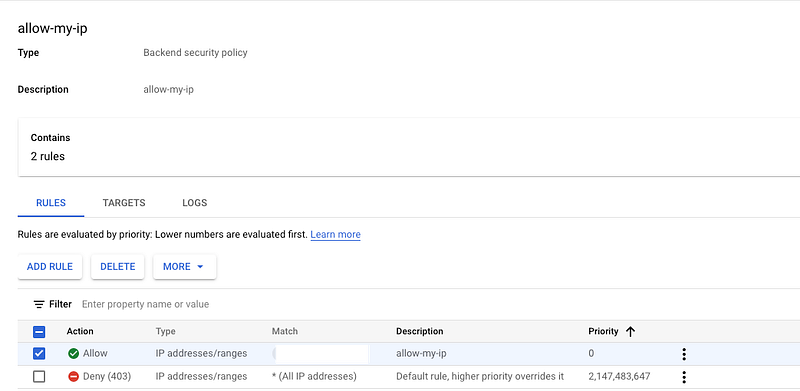
In order to apply this policy to the load balancer created by my Ingress above i have to create a BackendConfig Object and annotate the Kubernetes Service with this object. Cloud Armor Policies can be applied to individual backend services separately, giving you flexibility to choose which policy to apply to which backend. In my example this is what i need to do:
#Define a ackendConfig object
apiVersion: cloud.google.com/v1
kind: BackendConfig
metadata:
  name: cloudarmor-allow-my-ip
spec:
  securityPolicy:
    name: allow-my-ip
---
#Annotate the service with the object above
apiVersion: v1
kind: Service
metadata:
  name: foo
  annotations:
    cloud.google.com/neg: '{"ingress": true}'
    cloud.google.com/backend-config: '{"default": "cloudarmor-allow-my-ip"}'
spec:
  ports:
  - port: 8080
    targetPort: 8080
    name: http
  selector:
    app: foo
  type: ClusterIP
If you apply these manifests and wait few seconds you will see that the load balancer will allow you to connect from the IP address defined in the policy but will return a 403 if you try to connect from anywhere else.
Except for the default backend. Because Clour Armor policies are per backend and in our case we are using the Ingress default backend the policy will not apply to this one. You will have explicitly set it up.
To do that simply create a BackendConfig object in the kube-system namespace (this is required as BackendConfigs cannot be references cross-namespaces) and edit the Service called default-http-backend in the kube-system namespace and add the annotation like the one above:
apiVersion: cloud.google.com/v1
kind: BackendConfig
metadata:
  name: cloudarmor-allow-my-ip
  namespace: kube-system
spec:
  securityPolicy:
    name: allow-my-ip
kubectl edit svc default-http-backend -m kube-systemNow wait few seconds and try to with an unmatched path and you should get a 403.
In conclusion adding policies to default backend is simple and can be done two ways:
1 —Create a BackendConfig in the kube-system namespace and edit the existing Service for the implicit default-backend pod and annotate it with the policies you need.
2 — Define you own default backend pod and Service. Annotate the Service properly and add your default backend port to the spec part of the Ingress
Hope this helped ;)


