cb(<span class="hljs-literal">null</span>, <span class="hljs-built_in">require</span>(<span class="hljs-string">'./Details'</span>))
})
}
}
]
}</pre></div><p id="6841"><i>Note: I often use the above setup with the CommonChunksPlugin (with minChunks: Infinity) so I have one chunk with common modules between my different entry points. This also <a href="https://github.com/webpack/webpack/issues/368#issuecomment-247212086">minimized</a> running into missing Webpack runtime.</i></p><p id="9779">Brian Holt covers async route loading well in a <a href="https://btholt.github.io/complete-intro-to-react/">Complete Intro to React</a>. Code-splitting with async routing is possible with both the current version of React Router and the <a href="https://gist.github.com/acdlite/a68433004f9d6b4cbc83b5cc3990c194">new React Router V4</a>.</p><h1 id="6e62">Easy declarative route chunking with async getComponent + require.ensure()</h1><p id="0344">Here’s a tip for getting code-splitting setup even faster. In React Router, a <a href="https://github.com/ReactTraining/react-router/blob/master/docs/API.md#route">declarative route</a> for mapping a route “/” to a component App looks like <route path="”/”" component="{App}">.</route></p><p id="f5c3">React Router also supports a handy <a href="https://github.com/ReactTraining/react-router/blob/master/docs/API.md#getcomponentnextstate-callback">getComponent</a> attribute, which is similar to component but is asynchronous and is <b>super nice</b> for getting code-splitting setup quickly:</p><div id="65fb"><pre><<span class="hljs-title class_">Route</span>
path=<span class="hljs-string">"stories/:storyId"</span>
getComponent={<span class="hljs-function">(<span class="hljs-params">nextState, cb</span>) =></span> {
<span class="hljs-comment">// async work to find components</span>
<span class="hljs-title function_">cb</span>(<span class="hljs-literal">null</span>, <span class="hljs-title class_">Stories</span>)
}} /></pre></div><p id="5d91">getComponent takes a function defining the next state (which I set to null) and a callback.</p><p id="02ba">Let’s add some route-based code-splitting to <a href="https://github.com/insin/react-hn">ReactHN</a>. We’ll start with a snippet from our <a href="https://github.com/insin/react-hn/blob/master/src/routes.js#L36">routes</a> file — this defines require calls for components and React Router routes for each route (e.g news, item, poll, job, comment permalinks etc):</p><div id="c5f7"><pre><span class="hljs-selector-tag">var</span> IndexRoute = <span class="hljs-built_in">require</span>(<span class="hljs-string">'react-router/lib/IndexRoute'</span>)
<span class="hljs-selector-tag">var</span> App = <span class="hljs-built_in">require</span>(<span class="hljs-string">'./App'</span>)
<span class="hljs-selector-tag">var</span> Item = <span class="hljs-built_in">require</span>(<span class="hljs-string">'./Item'</span>)
<span class="hljs-selector-tag">var</span> PermalinkedComment = <span class="hljs-built_in">require</span>(<span class="hljs-string">'./PermalinkedComment'</span>) <--
<span class="hljs-selector-tag">var</span> UserProfile = <span class="hljs-built_in">require</span>(<span class="hljs-string">'./UserProfile'</span>)
<span class="hljs-selector-tag">var</span> NotFound = <span class="hljs-built_in">require</span>(<span class="hljs-string">'./NotFound'</span>)
<span class="hljs-selector-tag">var</span> Top = <span class="hljs-built_in">stories</span>(<span class="hljs-string">'news'</span>, <span class="hljs-string">'topstories'</span>, <span class="hljs-number">500</span>)
<span class="hljs-comment">// ....</span></pre></div><div id="09c7"><pre><span class="hljs-variable language_">module</span>.<span class="hljs-property">exports</span> = <span class="language-xml"><span class="hljs-tag"><<span class="hljs-name">Route</span> <span class="hljs-attr">path</span>=<span class="hljs-string">"/"</span> <span class="hljs-attr">component</span>=<span class="hljs-string">{App}</span>></span>
<span class="hljs-tag"><<span class="hljs-name">IndexRoute</span> <span class="hljs-attr">component</span>=<span class="hljs-string">{Top}/</span>></span>
<span class="hljs-tag"><<span class="hljs-name">Route</span> <span class="hljs-attr">path</span>=<span class="hljs-string">"news"</span> <span class="hljs-attr">component</span>=<span class="hljs-string">{Top}/</span>></span>
<span class="hljs-tag"><<span class="hljs-name">Route</span> <span class="hljs-attr">path</span>=<span class="hljs-string">"item/:id"</span> <span class="hljs-attr">component</span>=<span class="hljs-string">{Item}/</span>></span>
<span class="hljs-tag"><<span class="hljs-name">Route</span> <span class="hljs-attr">path</span>=<span class="hljs-string">"job/:id"</span> <span class="hljs-attr">component</span>=<span class="hljs-string">{Item}/</span>></span>
<span class="hljs-tag"><<span class="hljs-name">Route</span> <span class="hljs-attr">path</span>=<span class="hljs-string">"poll/:id"</span> <span class="hljs-attr">component</span>=<span class="hljs-string">{Item}/</span>></span>
<span class="hljs-tag"><<span class="hljs-name">Route</span> <span class="hljs-attr">path</span>=<span class="hljs-string">"comment/:id"</span> <span class="hljs-attr">component</span>=<span class="hljs-string">{PermalinkedComment}/</span>></span> <---
<span class="hljs-tag"><<span class="hljs-name">Route</span> <span class="hljs-attr">path</span>=<span class="hljs-string">"newcomments"</span> <span class="hljs-attr">component</span>=<span class="hljs-string">{Comments}/</span>></span>
<span class="hljs-tag"><<span class="hljs-name">Route</span> <span class="hljs-attr">path</span>=<span class="hljs-string">"user/:id"</span> <span class="hljs-attr">component</span>=<span class="hljs-string">{UserProfile}/</span>></span>
<span class="hljs-tag"><<span class="hljs-name">Route</span> <span class="hljs-attr">path</span>=<span class="hljs-string">"*"</span> <span class="hljs-attr">component</span>=<span class="hljs-string">{NotFound}/</span>></span>
<span class="hljs-tag"></<span class="hljs-name">Route</span>></span></span></pre></div><p id="7bd5">ReactHN currently serve users a monolithic bundle of JS with code for <i>all</i> routes. Let’s switch it up to route-chunking and only serve exactly the code needed for a route, starting with comment permalinks (comment/:id):</p><p id="c44f">So we first delete the implicit require for the permalink component:</p><div id="fe7d"><pre><span class="hljs-variable">var</span> <span class="hljs-variable">PermalinkedComment</span> = <span class="hljs-function"><span class="hljs-title">require</span>(‘./<span class="hljs-variable">PermalinkedComment</span>’)</span></pre></div><p id="c767">Then we take our route..</p><div id="cf57"><pre><span class="hljs-tag"><<span class="hljs-name">Route</span> <span class="hljs-attr">path</span>=<span class="hljs-string">”comment/:id”</span> <span class="hljs-attr">component</span>=<span class="hljs-string">{PermalinkedComment}/</span>></span></pre></div><p id="cebc">And update it with some declarative getComponent goodness. We’ve got our require.ensure() call to lazy-load in our route and this is all we need to do for code-splitting:</p><div id="e49f"><pre><<span class="hljs-title class_">Route</span>
path=<span class="hljs-string">"comment/:id"</span>
getComponent={<span class="hljs-function">(<span class="hljs-params">location, callback</span>) =></span> {
<span class="hljs-built_in">require</span>.<span class="hljs-title function_">ensure</span>([], <span class="hljs-function"><span class="hljs-params">require</span> =></span> {
<span class="hljs-title function_">callback</span>(<span class="hljs-literal">null</span>, <span class="hljs-built_in">require</span>(<span class="hljs-string">'./PermalinkedComment'</span>))
}, <span class="hljs-string">'PermalinkedComment'</span>)
}}
/></pre></div><p id="276f">OMG beautiful. And..that’s it. Seriously. We can apply this to the rest of our routes and run webpack. It will correctly find the require.ensure() calls and split our code as we intended.</p><figure id="258d"><img src="https://cdn-images-1.readmedium.com/v2/resize:fit:800/0*glKcFK9_RLNk9AyR."><figcaption></figcaption></figure><p id="ab79">After applying declarative code-splitting to many more of our routes we can see our route-chunking in action, only loading up the code needed for a route (which we can precache in Service Worker) as needed:</p><figure id="06d0"><img src="https://cdn-images-1.readmedium.com/v2/resize:fit:800/0*tVvolw4FTKjNFAnY."><figcaption></figcaption></figure><p id="3996">Reminder: A number of drop-in Webpack plugins for Service Worker caching are available:</p><ul><li><a href="https://github.com/goldhand/sw-precache-webpack-plugin">sw-precache-webpack-plugin</a> which uses sw-precache under the hood</li><li><a href="https://github.com/NekR/offline-plugin">offline-plugin</a> which is used by react-boilerplate</li></ul><h2 id="ee23">CommonsChunkPlugin</h2><figure id="f45c"><img src="https://cdn-images-1.readmedium.com/v2/resize:fit:800/0*QphlrnwHQiOsB06w."><figcaption></figcaption></figure><p id="dc1c">To identify common modules used across different routes and put them in a commons chunk, use the <a href="https://webpack.github.io/docs/list-of-plugins.html#commonschunkplugin">CommonsChunkPlugin</a>. It requires two script tags to be used per page, one for the commons chunk and one for the entry chunk for a route.</p><div id="eece"><pre>const CommonsChunkP<span class="hljs-attr">lugin</span> <span class="hljs-operator">=</span> require(<span class="hljs-string">"webpack/lib/optimize/CommonsChunkPlugin"</span>)<span class="hljs-punctuation">;</span>
module.<span class="hljs-attr">exports</span> <span class="hljs-operator">=</span> <span class="hljs-punctuation">{</span>
<span class="hljs-symbol"> entry:</span> <span class="hljs-punctuation">{</span>
<span class="hljs-symbol"> p1:</span> <span class="hljs-string">"./route-1"</span>,
<span class="hljs-symbol"> p2:</span> <span class="hljs-string">"./route-2"</span>,
<span class="hljs-symbol"> p3:</span> <span class="hljs-string">"./route-3"</span>
<span class="hljs-punctuation">}</span>,
<span class="hljs-symbol"> output:</span> <span class="hljs-punctuation">{</span>
<span class="hljs-symbol"> filename:</span> <span class="hljs-string">"[name].entry.chunk.js"</span>
<span class="hljs-punctuation">}</span>,
<span class="hljs-symbol"> plugins:</span> [
new CommonsChunkPlugin(<span class="hljs-string">"commons.chunk.js"</span>)
]
<span class="hljs-punctuation">}</span></pre></div><p id="ae81">The Webpack <a href="https://blog.madewithlove.be/post/webpack-your-bags/">— display-chunks flag</a> is useful for seeing what modules occur in which chunks. This helps narrow down what dependencies are being duplicated in chunks and can hint at whether or not it’s worth enabling the CommonChunksPlugin in your project. Here’s a project with multiple components that detected a duplicate Mustache.js dependency between different chunks:</p><figure id="59e8"><img src="https://cdn-images-1.readmedium.com/v2/resize:fit:800/0*YMvoz-W2HL3v2MIs."><figcaption></figcaption></figure><p id="2328">Webpack 1 also supports deduplication of libraries in your dependency trees using the <a href="https://github.com/webpack/docs/wiki/optimization#deduplication">DedupePlugin</a>. In Webpack 2, tree-shaking should mostly eliminate the need for this.</p><p id="07d3"><b>More Webpack tips</b></p><ul><li>The number of require.ensure() calls in your codebase generally correlates to the number of bundles that will be generated. It’s useful to be aware of this when heavily using ensure across your codebase.</li><li><a href="https://readmedium.com/webpack-2-tree-shaking-configuration-9f1de90f3233">Tree-shaking in Webpack2</a> will help remove unused exports. This can help keep your bundle sizes smaller.</li><li>Also, be careful to avoid require.ensure() calls in common/shared bundles. You might find this creates entry point references which have assumptions about the dependencies that have already been loaded.</li><li>In Webpack 2, System.import does not currently work with server-rendering but I’ve shared some notes about how to work around this on <a href="http://stackoverflow.com/a/39088208">StackOverflow</a>.</li><li>If optimising for build speed, look at the <a href="https://github.com/webpack/docs/wiki/list-of-plugins">Dll plugin</a>, <a href="https://www.npmjs.com/package/parallel-webpack">parallel-webpack</a> and targeted builds</li><li>If you need to <b>async</b> or <b>defer</b> scripts with Webpack, see <a href="https://github.com/numical/script-ext-html-webpack-plugin">script-ext-html-webpack-plugin</a></li></ul><p id="7b1a"><b>Detecting bloat in Webpack builds</b></p><p id="0f0b">The Webpack community have many web-established analysers for builds including <a href="http://webpack.github.io/analyse/">http://webpack.github.io/analyse/</a>,<a href="http://webpack.github.io/analyse/"> </a><a href="https://chrisbateman.github.io/webpack-visualizer/">https://chrisbateman.github.io/webpack-visualizer/</a>,<a href="https://chrisbateman.github.io/webpack-visualizer/"> </a>a<a href="https://chrisbateman.github.io/webpack-visualizer/">n</a>d<a href="https://chrisbateman.github.io/webpack-visualizer/"> </a><a href="https://alexkuz.github.io/stellar-webpack/.">https://alexkuz.github.io/stellar-webpack/.</a> These are handy for understanding what your largest modules are.</p><p id="820d"><a href="https://github.com/danvk/source-map-explorer"><b>source-map-explorer</b></a> (via Paul Irish) is also <i>fantastic</i> for understanding code bloat through source maps. Look at this tree-map visualisation with per-file LOC and % breakdowns for the ReactHN Webpack bundle:</p><figure id="4ffc"><img src="https://cdn-images-1.readmedium.com/v2/resize:fit:800/0*D5j-Jv_FVkMigRyZ."><figcaption></figcaption></figure><p id="daa6">You might also be interested in <a href="https://github.com/samccone/coverage-ext"><b>coverage-ext</b></a> by Sam Saccone for generating code coverage for any webapp. This is useful for understanding how much code of the code you’re shipping down is actually being executed.</p><h1 id="de4a">Beyond code-splitting: PRPL Pattern</h1><p id="eb3c">Polymer discovered an interesting web performance pattern for granularly serving apps called <a href="https://www.polymer-project.org/1.0/toolbox/server">PRPL</a> (see <a href="https://www.youtube.com/watch?v=J4i0xJnQUzU">Kevin’s I/O talk</a>). This pattern tries to optimise for interactivity and stands for:</p><ul><li>(P)ush critical resources for the initial route</li><li>(R)ender initial route and get it interactive as soon as possible</li><li>(P)re-cache the remaining routes using Service Worker</li><li>(L)azy-load and lazily instantiate parts of the app as the user moves through the application</li></ul><figure id="88f7"><img src="https://cdn-images-1.readmedium.com/v2/resize:fit:800/0*2XxuNsDEp1-4VuoU."><figcaption></figcaption></figure><p id="1c9b">We have to give great kudos here to the <a href="https://shop.polymer-project.org/">Polymer Shop demo</a> for showing us the way on real mobile devices. Using PRPL (in this case with HTML Imports, which can take advantage of the browser’s background HTML parser). No pixels go on screen that you can’t use. Additional work here is chunked and stays interactive. We’re interactive on a real mobile device at 1.75seconds. 1.3s of JavaScript but it’s all broken up. After that it all works.</p><p id="a1dc">You’re hopefully on board with the benefits of breaking down applications into more granular chunks by now. When a user first visits our PWA, let’s say they go to a particular route. The server (using H/2 Push) can push down the chunks needed for just that route — these are only the pieces needed to get the application booted up. Those go into the network cache.</p><p id="fb89">Once they’ve been pushed down, we’ve effectively primed the cache with the chunks we know the page will need. When the application boots up, it looks at the route and knows that what we need is already in the cache, so we get that really fast first loa
Options
d of our application — not just a splash screen — but the interactive content the user asked for.</p><p id="41af">The next part of this is rendering the content for the view as quickly as possible. The third is, while the user is looking at the current view, using Service Worker to start pre-caching all of the other chunks and routes the user hasn’t asked for yet and getting those all installed into the Service Worker cache.</p><p id="1d49">At this point the entire application (or a lot more of it) can be available offline. When a user navigates to a different part of the application, we can lazy load the next parts of it from the Service Worker cache. There’s no network loading needed because they’re already precached. Instant loading awesomeness ahoy! ❤</p><p id="5f40">PRPL can be applied to any app, as Flipkart recently demonstrated on their React stack. Apps fully using PRPL can take advantage of fast-loading using HTTP/2 server push by producing two builds that we conditionally serve depending on your browser support:</p><p id="2a2a">* A bundled build optimised to minimize round-trips for servers/browsers without HTTP/2 Push support. For most of us, this is what we ship today by default.</p><p id="6036">* An unbundled build for servers/browsers that do support HTTP/2 Push enabling a faster first-paint</p><p id="da9e">This builds on some of the thinking we talked about earlier with route-chunking. With PRPL, the server and our Service Worker work together to precache resources for intactive routes. When a user navigates around your app and changes routes, we lazy-load resources for routes not cached yet and create the required views.</p><h1 id="8843">Implementing PRPL</h1><p id="4746"><b>tl;dr: Webpack’s require.ensure() with an async ‘getComponent’ and React Router are the lowest friction paths to a PRPL-style performance pattern</b></p><figure id="86e4"><img src="https://cdn-images-1.readmedium.com/v2/resize:fit:800/0*-llrY94drXMjBUW6."><figcaption></figcaption></figure><p id="031b">A big part of PRPL is turning the JS bundling mindset upside down and delivering resources as close to the granularity in which they are authored as possible (at least in terms of functionally independent modules). With Webpack, this is all about route-chunking which we’ve already covered.</p><p id="8336">Push critical resources for the initial route. Ideally, using <a href="https://www.igvita.com/2013/06/12/innovating-with-http-2.0-server-push/">HTTP/2 Server Push</a> however don’t let this be a blocker for trying to go down a PRPL-like path. You can achieve substantially similar results to “full” PRPL in many cases without using H/2 Push, but just sending <a href="https://www.smashingmagazine.com/2016/02/preload-what-is-it-good-for/">preload headers</a> and H/2 alone.</p><p id="c59b">See this production waterfall by Flipkart of their before/after wins:</p><figure id="b09a"><img src="https://cdn-images-1.readmedium.com/v2/resize:fit:800/0*-hLp_Acvig_s4Uop."><figcaption></figcaption></figure><p id="97e3">Webpack has support for H/2 in the form of <a href="https://github.com/webpack/webpack/tree/master/examples/http2-aggressive-splitting">AggressiveSplittingPlugin</a>.</p><p id="7091">AggressiveSplittingPlugin splits every chunk until it reaches the specified maxSize as we can see with a short example below:</p><div id="08a7"><pre>module.<span class="hljs-attr">exports</span> <span class="hljs-operator">=</span> <span class="hljs-punctuation">{</span>
<span class="hljs-symbol"> entry:</span> <span class="hljs-string">"./example"</span>,
<span class="hljs-symbol"> output:</span> <span class="hljs-punctuation">{</span>
<span class="hljs-symbol"> path:</span> path.join(__dirname, <span class="hljs-string">"js"</span>),
<span class="hljs-symbol"> filename:</span> <span class="hljs-string">"[chunkhash].js"</span>,
<span class="hljs-symbol"> chunkFilename:</span> <span class="hljs-string">"[chunkhash].js"</span>
<span class="hljs-punctuation">}</span>,
<span class="hljs-symbol"> plugins:</span> [
new webpack.optimize.AggressiveSplittingPlugin(<span class="hljs-punctuation">{</span>
<span class="hljs-symbol"> minSize:</span> <span class="hljs-number">30000</span>,
<span class="hljs-symbol"> maxSize:</span> <span class="hljs-number">50000</span>
<span class="hljs-punctuation">}</span>),
<span class="hljs-comment">// ...</span></pre></div><p id="ef95">See the official <a href="https://github.com/webpack/webpack/tree/master/examples/http2-aggressive-splitting">plugin page</a> with examples for more details. <a href="https://docs.google.com/document/d/1K0NykTXBbbbTlv60t5MyJvXjqKGsCVNYHyLEXIxYMv0/preview?pref=2&pli=1">Lessons learned experimenting with HTTP/2 Push</a> and <a href="https://99designs.com.au/tech-blog/blog/2016/07/14/real-world-http-2-400gb-of-images-per-day/">Real World HTTP/2</a> are also worth a read.</p><ul><li>Rendering initial routes: this is really up to the framework/library you’re using.</li><li>Pre-caching remaining routes. For caching, we rely on Service Worker. <a href="https://github.com/GoogleChrome/sw-precache">sw-precache</a> is great for generating a Service Worker for static asset precaching and for Webpack we can use <a href="https://www.npmjs.com/package/sw-precache-webpack-plugin">SWPrecacheWebpackPlugin</a>.</li><li>Lazy-load and create remaining routes on demand — require.ensure() and System.import() are your friend in Webpack land.</li></ul><h1 id="d24b">Cache-busting & long-term caching with Webpack</h1><p id="1a97"><b>Why care about static asset versioning?</b></p><p id="14cd">Static assets refer to our page’s static resources like scripts, stylesheets and images. When users visit our page for the first time, they need to download all of the resources used by the it. Let’s say we land on a route and the JavaScript chunks needed haven’t changed since the last time the page was visited — we shouldn’t have to re-fetch these scripts because they should already exist in the browser cache. Fewer network requests is a win for web performance.</p><p id="a9fe">Normally, we accomplish this by setting up an <a href="https://developers.google.com/web/fundamentals/performance/optimizing-content-efficiency/http-caching?hl=en">expires header</a> for each of our files. An expires header just means that we can tell the browser to avoid making another request to the server for this file for a specific amount of time (e.g 1 year). As codebases evolve and are redeployed we want to make sure users get the freshest files without having to re-download resources if they haven’t changed.</p><p id="0158"><a href="https://css-tricks.com/strategies-for-cache-busting-css/">Cache-busting</a> accomplishes this by appending a string to filenames — it could be a build version (e.g src=”chunk.js?v=1.2.0”), a timestamp or something else. I prefer to adding a hash of the file contents to the filename (e.g chunk.d9834554decb6a8j.js) as this should always change when the contents of the file changes. MD5 hashing is commonly used in the Webpack community for this purpose which generates a ‘summary’ value 16 bytes long.</p><p id="27d5"><a href="https://readmedium.com/long-term-caching-of-static-assets-with-webpack-1ecb139adb95"><i>Long-term caching of static-assets with Webpack</i></a><i> is an excellent read on this topic and you should check it out. I try to cover the main points of what’s involved otherwise below.</i></p><p id="cc3b"><b>Asset versioning using content-hashing in Webpack</b></p><p id="6871">In Webpack, asset versioning using content hashing is setup <a href="https://webpack.github.io/docs/long-term-caching.html">[chunkhash]</a> in our Webpack config as follows:</p><div id="269a"><pre>filename: ‘<span class="hljs-comment">[name]</span>.<span class="hljs-comment">[chunkhash]</span>.js’,
chunkFilename: ‘<span class="hljs-comment">[name]</span>.<span class="hljs-comment">[chunkhash]</span>.js’</pre></div><p id="3d4c">We also want to make sure the normal [name].js and content-hashed ([name].[chunkhash].js) filenames are always correctly referenced in our HTML files. This is the difference between referencing <script src="”chunk”.js”"> and <script src=”chunk.d9834554decb6a8j.js”>.</script></p><p id="5e44">Below is a commented Webpack config sample that includes a few other plugins that smooth over getting long-term caching setup.</p><div id="db9a"><pre><span class="hljs-attribute">const path</span> = require(<span class="hljs-string">'path'</span>);
<span class="hljs-attribute">const webpack</span> = require(<span class="hljs-string">'webpack'</span>);</pre></div><div id="e9c2"><pre><span class="hljs-comment">// Use webpack-manifest-plugin to generate asset manifests with a mapping from source files to their corresponding outputs. Webpack uses IDs instead of module names to keep generated files small in size. IDs get generated and mapped to chunk filenames before being put in the chunk manifest (which goes into our entry chunk). Unfortunately, any changes to our code update the entry chunk including the new manifest, invalidating our caching.</span>
<span class="hljs-keyword">const</span> ManifestPlugin = <span class="hljs-keyword">require</span>(<span class="hljs-string">'webpack-manifest-plugin'</span>)<span class="hljs-punctuation">;</span></pre></div><div id="7073"><pre><span class="hljs-comment">// We fix this with chunk-manifest-webpack-plugin, which puts the manifest in a completely separate JSON file of its own.</span>
<span class="hljs-keyword">const</span> <span class="hljs-title class_">ChunkManifestPlugin</span> = <span class="hljs-built_in">require</span>(<span class="hljs-string">'chunk-manifest-webpack-plugin'</span>);</pre></div><div id="9fd9"><pre><span class="hljs-keyword">module</span>.<span class="hljs-keyword">exports</span> = {
entry: {
vendor: <span class="hljs-string">'./src/vendor.js'</span>,
main: <span class="hljs-string">'./src/index.js'</span>
},
output: {
path: path.join(__dirname, <span class="hljs-string">'build'</span>),
filename: <span class="hljs-string">'[name].[chunkhash].js'</span>,
chunkFilename: <span class="hljs-string">'[name].[chunkhash].js'</span>
},
plugins: [
<span class="hljs-keyword">new</span> <span class="hljs-title class_">webpack</span>.optimize.CommonsChunkPlugin({
name: <span class="hljs-string">"vendor"</span>,
minChunks: Infinity,
}),
<span class="hljs-keyword">new</span> <span class="hljs-title class_">ManifestPlugin</span>(),
<span class="hljs-keyword">new</span> <span class="hljs-title class_">ChunkManifestPlugin</span>({
filename: <span class="hljs-string">"chunk-manifest.json"</span>,
manifestVariable: <span class="hljs-string">"webpackManifest"</span>
}),
<span class="hljs-comment">// Work around non-deterministic ordering for modules. Covered more in the long-term caching of static assets with Webpack post.</span>
<span class="hljs-keyword">new</span> <span class="hljs-title class_">webpack</span>.optimize.OccurenceOrderPlugin()
]
};</pre></div><p id="c6a0">Now that we have a build of the chunk-manifest JSON, we need to inline it into our HTML so that Webpack actually has access to it when the page boots up. So include the output of the above in a <script> tag. Automatically inlining this script in HTML can be achieved using the <a href="https://github.com/ampedandwired/html-webpack-plugin">html-webpack-plugin</a>.</script></p><p id="12b0"><i>Note: Webpack are hoping to simplify the steps required for this long-term caching setup from ~4–1 by having <a href="https://github.com/webpack/webpack/tree/master/examples/explicit-vendor-chunk">no shared ID range</a>.</i></p><p id="4acc">To learn more about HTTP <a href="https://jakearchibald.com/2016/caching-best-practices/">Caching best practices</a>, read Jake Archibald’s excellent write-up.</p><h1 id="8be7">Further reading</h1><ul><li><a href="https://webpack.github.io/docs/code-splitting.html">Webpack’s documentation on code-splitting</a></li><li>Formidable’s OSS Playbook’s on Webpack <a href="https://formidable.com/open-source/playbook/docs/frontend/webpack-code-splitting/">code-splitting</a> and <a href="https://formidable.com/open-source/playbook/docs/frontend/webpack-shared-libs/">shared libraries</a></li><li><a href="http://michalzalecki.com/progressive-web-apps-with-webpack">Progressive Web Apps with Webpack</a></li><li><a href="https://getpocket.com/redirect?url=http%3A%2F%2Fjonathancreamer.com%2Fadvanced-webpack-part-2-code-splitting%2F&formCheck=0b0d10781e025a205b05e2941ffdc845">Advanced Webpack Part 2 — Code Splitting</a></li><li><a href="https://readmedium.com/progressive-loading-for-modern-web-applications-via-code-splitting-fb43999735c6#.1965mrwlr">Progressive loading for modern web applications via code splitting</a></li><li><a href="https://getpocket.com/redirect?url=https%3A%2F%2Ftailordev.fr%2Fblog%2F2016%2F03%2F17%2Floading-dependencies-asynchronously-in-react-components%2F&formCheck=0b0d10781e025a205b05e2941ffdc845">Loading dependencies asynchronously in React components</a></li><li><a href="https://readmedium.com/webpack-plugins-been-we-been-keepin-on-the-dll-cdfdd6cb8cd7">Webpack Plugins we been keeping on the DLL</a></li><li><a href="https://getpocket.com/redirect?url=https%3A%2F%2Fmedium.com%2Fmodus-create-front-end-development%2Fautomatic-code-splitting-for-react-router-w-es6-imports-a0abdaa491e9%23.twoltv57f&formCheck=0b0d10781e025a205b05e2941ffdc845">Automatic Code Splitting for React Router w/ ES6 Imports — Modus Create</a></li><li><a href="https://getpocket.com/redirect?url=http%3A%2F%2Fstackoverflow.com%2Fquestions%2F34925717%2Fusing-webpack-and-react-router-for-lazyloading-and-code-splitting-not-loading&formCheck=0b0d10781e025a205b05e2941ffdc845">Using webpack and react-router for lazyloading and code-splitting not loading</a></li><li><a href="https://reactjsnews.com/isomorphic-react-in-real-life">Isomorphic/Universal rendering/routing/data-fetching with React in real life</a></li><li><a href="https://getpocket.com/redirect?url=http%3A%2F%2Fblog.scottlogic.com%2F2016%2F02%2F05%2Fa-lazy-isomorphic-react-experiment.html&formCheck=0b0d10781e025a205b05e2941ffdc845">A Lazy Isomorphic React Experiment</a></li><li><a href="https://getpocket.com/redirect?url=https%3A%2F%2Fgithub.com%2Fryanflorence%2Fexample-react-router-server-rendering-lazy-routes&formCheck=0b0d10781e025a205b05e2941ffdc845">Server Rendering Lazy Routes</a> with React Router and code-splitting</li><li><a href="https://scotch.io/tutorials/react-on-the-server-for-beginners-build-a-universal-react-and-node-app">React on the server for beginners — building a universal React app</a></li><li><a href="https://getpocket.com/redirect?url=http%3A%2F%2Fblog.mxstbr.com%2F2016%2F01%2Freact-apps-with-pages%2F&formCheck=0b0d10781e025a205b05e2941ffdc845">React.js Apps with Pages</a></li><li><a href="https://getpocket.com/redirect?url=https%3A%2F%2Fwiredcraft.com%2Fblog%2Fcode-splitting-single-page-app%2F&formCheck=0b0d10781e025a205b05e2941ffdc845">Building the World Bank data site as a fast-loading, single-page app with code splitting</a></li><li><a href="https://github.com/gatsbyjs/gatsby/issues/431">Implementing PRPL in Gatsby (React.js static site generator)</a></li></ul><h2 id="da25">Advanced Module Bundling optimization reads</h2><ul><li><a href="https://nolanlawson.com/2016/08/15/the-cost-of-small-modules/">The cost of modules</a></li><li><a href="https://twitter.com/nolanlawson/status/768525330113925121">How RollUp and Closure Compiler mitigate the cost of modules</a></li><li><a href="https://github.com/samccone/The-cost-of-transpiling-es2015-in-2016">The cost of transpiling ES2015 in 2016</a></li></ul><p id="dc3e">In part 3 of this series, we’ll look at <a href="https://readmedium.com/progressive-web-apps-with-react-js-part-3-offline-support-and-network-resilience-c84db889162c#.tcspudthd"><b>how to get your React PWA working offline and under flaky network conditions</b></a>.</p><p id="7319">If you’re new to React, I’ve found <a href="https://goo.gl/G1WGxU">React for Beginners</a> by Wes Bos excellent.</p><p id="4808"><i>With thanks to Gray Norton, Sean Larkin, Sunil Pai, Max Stoiber, Simon Boudrias, Kyle Mathews and Owen Campbell-Moore for their reviews.</i></p></article></body>
Progressive Web Apps with React.js: Part 2 — Page Load Performance
Part 2 of a new series walking through tips for shipping mobile web apps optimized using Lighthouse. This issue, we’ll be looking at page load performance.
Follow L in the RAIL performance model. A+ performance is something all of us should be striving for even if a browser doesn’t support Service Worker. We can still get something meaningful on the screen quickly & only load what we need
Under representative network (3G) & hardware conditions
Be interactive in < 5s on first visit & < 2s on repeat visits once a Service Worker is active.
First load (network-bound), Speed Index of 3,000 or less
Second load (disk-bound because SW): Speed Index of 1,000 or less.
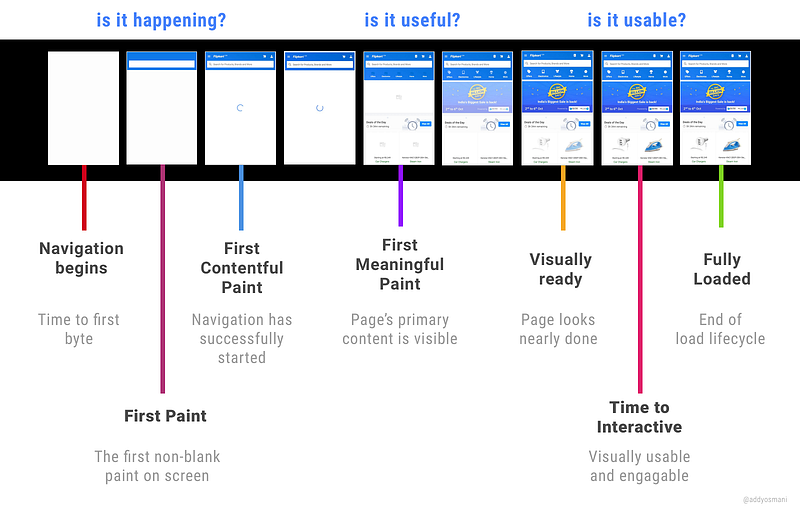
Let’s talk a little more about focusing on interactivity via TTI.
Focus on Time to interactive (TTI)
Optimizing for interactivity means making the app usable for users as soon as possible (i.e enabling them to click around and have the app react). This is critical for modern web experiences trying to provide first-class user experiences on mobile.

Lighthouse currently expresses TTI as a measure of when layout has stabilized, web fonts are visible and the main thread is available enough to handle user input. There are many ways of tracking TTI manually and what’s important is optimising for metrics that result in experience improvements for your users.
For libraries like React, you should be concerned by the cost of booting up the library on mobile as this can catch folks out. In ReactHN, we accomplished interactivity in under 1700ms by keeping the size and execution cost of the overall app relatively small despite having multiple views: 11KB gzipped for our app bundle and 107KB for our vendor/React/libraries bundle which looks a little like this in practice:
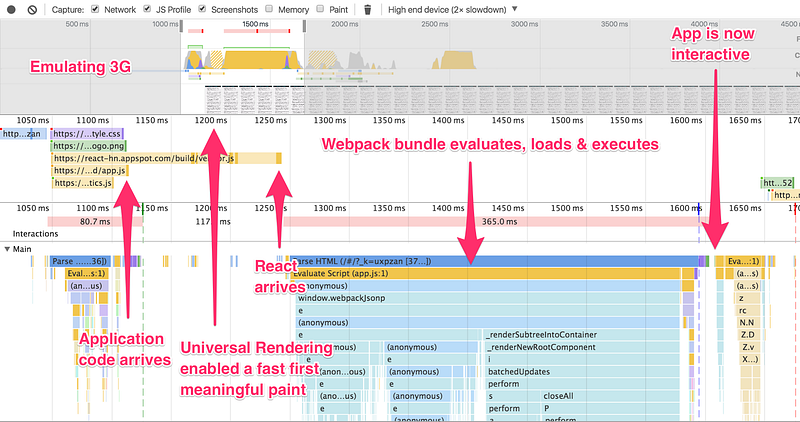
Later, for apps with granular functionality, we’ll look at performance patterns like PRPL which nail fast time-to-interactivity through granular “route-based chunking” while taking advantage of HTTP/2 Server Push (try the Shop demo to see what we mean).
Housing.com recently shipped a React experience using a PRPL-like pattern to much praise:
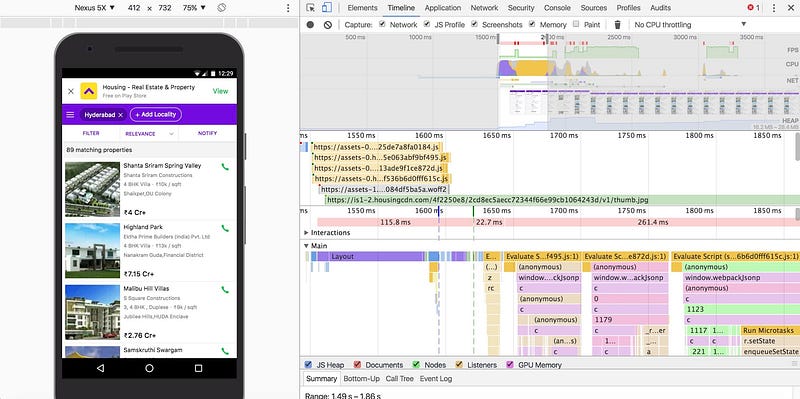
Housing.com took advantage of Webpack route-chunking to defer some of the bootup cost of entry pages (loading only what is needed for a route to render). For more detail see Sam Saccone’s excellent Housing.com perf audit.
As did Flipkart:
Note: There are many differing views on what “time to interactive” might mean and it’s possible Lighthouse’s definition of TTI will evolve. Other ways to track it could be the first point after a navigation where you can see a 5 second window with no long tasks or the first point after a text/content paint with a 5s window with no long tasks. Basically, how soon after the page settles is it likely a user will be able to interact with the app?
If you’re new to module bundling tools like Webpack, JS module bundlers (video) might be a useful watch.
Some of today’s JavaScript tooling makes it easy to bundle all of your scripts into a single bundle.js file that gets included in all pages.This means that a lot of the time, you’re likely loading a lot of code that isn’t required at all for the current route. Why load up 500KB of JS for a route when only 50KB will do? We should be throwing out script that isn’t conducive to shipping a fast experience for booting up a route with interactivity
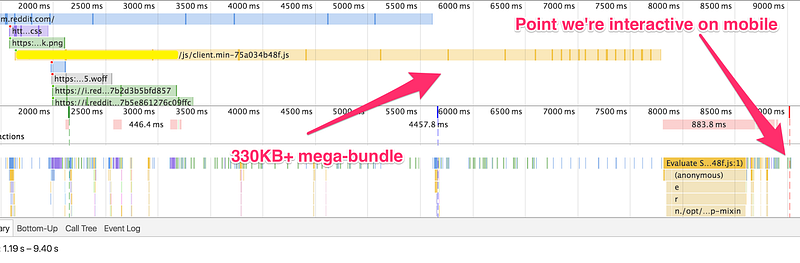
Avoid serving large, monolithic bundles (like above) when just serving the minimum functionally viable code a user actually needs for a route will do.
Code-splitting is one answer to the problem of monolithic bundles. It’s the idea that by defining split-points in your code, it can be split into different files that are lazy loaded on demand. This improves startup time and help us get to being interactive sooner.
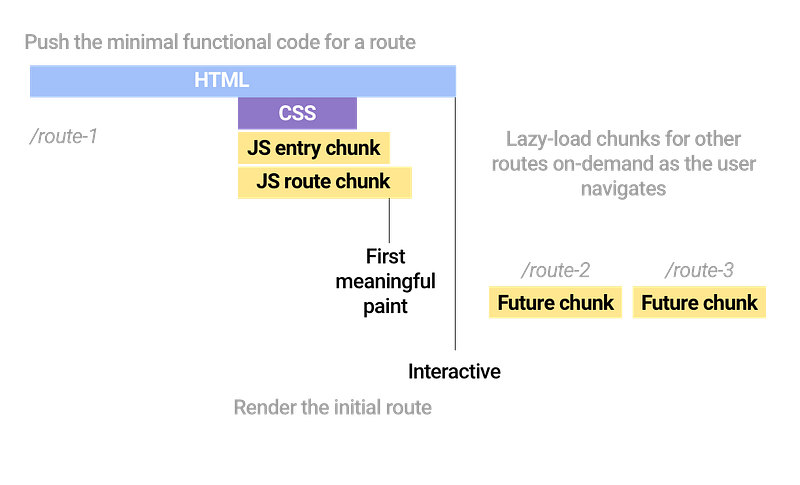
Imagine using an apartment listings app. If we land on a route listing the properties in our area (route-1) — we don’t need the code for viewing the full details for a property (route-2) or scheduling a tour (route-3), so we can serve users just the JavaScript needed for the listings route and dynamically load the rest.
This idea of code-splitting by route been used by many apps over the years, but is currently referred to as “route-based chunking”. We can enable this setup for React using the Webpack module bundler.
Code-splitting by routes in practice
Webpack supports code-splitting your app into chunks wherever it notices a require.ensure() being used (or in Webpack 2, a System.import). These are called “split-points” and Webpack generates a separate bundle for each of them, resolving dependencies as needed.
// Defines a "split-point"require.ensure([], function () {
const details = require('./Details');
// Everything needed by require() goes into a separate bundle// require(deps, cb) is asynchronous. It will async load and evaluate// modules, calling cb with the exports of your deps.
});
When your code needs something, Webpack makes a JSONP call to fetch it from the server. This works well with React Router and we can lazy-load in the dependencies (chunks) a new route needs before rendering the view to a user.
Webpack 2 supports automatic code-splitting with React Router as it can treat System.import calls for modules as import statements, bundling imported filed and their dependencies together. Dependencies won’t collide with the initial entry in your Webpack configuration.
Before we continue, one optional addition to your setup is from Resource Hints. This gives us a way to declaratively fetch resources without executing them. Preload can be leveraged for preloading Webpack chunks for routes users are likely to navigate to so the cache is already primed with them and they’re instantly available for instantiation.
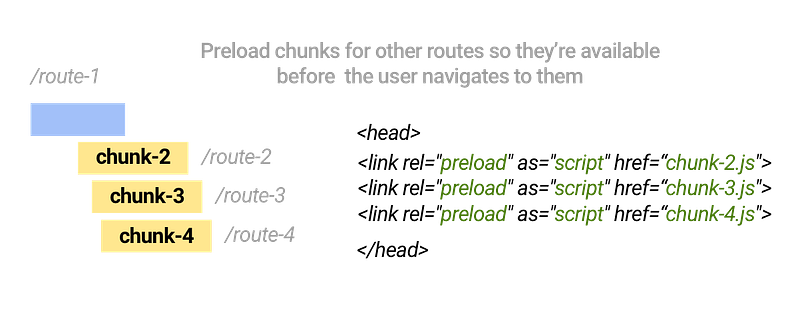
At the time of writing, preload is only implemented in Chrome, but can be treated as a progressive enhancement for browsers that do support it.
Note: html-webpack-plugin’s templating and custom-events can make setting this up a trivial process with minimal changes. You should however ensure that resources being preloaded are genuinely going to be useful for your averages users journey.
Asynchronously loading routes
Back to code-splitting — in an app using React and React Router, we can use require.ensure() to asynchronously load a component as soon as ensure gets called. Btw, this needs to be shimmed in Node using the node-ensure package for anyone exploring server-rendering. Pete Hunt covers async loading in Webpack How-to.
In the below example, require.ensure() enables us to lazy load routes as needed, waiting on a component to be fetched before it is used:
Note: I often use the above setup with the CommonChunksPlugin (with minChunks: Infinity) so I have one chunk with common modules between my different entry points. This also minimized running into missing Webpack runtime.
Brian Holt covers async route loading well in a Complete Intro to React. Code-splitting with async routing is possible with both the current version of React Router and the new React Router V4.
Easy declarative route chunking with async getComponent + require.ensure()
Here’s a tip for getting code-splitting setup even faster. In React Router, a declarative route for mapping a route “/” to a component `App` looks like .
React Router also supports a handy `getComponent` attribute, which is similar to `component` but is asynchronous and is super nice for getting code-splitting setup quickly:
<Route
path="stories/:storyId"
getComponent={(nextState, cb) => {
// async work to find componentscb(null, Stories)
}} />
`getComponent` takes a function defining the next state (which I set to null) and a callback.
Let’s add some route-based code-splitting to ReactHN. We’ll start with a snippet from our routes file — this defines require calls for components and React Router routes for each route (e.g news, item, poll, job, comment permalinks etc):
var IndexRoute = require('react-router/lib/IndexRoute')
var App = require('./App')
var Item = require('./Item')
var PermalinkedComment = require('./PermalinkedComment') <--
var UserProfile = require('./UserProfile')
var NotFound = require('./NotFound')
var Top = stories('news', 'topstories', 500)
// ....
ReactHN currently serve users a monolithic bundle of JS with code for all routes. Let’s switch it up to route-chunking and only serve exactly the code needed for a route, starting with comment permalinks (comment/:id):
So we first delete the implicit require for the permalink component:
And update it with some declarative getComponent goodness. We’ve got our require.ensure() call to lazy-load in our route and this is all we need to do for code-splitting:
OMG beautiful. And..that’s it. Seriously. We can apply this to the rest of our routes and run webpack. It will correctly find the require.ensure() calls and split our code as we intended.
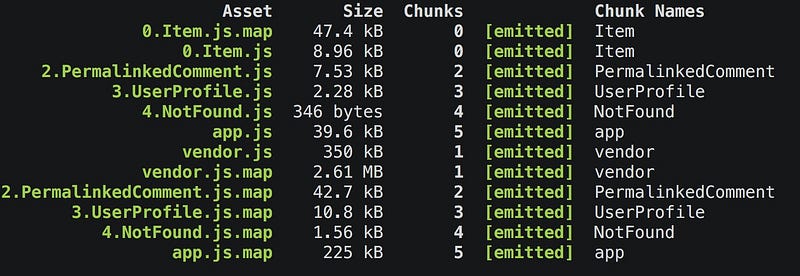
After applying declarative code-splitting to many more of our routes we can see our route-chunking in action, only loading up the code needed for a route (which we can precache in Service Worker) as needed:

Reminder: A number of drop-in Webpack plugins for Service Worker caching are available:
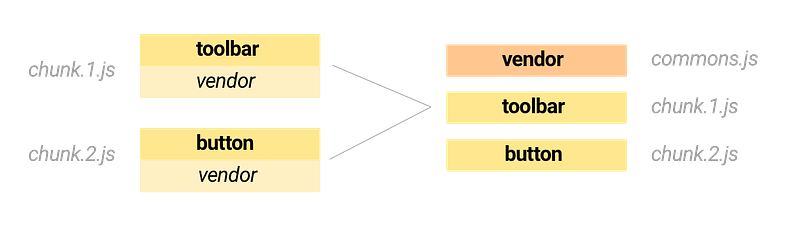
To identify common modules used across different routes and put them in a commons chunk, use the CommonsChunkPlugin. It requires two script tags to be used per page, one for the commons chunk and one for the entry chunk for a route.
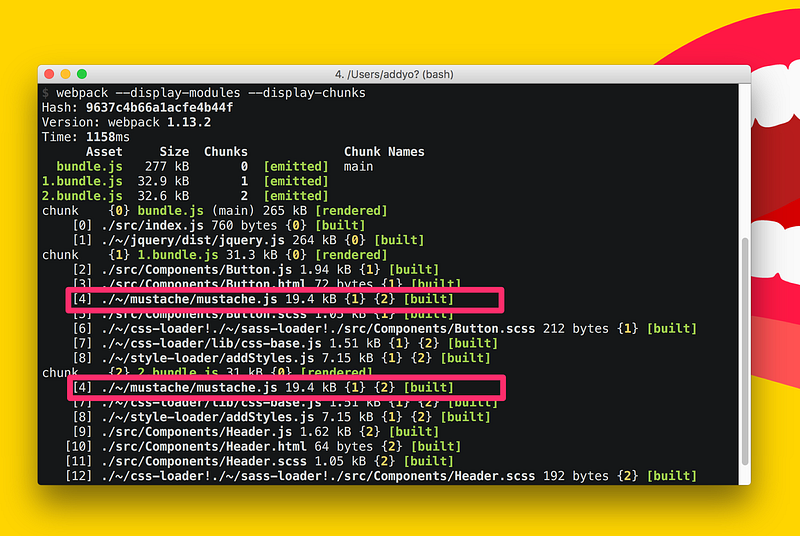
The Webpack — display-chunks flag is useful for seeing what modules occur in which chunks. This helps narrow down what dependencies are being duplicated in chunks and can hint at whether or not it’s worth enabling the CommonChunksPlugin in your project. Here’s a project with multiple components that detected a duplicate Mustache.js dependency between different chunks:
Webpack 1 also supports deduplication of libraries in your dependency trees using the DedupePlugin. In Webpack 2, tree-shaking should mostly eliminate the need for this.
More Webpack tips
The number of require.ensure() calls in your codebase generally correlates to the number of bundles that will be generated. It’s useful to be aware of this when heavily using ensure across your codebase.
Tree-shaking in Webpack2 will help remove unused exports. This can help keep your bundle sizes smaller.
Also, be careful to avoid require.ensure() calls in common/shared bundles. You might find this creates entry point references which have assumptions about the dependencies that have already been loaded.
In Webpack 2, System.import does not currently work with server-rendering but I’ve shared some notes about how to work around this on StackOverflow.
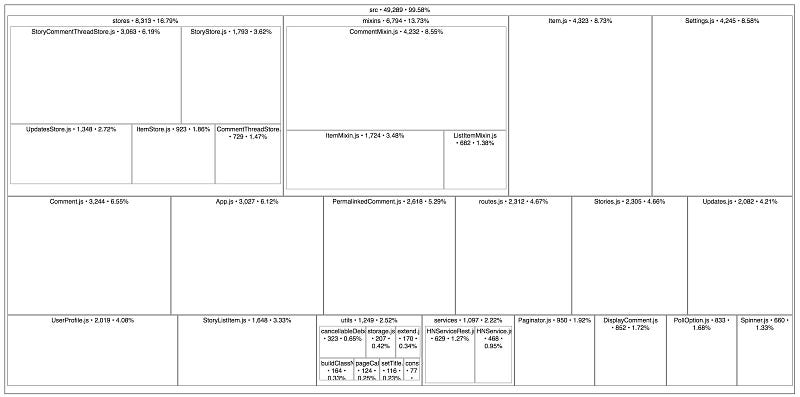
source-map-explorer (via Paul Irish) is also fantastic for understanding code bloat through source maps. Look at this tree-map visualisation with per-file LOC and % breakdowns for the ReactHN Webpack bundle:
You might also be interested in coverage-ext by Sam Saccone for generating code coverage for any webapp. This is useful for understanding how much code of the code you’re shipping down is actually being executed.
Beyond code-splitting: PRPL Pattern
Polymer discovered an interesting web performance pattern for granularly serving apps called PRPL (see Kevin’s I/O talk). This pattern tries to optimise for interactivity and stands for:
(P)ush critical resources for the initial route
(R)ender initial route and get it interactive as soon as possible
(P)re-cache the remaining routes using Service Worker
(L)azy-load and lazily instantiate parts of the app as the user moves through the application
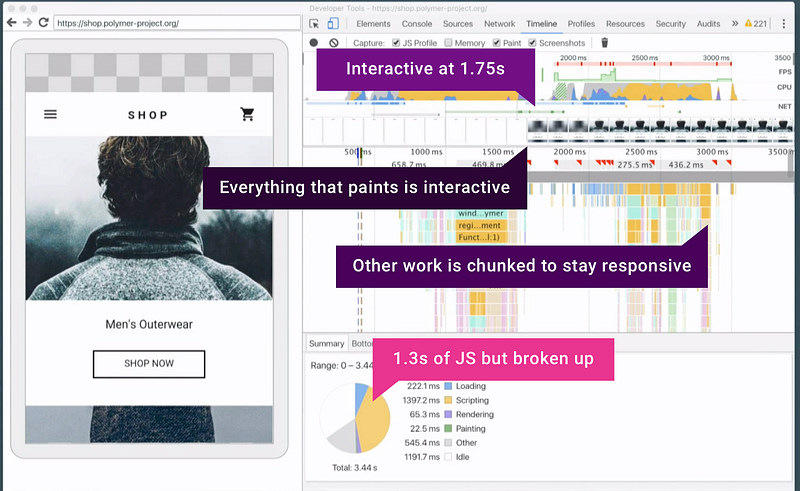
We have to give great kudos here to the Polymer Shop demo for showing us the way on real mobile devices. Using PRPL (in this case with HTML Imports, which can take advantage of the browser’s background HTML parser). No pixels go on screen that you can’t use. Additional work here is chunked and stays interactive. We’re interactive on a real mobile device at 1.75seconds. 1.3s of JavaScript but it’s all broken up. After that it all works.
You’re hopefully on board with the benefits of breaking down applications into more granular chunks by now. When a user first visits our PWA, let’s say they go to a particular route. The server (using H/2 Push) can push down the chunks needed for just that route — these are only the pieces needed to get the application booted up. Those go into the network cache.
Once they’ve been pushed down, we’ve effectively primed the cache with the chunks we know the page will need. When the application boots up, it looks at the route and knows that what we need is already in the cache, so we get that really fast first load of our application — not just a splash screen — but the interactive content the user asked for.
The next part of this is rendering the content for the view as quickly as possible. The third is, while the user is looking at the current view, using Service Worker to start pre-caching all of the other chunks and routes the user hasn’t asked for yet and getting those all installed into the Service Worker cache.
At this point the entire application (or a lot more of it) can be available offline. When a user navigates to a different part of the application, we can lazy load the next parts of it from the Service Worker cache. There’s no network loading needed because they’re already precached. Instant loading awesomeness ahoy! ❤
PRPL can be applied to any app, as Flipkart recently demonstrated on their React stack. Apps fully using PRPL can take advantage of fast-loading using HTTP/2 server push by producing two builds that we conditionally serve depending on your browser support:
* A bundled build optimised to minimize round-trips for servers/browsers without HTTP/2 Push support. For most of us, this is what we ship today by default.
* An unbundled build for servers/browsers that do support HTTP/2 Push enabling a faster first-paint
This builds on some of the thinking we talked about earlier with route-chunking. With PRPL, the server and our Service Worker work together to precache resources for intactive routes. When a user navigates around your app and changes routes, we lazy-load resources for routes not cached yet and create the required views.
Implementing PRPL
tl;dr: Webpack’s require.ensure() with an async ‘getComponent’ and React Router are the lowest friction paths to a PRPL-style performance pattern
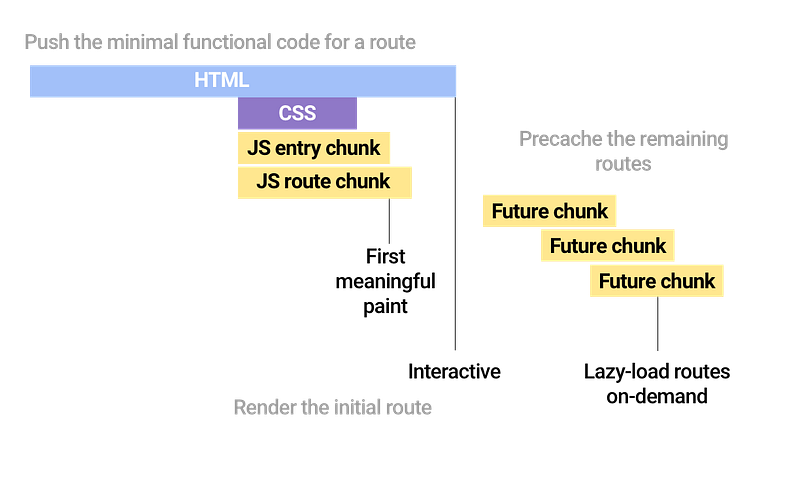
A big part of PRPL is turning the JS bundling mindset upside down and delivering resources as close to the granularity in which they are authored as possible (at least in terms of functionally independent modules). With Webpack, this is all about route-chunking which we’ve already covered.
Push critical resources for the initial route. Ideally, using HTTP/2 Server Push however don’t let this be a blocker for trying to go down a PRPL-like path. You can achieve substantially similar results to “full” PRPL in many cases without using H/2 Push, but just sending preload headers and H/2 alone.
See this production waterfall by Flipkart of their before/after wins:
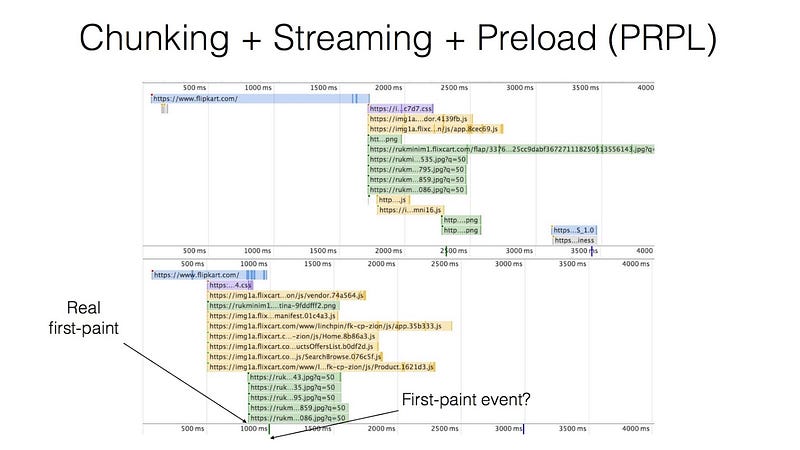
Rendering initial routes: this is really up to the framework/library you’re using.
Pre-caching remaining routes. For caching, we rely on Service Worker. sw-precache is great for generating a Service Worker for static asset precaching and for Webpack we can use SWPrecacheWebpackPlugin.
Lazy-load and create remaining routes on demand — require.ensure() and System.import() are your friend in Webpack land.
Cache-busting & long-term caching with Webpack
Why care about static asset versioning?
Static assets refer to our page’s static resources like scripts, stylesheets and images. When users visit our page for the first time, they need to download all of the resources used by the it. Let’s say we land on a route and the JavaScript chunks needed haven’t changed since the last time the page was visited — we shouldn’t have to re-fetch these scripts because they should already exist in the browser cache. Fewer network requests is a win for web performance.
Normally, we accomplish this by setting up an expires header for each of our files. An expires header just means that we can tell the browser to avoid making another request to the server for this file for a specific amount of time (e.g 1 year). As codebases evolve and are redeployed we want to make sure users get the freshest files without having to re-download resources if they haven’t changed.
Cache-busting accomplishes this by appending a string to filenames — it could be a build version (e.g src=”chunk.js?v=1.2.0”), a timestamp or something else. I prefer to adding a hash of the file contents to the filename (e.g chunk.d9834554decb6a8j.js) as this should always change when the contents of the file changes. MD5 hashing is commonly used in the Webpack community for this purpose which generates a ‘summary’ value 16 bytes long.
We also want to make sure the normal [name].js and content-hashed ([name].[chunkhash].js) filenames are always correctly referenced in our HTML files. This is the difference between referencing
Below is a commented Webpack config sample that includes a few other plugins that smooth over getting long-term caching setup.
// Use webpack-manifest-plugin to generate asset manifests with a mapping from source files to their corresponding outputs. Webpack uses IDs instead of module names to keep generated files small in size. IDs get generated and mapped to chunk filenames before being put in the chunk manifest (which goes into our entry chunk). Unfortunately, any changes to our code update the entry chunk including the new manifest, invalidating our caching.const ManifestPlugin = require('webpack-manifest-plugin');
// We fix this with chunk-manifest-webpack-plugin, which puts the manifest in a completely separate JSON file of its own.constChunkManifestPlugin = require('chunk-manifest-webpack-plugin');
module.exports = {
entry: {
vendor: './src/vendor.js',
main: './src/index.js'
},
output: {
path: path.join(__dirname, 'build'),
filename: '[name].[chunkhash].js',
chunkFilename: '[name].[chunkhash].js'
},
plugins: [
newwebpack.optimize.CommonsChunkPlugin({
name: "vendor",
minChunks: Infinity,
}),
newManifestPlugin(),
newChunkManifestPlugin({
filename: "chunk-manifest.json",
manifestVariable: "webpackManifest"
}),
// Work around non-deterministic ordering for modules. Covered more in the long-term caching of static assets with Webpack post.newwebpack.optimize.OccurenceOrderPlugin()
]
};
Now that we have a build of the chunk-manifest JSON, we need to inline it into our HTML so that Webpack actually has access to it when the page boots up. So include the output of the above in a
Note: Webpack are hoping to simplify the steps required for this long-term caching setup from ~4–1 by having no shared ID range.
To learn more about HTTP Caching best practices, read Jake Archibald’s excellent write-up.