png"><figcaption>Compiled, bundled and minified result.</figcaption></figure><figure id="83bb"><img src="https://cdn-images-1.readmedium.com/v2/resize:fit:800/1*kAvf-bWd43tz-Gnans4uMA.png"><figcaption>Network usage.</figcaption></figure><p id="7036">280kb for <b>bundle.js</b> and 3.5 seconds for initial loading with a regular 3g connection.</p><h1 id="134e">Implementing Progressive Loading</h1><p id="d3d3">How can we remove these chart components from <b>bundle.js</b> and load them later and draw something meaningful as fast as possible? Say hello to good old <a href="https://github.com/amdjs/amdjs-api/wiki/AMD">AMD</a> (asynchronous module definition)! And <b>webpack</b> has good support for <a href="https://github.com/webpack/docs/wiki/code-splitting">code splitting</a>.</p><p id="fbcc">I suggest to define HOC (higher order component) that will load chart only when a component is mounted into DOM (with <b>componentDidMount</b> lifecycle callback). Let’s define <b>LineChartAsync.js:</b></p>
<figure id="50ed">
<div>
<div>
<iframe class="gist-iframe" src="/gist/lavrton/03242bdac52b9b683e2ad703b551a70b.js" allowfullscreen="" frameborder="0" height="undefined" width="undefined">
</div>
</div>
</figure></iframe></div></div></figure><p id="3d5f">Then instead of</p><div id="6c5d"><pre><span class="hljs-keyword">import</span> LineChart <span class="hljs-keyword">from</span> ‘./LineChart’;</pre></div><p id="3ae2">We should write:</p><div id="f5aa"><pre><span class="hljs-keyword">import</span> LineChart <span class="hljs-keyword">from</span> ‘./LineChartAsync’;</pre></div><p id="6c41">Let us see what we have after bundling:</p><figure id="f811"><img src="https://cdn-images-1.readmedium.com/v2/resize:fit:800/1*jryYkUDxmxAb10ycQXCb7w.png"><figcaption></figcaption></figure><p id="e77d">We have <b>bundle.js</b> that includes a root App component and React.</p><p id="9af8"><b>1.bundle.js</b> and <b>2.bundle.js</b> are generated by webpack and they include <b>LineChart</b> and <b>BarChart</b> . But, wait, why is the total sum bigger? <b>143kb+143kb+147kb = 433kb</b> vs <b>280kb</b> from previous approach. That is because dependencies of <b>LineChart</b> and <b>BarChart</b> are included TWICE (<b>react-konva</b> and <b>konva</b> defined in both <b>1.bundle.js</b> and <b>2.bundle.js</b>), we can avoid this with <a href="https://webpack.github.io/docs/list-of-plugins.html#commonschunkplugin"><b>webpack.optimize.CommonsChunkPlugin</b></a><b>:</b></p><div id="412c"><pre><span class="hljs-keyword">new</span> webpack.optimize.CommonsChunkPlugin({
children: <span class="hljs-literal">true</span>,
<span class="hljs-comment">// (use all children of the chunk)</span>
<span class="hljs-keyword">async</span>: <span class="hljs-literal">true</span>,
<span class="hljs-comment">// (create an async commons chunk)</span>
}),</pre></div><figure id="da01"><img src="https://cdn-images-1.readmedium.com/v2/resize:fit:800/1*zwtYNq-NwnWsxfcdg8NaoA.png"><figcaption></figcaption></figure><p id="04fe">Now dependencies of <b>LineChart</b> and <b>BarChart</b> are moved in another file <b>3.bundle.js</b>, total size is almost the same (289kb):</p><figure id="cef3"><img src="https://cdn-images-1.readmedium.com/v2/resize:fit:800/1*K7LJ9xMqq6B23AbDoLKGIA.png"><figcaption>Network usage on the first load</figcaption></figure><figure id="4b7d"><img src="https://cdn-images-1.readmedium.com/v2/resize:fit:800/1*hCe4CnDmiV0r411J-MdV_w.png"><figcaption>Network usage after showing charts</figcaption></figure><p id="71e7">Now 1.75 seconds for initial loading. It is much better then 3.5 seconds.</p><h1 id="ede2">Refactoring</h1><p id="059a">To make the code better I would like to refactor <b>LineChartAsync</b> and <b>BarChartAsync. </b>First, let’s define basic <b>AsyncComponent</b>:</p>
<figure id="8c14">
<div>
<div>
<iframe class="gist-iframe" src="/gist/lavrton/2fd0f366533cc4ea518e6fe0a5224c3b.js" allowfullscreen="" frameborder="0" height="undefined" width="undefined">
</div>
</div>
</figure></iframe></div></div></figure><p id="be31">But we can improve <b>Progressive Loading</b> even more! When application is initially loaded we can schedule loading of additional component on background, so it is possible that they will be loaded before user toggled checkbox</p>
<figure id="be16">
<div>
<div>
<iframe class="gist-iframe" src="/gist/lavrton/71b08ffa2aba86a55b5f245f6983e1b1.js" allowfullscreen="" frameborder="0" height="undefined" width="undefined">
</div>
</div>
</figure></iframe></div></div></figure><p id="fe02">And <b>loader.js</b> will be something like this:</p>
<figure id="1f86">
<div>
<div>
<iframe class="gist-iframe" src="/gist/lavrton/e28ffa95b4aa397e2807dcb7a393bb2e.js" allowfullscreen="" frameborder="0" height="undefined" width="undefined">
</div>
</div>
</figure></iframe></div></div></figure><p id="e21c">Also, we can define components that will visible on the first screen, but in fact loaded asynchronously later and a user may see beautiful placeholder while a component is loading. Please note that placeholder is not for API call. It is exactly for loading component’s module (its definition and all its dependencies).</p><figure id="e701"><img src="https://cdn-images-1.readmedium.com/v2/resize:fit:800/1*GfTjl68eHSzFinna9CJ-iA.gif"><figcaption>Card component will be loaded later.</figcaption></figure><div id="fc7d"><pre><span class="language-xml">const renderPlaceholder = () =>
<span class="hljs-tag"><<span class="hljs-name">div</span> <span class="hljs-attr">style</span>=</span></span><span class="hljs-template-variable">{{<span class="hljs-name">textAlign:</span> ‘center’}}</span><span class="language-xml"><span class="hljs-tag">></span>
<span class="hljs-tag"><<span class="hljs-name">CircularProgress</span>/></span>
<span class="hljs-tag"></<span class="hljs-name">div</span>></span></span></pre></div><div id="0713"><pre><span class="hljs-keyword">export</span> <span class="hljs-keyword">default</span> (props) =>
<span class="language-xml"><span class="hljs-tag"><<span class="hljs-name">AsyncComponent</span>
{…<span class="hljs-attr">props</span>}
<span class="hljs-attr">loader</span>=<span class="hljs-string">{loader}</span>
<span class="hljs-attr">renderPlaceholder</span>=<span class="hljs-string">{renderPlaceholder}</span>
/></span></span></pre></div><h1 id="9bdf">Conclusion</h1><p id="b266">As a result of all improvements:</p><ol><li>Initial <b>bundle.js</b> has a smaller size. That means a user will see some working UI components faster.</li><li>Additional components can be loaded asynchronously in the background.</li><li>While a component is loading it can be replaced with some placeholder components .</li><li>For exactly this approach <b>Webpack is required</b>. But you can use it not only with React, but with other frameworks too.</li></ol><p id="fbb5">Take a look <a href="https://github.com/lavrton/Progressive-Web-App-Loading">https://github.com/lavrton/Progressive-Web-App-Loading</a> for full source and webpack configurations.</p><p id="bf0d">Do you have performance issues with your web-app? <a href="https://lavrton.com/web-perf.html">I can help you.</a></p></article></body>
Progressive loading for modern web applications via code splitting
Are your users tired of waiting when your app is loading and they close the tab? Let’s fix it with the progressive loading!
I will use webpack for bundling and React for a demonstration.
I am compiling and bundling all my javascript files (sometimes css and images too) into ONE HUGE bundle.js. I guess you are doing this too, aren’t you? It is a pretty common approach for making modern web applications.
But this approach has one (sometimes very important) drawback: first loading of your app may take too much time. As a web browser have to (1) load large file and (2) parse a lot of javascript code. And loading can take really much time if a user has bad internet connection. Also, your bundled file can have components that user will never see (e.g. user will never open some parts of your application).
Progressive Web Apps?
One of the good solutions for better UX is Progressive Web App. Google this term if you don’t know it yet. There are tons of good posts and videos about it. So Progressive Web has several core ideas, but right now I want to focus on Progressive Loading and implement it .
The idea of Progressive Loading is very simple:
Make “initial load” as fast as possible.
Load UI components only when they are required.
Let us assume we have React Application that draws some charts on a page:
Chart components are very simple:
These charts can be very heavy. Both of them havereact-konva as a dependency (and konva framework as a dependency of react-konva).
Please note that LineChart and BarChart are not visible on the first load. To see them a user needs to toggle checkbox:
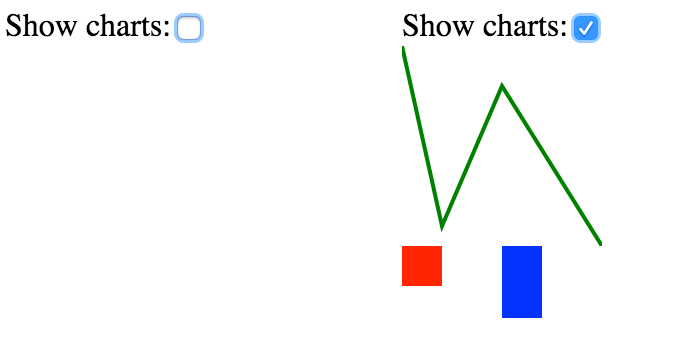
Before/after toggling charts
So it is possible that the user will NEVER toggle that checkbox. And this is a very common situation in real world web application: when a user never opens some parts of the app (or open them later). But with a current approach, we have to bundle all components and all their dependencies into one file. In this example we have: root App component, React, Chart components, react-konva, konva.
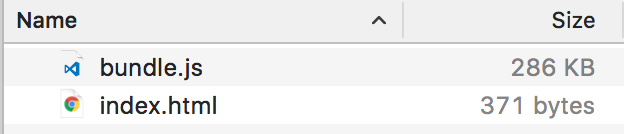
Compiled, bundled and minified result.Network usage.
280kb for bundle.js and 3.5 seconds for initial loading with a regular 3g connection.
Implementing Progressive Loading
How can we remove these chart components from bundle.js and load them later and draw something meaningful as fast as possible? Say hello to good old AMD (asynchronous module definition)! And webpack has good support for code splitting.
I suggest to define HOC (higher order component) that will load chart only when a component is mounted into DOM (with componentDidMount lifecycle callback). Let’s define LineChartAsync.js:
Then instead of
import LineChart from ‘./LineChart’;
We should write:
import LineChart from ‘./LineChartAsync’;
Let us see what we have after bundling:
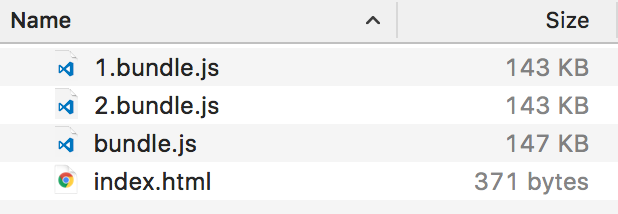
We have bundle.js that includes a root App component and React.
1.bundle.js and 2.bundle.js are generated by webpack and they include LineChart and BarChart . But, wait, why is the total sum bigger? 143kb+143kb+147kb = 433kb vs 280kb from previous approach. That is because dependencies of LineChart and BarChart are included TWICE (react-konva and konva defined in both 1.bundle.js and 2.bundle.js), we can avoid this with webpack.optimize.CommonsChunkPlugin:
new webpack.optimize.CommonsChunkPlugin({
children: true,
// (use all children of the chunk)async: true,
// (create an async commons chunk)
}),
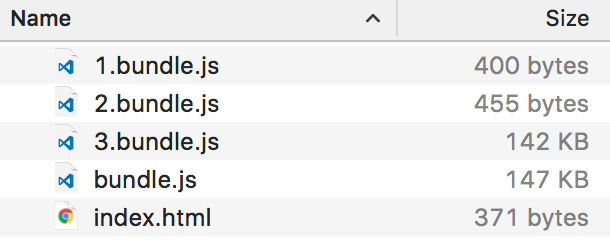
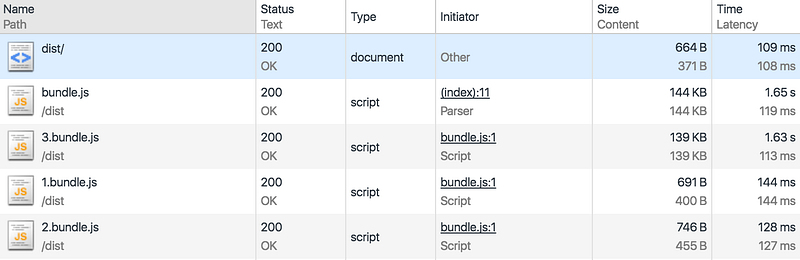
Now dependencies of LineChart and BarChart are moved in another file 3.bundle.js, total size is almost the same (289kb):

Network usage on the first loadNetwork usage after showing charts
Now 1.75 seconds for initial loading. It is much better then 3.5 seconds.
Refactoring
To make the code better I would like to refactor LineChartAsync and BarChartAsync. First, let’s define basic AsyncComponent:
And BarChartAsync (and LineChartAsync)can be rewritten into simpler component:
But we can improve Progressive Loading even more! When application is initially loaded we can schedule loading of additional component on background, so it is possible that they will be loaded before user toggled checkbox
And loader.js will be something like this:
Also, we can define components that will visible on the first screen, but in fact loaded asynchronously later and a user may see beautiful placeholder while a component is loading. Please note that placeholder is not for API call. It is exactly for loading component’s module (its definition and all its dependencies).