
Progressive Enhancement Techniques for React Part 2
In my previous post, I detailed some techniques for progressive enhancement for React. This post is sort of part 1.1: it’s a continuation on form handling.
More Complicated Forms
In the previous example, we had a form with a single submit button. However, it’s common that forms have multiple buttons that perform different actions but share some input fields. Imagine a form that has a field for your current password, a new password, and buttons to change the password and delete your account.
Below is a form demonstrating it. There’s a hidden input called id, so it would make sense for the update and delete buttons to both be included in the same form.
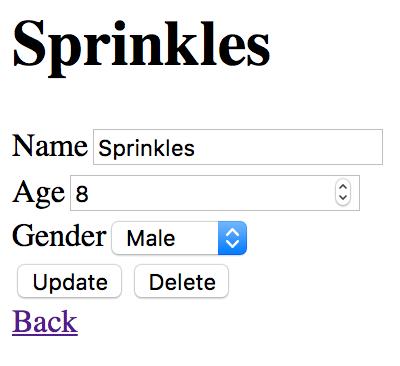
On the server, this would be handled by giving each button the same name, but different values. The value of the button would show up under the key of the name with a corresponding value.
The browser implementation of the form is very similar to the previous. However, instead of using the onSubmit handler on the form, we use onClick handlers for each button.
Note that to continue using uncontrolled components as last time, we have to use the property defaultValue instead of value for inputs.
The previous implementation of formDispatcher won’t be able to handle this. For a start, it expects a form, so we’ll need to modify it to handle buttons. We’ll also need to add an entry to the form data for the button name and value. In our case, clicking a button should add a key action with a value of either update or remove.
Lastly, we’ll need to make an action creator that can handle these two code paths. Like before, I’ll split the action creators into multiple parts: the parts that handle the AJAX calls, and the part that handles the form input. I’ll leave the AJAX calls out of this example.
And that’s all there is to it. There’s no extra work on the server, that’ll just work.
Notes Form Handling
Throughout this and the previous post, I used a hidden input to say what handler should be used. Traditionally, you’d define a URL to post to in the action property. However, there is a reason I chose to use hidden inputs. Using form actions when posting to the server means you’ll have to redirect to a new URL user after posting. This is problematic in the case that you want to redirect them back to where they came to in the case you use the form twice in two different places — you don’t know where to redirect them to! Not defining the action avoids this problem, as it will post to the current URL, so the user is not redirected.
However, even with the current setup, using form actions is very easy to do: it will require minimal changes to formDispatcher and the server. You should use whatever works for your project — you may find something completely different from these two methods that works better for you.
In the next post, I’ll be covering data fetching.