
Preventing Sensitive Files in GitHub with a .gitignore file
ACM.233 Keeping sensitive data out of GitHub by default
~~~~~~~~~~~~~~~~~~~~~~~~~~~~~~~~~~~~~~~~~~~~~~~~~~~~~~~~~~~
⚙️ Part of my series on Automating Cybersecurity Metrics. The Code.
🔒 Related Stories: Application Security | GitHub Security
💻 Free Content on Jobs in Cybersecurity | ✉️ Sign up for the Email List
~~~~~~~~~~~~~~~~~~~~~~~~~~~~~~~~~~~~~~~~~~~~~~~~~~~~~~~~~~~
I’m writing some code to automate the deployment of an S3 bucket on AWS. In the last post I considered how to migrate files from S3 to my new bucket. I had some issues checking in the files.
Now I’m going to use some code I created previously to automatically create an GitHub repository and add a .gitignore file to every new repository. I resolved the error I got in the last post.
A .gitignore file is a file that you can add to your git repository to disallow certain files to be added to it. You can enter a list of file names or various wildcard characters to the file.
What you put in your .gitignore file depends on your environment and the application development tools you are using. Here are some types of eils you might want to exclude in differnet scenarios:
- when using AWS, SSH, or encryption technologies you might want to disallow anyfile that ends with .pem.
- When using .NET there’s a local, personal configuration file that you should not check in. Otherwise the next person that checks out the code will have their personal settings overwritten.
- On Linux, if you have a file open and your system shuts down, a hidden cache still exists in the directory.
- On Macs, there’s a type of hidden file that hangs around in directories that you don’t need or want in your git repos.
- In Python temp files exist in some circumstances.
So you’ll want to set up your .gitignore file according to the types of files you want to prevent getting into the repository. Those seem to be all programming languages. There’s nothing for AWS or operating systems.
You can find a list of common .gitignore templates here:
You can find lots other examples of .gitignore files by searching around for them.
On your local machine you can create a global .gitignore file for all repositories like this:
$ touch ~/.gitignore
$ git config --global core.excludesFile ~/.gitignore
or ignore a previously committed file (but it will still be in git’s history):
$ echo debug.log >> .gitignore

$ git rm --cached debug.log
rm 'debug.log'

$ git commit -m "Start ignoring debug.log"
As explained here:
For now I’m going to automatically add a .gitignore file to any new repo I create by adding it the script I wrote to create a new repository in git.
I added the following after the repository is deleted and before deleting the token.
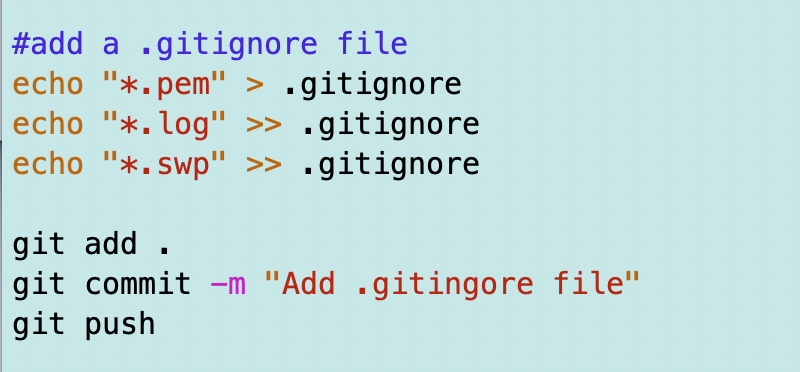
Now, I want to see if I have the same problem I had in the last post.
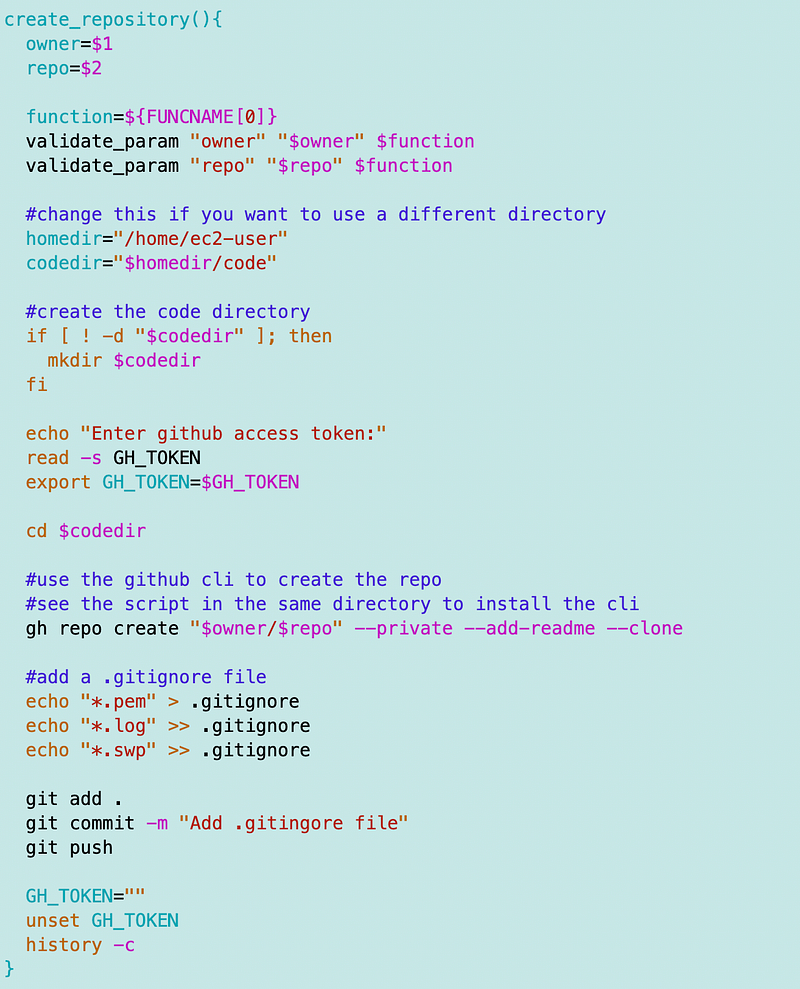
A create_repository function that includes adding the gitignore
But before I test it I’m going to do one other thing. I’m going to turn this script into a function. That way I can source it and call it from another directory.
Aligning the new repository with the main branch
That didn’t work. I wrote about a few errors I got trying to create a repo and push files:
Here’s what finally worked:
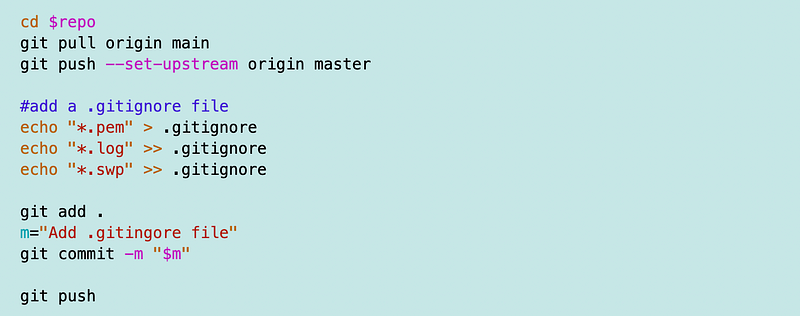
I did a pull to get the readme file before adding the new file and I got aligned with the correct origin. Then I create add, and push the file in the normal way. That way I can avoid rebase, merge, etc.
Now every repo I create will have a .gitignore file with whatever standard excludes I want to add here.
I could also have created a separate file and then included the contents. I the .gitignore file ends up being longer then I might do that later.
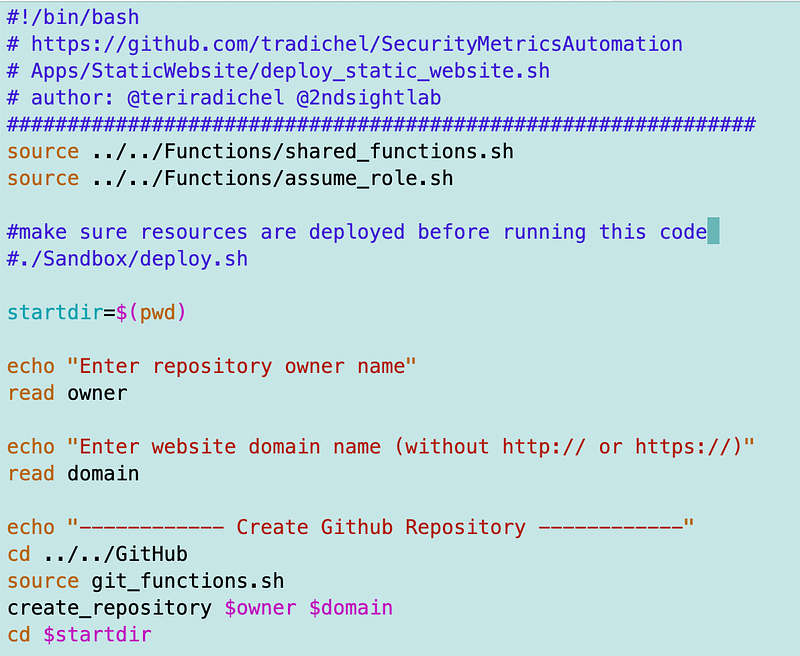
Calling the create_repository function
I added the code to call my function to the file below. I can execute this script to create a static website, including creating the repository for the site and all the AWS resources it requires.
Global gitignore options
One note on .gitingore files — make sure they are not allowing sensitive files in subfolders within youre repository. One way to ensure you disallow sensitive files from all repositories is to use a global git ignore file.
Insert something you don’t want to check in into the global file like this:
echo *.pem >> ~/.gitignore_globalThen apply the rule globally on your local machine.
git config --global core.excludesfile ~/.gitignore_globalFollow for updates.
Teri Radichel | © 2nd Sight Lab 2023
About Teri Radichel:
~~~~~~~~~~~~~~~~~~~~
⭐️ Author: Cybersecurity Books
⭐️ Presentations: Presentations by Teri Radichel
⭐️ Recognition: SANS Award, AWS Security Hero, IANS Faculty
⭐️ Certifications: SANS ~ GSE 240
⭐️ Education: BA Business, Master of Software Engineering, Master of Infosec
⭐️ Company: Penetration Tests, Assessments, Phone Consulting ~ 2nd Sight Lab
Need Help With Cybersecurity, Cloud, or Application Security?
~~~~~~~~~~~~~~~~~~~~~~~~~~~~~~~~~~~~~~~~~~~~~~~~~~~~~~~~~~~~~
🔒 Request a penetration test or security assessment
🔒 Schedule a consulting call
🔒 Cybersecurity Speaker for PresentationFollow for more stories like this:
~~~~~~~~~~~~~~~~~~~~~~~~~~~~~~~~~~~~~~~~~~~~~~~~~~~~~~~~~~~~~
❤️ Sign Up my Medium Email List
❤️ Twitter: @teriradichel
❤️ LinkedIn: https://www.linkedin.com/in/teriradichel
❤️ Mastodon: @teriradichel@infosec.exchange
❤️ Facebook: 2nd Sight Lab
❤️ YouTube: @2ndsightlab