
Pinecone: How I Built A Chat With PDF App Easily

People talk so much about large language models (LLMs) that they often forget an important aspect of building an AI application: the database.
Why do you need a database ? Well, unless you are a complete newbie in the world of software engineering, you know that any production-grade system needs a way to persist user generated data for basic authentication as well as to make your product (app, website, …) actually useful for the end user.
There is a lot of databases out there: relational, NoSQL, KV stores, you name it. The most famous are obviously MySQL, PostgreSQL and MongoDB. You have probably used one of those already. A database, at its foundational level, stores data in files organized in a specific and optimized manner, but its true value and complexity arise from the layers of abstraction, security, data integrity, and performance optimization mechanisms built atop this file-based foundation.
For AI applications, especially in NLP, there is a new type of databases that are very useful: vector databases. And Pinecone is one of the leaders in that space. A vector database, in NLP, is a specialized system optimized for storing, managing, and querying high-dimensional vectors that numerically represent textual data. It facilitates rapid similarity searches and efficient storage, making it essential for applications that deal with large-scale textual information and require quick retrieval of semantically related content.
Pinecone describes itself as the “Long-Term memory for AI”. Why does this matter ? Well, LLMs have a fixed context. For instance, if you tried to pass a 300 page document into ChatGPT to get answers from it, you will typically get an error message that says the text is too long. One solution to that hurdle is to store the document in a database, and only feed relevant information into the LLM context when needed. Pinecone helps you achieve that in a very efficient and impressively fast manner.
Of course, using a database and retrieving information to feed the context poses other challenges. For example, how do we know which chunks of the document are relevant to accurately answer a user request ? But this is a debate for another article. And by the way, I have written some thoughts about that already. Check it out:
Enough talk. Now let’s code !
The coding part
In this tutorial, I will do what people now call the “Hello World” of AI apps. I will build a chat with PDF document app using pinecone.
Let’s go !
Settings
First you need to go to the Pinecone website and create a free account.
This is optional but I encourage you to also install the python client of pinecone.
pip install pinecone-client
In your pinecone settings, get your api key and your environnement.
Design
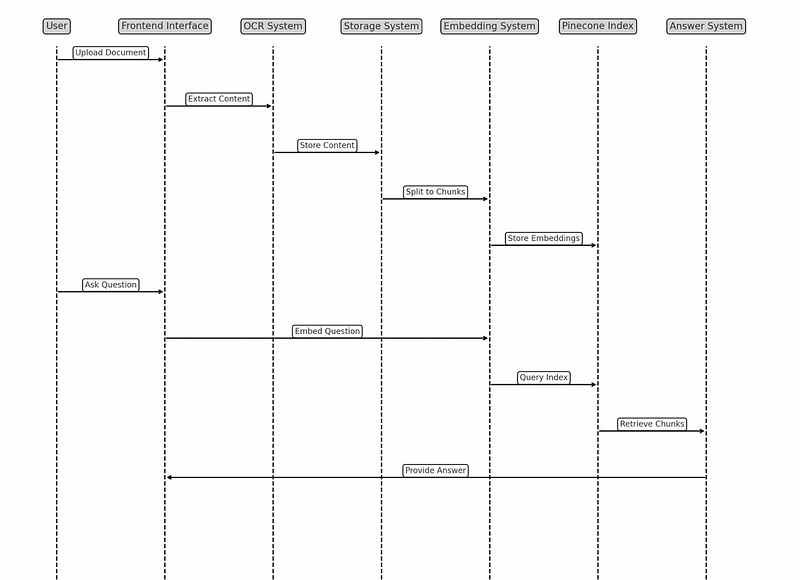
Now, let’s think about the conceptual design of our chat with PDF app. First we want the user to have a frontend interface where he can upload his document. Once the document is uploaded, we want to get its content using OCR if necessary, and store it in a folder. We then want to split that document into chunks and create and store embeddings of these chunks in a pinecone index. Once the index is built, we want to give our user the ability to ask questions about the PDF. Once we receive the question, we will have to create embeddings for it, query our pinecone index to retrieve the most similar chunks and use those chunks to give an answer to the user.
Here is the sequence diagram of the app:
Frontend
Let’s start with the frontend interface. For simplicity, this will be a CLI. The system will ask for the PDF name, assuming all PDFs are stored in a pdfs folder. At this point here is how the code looks like:
I commented out two lines of code. The first one, responder = Backend(pdf_path) is just a way for me to say that I will later add the logic that takes the pdf_path as input, extract the content via the OCR system, split the content in chunks, generate and store embeddings. Ideally, this process should return a responder object that I will later use to answer user questions.
The second line of code that I commented out shows how the responder object generated by the backend will behave. Ideally, I just want to be able to throw a question at it and immediately get an answer based on the document’s content.
Backend
Now let’s code the backend. I first defined how my responder is supposed to work. In order to work, the responder needs to have a large language model and a pinecone index. The LLM will be used to craft the final answer that will be sent to the user. The pinecone index will be useful to perform a semantic search over the chunks of the document uploaded by the user. In this case, I use the BERT tokenizer from Hugging Face transformers library. I use mean polling to make sure all my embeddings have the same dimension.
I then define a function to create chunks from pages of text and another to create embeddings from these chunks and format them in a way that makes them immediately usable for an upsert in a pinecone index. When I created chunks from pages, I made sure each chunk will have 512 tokens max. It is important to do that because I am using a BERT model to create embeddings.
When we put all that together, we have our backend. Once we get the pdf name from the user, we check if it was already in our vector store. If it is the case, the user can directly ask questions about the document. If the pdf is new, then we need to process it (OCR, create chunks, create embeddings and store embeddings) before the user can ask questions about the document.
The backend returns a responder object that we can directly use to respond to user questions.
And that’s it !
Happy coding !


