
Better Than Pinecone: Have You Tried This Open Source Alternative?

I recently wrote a blog post where I explained how I used Pinecone to build a chat with PDF app. Pinecone is a very powerful and useful vector database. If you develop LLM-based applications, and don’t want to write all the code to store and retrieve embeddings yourself, Pinecone is a good solution. I recently discovered an even better one.
With Pinecone, you have to keep in mind the costs. Sure, there is a generous free plan allowing you to store approximately 100k 1536-dimensional embeddings with metadata. It is good for demos, but if you envision even a small production-grade application, then you will certainly need more. And that’s when the costs start to kick in.
Hopefully, there comes an alternative.
A powerful alternative.
And most importantly, a free alternative.
It’s Chroma.
The one thing I really like about Chroma is that it even handles embeddings creation for you. Chroma also handles tokenization, and indexing automatically. Isn’t it great ?
In this tutorial, I will show you how to develop the same chat with PDF app we did with Pinecone, but this time using Chroma.
How will I proceed ? I won’t do the design of the app once again. So if you want to really understand all the prerequisites, you better read my previous article before coming back here.
I will take the code of my previous article, remove pinecone and refactor it so as to use Chroma.
But first things first. I need to install the python client of ChromaDB.
pip install chromadb
Then I need to identify what needs to be deleted from the older version of my code. For instance, since Chroma handles the embeddings creation for me, I will have to get rid of the embeddings creation in my backend and responder.
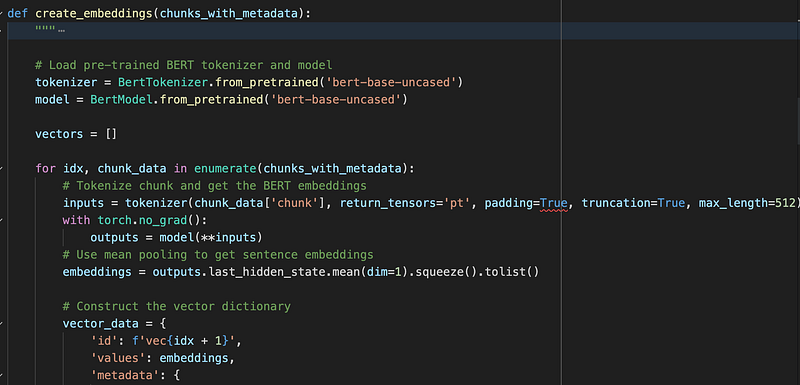
By using Chroma, I was able to decrease the number of code lines in the project from 200 to around 100. How? By simply removing the chunk and embedding creation I previously had to write by myself. That’s nice, right?
Here is the new code.
The main CLI stays the same. I still ask the user the name of the PDF file, pass it to the backend, and use the responder object to answer user questions.
I removed the embeddings creation logic that was inside the responder, since ChromaDB handles that for me. Now the responder just uses a LLM to craft responses to users.
As for the backend, it is lighter now. It basically handles text extraction, configures and returns the responder object that will be used to respond to users’ questions. I added the logic to extract the PDF content directly using PyMuPDF when possible and use OCR as a last resort, rather than handling everything through OCR.
And that’s it. In less than 30 minutes, I was able to refactor my application. I removed the costly pinecone for the free Chroma alternative.
Happy coding !


