
Partial Object Destructuring of React Props With ... Rest Parameters Syntax
When working with the React props object, it can be very helpful to use ES6 object destructuring to make your code clearer. However, sometimes you only want to destructure some of the props using partial object destructuring. Here’s how to do it.

Why Partially Destructure React Props?
The React props object is the name for the properties that you pass in to a component in React. You always pass the props (short for properties) as the sole argument to the render function in the React component.
You access props using props.name in a function component or this.props.name in a class component. A common reason you’ll need props is if you’re “lifting state up” and then passing it to the component:
Since props is just an object, you can destructure its properties like any other JavaScript object using the ES6 object destructuring syntax. You can easily turn props.name into just name, resulting in easier-to-read code.
I’ve talked before about destructuring all React props at the same time, which is a strategy I love because it helps me write cleaner code:
But today I want to tackle partial object destructuring, which is when you only need to access a part of the props object.
A common use case would be when your component may be receiving dozens of props, but you only want to access one or two of them. Instead of writing out a bunch of props that don’t even get used by the component, you can instead only destructure the props that you’re going to need.

How To Partially Destructure the React props Object
If you’re working with a large props object that you don’t want to destructure completely, you just destructure the props later in the code:
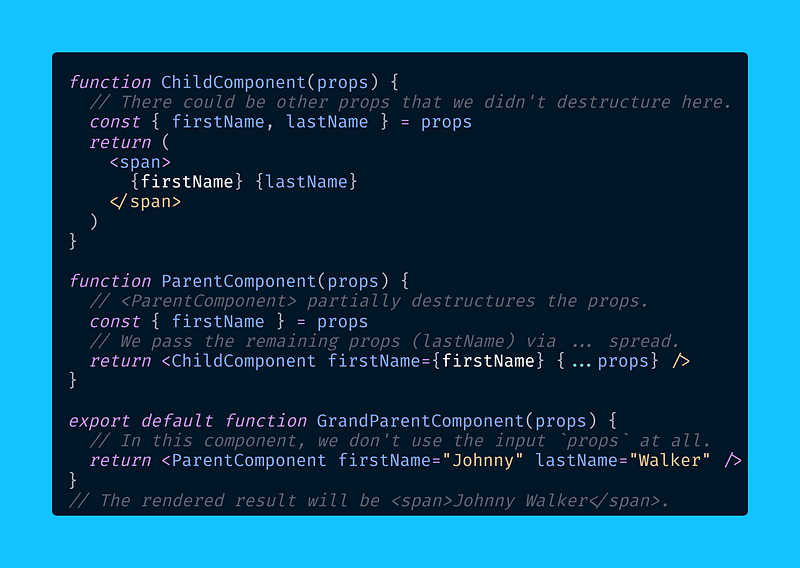
Compared to destructuring all of the props, where I always do it right in the parameters, it’s convenient to partially destructure later in the code.
Then, you can use the ... spread operator again to pass on all props to the child component with the syntax{...props}, if that’s what you need.
As an alternative , you can partially destructure props using the ... rest parameter in the render function’s arguments, same as later in the code:
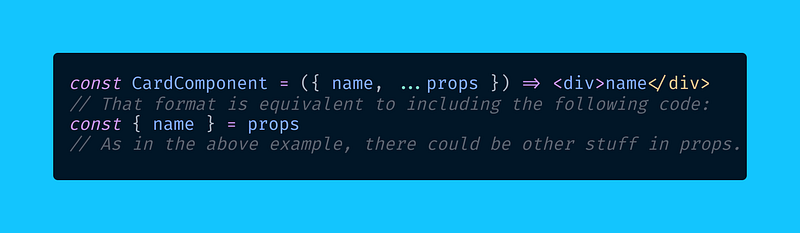
Here, we partially destructure in the parameters because we expect certain props, then we get the other props with the ... rest parameter.
And that’s all there is to partially destructuring props! Personally, I avoid this pattern, and I always completely destructure function parameters:
But you may prefer to partially destructure the props object, especially if you’re passing around 20 or 30 props at a time, since it results in less code.
Happy coding! 🐶

Dr. Derek Austin is the author of Career Programming: How You Can Become a Successful 6-Figure Programmer in 6 Months, now available on Amazon.