
Orchestrate Machine Learning Pipelines with AWS Step Functions
Advanced-Data Engineering and ML Ops with Infrastructure as Code

This story explains how to create and orchestrate machine learning pipelines with AWS Step Functions and deploy them using Infrastructure as Code. This article is for data and ML Ops engineers who would want to deploy and update ML pipelines using CloudFormation templates. These templates and Gihub repository likn will be provided in this article.
We can use AWS Step Functions to trigger any other service, even including managed services from other vendors. It’s a powerful tool that allows us to orchestrate the flow of how data services should process and transform data. I will use AWS Glue and AWS Personalize as an example to create a Machine Learning (ML) pipeline that can be scheduled at any required interval and has a flow like this:
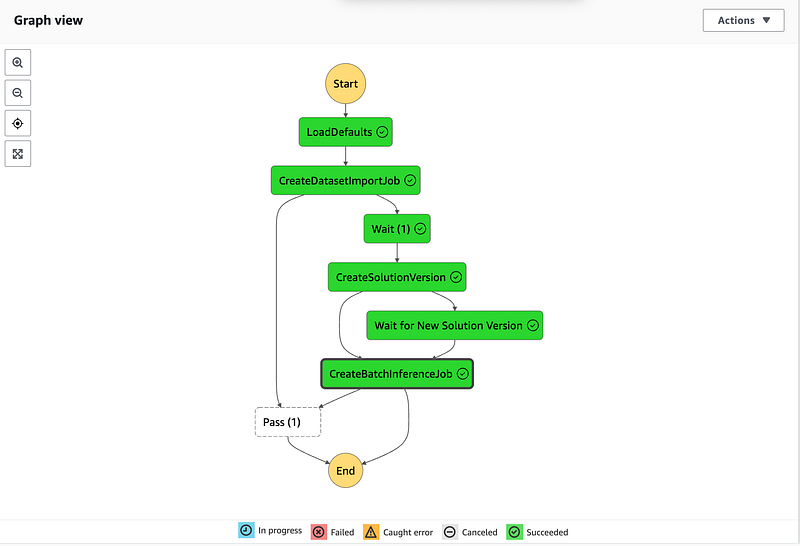
As a data engineer, I was tasked with designing a data pipeline that prepares the data in the data lake and triggers the machine learning model training.
So I was thinking that among other tools I could use, i.e. Airflow, etc. I never tried AWS Step Functions. Considering that it is a native service for AWS I decided to go for it. The idea was to train ML model daily or on demand using AWS Step Functions. That would ensure a flexible setup for any required model updates whenever I need it. The benefits of using infrastructure as code for data platforms are undisputed and I prevoiusly wrote about it here:
I chose to use AWS Personalize for testing purposes. This service can be used to serve better product recommendations to my application users. It appears that AWS Personalize is the right choice as you don’t need to worry about the machine learning model. It’a a managed service.
We just need to design the data pipeline that feeds the user interactions to the AWS Personalize API.
I chose to use AWS Glue to process user engagement data stored in AWS S3 to send it to AWS Personalize to train the solution. After that, the server will be able to get updated product recommendations for users in the back-end. I wanted to use AWS CloudFormation templates to provision the resources required for this data pipeline.
Those templates will be provided in this article.
Prerequisites, tools and libraries
- Python 3.8
- AWS SDK
- AWS CLI
- Bash scripting
Outline
We will work with a Movielens dataset and user ratings stored in AWS S3 datalake bucket to create a machine learning pipeline with AWS Glue feeding data into AWS Personalize. We will demonstrate how to deploy it with Infrastructure as Code. After a required data transformation, AWS Personalize will generate movie recommendations. Then we will orchestrate the pipeline using AWS Step Functions.
The workflow:
- Create datalake S3 bucket using AWS CloudFormation template and prepare data using AWS Glue
- Import prepared dataset and create/train AWS Personalize solution
- Create a data pipeline using AWS Step Functions
Firstly we would want to create a data lake using AWS S3. We can use an AWS CloudFormtaion template for this and then run a shell script combined with AWS CLI commands:
# rename STACK and S3 parameters to match your environment:
STACK=GlueS3Staging
S3=your.s3.bucket
aws \
CloudFormation deploy \
--template-file glue_s3_stack.yaml \
--stack-name $STACK \
--capabilities CAPABILITY_IAM \
--parameter-overrides \
"SourceDataBucketName"=$S3
Our Datalake CloudFormation template:
AWSTemplateFormatVersion: '2010-09-09'
Description: AWS Glue S3 data lake stack.
Parameters:

  SourceDataBucketName:
    Description: Data lake Glue bucket with source data files.
    Type: String
    Default: your.s3.bucket

Resources:

  DatalakeBucket:
    Type: AWS::S3::Bucket
    DeletionPolicy: Retain
    Properties:
      BucketName:
        Ref: SourceDataBucketName
      PublicAccessBlockConfiguration:
        BlockPublicAcls: true
        IgnorePublicAcls: true
        BlockPublicPolicy: true
        RestrictPublicBuckets: true

  MyJobRole:
    Type: AWS::IAM::Role
    Properties:
      ManagedPolicyArns:
        - arn:aws:iam::aws:policy/service-role/AWSGlueServiceRole
      AssumeRolePolicyDocument:
        Version: "2012-10-17"
        Statement:
          -
            Effect: "Allow"
            Principal:
              Service:
                - "glue.amazonaws.com"
            Action:
              - "sts:AssumeRole"
      Path: "/"
      Policies:
        -
          PolicyName: "root"
          PolicyDocument:
            Version: "2012-10-17"
            Statement:
              -
                Effect: "Allow"
                Action:
                  - s3:*
                  - s3-object-lambda:*
                Resource:
                  - !GetAtt [ DatalakeBucket, Arn ] # for example arn:aws:s3:::glue.staging.aws
                  - !Join ['/', [!GetAtt [ DatalakeBucket, Arn ], '*'] ] # arn:aws:s3:::glue.staging.aws/*

  PersonalizeBucketPolicy:
    Type: 'AWS::S3::BucketPolicy'
    Properties:
      Bucket: !Ref DatalakeBucket
      PolicyDocument:
        Statement:
          - Action: '*'
            Condition:
              Bool:
                'aws:SecureTransport': false
            Effect: Deny
            Principal:
              AWS: '*'
            Resource: !Join
              - ''
              - - !GetAtt
                  - DatalakeBucket
                  - Arn
                - /*
            Sid: HttpsOnly
          - Action:
              - 's3:GetObject'
              - 's3:ListBucket'
            Effect: Allow
            Principal:
              Service: personalize.amazonaws.com
            Resource:
              - !Join
                - ''
                - - !GetAtt
                    - DatalakeBucket
                    - Arn
                  - /*
              - !GetAtt
                - DatalakeBucket
                - Arn
          - Action:
              - 's3:GetObject'
              - 's3:ListBucket'
              - 's3:PutObject'
            Effect: Allow
            Principal:
              Service: personalize.amazonaws.com
            Resource:
              - !Join
                - ''
                - - !GetAtt
                    - DatalakeBucket
                    - Arn
                  - /*
              - !GetAtt
                - DatalakeBucket
                - Arn
        Version: 2012-10-17
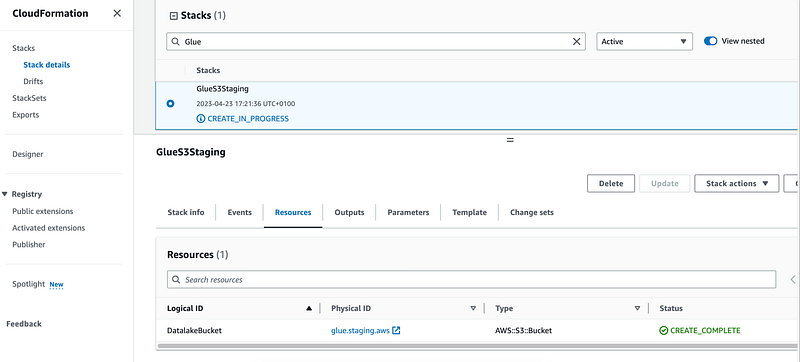
If everything goes well we will see a successfully deployed stack:
2. Use AWS Glue to transform and prepare raw user engagement data from Movielens
We can use AWS Glue and its Graphical User Interface (GIU) feature for ETL jobs to transform the data. The data must have the format required by AWS Personalize. Every time users give ratings to movies they interact and provide very useful data (`interactions`). AWS Personalize requires the following schema for that dataset:
- user_id (string)
- item_id (string)
- timestamp (long, in Unix epoch time format)
`user_ratedmovies-timestamp.dat` example:
# user_ratedmovies-timestamp.dat
userID movieID rating timestamp
75 3 1 1162160236000
75 32 4.5 1162160624000
75 110 4 1162161008000
We would want to transform this dataset to meet AWS Personalize requirements:
USER_ID,ITEM_ID,TIMESTAMP
75,32,1162160624000
75,110,1162161008000
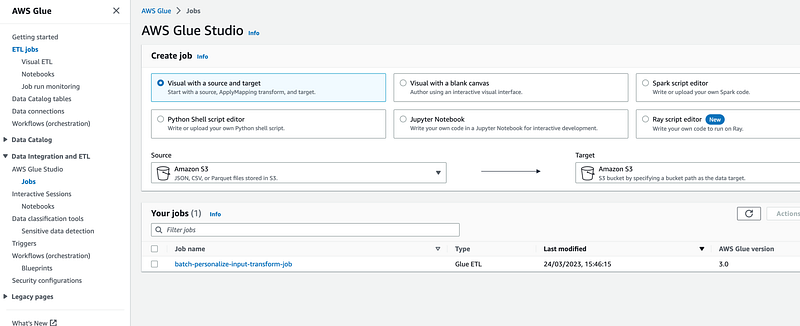
Basically it would just changing the column names. We would want to download the MovieLens dataset and load `user_ratedmovies-timestamp.dat` into our `/raw` folder. It has 48K interactions which should be enough to train AWS Personalize model. It will cost less than $0.05 to perform an ETL job on it. Then we can open AWS Glue Studio > Jobs and create one to transform our `/raw` dataset into `/transformed` that has a schema suitable for AWS Personalize.
Then we would want to use Visual ETL Editor to create a simple AWS Glue Workflow using the following nodes:
- Data Source
- Apply Mapping
- Data target
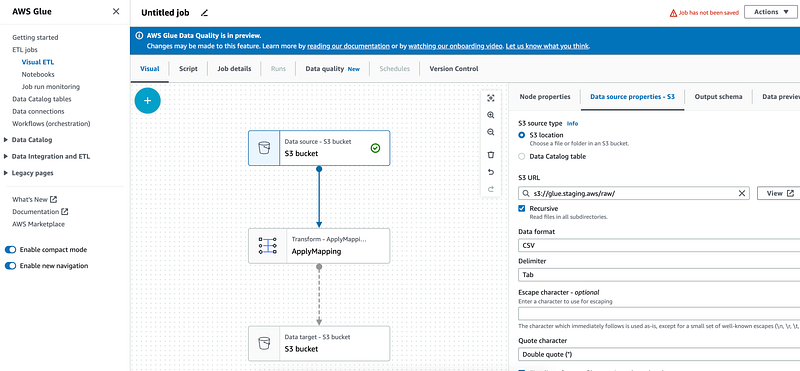
In the first node use `CSV` as a format. Indicate that data is `TAB` delimited:
...
   "separator": "\t",
   "quoteChar": "\"",
   "withHeader": true,
   "escaper": ""
In `Apply mapping` use the following schema transformations:
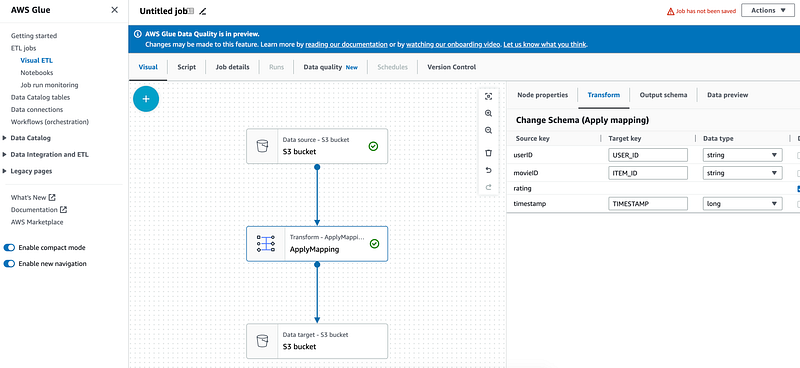
"mapping": [
    {
     "toKey": "USER_ID",
     "fromPath": [
      "userID"
     ],
     "toType": "string",
     "fromType": "string",
     "dropped": false
    },
    {
     "toKey": "ITEM_ID",
     "fromPath": [
      "movieID"
     ],
     "toType": "string",
     "fromType": "string",
     "dropped": false
    },
    {
     "toKey": "rating",
     "fromPath": [
      "rating"
     ],
     "toType": "string",
     "fromType": "string",
     "dropped": true
    },
    {
     "toKey": "TIMESTAMP",
     "fromPath": [
      "timestamp"
     ],
     "toType": "long",
     "fromType": "string",
     "dropped": false
    }
   ],
To upload the data into S3 run this in your command line:
# Change glue.staging.aws to your bucket name, it must be unique:
GLUE_S3=glue.staging.aws
aws s3 cp ./hetrec2011-movielens-2k-v2/user_ratedmovies-timestamps.dat s3://${GLUE_S3}/raw/user_ratedmovies-timestamps.dat
# i.e. upload: hetrec2011-movielens-2k-v2/user_ratedmovies-timestamps.dat to s3://glue.staging.aws/raw/user_ratedmovies-timestamps.dat
Open AWS Glue Studio > Jobs and create one to transform our `/raw` dataset into `/transformed` that has a schema suitable for AWS Personalize.
In the finbal node use `/transformed` prefix for our job output.
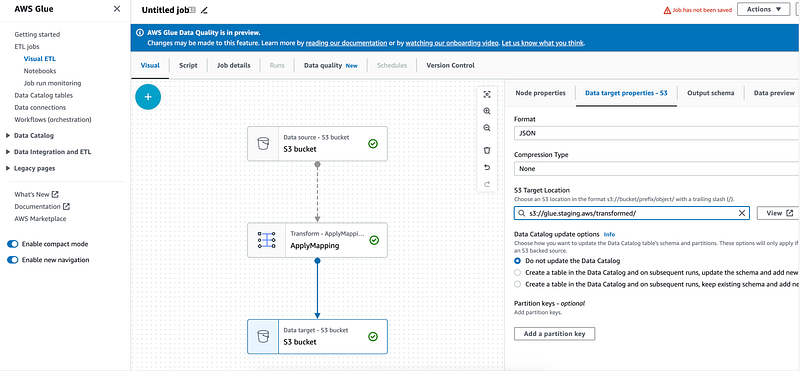
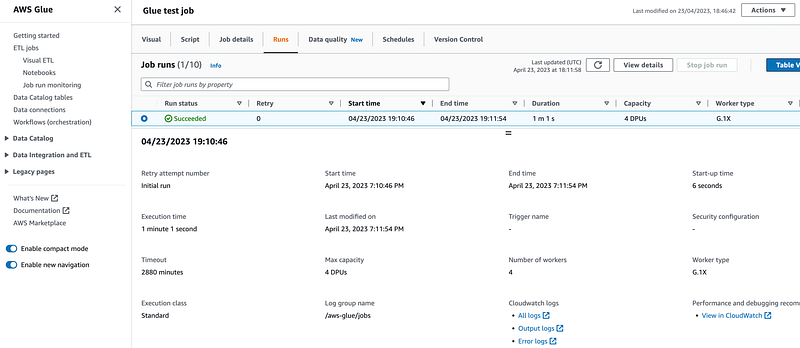
Save and run the job. If everything goes well we will see a successful execution:
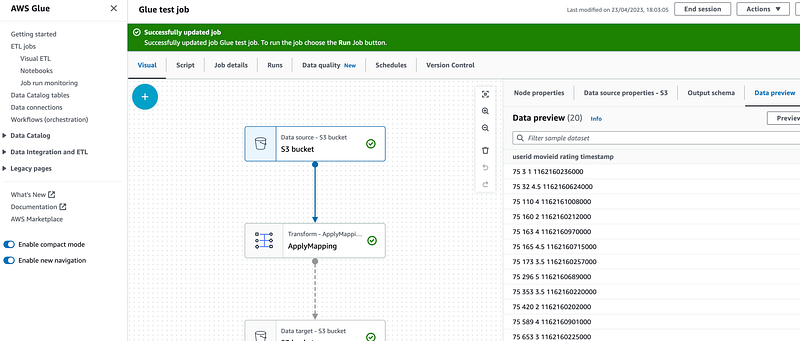
Check that the file has been successfully transformed. We can use `Preview` dataset to check the files in the bucket:
What if we don’t want to use Visual editor?
We can deploy this AWS Glue workflow with infrastructure as code.
When S3 and IAM resources are created we can describe this workflow with a file `glue_job_full_solution.py`
import sys
from awsglue.transforms import *
from awsglue.utils import getResolvedOptions
from pyspark.context import SparkContext
from awsglue.context import GlueContext
from awsglue.job import Job

args = getResolvedOptions(sys.argv, ["JOB_NAME"])
sc = SparkContext()
glueContext = GlueContext(sc)
spark = glueContext.spark_session
job = Job(glueContext)
job.init(args["JOB_NAME"], args)

# Script generated for node S3 bucket
S3bucket_node1 = glueContext.create_dynamic_frame.from_options(
    format_options={
        "quoteChar": '"',
        "withHeader": True,
        "separator": "\t",
        "optimizePerformance": False,
    },
    connection_type="s3",
    format="csv",
    connection_options={"paths": ["s3://glue.staging.aws/raw/"], "recurse": True},
    transformation_ctx="S3bucket_node1",
)

# Script generated for node ApplyMapping
ApplyMapping_node2 = ApplyMapping.apply(
    frame=S3bucket_node1,
    mappings=[
        ("userID", "string", "USER_ID", "string"),
        ("movieID", "string", "ITEM_ID", "string"),
        ("timestamp", "string", "TIMESTAMP", "long"),
    ],
    transformation_ctx="ApplyMapping_node2",
)

# Script generated for node S3 bucket
S3bucket_node3 = glueContext.write_dynamic_frame.from_options(
    frame=ApplyMapping_node2,
    connection_type="s3",
    format="csv",
    connection_options={
        "path": "s3://glue.staging.aws/transformed/",
        "partitionKeys": [],
    },
    transformation_ctx="S3bucket_node3",
)

job.commit()
Upload it to your S3 bucket and deploy with the following CloudFormation template `glue_job.yml`:
---
    Description: "AWS Glue Job to prepare movielens dataset for AWS Personalize"
    Parameters:
      ScriptLocation:
        Description: Data lake Glue bucket with source data files.
        Type: String
        Default: 's3://<YOUR_GLUE_BUCKET>/glue_scripts/glue_job_full_solution.py'
      SourceDataBucketName:
        Description: Data lake Glue bucket with source data files.
        Type: String
        Default: glue.staging.aws

    Resources:
      MyJobRole:
        Type: AWS::IAM::Role
        Properties:
          ManagedPolicyArns:
            - arn:aws:iam::aws:policy/service-role/AWSGlueServiceRole
          AssumeRolePolicyDocument:
            Version: "2012-10-17"
            Statement:
              -
                Effect: "Allow"
                Principal:
                  Service:
                    - "glue.amazonaws.com"
                Action:
                  - "sts:AssumeRole"
          Path: "/"
          Policies:
            -
              PolicyName: "root"
              PolicyDocument:
                Version: "2012-10-17"
                Statement:
                  -
                    Effect: "Allow"
                    Action:
                      - s3:*
                      - s3-object-lambda:*
                    Resource:
                      - !Sub
                        - arn:aws:s3:::${SourceDataBucketName}
                        - SourceDataBucketName: !Ref SourceDataBucketName
                      - !Sub
                        - arn:aws:s3:::${SourceDataBucketName}/*
                        - SourceDataBucketName: !Ref SourceDataBucketName


      MyJob:
        Type: AWS::Glue::Job
        Properties:
          GlueVersion: '3.0'
          Command:
            Name: glueetl
            PythonVersion: 3
            ScriptLocation: !Ref ScriptLocation
          # DefaultArguments:
          #   "--job-bookmark-option": "job-bookmark-enable"
          ExecutionProperty:
            MaxConcurrentRuns: 2
          MaxRetries: 0
          Name: cf-job1
          Role: !Ref MyJobRole
Run this shell script below in your command line:
# Change variables below names to match your environment.
# also replace your.s3.bucket with your glue S3 data bucket in glue_job_full_solution.py
STACK=GlueJob
GLUE_S3=glue.staging.aws
SCRIPT_LOCATION=s3://${GLUE_S3}/glue_scripts/glue_job_full_solution.py

aws s3 cp ./glue_job_full_solution.py $SCRIPT_LOCATION
# aws s3 cp ./glue_job_full_solution.py s3://<YOUR_GLUE_BUCKET>/glue_scripts/glue_job_full_solution.py

aws \
CloudFormation deploy \
--template-file glue_job.yml \
--stack-name $STACK \
--capabilities CAPABILITY_IAM \
--parameter-overrides \
"ScriptLocation"=$SCRIPT_LOCATION \
"SourceDataBucketName"=$GLUE_S3
Now we would want to import prepared dataset into AWS Personalize to train a model.
Import prepared dataset and create AWS Personalize solution
This step of the pipeline can also be deployed using infrastructure as code. In the previous step we created resources for our data pipeline, i.e. AWS S3 bucket and AWS Glue transformations to prepare the data. AWS Personalize is a modern no-code service to train recommendation models. It is a machine-learning service that uses user engagement data to generate item recommendations for customers.
We just need to design the data pipeline that feeds the user interactions to the AWS Personalize.
In theory in this step we would want to do the following:
1. Create an AWS Personalize dataset group and a dataset
There are three types of datasets in AWS Personalize:
- Interactions (we will use this one)
- Items
- Users
2. Create dataset group
- Describe the dataset schema for our interactions dataset
- Describe AWS Personalize permissions so it can access the data in S3 by adding an IAM policy:
{
   "Version":"2012-10-17",
   "Id":"PersonalizeS3BucketAccessPolicy",
   "Statement":[
      {
         "Sid":"PersonalizeS3BucketAccessPolicy",
         "Effect":"Allow",
         "Principal":{
            "Service":"Personalize.amazonaws.com"
         },
         "Action":[
            "s3:GetObject",
            "s3:ListBucket",
            "s3:PutObject"
         ],
         "Resource":[
            "arn:aws:s3:::<your-bucket-name>",
            "arn:aws:s3:::<your-bucket-name> /*"
         ]
      }
   ]
}
3. Create a dataset schema in AWS Personalize.
Typical AWS Personalize schema will look like this. We will use it:
{

  "type": "record",
  "name": "Interactions",
  "namespace": "com.amazonaws.Personalize.schema",
  "fields": [
      {
          "name": "USER_ID",
          "type": "string"
      },
      {
          "name": "ITEM_ID",
          "type": "string"
      },
      {
          "name": "TIMESTAMP",
          "type": "long"
      }
  ],
  "version": "1.0"
}
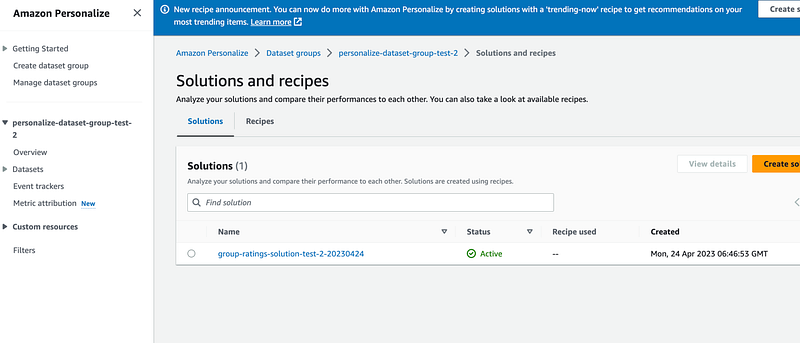
4. Create AWS Personalize solution aka train the model
Use `Item recommendation` type and `aws-user-personalization` recipe.
It might take approximately 20 minutes to train the model using our user interaction data.
5. Create batch inference job to get recommendations
Batch inference jobs generate batch item recommendations for users based on Amazon S3 input data. The input data might be a JSON list of users or objects. A batch inference task may be created using the Amazon Personalize interface, the AWS Command Line Interface (AWS CLI), or AWS SDKs.
Use data from `batch_users_input` folder:
// s3://<YOUR_GLUE>BUCKET/batch_users_input/file>
{"userId":"75"}
{"userId":"78"}
{"userId":"127"}
For output data choose the s3 bucket we created earlier with the suffix `/recommendations`.
So how do we deploy it using AWS CloudFormation?
All AWS Personalize resources can be created using AWS CloudFormation. For instance, a dataset schema can be created using yaml templates like so:
  PersonalizeDatasetSchema:
    Type: AWS::Personalize::Schema
    Properties:
      # Domain: String
      Name: movie-ratings-schema
      Schema: "{\"type\":\"record\",\"name\":\"Interactions\",\"namespace\":\"com.amazonaws.Personalize.schema\",\"fields\":[{\"name\":\"USER_ID\",\"type\":\"string\"},{\"name\":\"ITEM_ID\",\"type\":\"string\"},{\"name\":\"TIMESTAMP\",\"type\":\"long\"}],\"version\":\"1.0\"}"
AWS Personalize accepts AVRO schema definitions.
Before we can actually get recommendations we need to create a solution version. We can do it via AWS web console:
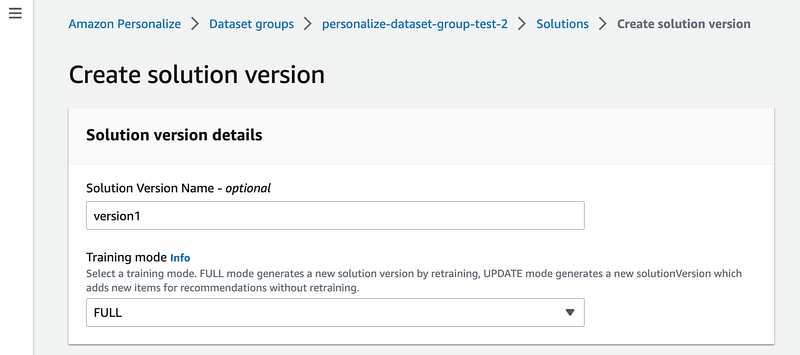
or using AWS CLI. For example, run the command below in your command line:
aws Personalize create-solution-version \
  --solution-arn $SOLUTION_ARN

{
    "solutionVersionArn": "arn:aws:Personalize:eu-west-1:12345678:solution/test-Personalize-movie-solution/aa0adb7f"
}
It might take up to 20 minutes to create a solution version but when it is ready we go and create a batch inference job:
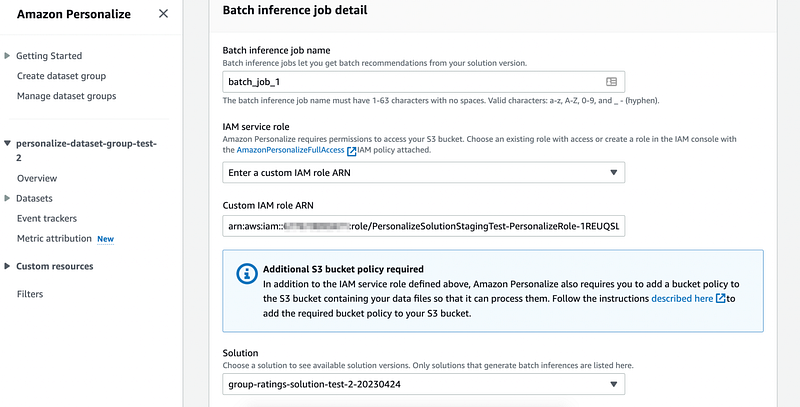
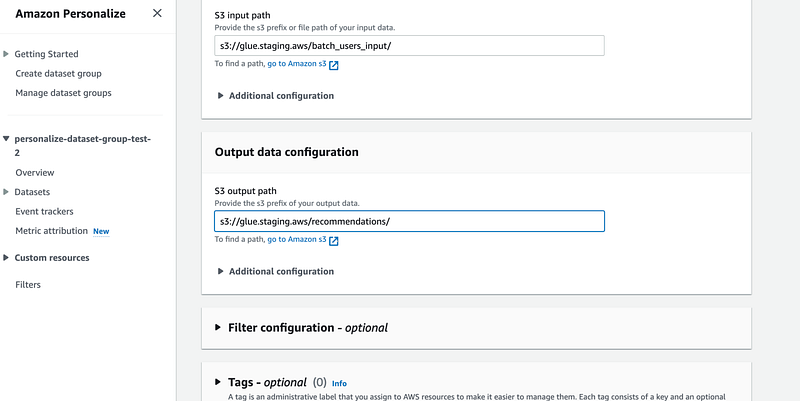
When job is ready you should be able to see recommendations in our datalake bucket under `/recommendations` folder:
{"input":{"userId":"4638"},"output":{"recommendedItems":["63992","115149","110102","148626","148888","31685","102445","69526","92535","143355","62374","7451","56171","122882","66097","91542","142488","139385","40583","71530","39292","111360","34048","47099","135137"],"scores":[0.0152238,0.0069081,0.0068222,0.006394,0.0059746,0.0055851,0.0049357,0.0044644,0.0042968,0.004015,0.0038805,0.0037476,0.0036563,0.0036178,0.00341,0.0033467,0.0033258,0.0032454,0.0032076,0.0031996,0.0029558,0.0029021,0.0029007,0.0028837,0.0028316]},"error":null}
{"input":{"userId":"663"},"output":{"recommendedItems":["368","377","25","780","1610","648","1270","6","165","1196","1097","300","1183","608","104","474","736","293","141","2987","1265","2716","223","733","2028"],"scores":[0.0406197,0.0372557,0.0254077,0.0151975,0.014991,0.0127175,0.0124547,0.0116712,0.0091098,0.0085492,0.0079035,0.0078995,0.0075598,0.0074876,0.0072006,0.0071775,0.0068923,0.0066552,0.0066232,0.0062504,0.0062386,0.0061121,0.0060942,0.0060781,0.0059263]},"error":null}
{"input":{"userId":"3384"},"output":{"recommendedItems":["597","21","223","2144","208","2424","594","595","920","104","520","367","2081","39","1035","2054","160","1370","48","1092","158","2671","500","474","1907"],"scores":[0.0241061,0.0119394,0.0118012,0.010662,0.0086972,0.0079428,0.0073218,0.0071438,0.0069602,0.0056961,0.0055999,0.005577,0.0054387,0.0051787,0.0051412,0.0050493,0.0047126,0.0045393,0.0042159,0.0042098,0.004205,0.0042029,0.0040778,0.0038897,0.0038809]},"error":null}
...
Deploy with CloudFormation
To deploy this step using AWS CloudFormation make sure data files exist in the bucket before running this part.
Files transformed with AWS Glue job from the previous step must be present in DATA_LOCATION. Run this shell script in command line:
# Make sure data files exist in the bucket before running this part.
# Files transformed with AWS Glue job from the previous Milestone
#  must be present in DATA_LOCATION:
# Example! replace with your bucket:
DATA_LOCATION=s3://glue.staging.aws/transformed/
STACK_NAME=PersonalizeSolutionStagingTest

aws \
CloudFormation deploy \
--template-file Personalize_basic.yml \
--stack-name $STACK_NAME \
--capabilities CAPABILITY_IAM \
--parameter-overrides \
"DataLocation"=$DATA_LOCATION


# create change_set
DATA_IMPORT_JOB=group-ratings-import-job-test-202304024-3
# Provide the stack for your solution here:
STACK_ARN=arn:aws:CloudFormation:eu-west-1:11111111:stack/PersonalizeSolutionStagingTest/11654160-e26b-11ed-a555-062721536c4d
date

TIME=`date +"%Y%m%d%H%M%S"`
CHANGE_SET_ID=$(aws \
CloudFormation create-change-set \
    --stack-name ${STACK_ARN} \
    --change-set-name ChangeSet${TIME} \
    --template-body file://Personalize_basic.yml \
    --capabilities CAPABILITY_IAM \
    --parameters \
        ParameterKey="DatasetImportJobName",ParameterValue="${DATA_IMPORT_JOB}" \
    --query Id \
    --output text
)
change_set_result=($?)
echo  "Command create-change_set executed with code: $change_set_result"
echo "waiting for change-set ${CHANGE_SET_ID} to be created and updating instead..."

aws \
CloudFormation wait change-set-create-complete \
    --change-set-name ChangeSet${TIME} \
    --stack-name $STACK_ARN

aws \
CloudFormation execute-change-set \
    --stack-name $STACK_ARN \
    --change-set-name ChangeSet${TIME}

echo "done"
Our personalize_basic.yaml :
---
AWSTemplateFormatVersion: '2010-09-09'

Description: IAM Policies, and resources to work with Personalize.

Parameters:

  DataLocation:
    Description: Data lake bucket with source data files.
    Type: String
    Default: s3://glue.staging.aws/transformed/
  PersonalizeBucket:
    Description: Data lake bucket with source data files.
    Type: String
    Default: s3://glue.staging.aws/
  DatasetImportJobName:
    Description: DatasetImportJob Name.
    Type: String
    Default: group-ratings-import-job-test-202304024-2

Resources:

### Personalize resources ###

  PersonalizePolicy:
    Type: AWS::IAM::Policy
    DependsOn: PersonalizeRole
    Properties:
      Roles:
        - !Ref PersonalizeRole
      PolicyName: 'Personalize-policy'
      PolicyDocument:
        {
          "Version": "2012-10-17",
            "Statement": [
                {
                    "Sid": "",
                    "Effect": "Allow",
                    "Action": [
                        "s3:GetObject",
                        "s3:ListBucket",
                        "s3:PutObject"
                    ],
                    "Resource": "*"
                }
          ]
        }

  PersonalizeRole:
    Type: AWS::IAM::Role
    Properties:
      AssumeRolePolicyDocument:
        Version: "2012-10-17"
        Statement:
          -
            Effect: Allow
            Principal:
              Service:
                - "personalize.amazonaws.com"
            Action:
              - "sts:AssumeRole"

  PersonalizeDatasetGroup:
    Type: 'AWS::Personalize::DatasetGroup'
    Properties:
      Name: !Join
        - ''
        - - !Ref 'AWS::StackName'
          - '-personalize-dataset-group-test'

  PersonalizeDatasetSchema:
    Type: AWS::Personalize::Schema
    Properties:
      # Domain: String
      # Name: movie-ratings-schema-test-2-20230424
      Name: !Join
        - ''
        - - !Ref 'AWS::StackName'
          - '-movie-ratings-schema-test'
      Schema: "{\"type\":\"record\",\"name\":\"Interactions\",\"namespace\":\"com.amazonaws.personalize.schema\",\"fields\":[{\"name\":\"USER_ID\",\"type\":\"string\"},{\"name\":\"ITEM_ID\",\"type\":\"string\"},{\"name\":\"TIMESTAMP\",\"type\":\"long\"}],\"version\":\"1.0\"}"
      # # or like so:
      # Schema: >-
      #   {"type": "record","name": "Interactions", "namespace":
      #   "com.amazonaws.personalize.schema", "fields": [ { "name": "USER_ID",
      #   "type": "string" }, { "name": "ITEM_ID", "type": "string" }, { "name":
      #   "TIMESTAMP", "type": "long"}], "version": "1.0"}

  PersonalizeDataset:
    DependsOn: [PersonalizePolicy, PersonalizeRole, PersonalizeDatasetGroup, PersonalizeDatasetSchema]
    Type: 'AWS::Personalize::Dataset'
    Properties:
      # Name: item-ratings-dataset
      Name: !Join
        - ''
        - - !Ref 'AWS::StackName'
          - '-item-ratings-dataset'
      DatasetType: Interactions
      DatasetGroupArn: !GetAtt PersonalizeDatasetGroup.DatasetGroupArn
      SchemaArn: !GetAtt PersonalizeDatasetSchema.SchemaArn
      DatasetImportJob:
        JobName: !Ref DatasetImportJobName # i.e. group-ratings-import-job-test-20230424
        DataSource:
          DataLocation: !Ref DataLocation
        RoleArn: !GetAtt PersonalizeRole.Arn

  PersonalizeSolution:
    Type: AWS::Personalize::Solution
    DependsOn: [PersonalizeDatasetGroup, PersonalizeDataset]
    Properties:
      DatasetGroupArn: !GetAtt PersonalizeDatasetGroup.DatasetGroupArn
      # EventType: String # The event type (for example, 'click' or 'like') that is used for training the model. If no eventType is provided, Amazon Personalize uses all interactions for training with equal weight regardless of type.
      # Name: item-ratings-solution-test-2-20230424
      Name: !Join
        - ''
        - - !Ref 'AWS::StackName'
          - '-item-ratings-solution-test'
      # PerformAutoML: false
      # PerformHPO: Boolean # Whether to perform hyperparameter optimization (HPO) on the chosen recipe. The default is false
      RecipeArn: 'arn:aws:personalize:::recipe/aws-user-personalization'
      # https://docs.aws.amazon.com/AWSCloudFormation/latest/UserGuide/aws-properties-personalize-solution-solutionconfig.html
      # SolutionConfig:
      #   SolutionConfig

Outputs:
  PersonalizeSolutionArn:
    Value: !GetAtt PersonalizeSolution.SolutionArn
    Export:
      Name: !Join
        - ''
        - - !Ref 'AWS::StackName'
          - '-PersonalizeSolutionArn'
  PersonalizeRoleArn:
    Value: !GetAtt PersonalizeRole.Arn
    Export:
      Name: !Join
        - ''
        - - !Ref 'AWS::StackName'
          - '-PersonalizeRoleArn'
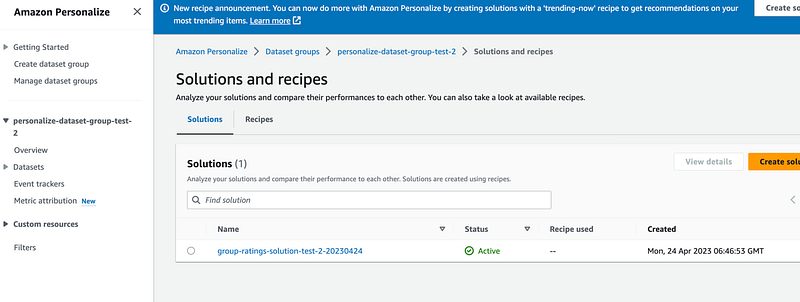
If everything goes well you will see the solution:
3. Create a machine-learning pipeline using AWS Step Functions
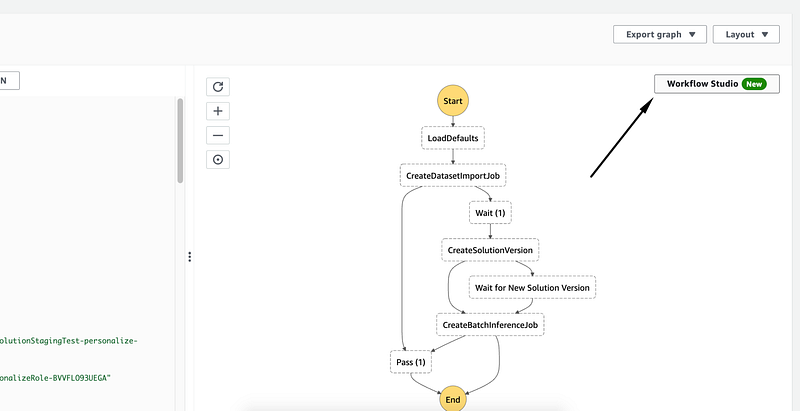
Now we would want to automate and/or schedule this process. Maybe we need to run model updates daily or want other stakeholders to be able to trigger it on demand. We can use AWS Step Functions for this.
In steps 1 and 2 we created resources for our data pipeline, i.e. AWS S3 bucket, AWS Glue transformations to prepare the data and train the ML model for our user recommendations. Now we will create a State machine (AWS Step Functions) to visualize the workflow and deploy / run the pipeline on a schedule.
We would want to do the following:
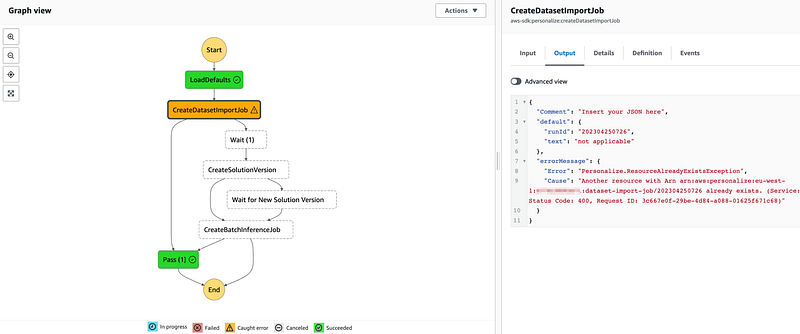
- Use `CreateDatasetImportJob`. If DatasetImportJob with this name has been submitted then `Pass`:
2. Implement a `Wait` logic by adding a `Wait` node. Set it to 20 minutes. In each scenario it is different and some adjustments might be required.
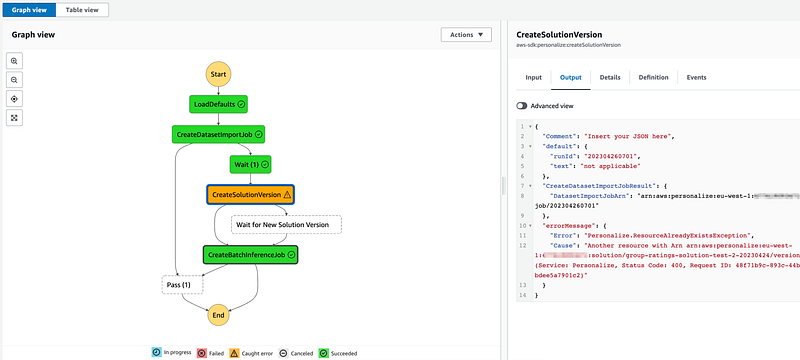
3. Add `CreateSolutionVersion` node afterwards. If solution version exists with this name then proceed and create a batch inference job:
4. Implement a `Wait` logic by adding a `Wait` node. Set it to 20 minutes. In each scenario it is different and some adjustments might be required.
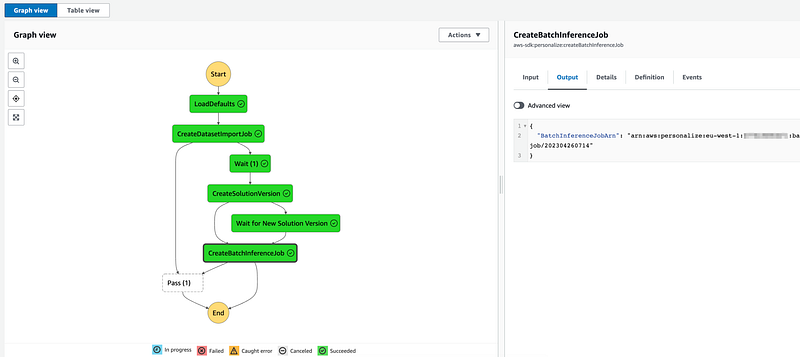
5. Then add `CreateBatchInferenceJob` after solution is created. (Use `$.SolutionVersionArn` parameter from the previous step)
6. Implement a `Wait` logic by adding a `Wait` node
7. In Error handling for Step 3 (`CreateBatchInferenceJob`) add Catch errors, enter Personalize.ResourceInUseException. Enter `Wait` for Fallback state. enter `$.errorMessage` for `ResultPath`
We can use Visual Editor to create the required workflow but it is preferable to use infrastructure as code.
Deploy with CloudFormation
Deploy the complete solution using AWS CloudFormation.
Run this in your command line:
DATA_LOCATION=s3://glue.staging.aws/transformed/ # replace with your bucket
STACK_NAME=PersonalizeSolutionStagingTest

aws \
CloudFormation deploy \
--template-file Personalize_step_machine.yml \
--stack-name $STACK_NAME \
--capabilities CAPABILITY_IAM \
--parameter-overrides \
"DataLocation"=$DATA_LOCATION


# If stack already exists then
# create a change_set and execute it:
STACK_NAME=PersonalizeSolutionStagingTest
DATA_LOCATION=s3://glue.staging.aws/transformed/
DATA_IMPORT_JOB=group-ratings-import-job-test-202304024-3
# replace with your Solution ARN:
STACK_ARN=arn:aws:CloudFormation:eu-west-1:111111111:stack/PersonalizeSolutionStagingTest/11654160-e26b-11ed-a555-062721536c4d
date

TIME=`date +"%Y%m%d%H%M%S"`
CHANGE_SET_ID=$(aws \
CloudFormation create-change-set \
    --stack-name ${STACK_ARN} \
    --change-set-name ChangeSet${TIME} \
    --template-body file://Personalize_step_machine.yml \
    --capabilities CAPABILITY_IAM \
    --parameters \
        ParameterKey="DatasetImportJobName",ParameterValue="${DATA_IMPORT_JOB}" \
    --query Id \
    --output text
)
change_set_result=($?)
echo  "Command create-change_set executed with code: $change_set_result"
echo "waiting for change-set ${CHANGE_SET_ID} to be created and updating instead..."

aws \
CloudFormation wait change-set-create-complete \
    --change-set-name ChangeSet${TIME} \
    --stack-name $STACK_ARN

aws \
CloudFormation execute-change-set \
    --stack-name $STACK_ARN \
    --change-set-name ChangeSet${TIME}

echo "done"
The template file `Personalize_step_machine.yaml` should look like this:
---
AWSTemplateFormatVersion: '2010-09-09'

Description: IAM Policies, and resources to work with Personalize.

Parameters:

  DataLocation:
    Description: Data lake bucket with source data files.
    Type: String
    Default: s3://glue.staging.aws/transformed/
  PersonalizeBucket:
    Description: Data lake bucket with source data files.
    Type: String
    Default: s3://glue.staging.aws/
  DatasetImportJobName:
    Description: DatasetImportJob Name.
    Type: String
    Default: item-ratings-import-job-test-20230426

  # SolutionVersionArn:
  #   Description: Custom SolutionVersionArn that must exist for Batch Inference job. It takes from 20 minutes to 48 hours to create one.
  #   Type: String
  #   Default: arn:aws:personalize:eu-west-1:1111111:solution/item-ratings-solution-test-2-20230424/version1
  # SolutionVersionName:
  #   Type: String
  #   Default: version1
  JobInputPath:
    Description: S3 path for training data.
    Type: String
    Default: s3://glue.staging.aws/batch_users_input/three_user_input
  JobOutputPath:
    Description: S3 path for recommendations data.
    Type: String
    Default: s3://glue.staging.aws/recommendations/

Resources:

### Personalize resources ###

  PersonalizePolicy:
    Type: AWS::IAM::Policy
    DependsOn: PersonalizeRole
    Properties:
      Roles:
        - !Ref PersonalizeRole
      PolicyName: 'Personalize-policy'
      PolicyDocument:
        {
          "Version": "2012-10-17",
            "Statement": [
                {
                    "Sid": "",
                    "Effect": "Allow",
                    "Action": [
                        "s3:GetObject",
                        "s3:ListBucket",
                        "s3:PutObject"
                    ],
                    "Resource": "*"
                }
          ]
        }

  PersonalizeRole:
    Type: AWS::IAM::Role
    Properties:
      AssumeRolePolicyDocument:
        Version: "2012-10-17"
        Statement:
          -
            Effect: Allow
            Principal:
              Service:
                - "personalize.amazonaws.com"
            Action:
              - "sts:AssumeRole"

  PersonalizeDatasetGroup:
    Type: 'AWS::Personalize::DatasetGroup'
    Properties:
      Name: !Join
        - ''
        - - !Ref 'AWS::StackName'
          - '-personalize-dataset-group-test'

  PersonalizeDatasetSchema:
    Type: AWS::Personalize::Schema
    Properties:
      Name: !Join
        - ''
        - - !Ref 'AWS::StackName'
          - '-movie-ratings-schema-test'
      Schema: "{\"type\":\"record\",\"name\":\"Interactions\",\"namespace\":\"com.amazonaws.personalize.schema\",\"fields\":[{\"name\":\"USER_ID\",\"type\":\"string\"},{\"name\":\"ITEM_ID\",\"type\":\"string\"},{\"name\":\"TIMESTAMP\",\"type\":\"long\"}],\"version\":\"1.0\"}"
      # # or like so:
      # Schema: >-
      #   {"type": "record","name": "Interactions", "namespace":
      #   "com.amazonaws.personalize.schema", "fields": [ { "name": "USER_ID",
      #   "type": "string" }, { "name": "ITEM_ID", "type": "string" }, { "name":
      #   "TIMESTAMP", "type": "long"}], "version": "1.0"}

  PersonalizeDataset:
    DependsOn: [PersonalizePolicy, PersonalizeRole, PersonalizeDatasetGroup, PersonalizeDatasetSchema]
    Type: 'AWS::Personalize::Dataset'
    Properties:
      # Name: item-ratings-dataset
      Name: !Join
        - ''
        - - !Ref 'AWS::StackName'
          - '-item-ratings-dataset'
      DatasetType: Interactions
      DatasetGroupArn: !GetAtt PersonalizeDatasetGroup.DatasetGroupArn
      SchemaArn: !GetAtt PersonalizeDatasetSchema.SchemaArn
      DatasetImportJob:
        JobName: !Ref DatasetImportJobName # i.e. group-ratings-import-job-test-20230424
        DataSource:
          DataLocation: !Ref DataLocation
        RoleArn: !GetAtt PersonalizeRole.Arn

  PersonalizeSolution:
    Type: AWS::Personalize::Solution
    DependsOn: [PersonalizeDatasetGroup, PersonalizeDataset]
    Properties:
      DatasetGroupArn: !GetAtt PersonalizeDatasetGroup.DatasetGroupArn
      # EventType: String # The event type (for example, 'click' or 'like') that is used for training the model. If no eventType is provided, Amazon Personalize uses all interactions for training with equal weight regardless of type.
      Name: !Join
        - ''
        - - !Ref 'AWS::StackName'
          - '-item-ratings-solution-test'
      # PerformAutoML: false
      # PerformHPO: Boolean # Whether to perform hyperparameter optimization (HPO) on the chosen recipe. The default is false
      RecipeArn: 'arn:aws:personalize:::recipe/aws-user-personalization'
      # https://docs.aws.amazon.com/AWSCloudFormation/latest/UserGuide/aws-properties-personalize-solution-solutionconfig.html
      # SolutionConfig:
      #   SolutionConfig

### Orchestrator resources ###
  EventsStateMachineExecutionRole:
    Type: "AWS::IAM::Role"
    Properties:
      AssumeRolePolicyDocument:
        Version: "2012-10-17"
        Statement:
          - Effect: "Allow"
            Principal:
              Service:
                - Fn::Sub: "events.amazonaws.com"
            Action: "sts:AssumeRole"
      Path: "/"
      Policies:
        - PolicyName: EventsStateMachineExecution
          PolicyDocument:
            Version: "2012-10-17"
            Statement:
              - Effect: Allow
                Action:
                  - "states:StartExecution"
                Resource: "*"

  StatesExecutionRole:
    Type: "AWS::IAM::Role"
    Properties:
      AssumeRolePolicyDocument:
        Version: "2012-10-17"
        Statement:
          - Effect: "Allow"
            Principal:
              Service:
                - !Sub states.${AWS::Region}.amazonaws.com
            Action: "sts:AssumeRole"
      Path: "/"
      Policies:
        - PolicyName: StatesExecutionPolicy
          PolicyDocument:
            Version: "2012-10-17"
            Statement:
              - Effect: Allow
                Action:
                  - "lambda:InvokeFunction"
                Resource: "*"
              - Effect: Allow
                Action:
                  - "personalize:*"
                Resource: "*"
              - Effect: Allow
                Action:
                  - "s3:*"
                Resource: "*"
              - Effect: Allow
                Action:
                  - "glue:*"
                Resource: "*"
              - Effect: Allow
                Action:
                  - "iam:PassRole"
                Resource: "*"

  MyStateMachine:
    Type: AWS::StepFunctions::StateMachine
    Properties:
      StateMachineName: Personalize-Steps-Test
        # Ref: StateMachineName
      DefinitionString:
        !Sub
          - |-
            {
              "Comment": "A description of my state machine",
              "StartAt": "LoadDefaults",
              "States": {
                "LoadDefaults": {
                  "Type": "Pass",
                  "Result": {
                    "runId": "202304260835",
                    "text": "not applicable"
                  },
                  "ResultPath": "$.default",
                  "Next": "CreateDatasetImportJob"
                },
                "CreateDatasetImportJob": {
                  "Type": "Task",
                  "Parameters": {
                    "DataSource": {
                      "DataLocation": "${DataLocationS3}"
                    },
                    "DatasetArn": "${DatasetArn}",
                    "JobName.$": "$.default.runId",
                    "RoleArn": "${PersonalizeRoleArn}"
                  },
                  "Resource": "arn:aws:states:::aws-sdk:personalize:createDatasetImportJob",
                  "Catch": [
                    {
                      "ErrorEquals": [
                        "Personalize.ResourceAlreadyExistsException"
                      ],
                      "Next": "Pass (1)",
                      "ResultPath": "$.errorMessage"
                    }
                  ],
                  "ResultPath": "$.CreateDatasetImportJobResult",

                  "Next": "Wait (1)"
                },
                "Pass (1)": {
                  "Type": "Pass",
                  "End": true
                },
                "Wait (1)": {
                      "Type": "Wait",
                      "Seconds": 1200,
                      "Next": "CreateSolutionVersion"
                },
                "CreateSolutionVersion": {
                      "Type": "Task",
                      "Parameters": {
                        "Name.$": "$.default.runId",
                        "SolutionArn": "${SolutionArn}"
                      },
                      "Resource": "arn:aws:states:::aws-sdk:personalize:createSolutionVersion",
                      "ResultPath": "$.CreateSolutionVersionResult",
                      "Catch": [
                        {
                          "ErrorEquals": [
                            "Personalize.ResourceAlreadyExistsException"
                          ],
                          "Next": "CreateBatchInferenceJob",
                          "ResultPath": "$.errorMessage"
                        }
                      ],
                      "Next": "Wait for New Solution Version"
                },
                "Wait for New Solution Version": {
                      "Type": "Wait",
                      "Seconds": 1200,
                      "Next": "CreateBatchInferenceJob"
                },
                "CreateBatchInferenceJob": {
                      "Type": "Task",

                      "Parameters": {
                        "JobInput": {
                          "S3DataSource": {
                            "Path": "${JobInputPath}"
                          }
                        },
                        "JobName.$": "$.default.runId",
                        "JobOutput": {
                          "S3DataDestination": {
                            "Path": "${JobOutputPath}"
                          }
                        },
                        "RoleArn": "${PersonalizeRoleArn}",
                        "SolutionVersionArn.$": "$.CreateSolutionVersionResult.SolutionVersionArn"
                      },
                      "Resource": "arn:aws:states:::aws-sdk:personalize:createBatchInferenceJob",
                      "Catch": [
                        {
                          "ErrorEquals": [
                            "Personalize.ResourceInUseException"
                          ],
                          "Next": "Pass (1)",
                          "ResultPath": "$.errorMessage",
                          "Comment": "Testing..."
                        }
                      ],
                      "End": true
                }
              }
            }
          - {
              PersonalizeRoleArn: !GetAtt [ PersonalizeRole, Arn ],
              DataLocationS3: !Ref DataLocation,
              DatasetArn: !GetAtt [PersonalizeDataset, DatasetArn],
              SolutionArn: !GetAtt [PersonalizeSolution, SolutionArn],
              # SolutionVersionName: !Ref SolutionVersionName,
              DatasetImportJobName: !Ref DatasetImportJobName,
              JobInputPath: !Ref JobInputPath,
              JobOutputPath: !Ref JobOutputPath
              # SolutionVersionArn: !Ref SolutionVersionArn
            }
      RoleArn: !GetAtt [ StatesExecutionRole, Arn ]
      Tags:
        - Key: PERSONALIZE_SOLUTION_NAME
          Value: item-interactions-solution-staging
        - Key: Service
          Value: personalize-staging

Outputs:
  PersonalizeSolutionArn:
    Value: !GetAtt PersonalizeSolution.SolutionArn
    Export:
      Name: !Join
        - ''
        - - !Ref 'AWS::StackName'
          - '-PersonalizeSolutionArn'
  PersonalizeRoleArn:
    Value: !GetAtt PersonalizeRole.Arn
    Export:
      Name: !Join
        - ''
        - - !Ref 'AWS::StackName'
          - '-PersonalizeRoleArn'
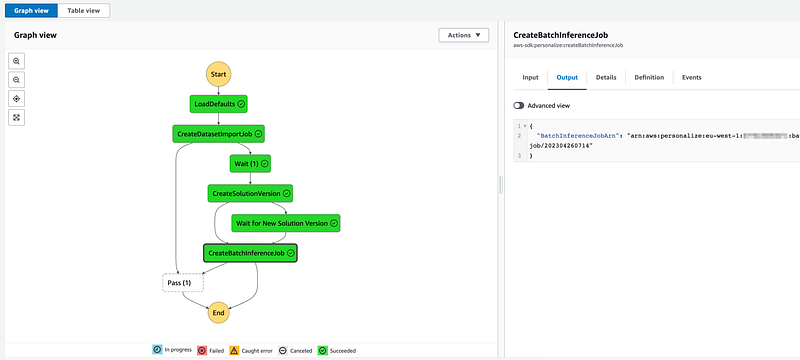
If everything goes well we will create a simple, yet fully functioning AWS Personalize solution that can be updated, deployed, trained with infrastructure as code.
A few things to consider before you start:
The AWS Glue visual editor launches an Apache Spark session to sample our source data and run required transformations. This session lasts 30 minutes before shutting down automatically. AWS would charge us for two DPUs at the development endpoint rate (DEVED-DPU-Hour), which amounts to $0.44 each 30 minute session.
AWS Personalize has a Free tier:
Amazon Personalize charges us per GB of data uploaded into the service. This includes data sent in real time to Amazon Personalize as well as bulk data uploaded using Amazon Simple Storage Service (S3).
When we use Custom Recommendation Solutions for the first two months after signing up, we would have the following benefits:
- Data processing and storage: Up to 20 GB per month per eligible AWS Region.
- Training: Up to 100 training hours per month per eligible Region.
- Recommendations: Up to 50 TPS-hours of real-time recommendations/month.
Pricing examples provided by AWS:
ETL job: Consider an AWS Glue Apache Spark job that runs for 15 minutes and uses 6 DPU. The price of 1 DPU-Hour is $0.44. Since your job ran for 1/4th of an hour and used 6 DPUs, AWS will bill you 6 DPU * 1/4 hour * $0.44, or $0.66.
AWS Glue Studio Job Notebooks and Interactive Sessions: Suppose you use a notebook in AWS Glue Studio to interactively develop your ETL code. An Interactive Session has 5 DPU by default. If you keep the session running for 24 minutes or 2/5th of an hour, you will be billed for 5 DPUs * 2/5 hour at $0.44 per DPU-Hour or $0.88.
Conclusion
AWS Personalize is a great ML tool where we don’t need to worry about data science. We just need to design the data pipeline that feeds the user interactions to the AWS Personalize API.
We have created and deployed a machine-learning pipeline where user interactions data is processed with AWS Glue in the datalake.
After that we created a simple workflow to train an AWS Personalize recommendation solution using AWS Step funcitons.
We can create it using the Visual Editor or by using Infrastructure as code templates which can be found in Full solution sections.
In one of my previous articles I wrote how simple Lambda functions can be used to trigger other services:
Combining this technique with modern Ml Ops makes it a powerful tool for data engineers.
Recommended read:
- Main repository with all files included:
2. Avro Schemas:
3. AWS Glue Pricing:
4. AWS Personalize Pricing:
https://aws.amazon.com/Personalize/pricing/
5. Mastering AWS CLI: https://readmedium.com/mastering-aws-cli-5454ad5e685c
6. Data Platform Architecture types:
https://towardsdatascience.com/data-platform-architecture-types-f255ac6e0b7


