
Optimising Docker Performance — The Key 4 Techniques You Need
Docker containers and containerisation technologies have changed the cloud industry forever. Thousands of new containers are being deployed every day onto AWS alone.
I’ve seen so many blogs on Medium about how to set up Docker containers for beginners; however, many of these don’t even scratch the surface of what’s possible. Many of these tutorials leave companies and developers deploying inefficient containers without knowing any better. Today we’ll look at four quick and easy techniques to optimise your containers, making them fast, secure and compact.
Excluding unnecessary files
When working with Docker and microservice architecture in general, image size and build times matter. Ignoring files that aren’t required is a quick and easy way to reduce image size. In Docker, we can achieve this by using the .dockerignore file. Using this file, we can specify “ignore rules” and exceptions similar to the .gitignore file from git. Any files or folders listed won’t be uploaded to the docker server and included in the build context.
This is very useful to prevent secret exposure and confidential files as well.
What should go in your .dockerignore file?
You should be using it in every project you build; it ensures your docker images are small, quick and secure. Below are some of the recommended files and folders you should be looking to ignore in your project:
- .git folder
- Build logs
- Test scripts
- Temporary files
- Local Secrets
- Cached files
Use the multi-stage build
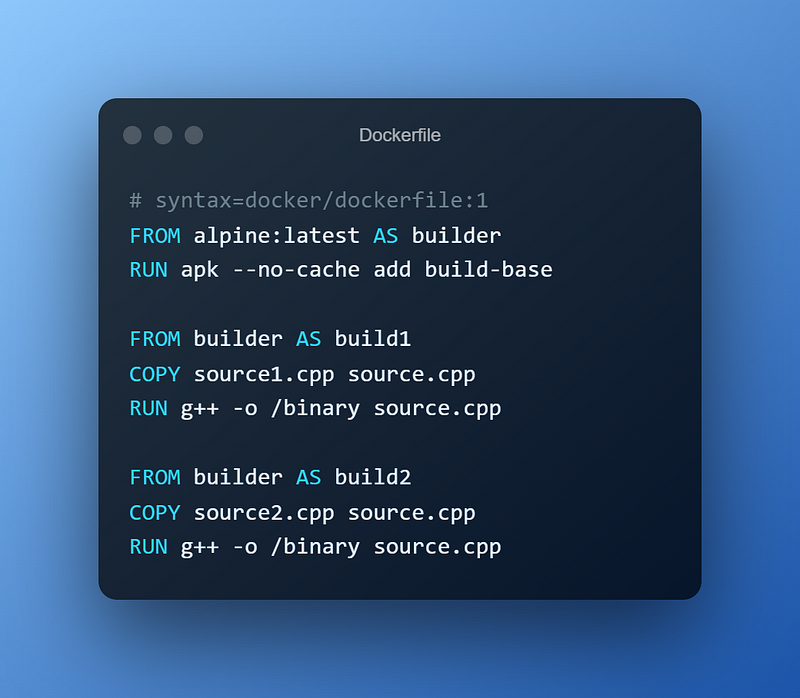
When trying to keep the size of your image low, you can implement many different strategies. One of the most effective things that the Docker Docs recommend is leveraging the multi-stage tool. We can use multiple From commands in any given Dockerfile to build from a new stage. Using this to our advantage, we can selectively copy artefacts from one stage to another and leave behind anything we don’t want in the final image.
Using Distroless Images
Distroless images only contain your application and its immediate runtime dependencies. This excludes all the additional files we don’t need, like shells, package managers or extraneous programs. This restricts our image only to run precisely what the app requires and can significantly shrink image sizes. Read more from Google Container tools.
Cleaning inter-dependencies after installing packages
After installing our application and the necessary runtime dependencies, many Debian images can accumulate unrequired binaries and files. These may consume space and lead to longer build times and increased image sizes. Therefore, If we can remove some of these, we may be able to find some improved performance.
Luckily, many of these can be cleaned up and removed safely and securely from your images.
$ apt-get clean # Clears cached packages
$ apt-get autoclean # Removes obsolete files
$ apt-get autoremove # Removes the dependencies of removed packages
I regularly post articles on DevOps articles exclusively on Medium — If you would like to read more, I recommend checking out the stories below.
If you’ve enjoyed this article and you’re not a member, consider supporting me and thousands of other writers by signing up for a membership and get unlimited access to content from Medium’s fantastic writers. Your membership directly supports me with a portion of your fee and won’t cost you more.
Click here to signup today.