avatarChinmay Bhalerao

Free AI web copilot to create summaries, insights and extended knowledge, download it at here

4330

Abstract

54">— — — — — — — — — — — — — — — — — — — — — — — — — — — — — —</p><h1 id="ca78">4) Omni page</h1><figure id="84f4"><img src="https://cdn-images-1.readmedium.com/v2/resize:fit:800/1*a1g3EwFpsdkKn1-hz_oXFQ.png"><figcaption></figcaption></figure><p id="efc0"><a href="https://docs.uipath.com/activities/docs/omnipage-ocr"><b>Documentation</b></a></p><p id="fd50"><a href="https://youtu.be/x6pHrumtHVw"><b>Video</b></a></p><p id="2413">— — — — — — — — — — — — — — — — — — — — — — — — — — — — — —</p><h1 id="e6b0">5) Easy OCR</h1><figure id="0e50"><img src="https://cdn-images-1.readmedium.com/v2/resize:fit:800/1*J6GMkHC16hBQx839iSa9ug.png"><figcaption></figcaption></figure><p id="9dc8"><a href="https://www.jaided.ai/easyocr/documentation/"><b>Documentation</b></a></p><p id="5dc9"><a href="https://youtu.be/owiqdzha_DE"><b>Video</b></a></p><p id="c1be">— — — — — — — — — — — — — — — — — — — — — — — — — — — — — —</p><h1 id="6090">6) Abby cloud OCR</h1><figure id="2ca5"><img src="https://cdn-images-1.readmedium.com/v2/resize:fit:800/1*DchttnTm1HsFBHn7NkwXWQ.png"><figcaption></figcaption></figure><p id="f5ac"><a href="https://www.abbyy.com/cloud-ocr-sdk/documentation/"><b>Documentation</b></a></p><p id="2a8c"><a href="https://youtu.be/k9lOAQzTJjc"><b>Video</b></a></p><p id="71ea">— — — — — — — — — — — — — — — — — — — — — — — — — — — — — —</p><h1 id="f22e">7) Google vision OCR</h1><figure id="bd6d"><img src="https://cdn-images-1.readmedium.com/v2/resize:fit:800/1*L_dlRGqHJTRizORoHE8WYQ.jpeg"><figcaption></figcaption></figure><p id="a445"><a href="https://cloud.google.com/vision/docs/apis"><b>Documentation</b></a></p><p id="4e50"><a href="https://youtu.be/xKvffLRSyPk"><b>Video</b></a></p><p id="bf47">— — — — — — — — — — — — — — — — — — — — — — — — — — — — — —</p><h1 id="45b7">8) UI path document OCR</h1><figure id="2209"><img src="https://cdn-images-1.readmedium.com/v2/resize:fit:800/1*q_BhqVodws4f2vvIi0ov1g.png"><figcaption></figcaption></figure><p id="2592"><a href="https://docs.uipath.com/activities/docs/ui-path-document-ocr"><b>Documentation</b></a></p><p id="105d"><a href="https://youtu.be/oFHPMZehoiU"><b>Video</b></a></p><p id="dfee">— — — — — — — — — — — — — — — — — — — — — — — — — — — — — —</p><h1 id="15b3">Then which OCR technique we should use ?</h1><p id="21fe">There is a comprehensive comparison for all famous text extraction models</p><p id="3ad9">by “<a href="https://youtu.be/y3G4RAY2alU">Nisarg Kadam</a>” in his YouTube video . I will show his last conclusion,</p><figure id="d0fd"><img src="https://cdn-images-1.readmedium.com/v2/resize:fit:800/1*6jM4BiZOLsT7q1C-gpMzgQ.png"><figcaption>Text extraction comparison [<a href="https://www.youtube.com/watch?v=y3G4RAY2alU">Image source</a>]</figcaption></figure><blockquote id="1efe"><p>In this particular video series, he compared all models taking in consideration of Digital document, scanned document, Handwritten scanned document, digital photo and handwritten photo.<b> Google Vision</b> and <b>UiPath</b> Document seems work very well in all types of documents. But still most of things are problem statement dependent .</p></blockquote><p id="8a65">links for Nisarg Kadam’s videos :</p><p id="b6d5"><b>part 1:<a href="https://youtu.be/5sMVA9GHziU">Which OCR is best ?</a></b></p><p id="3a38"><b>part2:</b> <a href="https://youtu.be/y3G4RAY2alU"><b>Which OCR is best?</b></a></p><h1 id="da3d">What if we applied OCR model and didn't get good results ?</h1><p id="c864">There can be many reasons as well as few ways by which you can improve text extraction’s performance .</p><p id="5d30"><b>ways to improve accuracy of OCR model:</b></p><blockquote id="2f95"><p>1) <b>Select only that language which are present in your source document</b></p></blockquote><p id="3aed">This reduces wrong interpretations of characters and patterns and helps to reduce noise. Like in Tesseract, you can select language package.</p><blockquote id="1548"><p><b>2) Text rotations</b></p></blockquote><p id="4a0b">Most of OCR engines work well with horizontal and vertical alignment. It gets harder when there is skewness or angled rotation in text. Some OCR engines have <b>PSM</b> (page segmentation mode) where we can select the orientation of scanning.</p><blockquote id="af66"><p><b>3) Lighting of image</b></p></blockquote><p id="ae34">Brightness and

Options

contrast are the two things which enhance the readability and explicitness of features for text extraction. there are many apps which can help to adjust contrast and brightness of image. Proper lightning condition can improve results of OCR.</p><blockquote id="5577"><p><b>4) Image extension</b></p></blockquote><p id="1375">Compressions, resizing and other image manipulations tends to loose image information. .JPG format tends to loose more data after such operations where as .PNG and .TIFF don’t loose data in such extent. Choosing image format wisely can improve OCR’s efficiency. Below mentioned python code can be useful to convert image into desired DPI.</p><div id="ba57"><pre>from PIL import Image <span class="hljs-selector-tag">img</span> = Image<span class="hljs-selector-class">.open</span>(<span class="hljs-string">"IMAGE.png"</span>) <span class="hljs-selector-tag">img</span><span class="hljs-selector-class">.save</span>(<span class="hljs-string">"Converted_IMAGE-600.png"</span>, dpi=(<span class="hljs-number">300</span>,<span class="hljs-number">300</span>))</pre></div><blockquote id="f6a9"><p><b>5) Image quality</b></p></blockquote><p id="6269">Dots per inch or DPI is main factor while considering quality of image. Resolution less than 300 DPI can make image unclear. There are many DPI conversion tools online which can get you required DPI. So try to use higher DPI image.</p><p id="35f6">For more understanding of concepts like DPI, Resolution, PNG,JPG & other image formats, PPI, Lossless formats etc. you can refer my <a href="https://readmedium.com/calibration-in-image-processing-c4c164870f21"><b>previous blog.</b></a></p><h1 id="c661">| Useful materials |</h1><ol><li>I found one pretty good series to understand OCR by <a href="https://www.youtube.com/channel/UC5vr5PwcXiKX_-6NTteAlXw"><b>Python Tutorials for Digital Humanities</b></a> . This is <a href="https://youtu.be/tQGgGY8mTP0"><b>link</b></a> for video series on OCR.</li><li>One interesting GitHub account I found was of<b> Kba</b> for OCR. Here is the link : <a href="https://github.com/kba/awesome-ocr"><b>kba /awesome OCR</b></a><b> . </b>You will get to know many things as well as interesting projects with source code from this account.</li><li>I found one excellent book “<b>OCR with Tesseract, OpenCV, and Python” by Dr.Adrian Rosebrock .link for book : <a href="https://pyimagesearch.mykajabi.com/offers/WQyUdVtT/checkout">Book link</a></b></li></ol><p id="16fe"><b>Dr.Adrian Rosebrock </b>Former Founder/CEO at PyImageSearch.com and did his PhD in Computer Vision .</p><p id="ff46">So these all things which can help you to solve your OCR related problem statements at basic levels.</p><p id="3559">4. A project for “OCR models reading Captchas” you can refer <a href="https://youtu.be/OS5GDGU-jvc"><b>this </b></a>video.</p><p id="5809">— — — — — — — — — — — — — — — — — — — — — — — — — — — — — — —</p><p id="c3e6">|| <b>Read my previous stories</b> ||</p><p id="fede"><a href="https://readmedium.com/object-detection-lite-template-matching-c9af77517f6c"><b>Object detection lite : Template Matching</b></a></p><p id="d5c7"><a href="https://readmedium.com/calibration-in-image-processing-c4c164870f21"><b>Calibration in Image Processing</b></a></p><p id="22c5"><a href="https://readmedium.com/types-of-edge-detection-algorithms-365122d799bf"><b>Types of Edge detection algorithms</b></a></p><p id="44a6">Follow me for more such content on <a href="https://www.linkedin.com/in/chinmay-bhalerao-6b5284137/"><b>LinkedIn</b></a> & <a href="https://medium.com/@BH_Chinmay"><b>Medium</b></a> .</p><p id="00bf">— — — — — — — — — — — — — — — — — — — — — — — — — — — — — — — -</p><p id="7c2a"><b>THANK YOU!!</b></p><div id="7941" class="link-block"> <a href="https://readmedium.com/mlearning-ai-submission-suggestions-b51e2b130bfb"> <div> <div> <h2>Mlearning.ai Submission Suggestions</h2> <div><h3>How to become a writer on Mlearning.ai</h3></div> <div><p>medium.com</p></div> </div> <div> <div style="background-image: url(https://miro.readmedium.com/v2/resize:fit:320/1*6xCb1sNpjadaSBuVLPTFQQ.png)"></div> </div> </div> </a> </div></article></body>

OCR : The Incredible reading capability of Machine
Image Source

What if you have thousands of paper documents and forms and you want to store it digitally! typing each word can help right ? but it will be very tedious, hectic and time-consuming task to type each and everything manually. OCR can help here. OCR stands for “Optical Character Recognition”. An area of computer vision, OCR processes images of text and converts that text into machine-readable forms. It is a technology that recognizes text within a digital image. OCR is used to convert the non-editable soft copies into the editable text documents. Due to this, it can be referred as “The wizardous reading capability of Machine.”
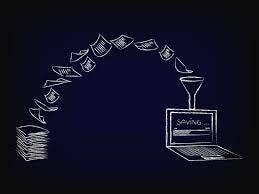
Image source

Basically all Optical Character Recognition engines follow basic steps as :

  1. Noise elimination

a. It removes dusts, graphics

b. It aligns text

c. Converts any type of color combinations into black and white

2) Character recognition

a. Compares each scanned letters pixel by pixel

b. Works on knowing what possible font it can be

c. Decides closest match

3) More sophisticated algorithms work on finest levels. They break each character into different segments and then identify its curves, intensities, corners and look for physical matching to actual shape of characters.

4) On the basis of extracted features and matching, OCR engine decides which character this can be.

5) After identifying characters indivisibly, it aligns them into word sequence .

6) Many times, OCR engines have data or dictionary for mapping a word for which engine is skeptic about or if formed word from characters is not making sense.

Basic steps of working of OCR tools are quite similar. But according to product and its organization, there are many changes in high level processing. I won’t describe all methods in this blog because each method will require separate blog to describe. But I will provide names and references to understand OCR tools in more detail.

You can refer detailed OCR overview for more sound understanding .

Most famous OCR tools are:

1) Tesseract or Pytesseract
Documentation

Video

— — — — — — — — — — — — — — — — — — — — — — — — — — — — — —

2) Keras OCR
Documentation

Video

— — — — — — — — — — — — — — — — — — — — — — — — — — — — — —

3) Microsoft OCR API

Documentation

Video

— — — — — — — — — — — — — — — — — — — — — — — — — — — — — —

4) Omni page

Documentation

Video

— — — — — — — — — — — — — — — — — — — — — — — — — — — — — —

5) Easy OCR
Documentation

Video

— — — — — — — — — — — — — — — — — — — — — — — — — — — — — —

6) Abby cloud OCR
Documentation

Video

— — — — — — — — — — — — — — — — — — — — — — — — — — — — — —

7) Google vision OCR
Documentation

Video

— — — — — — — — — — — — — — — — — — — — — — — — — — — — — —

8) UI path document OCR

Documentation

Video

— — — — — — — — — — — — — — — — — — — — — — — — — — — — — —

Then which OCR technique we should use ?

There is a comprehensive comparison for all famous text extraction models

by “Nisarg Kadam” in his YouTube video . I will show his last conclusion,
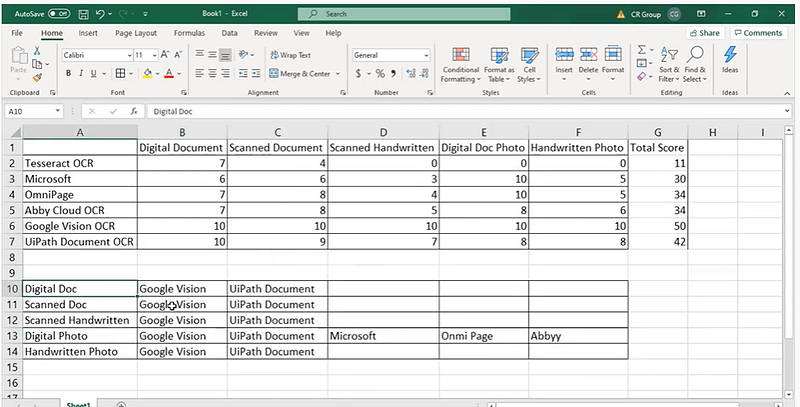
Text extraction comparison [Image source]

In this particular video series, he compared all models taking in consideration of Digital document, scanned document, Handwritten scanned document, digital photo and handwritten photo. Google Vision and UiPath Document seems work very well in all types of documents. But still most of things are problem statement dependent .

links for Nisarg Kadam’s videos :

part 1:Which OCR is best ?

part2: Which OCR is best?

What if we applied OCR model and didn't get good results ?

There can be many reasons as well as few ways by which you can improve text extraction’s performance .

ways to improve accuracy of OCR model:

1) Select only that language which are present in your source document

This reduces wrong interpretations of characters and patterns and helps to reduce noise. Like in Tesseract, you can select language package.

2) Text rotations

Most of OCR engines work well with horizontal and vertical alignment. It gets harder when there is skewness or angled rotation in text. Some OCR engines have PSM (page segmentation mode) where we can select the orientation of scanning.

3) Lighting of image

Brightness and contrast are the two things which enhance the readability and explicitness of features for text extraction. there are many apps which can help to adjust contrast and brightness of image. Proper lightning condition can improve results of OCR.

4) Image extension

Compressions, resizing and other image manipulations tends to loose image information. .JPG format tends to loose more data after such operations where as .PNG and .TIFF don’t loose data in such extent. Choosing image format wisely can improve OCR’s efficiency. Below mentioned python code can be useful to convert image into desired DPI.

from PIL import Image
img = Image.open("IMAGE.png")
img.save("Converted_IMAGE-600.png", dpi=(300,300))

5) Image quality

Dots per inch or DPI is main factor while considering quality of image. Resolution less than 300 DPI can make image unclear. There are many DPI conversion tools online which can get you required DPI. So try to use higher DPI image.

For more understanding of concepts like DPI, Resolution, PNG,JPG & other image formats, PPI, Lossless formats etc. you can refer my previous blog.

| Useful materials |

  1. I found one pretty good series to understand OCR by Python Tutorials for Digital Humanities . This is link for video series on OCR.
  2. One interesting GitHub account I found was of Kba for OCR. Here is the link : kba /awesome OCR . You will get to know many things as well as interesting projects with source code from this account.
  3. I found one excellent book “OCR with Tesseract, OpenCV, and Python” by Dr.Adrian Rosebrock .link for book : Book link

Dr.Adrian Rosebrock Former Founder/CEO at PyImageSearch.com and did his PhD in Computer Vision .

So these all things which can help you to solve your OCR related problem statements at basic levels.

4. A project for “OCR models reading Captchas” you can refer this video.

— — — — — — — — — — — — — — — — — — — — — — — — — — — — — — —

|| Read my previous stories ||

Object detection lite : Template Matching

Calibration in Image Processing

Types of Edge detection algorithms

Follow me for more such content on LinkedIn & Medium .

— — — — — — — — — — — — — — — — — — — — — — — — — — — — — — — -

THANK YOU!!

Ocr
Computer Vision
Deep Learning
Ocr Software
Ml So Good
Recommended from ReadMedium