
#30DaysOfNLP
NLP-Day 10: Why You Should Care About Word Vectors
Introducing Word2Vec by uncovering word embeddings
Yesterday, we finished our hands-on implementation of Latent Semantic Analysis. We created our matrix of topic vectors and even tried to make sense of it.
However, till now we ignored the context. The neighbors. The entourage of a single word. We ignored how the relationship between a word and its surroundings affects the overall meaning of a text.
Now, it’s time to change all of that. It’s time to discover word vectors.
In the following sections, we’re going to learn what a word vector is and why it’s so useful and exciting. We will learn how a word vector is created and how we can utilize pre-trained models and external libraries.
We have a lot of ground to cover, so take a seat, don’t go anywhere, and make sure to follow #30DaysOfNLP: Why You Should Care About Word Vectors.
What is a word vector?
So far we created Bag-Of-Words and TF-IDF vectors, ignoring the nearby, more relevant surroundings of a word. We basically threw every word, we could get our hands on, into a huge statistical bag.
However, it is reasonable to assume that words appearing close together in a sentence are defined by a stronger, more meaningful relationship than words that appear widely apart. The closer the words the more context they convey.
So how do we capture a word’s surroundings?
With word vectors. A word vector tries to represent those nearby relationships by creating smaller “bags” from a neighborhood of only a few words. Usually less than 10 tokens.
By focusing only on the close company a word keeps, it is able to create a numerical vector representation of the semantics, the literal and implied meaning of a word.
In order to compute such a representation, Tomas Mikolov and this team of researchers at Google introduced Word2Vec in 2013.
Word2Vec utilizes a neural network to learn the meaning of a text by processing a large corpus of unlabeled documents. The main idea here is to learn word embeddings, a set of weights by either predicting the surrounding words or the target word based on its company. The set of weights can then be used to produce a word vector, encapsulating the word’s semantics.
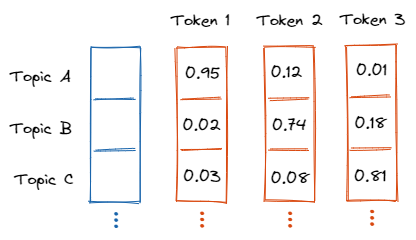
Due to the unsupervised nature of the training process, word vectors are especially powerful.
Why is it useful, applications?
Word vectors are useful since they enable us to perform meaningful vector algebra. Thus, making it possible to execute semantic queries, analogies, and vector-oriented reasoning in general.
Questions in the form of "a is to b as c is to? are now possible to answer.
Consider, the following question: "A 'man' is to 'woman' as 'uncle' is to?". The answer is, of course, "aunt". Visualizing such word pairs in a vector space could look like the following.
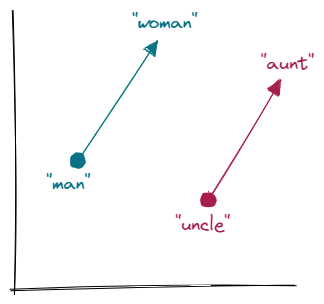
The Word2Vec model “knows” that the direction and distance between "man" and "woman" are roughly the same as between "uncle" and "aunt". This measure allows for vector-oriented reasoning to work.
We will, however, almost never hit the exact word vector in our vocabulary, but the closest will most likely suffice. This is especially useful for semantic queries in search engines or to simply overcome the rigidity of pattern matching.
How is a word vector created?
Now, we have a basic understanding of what a word vector is. But how do we calculate these vector representations?
There are two different possible ways to train a Word2Vec model.
- The skip-gram approach tries to predict a word’s surrounding context.
- The continuous bag-of-words (CBOW) approach predicts a target word based on its nearby company.
Although we have two different techniques to train our model and obtain the word embeddings. We will most likely rely on pre-trained models. The computation of word vectors can be very resource-intensive, requiring a lot of data as well as computation time.
So how does skip-gram actually work?
With the skip-gram approach, we try to predict the surrounding words based on an input word. We can think about this as a fixed size “sliding window” that runs over our sentence.
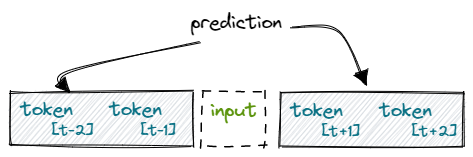
We create an n-gram of words based on the sliding window. The word in the center, the input token, can be represented by a One-Hot-Vector. Next, we try to predict the surrounding words. Depending on “how big our window” is, we need multiple iterations per training round.
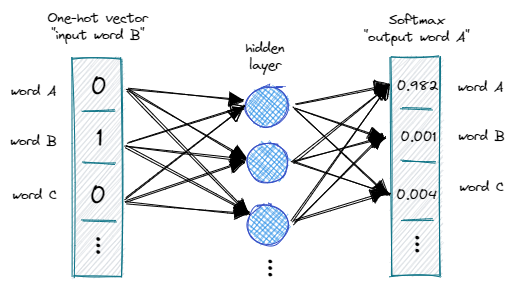
In the example above, we try to predict the previous and next words based on the input token. We utilize the softmax function, in order to output probabilities ranging between 0 and 1.
Once completed the training process, we obtain a set of weights that represent the semantic meaning. Words with similar meanings will have similar vectors since our model was trained to predict similar surroundings.
We can simply take the dot product of the embedding and a one-hot encoded input word to create our word vector.
And what about CBOW?
The training process with the CBOW approach is basically the same as before. However, now we try to predict a target word based on its nearby company. The surroundings are also captured by a fixed-size sliding window.
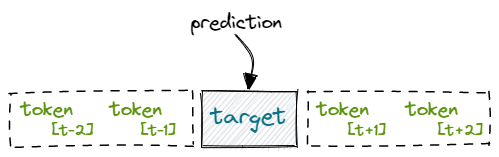
The CBOW approach is much faster to train since we only need to predict a single target per training epoch. It is also considered to show higher accuracy for more frequently appearing words.
Implementations, libraries to use in the real world
As mentioned earlier, training a Word2Vec model can be pretty resource-intensive. We most likely don’t have access to a huge training corpus that is required to create decent vector representations. And we probably don’t have the computational resources to train the model.
Fortunately, we can rely on pre-trained models.
A popular library we can use is gensim.
So if you haven’t already make sure to pip install gensim and let’s get started.
First of all, we need to download a pre-trained Word2Vec model. A popular choice is a model trained on Google News Documents which can be downloaded here.
Next, we can import the gensim library and create our word vector based on the pre-trained model. We limit the size to 200k words since the model is huge and otherwise takes a long time to load.
We can use the most_similar() function to re-create our example from before. By querying the most similar words to "uncle" and "woman" and by subtracting the "man" we obtain the correct output, which is the word "aunt".
But can we train our own Word2Vec model?
Sometimes it might be necessary to create our own domain-specific Word2Vec model. This is also possible by utilizing the gensim library. However, it requires us to do some preprocessing first.
First of all, we need to break our document into sentences and the sentences into a list of tokens.
Next, we import the Word2Vec class and provide the token list as well as some hyperparameters as input.
from gensim.model.word2vec import Word2Vectoken_list = ['This', 'is', 'an', 'example']model = Word2Vec(
token_list,
workers=2,
size=300,
min_count=3,
window=6,
sample=1e-3
)# discard output since we only care about embedding
model.init_sims(replace=True)# save model
model.save("my_example_word2vec")Once the training is finished, we discard the output weights and save the model, containing only the weights of the hidden layer.
Alternative libraries
Word2Vec paved the way for word vectors, however, at least two other popular models exist, namely GloVe and fastText.
GloVe, developed by Stanford NLP researchers, relies on singular value decomposition (SVD) in order to create word vectors. This has several advantages over the neural network training approach which relies on backpropagation.
Most importantly GloVe is faster to train, can handle larger documents due to better RAM/CPU efficiency, and is considered to be more accurate. All in all, GloVe should probably be our workhorse when it comes to training new word vector representations.
And then there is fastText by Facebook. FastText pushes the Word2Vec training concept one step further by predicting the surrounding n-grams of characters instead of the neighboring words. This has the advantage that fastText can handle rare words much better.
Conclusion
In this article, we took our first step into the world of word vectors. We learned not only what a word vector is, why it’s useful, and how it’s computed, but also how to use pre-trained models to handle semantic queries and analogies.
Word2Vec models are exciting since they allow for vector-oriented reasoning. However, they’re resource-intensive and much slower to train when compared to Latent Semantic Analysis. And word vectors are biased. They can only learn the relationships that are present in our training corpus.
In the next article, we will expand on the idea of relationships by exploring the concept of Convolutional Neural Networks and the word order in particular.
So take a seat, sharpen your pencil, make sure to follow, and never miss a single day of the ongoing series #30DaysOfNLP.
Enjoyed the article? Become a Medium member and continue learning with no limits. I’ll receive a portion of your membership fee if you use the following link, at no extra cost to you.
References / Further Material:
- Hobson Lane, Cole Howard, Hannes Max Hapke. Natural Language Processing in Action. New York: Manning, 2019.


