
Network Services on AWS
ACM.70 Bastion Hosts (Jump Hosts), VPNs, Private Link, NAT, Peering, Transit Gateway, Private and Public Subnets and VPCs, Direct Connect
Part of my series on Automating Cybersecurity Metrics and Network Security. The Code.
Free Content on Jobs in Cybersecurity | Sign up for the Email List
I wrote about troubleshooting CloudFormation in the last post.
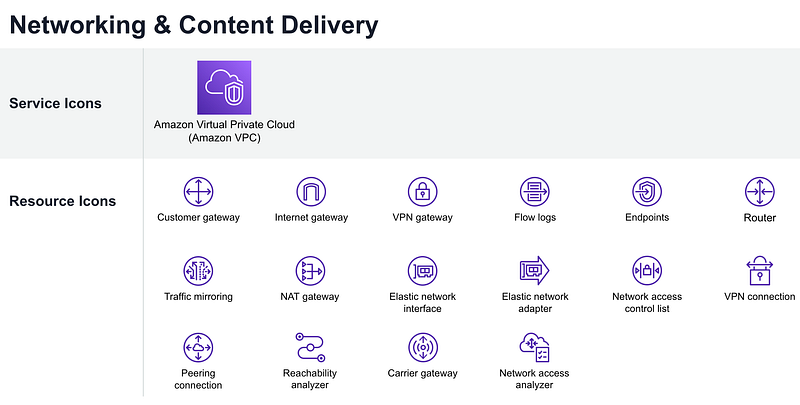
Now let’s look at some of the networking services available to us on AWS.
There are so many different ways to configure and set up a network on AWS and there’s not necessarily one “right” answer as to how you should do it. However, before we can even think about architecting a network you need to know what some of the different services and components of a network might be and their purpose within a network architecture.
This list is not at all an exhaustive and it’s hard to know exactly where to cut it off. Where does the line of network security end and application security begin? There are some additional networking-related services I’m not listing here which I might address in later posts as they edge more into the realm of application configuration, security, and optimization. I’m sticking to things that primarily work at layer 4 on the OSI model but including a few things for controlling network access we’ll be using in upcoming posts.
I’ve already covered how to automate some of these resources in the earlier posts in these series but it seemed like it would be a good idea to make the distinction between a few of these resources before proceeding.
Virtual Private Network: This is how you carve out your piece of the AWS network used for your resource that you can partially control. You can set up rules, security services, and appliances to allow traffic in and out of your VPC at the network layer.
Subnet: You can carve up your VPC into smaller subnetworks so you can define traffic rules between them. You must create a subnet in an AWS VPC to deploy resources into it. You don’t deploy resources directly into the VPC.
Route Table: You define routes to other networks outside your VPC in your AWS route table. I showed you how to create public VPCs in a prior post by defining a route that uses an Internet Gateway. You can also define routes that restrict traffic to other private networks.
Gateway: You add a gateway to your route table to allow traffic to reach another network. An Internet Gateway allows traffic to reach the Internet. A VPN gateway might allow traffic to reach another private network. AWS offers a number of gateways you can use in an AWS route table such as a NAT Gateway, Internet Gateway, Transit Gateway, a gateway specific to IPV6, and a gateway for a private VPN.
Network Access Control List (ACL): Define an ACL to create rules to allow or deny traffic into your subnets. Stateless.
Peering: You can create peering connections to allow traffic to traverse between VPCs on AWS. the traffic will remain on the AWS backbone and not traverse the Internet to get between the two VPCs. You add a route for your peering connection to your route table.
Security Groups: A set of rules you can apply to resources on AWS that work like a host-based firewall, except that the rules are enforced on the hypervisor not the network interfaces of the resources you deploy on AWS. Stateful.
Site-to-Site VPN: A site to site VPN can protect all or part of the traffic between two networks or sites in an encrypted tunnel. If configured properly and no vulnerabilities exist, attackers will not be able to perform a man-in-the-middle (MITM) attack and view the traffic. Sometimes these VPNs are set up with split tunnels and only protect a part of the data for performance reasons which leaves some traffic exposed. A site-to-site VPN can tunnel all your traffic of any type of protocol between two locations.
Client VPN: A client VPN is typically used by a user who wants to connect to a network. The user configures client software on their device such as a laptop and then connects to a VPN endpoint to connect to a private network. Depending on the type of VPN protocol you use, more or less of your network packet will be encrypted.
One of the major differences between SSL and IPsec is which layer of the OSI model each one belongs to. The OSI model is an abstract representation, broken into “layers,” of the processes that make the Internet work.
The IPsec protocol suite operates at the network layer of the OSI model. It runs directly on top of IP (the Internet Protocol), which is responsible for routing data packets.
Meanwhile, SSL operates at the application layer of the OSI model. It encrypts HTTP traffic instead of directly encrypting IP packets.
https://www.cloudflare.com/learning/network-layer/ipsec-vs-ssl-vpn/
Cloud Wan: AWS Cloud WAN allows you to connect a number of remote locations to a private network.
Direct Connect: Organizations that host resources in a data center can use AWS Direct Connect can setup a private connection to AWS. A direct connect will not traverse the Internet like a VPN which generally reduces latency and improves performance and security. The organization will need to implement encryption as this is simply a connection, not a VPN or encrypted tunnel.
Transit VPC: Often organizations are connecting many VPCs, not just one. A transit VPC can simplify a network design by connecting a location to a single VPC and from there, that VPC manages all the connections to the other VPCs.
Transit Gateway: A Transit Gateway also simplifies hybrid network architectures by connecting on-premises networks to AWS using a single Transit Gateway that acts as a hub instead of managing a number of complex peering relationships.
Bastion Host: A bastion host, or jump host, is a host that a user connects to which resides on the edge of a network. The bastion host is accessible from the Internet. Once users connects and logs into the bastion host, they can reach other resources on the private network. A bastion host is typically configured for inbound traffic only.
NAT: A nat allows resources in a private network which is not connected to the Internet to send traffic to the Internet. For example, when resources need to get software updates and they reside in a private network they may send traffic to a NAT to reach the Internet. The NAT “translates” the traffic from private to public so it can route to the appropriate location on the Internet and retrieve data. A NAT is typically configured for outbound traffic only.
Proxy: A proxy can receive and forward requests to another network. When a proxy makes a request it looks as if that request is coming from the proxy, not the original host that made the request. That functionality can be used for good or evil purposes. A proxy can inspect network traffic before allowing it in or out of a network. Proxies can also facilitate forwarding traffic that would otherwise be blocked in cases where the remote host accessing the proxy does not have access, but the host on which the proxy resides is allowed by network firewall rules. Different types of proxies exist — forward and reverse proxies — which are used to solve different types of problems. Reverse proxies are often uses in micro-services architectures to forward a request to the appropriate service.
Network Firewall: When you block traffic using AWS Subnet NACLs and Security Groups you have limited options compared to a traditional firewall. You can essentially only block based on IP Address, ports, and protocols (layer 3 or 4). It’s a good idea to block traffic as early as possible in the TCP/IP stack but sometimes you need a bit more fine grained control and AWS Network Firewall gives you that. You could also deploy our own edge firewall appliance within AWS but sometimes the integrated options work more seamlessly. Which one you choose depends on your security and cost requirements and which solution best meets them.
Private Link: AWS Private Link allows a vendor to set up a service for private access within the AWS network. You can also access AWS services that are available via Private Link.
VPC Endpoint: You set up a VPC endpoint in your VPC to connect to a service available via Private Link. There are different types of VPC endpoints covered in an upcoming post. Many AWS services require your applications and resources to make a request destined for the Internet to connect to them. You can create a VPC Endpoint to connect to those services via Private Link if you don’t want to set up a NAT to allow those resources to get to the Internet and additionally keep the traffic on the AWS network instead.
I’m going to leave things like DNS, TLS, WAFs (web application firewalls), CDNs (content delivery networks), service mesh, and load balancers for other posts as I want to go ahead and implement some of the above first and then see which of the other services we need.
Follow for updates.
Teri Radichel | © 2nd Sight Lab 2022
About Teri Radichel:
~~~~~~~~~~~~~~~~~~~~
⭐️ Author: Cybersecurity Books
⭐️ Presentations: Presentations by Teri Radichel
⭐️ Recognition: SANS Award, AWS Security Hero, IANS Faculty
⭐️ Certifications: SANS ~ GSE 240
⭐️ Education: BA Business, Master of Software Engineering, Master of Infosec
⭐️ Company: Penetration Tests, Assessments, Phone Consulting ~ 2nd Sight Lab
Need Help With Cybersecurity, Cloud, or Application Security?
~~~~~~~~~~~~~~~~~~~~~~~~~~~~~~~~~~~~~~~~~~~~~~~~~~~~~~~~~~~~~
🔒 Request a penetration test or security assessment
🔒 Schedule a consulting call
🔒 Cybersecurity Speaker for PresentationFollow for more stories like this:
~~~~~~~~~~~~~~~~~~~~~~~~~~~~~~~~~~~~~~~~~~~~~~~~~~~~~~~~~~~~~
❤️ Sign Up my Medium Email List
❤️ Twitter: @teriradichel
❤️ LinkedIn: https://www.linkedin.com/in/teriradichel
❤️ Mastodon: @teriradichel@infosec.exchange
❤️ Facebook: 2nd Sight Lab
❤️ YouTube: @2ndsightlab


