</p><p id="d9fc">So, no we don't want the database-server to be accessible by every pod in the namespace. Instead only the kafka-server should be accessing it. i.e. only the pods with the label app=kafka-server should be able to communicate to the database-server ( i.e. with the label app=database-server ).</p>
<figure id="41cc">
<div>
<div>
<iframe class="gist-iframe" src="/gist/pavan-kumar-99/9bbdcbffeb3a251f7aeb5855b6bcc148.js" allowfullscreen="" frameborder="0" height="undefined" width="undefined">
</div>
</div>
</figure></iframe></div></div></figure><p id="9f2c">Let us now take a look at the manifests closely.</p><blockquote id="b348"><p>spec.podSelector: The labels of the pod to which this network policy is to be applied.</p></blockquote><blockquote id="3a90"><p>ingress.from.podSelector: The labels of the pods from which the ingress traffic is allowed.</p></blockquote><blockquote id="e647"><p>ingress.ports: The ports to which the ingress communication is allowed.</p></blockquote><p id="d454">Let us now apply the NetworkPolicy to see the change.</p><div id="9e94"><pre><span class="hljs-meta prompt_">$ </span><span class="language-bash">git <span class="hljs-built_in">clone</span> https://github.com/pavan-kumar-99/medium-manifests.git \
-b network-policies</span></pre></div><div id="8068"><pre><span class="hljs-variable"></span> <span class="hljs-built_in">cd</span> medium<span class="hljs-literal">-manifests</span>/</pre></div><div id="910a"><pre> kubectl apply -f <span class="hljs-keyword">access</span>-db-<span class="hljs-keyword">from</span>-kafka-netpol.yaml</pre></div><p id="109b">Hurrah, our first policy is now applied. Let us try to access the database servers from 2 different pods i.e.</p><ol><li>From the web-server pod ( This should fail ).</li><li>From the Kafka Pod ( This should Pass ).</li></ol><div id="b92b"><pre> <span class="hljs-built_in">export</span> <span class="hljs-attribute">role</span>=<span class="hljs-string">"web-server"</span></pre></div><div id="fd8c"><pre> <span class="hljs-attribute">server_name</span>=(kubectl <span class="hljs-built_in">get</span> po -l <span class="hljs-attribute">app</span>=<span class="hljs-variable">role</span> -o <span class="hljs-attribute">jsonpath</span>=<span class="hljs-string">'{.items[0].metadata.name}'</span>)</pre></div><div id="a90f"><pre> kubectl exec <span class="hljs-variable">server_name</span> -- <span class="hljs-regexp">/bin/</span>sh -c <span class="hljs-string">"curl -s database-server"</span>
command terminated with <span class="hljs-keyword">exit</span> code <span class="hljs-number">7</span></pre></div><p id="42bc">The request will get timed out now. Let us now try the same from the Kafka server.</p><div id="c5b5"><pre> <span class="hljs-built_in">export</span> <span class="hljs-attribute">role</span>=<span class="hljs-string">"kafka-server"</span></pre></div><div id="f545"><pre> <span class="hljs-attribute">server_name</span>=(kubectl <span class="hljs-built_in">get</span> po -l <span class="hljs-attribute">app</span>=<span class="hljs-variable">role</span> -o <span class="hljs-attribute">jsonpath</span>=<span class="hljs-string">'{.items[0].metadata.name}'</span>)</pre></div><div id="a281"><pre><span class="hljs-meta prompt_"> </span><span class="language-bash">kubectl <span class="hljs-built_in">exec</span> <span class="hljs-variable">server_name</span> -- /bin/sh -c <span class="hljs-string">"curl -s database-server"</span></span></pre></div><figure id="9f4a"><img src="https://cdn-images-1.readmedium.com/v2/resize:fit:800/1*Bv3VHwxc16AcigCNx7hZxQ.png"><figcaption>The curl command is now successful</figcaption></figure><p id="532d">You should now be able to connect to the database-server pod from the kafka-server pod.</p><p id="baeb">We should also restrict the traffic to the kafka-server pod to allow the ingress traffic only from the web-server pod. But this time let's make it a bit more interactive by visualizing the networking policies.</p><figure id="60a3"><img src="https://cdn-images-1.readmedium.com/v2/resize:fit:800/0*-YadQJKdNO6Dj2yZ.gif"><figcaption>Image Credits: Google</figcaption></figure><p id="8772">Yes, you've read it right.<b> <a href="https://editor.cilium.io/">editor.cilium.io</a></b> makes it easy to build and visualize Network Policies, which can then be downloaded as YAML and run in any Kubernetes cluster. The YAML’s can also be uploaded to visualize them with a proper GUI.</p><figure id="0bae"><img src="https://cdn-images-1.readmedium.com/v2/resize:fit:800/1*Yds7rptZEfOAtls3VEayrA.png"><figcaption>Cilium Editor</figcaption></figure><p id="2546">The box in the center represents the resource to which you are trying to apply the network policy to. The resource to your left represents the ingress policies and the resources to your right represent the egress policies. We should now restrict the traffic to the kafka-server pod to allow the ingress traffic only from the web-server pod.</p><p id="266a">Once you create the policy you should find the policy yaml created on the screen.</p><figure id="c287"><img src="https://cdn-images-1.readmedium.com/v2/resize:fit:800/1*dB71dB0J5HSBq4PY7aLSIQ.png"><figcaption>Network policy from cilium editor</figcaption></figure><p id="9ff1">We will now download and apply the policy to our Kubernetes cluster. I have already downloaded this to my GitHub repo.</p><div id="295b"><pre><span class="hljs-meta prompt_"> </span><span class="language-bash">git <span class="hljs-built_in">clone</span> https://github.com/pavan-kumar-99/medium-manifests.git \
-b network-policies</span></pre></div><div id="f092"><pre><span class="hljs-variable"></span> <span class="hljs-built_in">cd</span> medium<span class="hljs-literal">-manifests</span>/</pre></div><div id="78ae"><pre>$ kubectl apply -f <span class="hljs-keyword">access</span>-kafka-<span class="hljs-keyword">from</span>-web.yaml</pre></div>
<figure id="4e35">
Options
<div>
<div>
<iframe class="gist-iframe" src="/gist/pavan-kumar-99/2fed8fbf231a86f053274ade2ee7d956.js" allowfullscreen="" frameborder="0" height="undefined" width="undefined">
</div>
</div>
</figure></iframe></div></div></figure><p id="5588">Hurrah, our second policy is also applied. Let us try to access the kafka servers from 2 different pods i.e.</p><ol><li>From the web-server pod ( This should Pass ).</li><li>From the Database Pod ( This should fail ).</li></ol><div id="9ccd"><pre>$ <span class="hljs-built_in">export</span> <span class="hljs-attribute">role</span>=<span class="hljs-string">"database-server"</span></pre></div><div id="2950"><pre>$ <span class="hljs-attribute">server_name</span>=$(kubectl <span class="hljs-built_in">get</span> po -l <span class="hljs-attribute">app</span>=<span class="hljs-variable">$role</span> -o <span class="hljs-attribute">jsonpath</span>=<span class="hljs-string">'{.items[0].metadata.name}'</span>)</pre></div><div id="087e"><pre>$ kubectl exec <span class="hljs-variable">$server_name</span> -- <span class="hljs-regexp">/bin/</span>sh -c <span class="hljs-string">"curl -s kafka-server"</span>
command terminated with <span class="hljs-keyword">exit</span> code <span class="hljs-number">7</span></pre></div><p id="aa0c">We will now try to access the kafka server from the web-server</p><div id="07ee"><pre> <span class="hljs-built_in">export</span> <span class="hljs-attribute">role</span>=<span class="hljs-string">"web-server"</span></pre></div><div id="ba9a"><pre> <span class="hljs-attribute">server_name</span>=(kubectl <span class="hljs-built_in">get</span> po -l <span class="hljs-attribute">app</span>=<span class="hljs-variable">role</span> -o <span class="hljs-attribute">jsonpath</span>=<span class="hljs-string">'{.items[0].metadata.name}'</span>)</pre></div><div id="9304"><pre><span class="hljs-meta prompt_"> </span><span class="language-bash">kubectl <span class="hljs-built_in">exec</span> <span class="hljs-variable">server_name</span> -- /bin/sh -c <span class="hljs-string">"curl -s kafka-server"</span></span></pre></div><figure id="cedc"><img src="https://cdn-images-1.readmedium.com/v2/resize:fit:800/1*obOTToGfTb_qgfDj8BriOw.png"><figcaption>Network policy works as expected</figcaption></figure><h1 id="7e1d">Conclusion</h1><p id="b181">With the help of tools like <a href="https://editor.cilium.io/">https://editor.cilium.io/</a> understanding and visualizing, network policies are now made easier. Many more complicated network policies include selectors like CIDR block, namespaces, etc. I will try to cover them in my next article with an actual golang application.</p><p id="6575">Until next time…..</p><h1 id="066a">Recommended</h1><div id="4985" class="link-block">
<a href="https://www.techmanyu.com/creating-self-hosted-github-runners-in-a-kubernetes-cluster-fd05560de34a">
<div>
<div>
<h2>Creating Self Hosted GitHub runners in a Kubernetes Cluster</h2>
<div><h3>Run your GitHub actions on your own Kubernetes cluster</h3></div>
<div><p>www.techmanyu.com</p></div>
</div>
<div>
<div style="background-image: url(https://miro.readmedium.com/v2/resize:fit:320/0*v7sh21xyhzf1vtUn)"></div>
</div>
</div>
</a>
</div><div id="52c3" class="link-block">
<a href="https://readmedium.com/introduction-to-crossplane-2f873ae0f9f3">
<div>
<div>
<h2>Introduction to Crossplane</h2>
<div><h3>How to create any resource on the cloud using Kubernetes manifests and Crossplane.</h3></div>
<div><p>medium.com</p></div>
</div>
<div>
<div style="background-image: url(https://miro.readmedium.com/v2/resize:fit:320/0*Z7UAsh05_x8EyrQ4)"></div>
</div>
</div>
</a>
</div><div id="14ec" class="link-block">
<a href="https://faun.pub/introduction-to-bitnami-sealed-secrets-bb5ae74d9a25">
<div>
<div>
<h2>Introduction to Bitnami Sealed Secrets</h2>
<div><h3>How to store your secrets in GitHub using Sealed Secrets and Kubese</h3></div>
<div><p>faun.pub</p></div>
</div>
<div>
<div style="background-image: url(https://miro.readmedium.com/v2/resize:fit:320/0*k2cpKV2yGR-uIWWQ.jpg)"></div>
</div>
</div>
</a>
</div><div id="8718" class="link-block">
<a href="https://readmedium.com/autoscaling-in-kubernetes-hpa-vpa-ab61a2177950">
<div>
<div>
<h2>AutoScaling in Kubernetes ( HPA / VPA )</h2>
<div><h3>Autoscale your applications in Kubernetes using Vertical Pod Autoscaler ( VPA ) and Horizontal Pod Autoscaler ( HPA )</h3></div>
<div><p>medium.com</p></div>
</div>
<div>
<div style="background-image: url(https://miro.readmedium.com/v2/resize:fit:320/1*xHPFSf2EV4_TGufv4IsC9w.png)"></div>
</div>
</div>
</a>
</div><h2 id="9580">Reference</h2><div id="ee14" class="link-block">
<a href="https://kubernetes.io/docs/concepts/services-networking/network-policies/#the-networkpolicy-resource">
<div>
<div>
<h2>Network Policies</h2>
<div><h3>If you want to control traffic flow at the IP address or port level (OSI layer 3 or 4), then you might consider using…</h3></div>
<div><p>kubernetes.io</p></div>
</div>
<div>
<div style="background-image: url(https://miro.readmedium.com/v2/resize:fit:320/0*zzIzg4Wumu_SklYX)"></div>
</div>
</div>
</a>
</div></article></body>
Network Policies demystified in Kubernetes
Visualize network policies in Kubernetes using Cilium Editor
You might have a couple of microservices running on Kubernetes. Considering a simple architecture you might have a web server ( The frontend ) and a database server ( The backend ) and a couple of other microservices too ( Ex: A messaging queue like Kafka, RabbitMQ, etc ). You might want that the database server should only be accessible by Kafka, RabbitMQ Pods. The messaging broker pods ( i.e. Kafka ) should receive traffic only from the web-server pods. How is all of this achieved? How can we control the Ingress and Egress traffic to/from the Kubernetes resources? Network Policies in Kubernetes to our rescue here. Network Policies are the Kubernetes resources that control the traffic between Kubernetes resources like Pods, network endpoints. It defines the network access policies for communication between Pods, network endpoints. Network policies allow us to specify the entities to which a Pod is authorized to connect. The aforementioned problem with the limited communication between pods can be solved by enforcing a networking policy on the database pod, that would allow traffic from the pods that have the label app=messaging-server, and the same with the Kafka/RabbitMQ pods to allow traffic from the pods that have the label app=web-server.
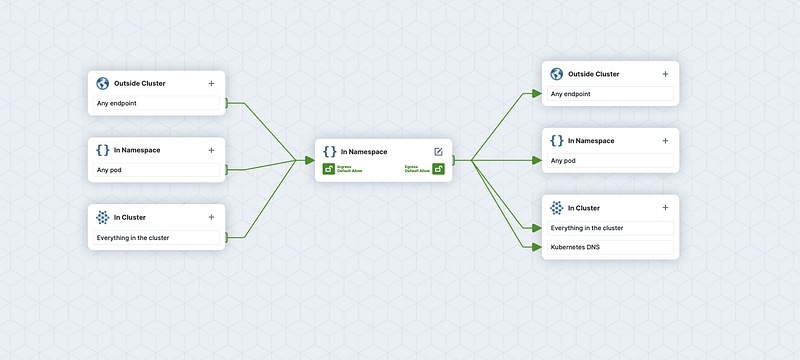
Network Policy visualizing using cilium editor
What is the entire story all about? (TLDR)
Understanding various networking policies in Kubernetes.
Visualize these networking policies using the cilium editor.
Prerequisites
A Kubernetes cluster ( Can be either On-Prem, AKS, EKS, GKE, Kind ).
Network policies are implemented by the network plugin. To use network policies, you must be using a networking solution that supports NetworkPolicy.
By default Pods are non-isolated. That means that
Each Pod can communicate to every other pod in the same namespace.
All the pods from one namespace can communicate to every other pod in a different namespace.
No Ingress or Egress policies are applied to the Pods. By default, the Ingress and Egress traffic is allowed to and from the Pod.
Let us get started by creating 3 deployments. In the scope of this demo, all three deployments will use the same image ( i.e. Nginx ) as the primary intention of this article is to understand the concept of network policies but not to develop an application from scratch. Let us create the web-server components.
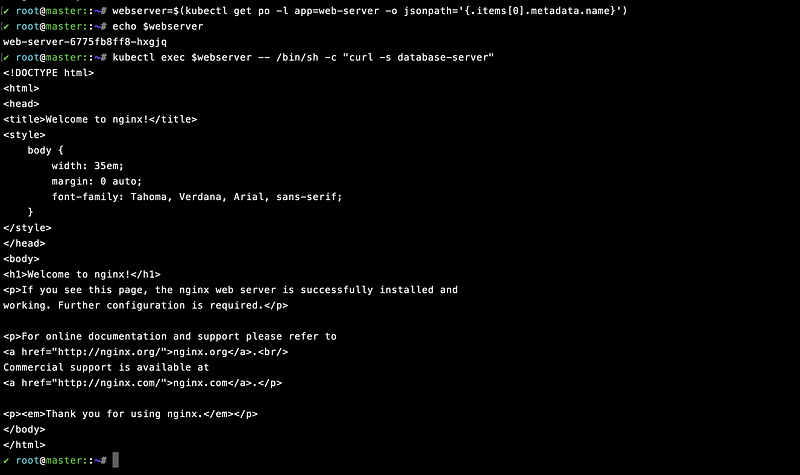
Communication between web-server and database-server
You should notice that the web-server can communicate with the database-server. This is the same with the other pods as well. You can check that by changing the role to kafka-server or any other server in the above command.
So, no we don't want the database-server to be accessible by every pod in the namespace. Instead only the kafka-server should be accessing it. i.e. only the pods with the label app=kafka-server should be able to communicate to the database-server ( i.e. with the label app=database-server ).
Let us now take a look at the manifests closely.
spec.podSelector: The labels of the pod to which this network policy is to be applied.
ingress.from.podSelector: The labels of the pods from which the ingress traffic is allowed.
ingress.ports: The ports to which the ingress communication is allowed.
Let us now apply the NetworkPolicy to see the change.
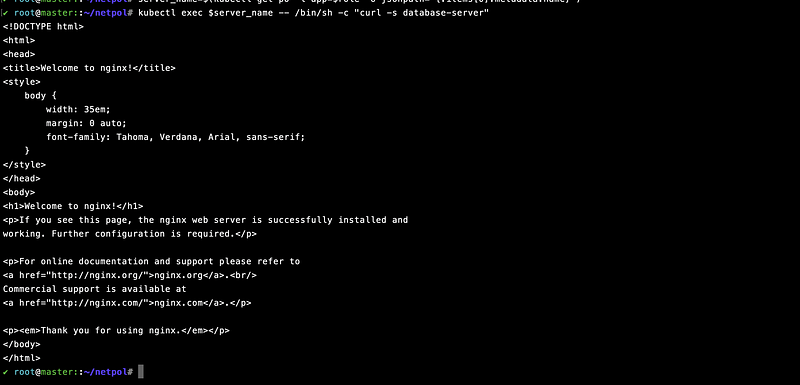
You should now be able to connect to the database-server pod from the kafka-server pod.
We should also restrict the traffic to the kafka-server pod to allow the ingress traffic only from the web-server pod. But this time let's make it a bit more interactive by visualizing the networking policies.

Image Credits: Google
Yes, you've read it right.editor.cilium.io makes it easy to build and visualize Network Policies, which can then be downloaded as YAML and run in any Kubernetes cluster. The YAML’s can also be uploaded to visualize them with a proper GUI.
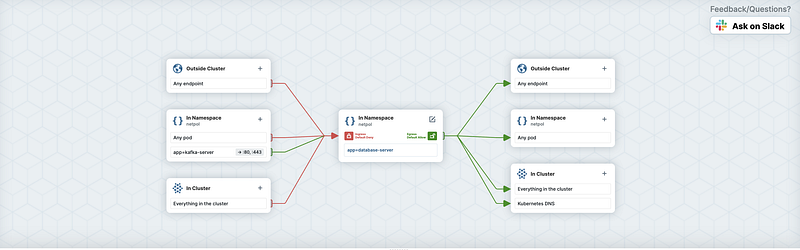
Cilium Editor
The box in the center represents the resource to which you are trying to apply the network policy to. The resource to your left represents the ingress policies and the resources to your right represent the egress policies. We should now restrict the traffic to the kafka-server pod to allow the ingress traffic only from the web-server pod.
Once you create the policy you should find the policy yaml created on the screen.
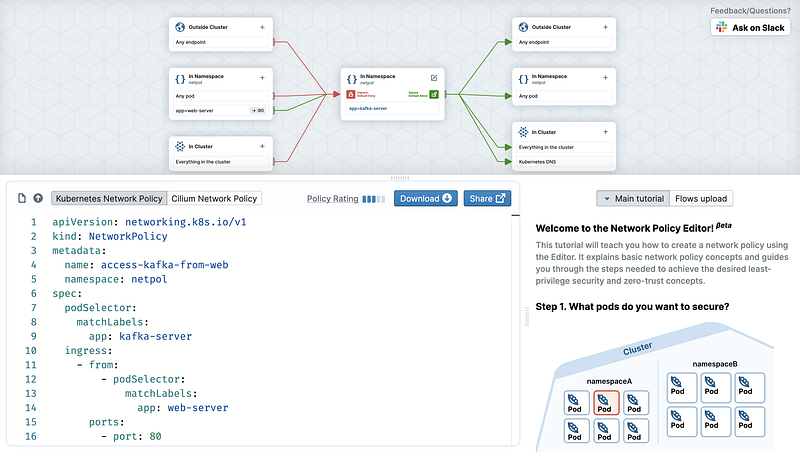
Network policy from cilium editor
We will now download and apply the policy to our Kubernetes cluster. I have already downloaded this to my GitHub repo.
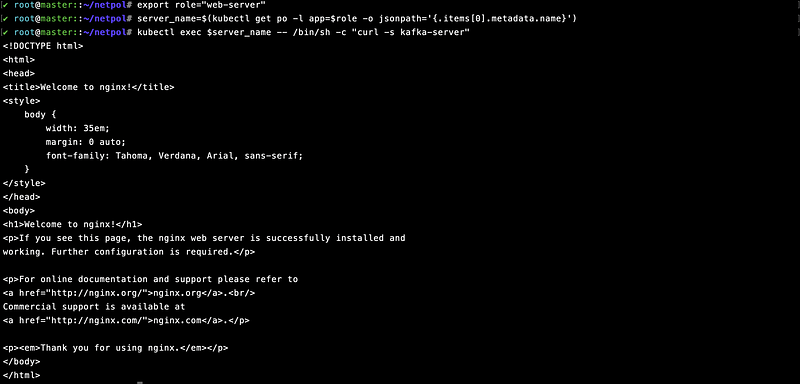
With the help of tools like https://editor.cilium.io/ understanding and visualizing, network policies are now made easier. Many more complicated network policies include selectors like CIDR block, namespaces, etc. I will try to cover them in my next article with an actual golang application.