
AutoScaling in Kubernetes ( HPA / VPA )
Autoscale your applications in Kubernetes using Vertical Pod Autoscaler ( VPA ) and Horizontal Pod Autoscaler ( HPA )
What is Autoscaling?
Autoscaling is a method that dynamically scales up / down the number of computing resources that are being allocated to your application based on its needs. For example, you might have a situation where the load on your website increases only at the end of every month. You might need additional web servers to handle the load at the end of every month. But what about the rest of the days, your servers sit idle and your monthly cloud bill also increases. With Autoscaling enabled the number of servers can be increased/decreased based on the load and the number of users. While the world moving towards the Kubernetes era, autoscaling plays a major role in the scalability of containerized applications. In this article, we will try to understand the various types of autoscalers available in Kubernetes and try to understand the best suitable autoscaler for application in Kubernetes.
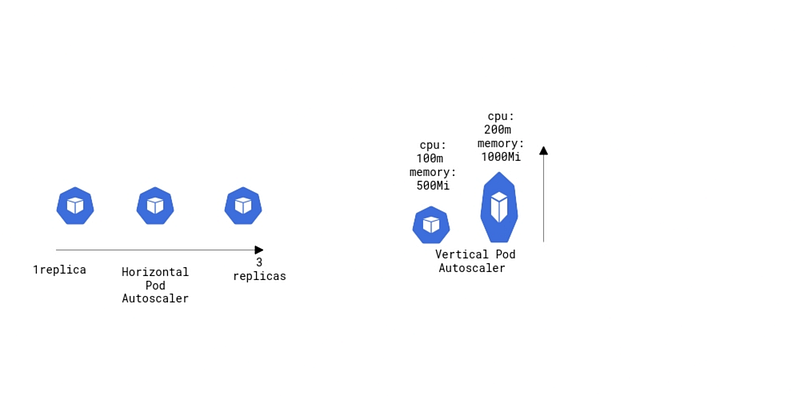
What is the entire story all about? (TLDR)
- Understand the various type of Autoscaling in Kubernetes ( HPA / VPA ).
- A live demo of both Horizontal Pod Autoscaler ( HPA ) and Vertical Pod Autoscaler ( VPA ).
Prerequisites
- A Kubernetes cluster ( Can be either On-Prem, AKS, EKS, GKE, Kind ).
Story Resources
- GitHub Link: https://github.com/pavan-kumar-99/medium-manifests
- GitHub Branch: autoscaling
Installing metrics server
For Horizontal Pod Autoscaler ( HPA ) and Vertical Pod Autoscaler ( VPA ) to work it requires the metrics to be exported from the kubelet. Metrics Server collects resource metrics from Kubelets and exposes them in Kubernetes apiserver through Metrics API for use by Horizontal Pod Autoscaler and Vertical Pod Autoscaler. You can install the metrics server from here. But if you are installing a metrics server on your local cluster ( Eg Kind, Self-Hosted Kubernetes Cluster, etc ) you will have to add these two additional flags as mentioned in the metrics server documentation.
- --kubelet-insecure-tls
- --kubelet-preferred-address-types=InternalIP
I have already created the manifests by adding the aforementioned entries. You can install them in your cluster by cloning my GitHub repo.
$ git clone https://github.com/pavan-kumar-99/medium-manifests.git \
-b autoscaling
$ cd medium-manifests/ $ kubectl apply -f metrics-server.yaml $ kubectl top po ( This should now return all the metrics of your Pod ). 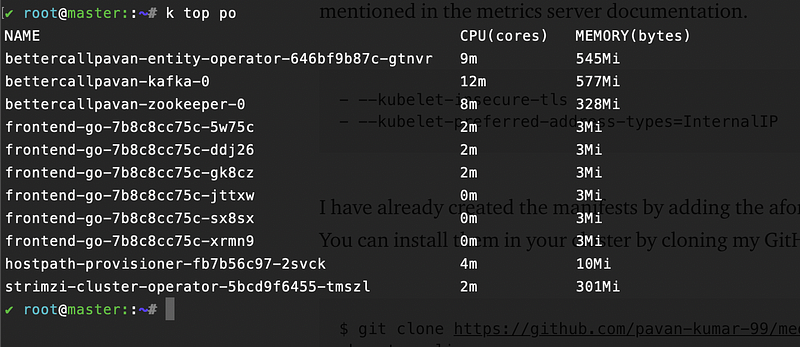
Horizontal Pod Autoscaler ( HPA )
Horizontal Pod Autoscaler scales the number of Pods in a Deployment. Statefulset, ReplicaSet based on CPU/Memory utilization or any custom metrics exposed by your application. The HPA works on a control loop. Each separate HPA exists for each Deployment, Statefulset, Replicaset. The HPA object constantly checks the Deployments, Statefulset, Replicaset’s metrics against the Memory/CPU threshold that you specify and keeps on increasing/decreasing the replicas count. By using HPA we will only be paying for the extra resources only when we need them. Alright, enough of the talk let us now get into action.
Let us deploy a sample Nginx deployment with the Kubernetes service type as LoadBalancer. Once the deployment is ready, let us deploy a Horizontal Pod Autoscaler ( HPA ) that would scale the replicas when the CPU utilization is greater than 50 percent.
$ git clone https://github.com/pavan-kumar-99/medium-manifests.git \
-b autoscaling
$ cd medium-manifests/$ kubectl apply -f deploy.yaml $ kubectl get svc k8s-autoscaler -o jsonpath='{.status.loadBalancer.ingress[0].ip}'
Once the deployments are ready, let us now create the HPA.
So this HPA says that the deployment k8s-autoscaler should have a minimum replica count of 2 all the time, and whenever the CPU utilization of the Pods reaches 50 percent, the pods should scale to 10 replicas. And when the CPU utilization comes below 50 percent the replicas will scale back to 2.
$ kubectl apply -f hpa.yamlWe will now send some curl requests to the service that we created earlier. When the CPU utilization goes about 50% we should see the replicas scaling to 10.
$ external_ip=$(kubectl get svc k8s-autoscaler -o jsonpath='{.status.loadBalancer.ingress[0].ip}')$ while true; do curl $external_ip ; done Once the CPU crossed the threshold ( i.e. 50 percent ) we should now see the pods being scaled up in the events of the HPA.
$ kubectl desribe hpa k8s-autoscaler
$ kubectl get deploy k8s-autoscalerNAME READY UP-TO-DATE AVAILABLE AGEk8s-autoscaler 10/10 10 10 28mLet us now stop send the curl requests. You should now see the replicas being scaled back to two (i.e. minReplicas ).
Cleanup
$ kubectl delete deploy k8s-autoscaler$ kubectl delete svc k8s-autoscaler$ kubectl delete hpa k8s-autoscalerVertical Pod Autoscaler ( VPA )
Unlike Horizontal Pod Autoscaler ( HPA ), Vertical Pod Autoscaler ( VPA ) automatically adjusts the CPU and Memory attributes for your Pods. The Vertical Pod Autoscaler ( VPA ) will automatically recreate your pod with the suitable CPU and Memory attributes. This will free up the CPU and Memory for the other pods and help you better utilize your Kubernetes cluster. The Kubernetes worker nodes are used efficiently because Pods use exactly what they need. The Vertical Pod Autoscaler ( VPA ) can suggest the Memory/CPU requests and Limits and it can also automatically update it if enabled by the user. This will reduce the time taken by the engineers running the Performance/Benchmark testing to determine the correct values for CPU and memory requests. Alright, let us now get into action.
HPA comes with the K8s cluster by default. Let us install VPA in our K8s cluster.
$ git clone https://github.com/kubernetes/autoscaler.git$ cd autoscaler/vertical-pod-autoscaler/$ ./hack/vpa-up.sh $ kubectl get po -n kube-system 
Let us now deploy a sample nginx deployment that requests 1GB of RAM and 200m of CPU and the limits would be 50Gi of RAM and 500m of CPU.
resources: limits: cpu: 500m memory: 50Gi requests: cpu: 200m memory: 1GiHowever, the above spec is way too much for an idle nginx deployment. Let us see how Vertical Pod Autoscaler ( VPA ) helps us here.
$ git clone https://github.com/pavan-kumar-99/medium-manifests.git \
-b autoscaling
$ cd medium-manifests/$ kubectl apply -f deploy.yamlThe above Vertical Pod Autoscaler ( VPA ) says to automatically recreate the pods in the deployment with the CPU/Memory values given by Vertical Pod Autoscaler ( VPA ). If the updateMode is set to "Off" it will only give us the recommendations but it will not update the pods ( in the deployments ) automatically.
$ kubectl apply -f vpa.yamlNow when you describe the VPA you should see that the VPA has already given us the recommendations for our pods and has recreated them with the new memory requests and limits.
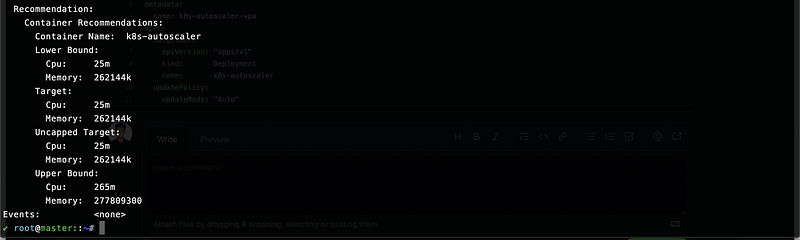

We will validate this by selecting one of the replicas and describing their memory/CPU resources.
$ kubectl get po k8s-autoscaler-588f96c849-j5h4m -o jsonpath='{.spec.containers[0].resources}' | jq .{"limits": {"cpu": "62m","memory": "12500Mi"},
"requests": {"cpu": "25m","memory": "262144k"}
}
If you want to apply these VPA’s to all the deployments across all the namespaces in your Kubernetes cluster, you can use the script in the repository. This will enable the VPA Auto mode for all the pods in your Kubernetes cluster, except for the kube-system as you might not want your cluster to go down if the api-server pod gets restarted multiple times.
$ sh enable_vpa_all.sh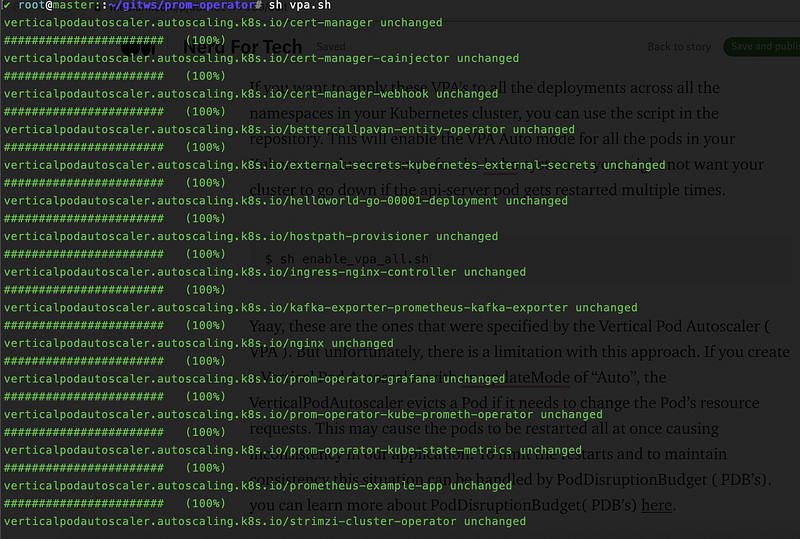
Yaay, these are the ones that were specified by the Vertical Pod Autoscaler ( VPA ). But unfortunately, there is a limitation with this approach. If you create a Vertical Pod Autoscaler with an updateMode of “Auto”, the VerticalPodAutoscaler evicts a Pod if it needs to change the Pod’s resource requests. This may cause the pods to be restarted all at once causing inconsistency in our application. To limit the restarts and to maintain consistency this situation can be handled by PodDisruptionBudget ( PDB’s). you can learn more about PodDisruptionBudget( PDB’s) here.
$ kubectl apply -f pdb.yamlThis PDB ensures that the 1 replica of the deploy k8s-autoscaler runs all the time without any restarts. This will eventually ensure that our application is highly available and consistent across various cluster disruptions.
Cleanup
$ kubectl delete deploy k8s-autoscaler$ kubectl delete svc k8s-autoscaler$ kubectl delete vpa k8s-autoscaler$ kubectl delete pdb k8s-autoscaler-pdbConclusion
- Horizontal Pod Autoscaling and Vertical Pod Autoscaling can be used together known as
MultidimPodAutoscaler( GKE Feature ). - HPA and VPA should not be used together to evaluate CPU/Memory. However, the ideal scenario can be that VPA can be used to evaluate CPU or Memory whereas HPA can be used to evaluate external metrics ( like the number of HTTP requests or the number of active users, etc ).
Thanks for reading my article. Hope you have liked it. Here are some of my other articles that may interest you.
Till we meet again………..


