
My SEO Video Strategy Increases First Page Google Rankings by 53%
My complete process in five steps

When it comes to ranking content, few things move the needle as much as video.
In this article, I’m going to break down my complete SEO video strategy that doubles engagement, gets three times as many backlinks, and increases first-page ranking on Google by up to 53%.
SEO stands for search engine optimization.
Now, video isn’t magic and I can’t guarantee these exact same results for everyone.
There are a ton of other factors that affect how well you will rank on Google. However, all other things being equal, video is an excellent way to boost your chance of higher rankings.
Here is my complete SEO video strategy.
My Exact SEO Video Strategy
To hopefully make my process as replicable as possible, I’ll divide the strategy into five distinct but related parts.
Those five parts are:
- How often I add videos to my articles
- What videos I use
- Where I put videos on the page
- How I get more people to watch the video
- What I do to add even more SEO magic
Each part is super important, so let’s look at them one at a time in a bit more detail.
How Often I Add Video to My Articles
I have always been a huge proponent of incorporating video into my content marketing strategy.
I believe that video is an incredibly powerful tool for engaging an audience and boosting engagement on articles, as well as helping with SEO. For this reason, I always make sure to include a relevant video in the majority of my articles.
My goal is to always include a relevant and helpful video. There are two reasons for this: SEO and dwell time.
On the one hand, including videos can help to improve my on-page SEO significantly. By having keyword-rich videos on my pages, I am able to signal to search engines that the content on that page is important and relevant, which can help it rank higher in search results.
On the other hand, adding videos also helps me boost dwell time on my articles.
Dwell time measures how long a visitor spends reading and viewing content on a website or article, and high dwell time is correlated with better ad placements and higher affiliate revenue.
The more time people spend consuming my content, the more money I make — so adding videos helps me increase my earnings.
What Videos I Use
In my work as a blogger, I am constantly on the lookout for engaging content to share with my audience. Whether it’s an article, infographic, or video, quality is key when it comes to creating shareable content.
That’s why I focus on using the best possible videos in my articles.
When it comes to selecting videos to use on my blog posts, there are a few different criteria that I consider. For one thing, I always ask myself whether I can create a better video myself.
If I think that I can create something more engaging or comprehensive than the existing video, then I will generally opt for making my own.
However, if I feel like another creator has done a great job with the topic and created an excellent video, then I might decide to use their content instead.
Here is how I find and choose videos on YouTube:
- I go to YouTube and type my keyword into the search box
- I usually go with the first or second video that shows up in YouTube search
- I look at how old the video is and how related it is to my topic
- Ideally, the video includes my keyword in the title and thumbnail
- I always watch the video to make sure I feel comfortable with the quality and content
Another method I use is to type my keyword into Google search. Some results will include videos on the first page results. If so, I look at the first video that shows up — it’s usually the best and most relevant (at least to Google).
If no video shows up in the “All” search (the normal Google Search), I will click on Video:
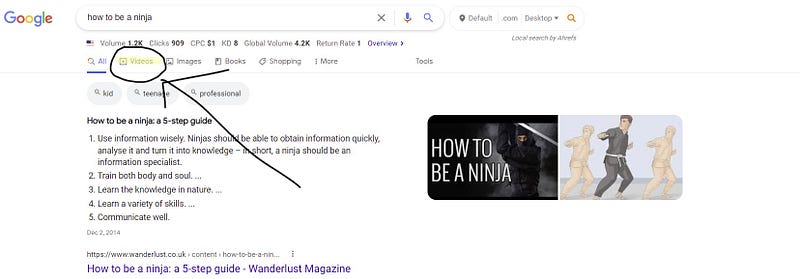
That takes you to a video Google search. Again, I’ll choose the highest-ranking relevant video.
Where I Place Videos On the Page
I almost always place my videos strategically 1/3 to 1/2 way down the page, usually between the second and fifth H2 subheading.
For example, this video that inspired the article you are reading:
Most people won’t read an entire article, so by placing the video in a prime location, I’m more likely to grab their attention and keep them on the page longer.
Plus, adding a video in this spot also allows me to offer more value by providing helpful information in a visual format.
However, there are times when placing the video at the top of the page makes more sense, such as when the video is the most important part of the article or when I think people clicked on my article expecting to find a video.
That’s pretty rare for my content, though.
Ultimately, it’s all about strategically placing your videos to ensure maximum impact.
How I Get More People to Watch the Video
I don’t always get this part right, but what I do is hype up the video a bit. I’ll say something like, “Here’s a good video that shows you exactly how to XYZ.”
The XYZ is often related to the topic, keyword, and a tangible benefit the reader might like.
For example, “Here’s a good video that shows you exactly how to automatically embed relevant, high-quality YouTube videos on your blog.”
As long as the video is related to the topic, some people might click.
The better thumbnail and hype job that I do, the more people will watch at least a little bit of the video.
What I Do to Add Even More SEO Magic
If you’re serious about ranking in search, then you need to do everything you can to send strong signals to Google that your content is relevant to the keywords for which you want to rank.
One simple way to do this is to include your keywords in the citation portion of any videos you embed on your website or blog.
For example, if you’re embedding a video about blogging tips, you could cite it as, “YouTube Video by Writing Secrets — 7 Quick Wins for Brand New Bloggers.”
This small SEO tweak will help send a powerful signal to Google.
Final Thoughts
Overall, integrating videos into all of my articles has been an extremely valuable strategy in growing my online business and monetizing my website’s content effectively.
I hope this article helps you implement an SEO video strategy for your own success.
Read more:
- Update These 3 Types of Content for a 75% Boost in Traffic
- Use “Sloth” Words in Your Titles for 57% Higher CTR
- What Is Copymatic AI Writer? (Explained for Beginners W/ Examples)
If you want to support my writing, become a Medium member. If you do, I will get a small commission. Thanks!