avatarNuno Campos

Summary

The article discusses the author's current Obsidian plugin setup, detailing the specific plugins used for various productivity and organizational enhancements.

Abstract

In the continuation of a series on Obsidian setups, the author delves into the specific plugins they are currently utilizing to optimize their workflow within the Obsidian knowledge management application. These plugins include Dashing Cursor for visual cursor effects, Editor Syntax Highlight for code block syntax highlighting, MetaEdit for managing YAML data, Multi-Column Markdown for creating multi-column content, Natural Language Dates for easier date input, Obsidian Charts for interactive chart creation, Obsidian Markmind for mind mapping, Obsidian42 — BRAT for beta plugin testing, Strange New Worlds for visualizing note connections, Outliner for creating collapsible lists, and Ozan's Image in Editor Plugin for viewing media directly in the editor. The author provides examples and use cases for several of these plugins, emphasizing their utility in managing tasks, organizing notes, and enhancing the overall Obsidian experience.

Opinions

  • The author finds the Dashing Cursor plugin reminiscent of Neovide's cursor effects, though not as advanced.
  • MetaEdit is praised for its ability to auto-populate properties in notes, particularly for managing the status of notes in the inbox folder.
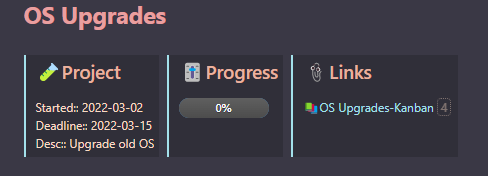
  • Multi-Column Markdown is highlighted as a useful tool for organizing content in a visually appealing way, as seen in the author's Home Dashboard and Project "OS Upgrades" Home Note.
  • Natural Language Dates is described as very handy for adding or editing tasks, streamlining the process of working with dates.
  • Obsidian Charts is used occasionally for presenting data in a more engaging manner than plain text.
  • Obsidian Markmind is primarily used for creating mind maps, indicating a preference for visual organization.
  • Obsidian42 — BRAT is utilized to test beta plugins, showcasing the author's interest in staying on the cutting edge of Obsidian plugin developments.
  • Strange New Worlds is appreciated for its ability to reveal connections between notes, enhancing the understanding of the vault's structure.
  • The Outliner plugin is valued for its RoamResearch-like list functionality, including collapsible levels and hotkeys.
  • Ozan's Image in Editor Plugin is noted for its convenience in viewing images and other media types without leaving the editor view.

My Obsidian Setup (Part 31) — Plugins I’m Using Now (2/3)

This article is the continuation of this one:

So I’ll continue to show what plugins I’m using right now.

Dashing Cursor

This plugin adds a dashing effect between your cursor positions, like on Neovide (well, not as good as Neovide yet). GitHub here.

Editor Syntax Highlight

Enables syntax highlighting for code blocks in the editor. GitHub here.
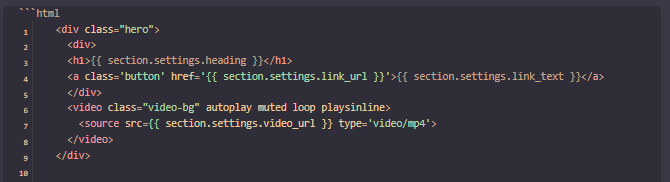
Editor Syntax Highlight. Image by Nuno Campos

MetaEdit

This plugin helps you manage your notes' YAML data. GitHub here.

I’m using it, for example, to set auto-properties for some notes. When I add a new note to my inbox folder, I want it to have a status, and the status value must be read, unread, attention, or pin.
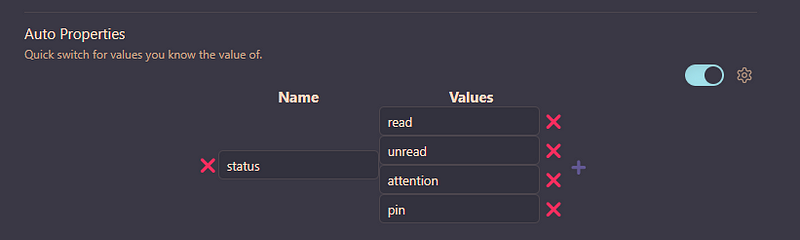
MetaEdit settings. Image by Nuno Campos

Multi-Column Markdown

Allows you to create multi-column content, which also works within preview mode. GitHub here.

I’m using this in several notes, like:
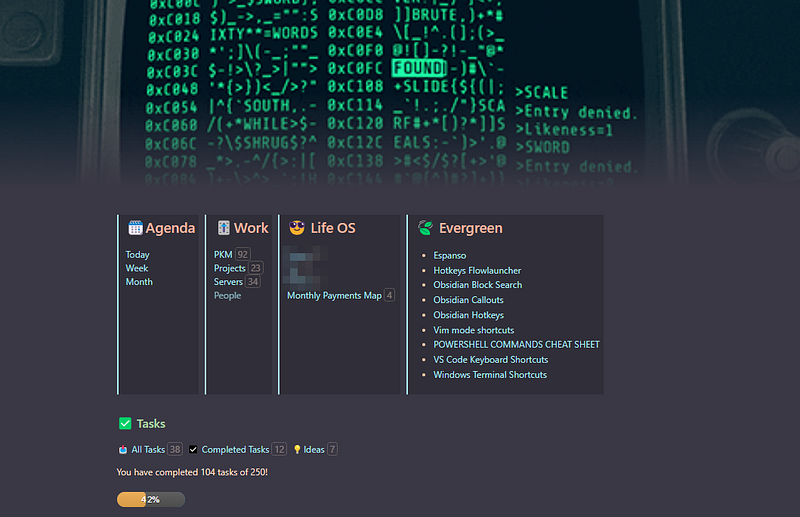
Home Dashboard. Image by Nuno Campos
Project “OS Upgrades” Home Note. Image by Nuno Campos

Natural Language Dates

Makes it easier to work with dates by allowing you to use natural language syntax like today, tomorrow, next week, etc. GitHub here.

This feature is very handy when adding or editing tasks.

Obsidian Charts

Allows you to create interactive charts. GitHub here.

I use this sometimes when I want to present data to someone else and want to show something more eye-catching than just raw data.

Obsidian Markmind

Mind map, outline and pdf annotate tool. GitHub here.

Use this mainly to create mind maps.

Obsidian42 — BRAT

Beta Reviewers Auto-update Tester enables you to test plugins that are still in beta. GitHub here.

Use this to test some plugins that catch my attention. The latest I tried using BRAT were Strange New Worlds and Projects.

Strange New Worlds

Allows you to see the connections that links, block references, and embeds have with other files. In other words, it will allow you to better understand the connections in your vault. GitHub here.
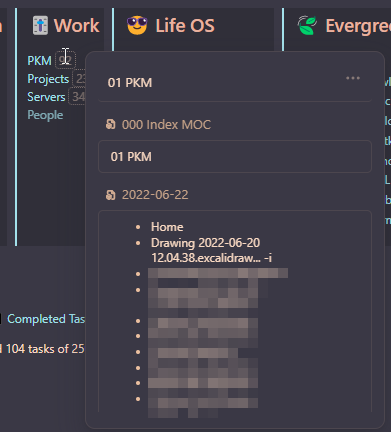
Strange New Worlds connections and preview of the connected files. Image by Nuno Campos

Outliner

Create lists like RoamResearch, allowing top levels to collapse or expand, drawing vertical indentation lines, assigning hotkeys to multiple actions in the lists, etc. GitHub here.

Ozan’s Image in Editor Plugin

Allows you to view images, iframes, PDF files, and other block types in the editor view without switching to preview mode. GitHub here.

You can read the previous parts of My Obsidian Setup series here:

Click here to be notified every time I publish a new story 😉.

If you’re not a Medium member yet and wish to support me or get access to all my stories, click here.

Programming
Obsidian
Productivity
Notes
Notetaking
Recommended from ReadMedium