
Multi-Session Compromise
ACM.146 How session compromise could defeat segregation of duties
~~~~~~~~~~~~~~~~~~~~~~~~~~~~~~~~~~~~~~~~~~~~~~~~~~~~~~~~~~~
⚙️ Check out my series on Automating Cybersecurity Metrics. The Code.
🔒 Related Stories: IAM | AWS Security | Data Breaches | Penetration Testing
💻 Free Content on Jobs in Cybersecurity | ✉️ Sign up for the Email List
~~~~~~~~~~~~~~~~~~~~~~~~~~~~~~~~~~~~~~~~~~~~~~~~~~~~~~~~~~~
Yesterday I explained some of the issues related to session compromise.
Then I mentioned that I have one other concern [at least] for this approach of using two different roles for separation of duties to limit an abuse of create user permissions.
The way I have been demonstrating segregation of duties in these posts up till now is with all my code on one host where I execute commands with one user that requires MFA to assume a role — and then the next command might get executed by a different user role that requires a different MFA device to assume.
What happens during this scenario? Let’s say I run a command with the IAM administrator role. It pops up an prompt for an MFA token. I enter it. A session gets created and some temporary tokens are cached on my machine.
Next I run a command as the KMS administrator. A prompt appears for me to enter my token so I enter a token from the MFA administrator profile.
Now let’s say I fixed or added something in one of my IAM scripts. I go back and run it to update my implementation. What happens?
The AWS CLI does not prompt me again for my MFA code because the session credentials are now cached on the host, as explained in my last post — for both roles.
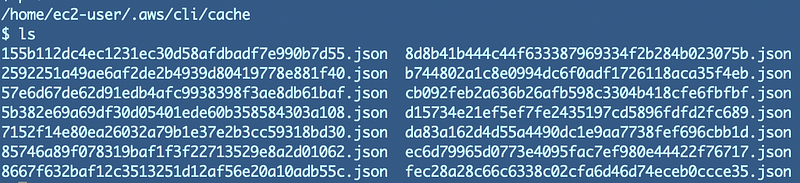
You might see where I’m going with this. Let’s say I split my IAM Administrator into two roles — IAM User Administrator and IAM Access Administrator. I’m running scripts for both users with both roles have active sessions.
Now let’s say an attacker gets onto the machine where I have an active session for both users. Now the attacker or a malicious insider who is aware of all this has everything required to escalate privileges using the two sets of temporary credentials for that session.
I feel like the AWS SSO UI has the same issue. In the past when you switch roles at least you had to enter an account and a role (unless you were using something like Active Directory federation that provides a pop up screen with a list of accounts).
Here’s an image from the AWS Security blog that shows once you login you can simply click a link to get to any account, including programmatic access. As I noted in a prior post, I don’t see a way to turn that programmatic access off with AWS SSO at the time of this writing (with except for recent billing policy action changes.)
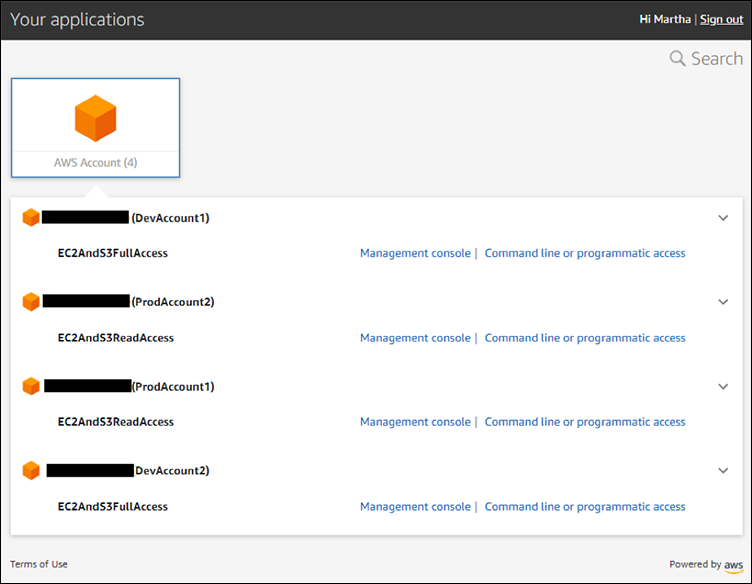
If an attacker gets onto a user’s machine and the user is using a low privilege role, but all the attacker has to do is go to the main SSO page for the organization and click a different link to elevate privileges, so can malware on that user’s machine.
It would be nice if AWS would at least let you provide a separate MFA device for different roles and require the user to re-enter the MFA device to assume the higher privilege role.
I wrote about that fix here:
By the way, the way around this is to give the user two logins — one for sensitive actions and one for every-day use. Then at least the attacker is somewhat limited.
An even better approach is the one I want to show you — eventually…we’re getting there.
Revoking IAM Sessions for an assumed role
One way to try to prevent this would be to revoke the session of the assumed role as soon as a script run by that role is complete. Then assume the next role with the second set of credentials.
Here are the steps:
- Run a script with a particular session and the related keys.
- Revoke the session.
- Assume the next role and run the next script.
- If you need to go back and user the first user, revoke the second user’s session.
What’s the problem with that approach?
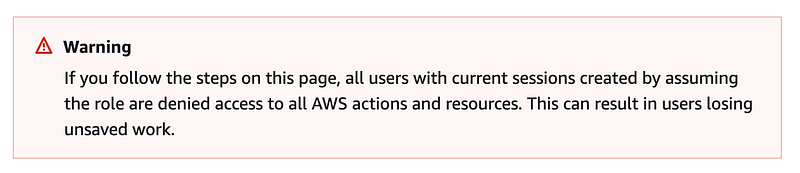
First of all you can’t really revoke sessions on AWS. You have to update policies to disallow actions.
As stated at the top of the page, you’re going to block all users who have assumed the role, not the single session you want to terminate. This is not really a session revocation. This is just a permission change and it’s not ideal to be changing IAM policies around frequently unless the purpose of the change is to change permissions, so this is not a good approach. I hope AWS will provide a better way to revoke sessions in the near future. #awswishlist
Running all your scripts in this linear fashion might prevent some parallel processing to speed up completion of tasks.
It’s also just got a fragile feel to it. Someone is going to forget to revoke a session and then you’ll have problems.
Running sessions on separate compute resources
Another approach would be to execute the scripts on different compute resources. If an attacker breaks into one system they would need to break into the other in order as well to compromise both sessions at the same time and perform their desired task.
This presumes you don’t have a scenario where all the systems have the same network access with the same vulnerability.
Now the weak point is that if one user is testing with both accounts, the attacker may be able to get into multiple compute resources via the same user workstation.
Let’s say the user is logged into two RDP or SSH sessions. Or perhaps the user has two windows open with an AWS CloudShell session running and the attacker has access to all the browser windows.
This is a better solution, though it still could pose a risk.
Automation
We could also use automation such that it is harder for an attacker to get a handle on both sessions because the roles are leveraged in two different batch jobs, for example. That’s where I’m going with ultimately. In production we can provide more separation and segregation.
In the development workspace, hopefully there’s less useful things for an attacker to steal or attack. And hopefully you have backups to recover from ransomware. Also, ideally you have monitoring in place such as unsuccessful network access on a private network or attempts to access canaries or honey tokens.
Short session duration
Well, I don’t see a great solution here for commands run manually, but one thing we can do is short term is set a short session duration for a role that performs sensitive actions. Hopefully people performing sensitive security-related actions such as policy changes will not mind the short duration.
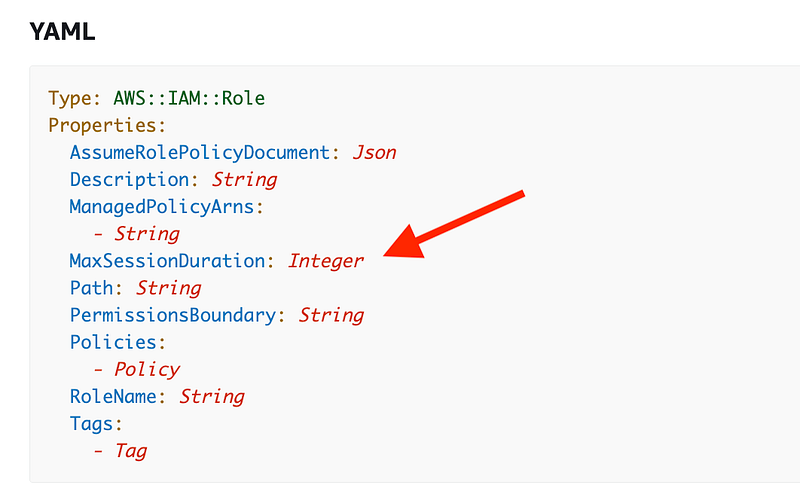
Just a note that you might not want a short duration for all roles. Some roles need to run scripts that take a long time. Also developers are writing code all day and are in non-production environments. (You do have developers working only in non-production environments, right?) Those types of systems and users may be safer to grant longer session durations, but you’ll have to evaluate your particular environment.
Since we have one role-creation template, we’ll want to consider these variations and create a way to set a default duration and have the capability to override it if needed.
There’s one other way I can potentially break up my user creation and user access roles. What if the users are not created on AWS? I’ll explore that next.
Follow for updates.
Teri Radichel | © 2nd Sight Lab 2023
About Teri Radichel:
~~~~~~~~~~~~~~~~~~~~
⭐️ Author: Cybersecurity Books
⭐️ Presentations: Presentations by Teri Radichel
⭐️ Recognition: SANS Award, AWS Security Hero, IANS Faculty
⭐️ Certifications: SANS ~ GSE 240
⭐️ Education: BA Business, Master of Software Engineering, Master of Infosec
⭐️ Company: Penetration Tests, Assessments, Phone Consulting ~ 2nd Sight Lab
Need Help With Cybersecurity, Cloud, or Application Security?
~~~~~~~~~~~~~~~~~~~~~~~~~~~~~~~~~~~~~~~~~~~~~~~~~~~~~~~~~~~~~
🔒 Request a penetration test or security assessment
🔒 Schedule a consulting call
🔒 Cybersecurity Speaker for PresentationFollow for more stories like this:
~~~~~~~~~~~~~~~~~~~~~~~~~~~~~~~~~~~~~~~~~~~~~~~~~~~~~~~~~~~~~
❤️ Sign Up my Medium Email List
❤️ Twitter: @teriradichel
❤️ LinkedIn: https://www.linkedin.com/in/teriradichel
❤️ Mastodon: @teriradichel@infosec.exchange
❤️ Facebook: 2nd Sight Lab
❤️ YouTube: @2ndsightlab