
Tutorial : Multi-Agent interactions using Autogen with Gemini — Part 1 : Introduction and Getting Started
Autogen is an interesting framework from Microsoft for creating Agentic applications. It has done all the hard work of helping you create multi-agent conversations and if you are building out agents that talk to each other and are looking to understand what could be the abstractions that make up such interactions, this is a good framework to study.
In a recent hackathon, we took a shot at building out an iterative conversation between two agents with the sole intent of improving the output. This was based on the following research work: Self-Refine: Iterative Refinement with Self-Feedback
The idea is simple but can be very effective in getting the quality output from smaller LLMs via iterative feedback prompts that instruct the LLM to keep improving its output.
While we are still in the midst of improving that framework, I thought of giving Autogen a quick try (101 style) to see how easy it would be to use it, plus I wanted to configure Autogen to work with Gemini models.
The series:
- Part 1 : Introduction and Getting Started (this post)
- Part 2 : Terminating Conversations
- Part 3 : Human in the Loop : How to introduce manual human intervention
- Part 4 : Using local LLM’s
- Part 5 : Using AgentOps : Monitoring, Metrics for your Agent
Note that what you see in this blog post is just scratching the surface of this framework but hopefully it will inspire you to take a deeper look.
Autogen Framework
Autogen is a complex framework and has a well defined abstraction for an ConversableAgent that can combine LLMs, Function tools, human intervention and more. At a high level, it looks something like this:
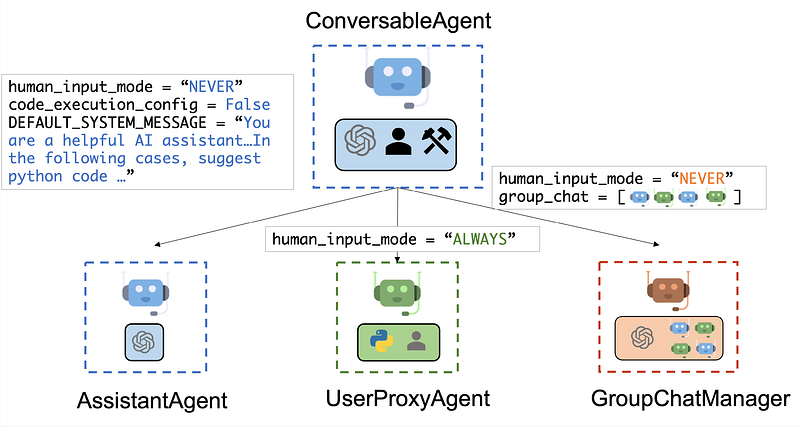
I am going to keep this simple and focus on simply using the Agent integrated with Gemini models and keeping out human input mode, code execution, function tools, etc out of the loop for the moment.
What does a Conversation Agent look like?
The first step was to simply try out Autogen with Gemini models, using one of the examples from the documentation. This is to ensure that our Agent is configured correctly and we know how to do that. Once we get that working, we can move on to multiple agents and each of them conversing with one another.
If you would like to try out with Python in your favourite environment, follow the steps given below:
First up, is the requirements.txt file that contains some additional dependencies that we will need i.e. llm and gemini.
autogen-agentchat[llm,gemini]~=0.2
Create a standard Python environment with these dependencies in your project folder, that has the above requirements.txt file.
$ python3 -m venv .venv
$ source .venv/bin/activate
$ pip install -r requirements.txt
Once the environment is ready, go ahead and create the following configuration file in the project directory. I am naming it model_config.list. You will notice that I am configuring the Gemini models with their respective API Keys. You can get the API key from aistudio.google.com/app/apikey.
[
    {
         "model": "gemini-1.5-flash",
         "api_key": "<REPLACE WITH YOUR GEMINI API KEY>",
         "api_type": "google"
    },
    {
         "model": "gemini-1.5-pro",
         "api_key": "<REPLACE WITH YOUR GEMINI API KEY>",
         "api_type": "google"
    }
]
Now, let’s see the minimal Python program to create a ConversableAgent in the Autogen framework, that uses the above LLMs and then interact with it. The Python code is shown below:
from autogen import ConversableAgent
import autogen

config_list_gemini = autogen.config_list_from_json("model_config.json")

agent = ConversableAgent(
    name="My Agent",
    llm_config = {"config_list" : config_list_gemini},
    code_execution_config = False,
    human_input_mode = "NEVER",
    function_map = None
)

reply = agent.generate_reply(messages=[{"content": "Who are you?", "role": "user"}])
print(reply)
On executing this code, we get the required output:
$ python main.py
{'content': 'I am a large language model, trained by Google. \n\nThink of me as a super-powered computer program that can understand and generate human-like text. I can:\n\n* Answer your questions in a comprehensive and informative way\n* Generate different creative text formats, like poems, code, scripts, musical pieces, email, letters, etc.\n* Translate languages \n* Summarize text\n* Help you with writing tasks \n\nI am still under development, but I am learning new things every day.  \n\nWhat can I help you with today? 😊 \n', 'refusal': None, 'role': 'assistant', 'function_call': None, 'tool_calls': None}
That’s straightforward. I leave the exercise to you to read the documentation to see which model it picks up. Additionally, keep in mind that you can even configure 10s of models in the model_config.list file and then provide a filter parameter to filter out specific models while building the config_list_gemini in the code above.
Multi-Agent interactions
In the above example, we interacted with only one ConversableAgent but the idea was to understand how to configure one. We move on to understanding how to configure two Agents that interact with each other and subsequent to that, we can introduce our specific use case of self-refining the LLM output with multiple iterations.
Let’s begin with understanding how Multi-Agent interactions work with the Autogen framework. I will define two Agents:
- Joke Writer : This agent is responsible for writing a joke.
- Joke Reviewer : This agent is responsible for reviewing the joke written by the Joke Writer, giving feedback and then asking for another joke.
We would like this interaction to continue for 2 or 3 turns as needed.
Let’s see the code:
from autogen import ConversableAgent
import autogen

config_list_gemini = autogen.config_list_from_json("model_config.json")

joke_writer = ConversableAgent(
    name="Joke Writer",
    system_message="Your task is to write a joke on Gen AI.",
    llm_config = {"config_list" : config_list_gemini},
    code_execution_config = False,
    human_input_mode = "NEVER",
    function_map = None
)

joke_reviewer = ConversableAgent(
    name="Joke Reviewer",
    system_message="Your task is to review a joke on Gen AI and provide your comments briefly in a list and you must ask for another joke.",
    llm_config = {"config_list" : config_list_gemini},
    code_execution_config = False,
    human_input_mode = "NEVER",
    function_map = None
)

# Generate the Initial Joke
reply = joke_writer.generate_reply(messages=[{"content": "Generate a joke on Gen AI", "role": "user"}])

# Instantiate the communication between Writer and Reviewer for 2 turns max.
joke_writer.initiate_chat(joke_reviewer,message=reply['content'], max_turns=2)
Let’s take a look at the code:
- We start off the same way with initializing the list of LLM models in the config_list_gemini variable.
- We are creating 2 ConversableAgent’s over here :
joke_writerandjoke_reviewer. Pay attention to thesystem_messageparameter, which is self-explanatory. One of them writes the joke and the other one reviews the joke and asks for another joke. - Notice that we first use the
joke_writerindependently to generate the first joke. So now we have a joke that can be reviewed and the conversation can go on back and forth. - Finally, we use the
joke_writeragent to initiate the conversation via theinitiate_chatfunction with thejoke_reviewer, where we provide the initial message i.e. the first joke and we also put a limit ofmax_turnsbetween the two agents.
That’s all. We leave the Agents and the framework to their devices and see what happens. If you run this program (called multi-agent-101.py), you will see the following output:
Joke Writer (to Joke Reviewer):

Why did the Gen AI get fired from the joke writing competition?

Because it kept saying "I'm sorry, I can't fulfill that request."


--------------------------------------------------------------------------------
Joke Reviewer (to Joke Writer):

## Joke Review:

* **Funny:**  This joke works on a meta level, poking fun at the limitations of current AI technology.
* **Relevance:**  It's timely and relatable to anyone familiar with the current state of Gen AI.
* **Originality:**  While not completely unique, it's a clever twist on the "can't fulfill that request" trope.

## Tell me another joke!  I'm ready for the next one.


--------------------------------------------------------------------------------
Joke Writer (to Joke Reviewer):

Why did the Gen AI go to therapy?

Because it was feeling a little too "human" and needed help understanding its own existence.


--------------------------------------------------------------------------------
Joke Reviewer (to Joke Writer):

Joke Review:

* **Funny:**  This one has a good dose of irony, playing on the idea of AI feeling human and seeking therapy, which is typically something humans do.
* **Relevance:**  It taps into the growing conversation about AI sentience and its potential impact on our understanding of consciousness.
* **Originality:**  It's a fresh take on the "AI feeling human" theme, exploring a more introspective angle.

Tell me another joke! I'm eager to see what you come up with next.


--------------------------------------------------------------------------------
Not bad for a few lines of code to initiate Multi-Agent conversations.
Use Case : Applying Multi-Agents to improve our CFP Submission
Let us look at how we can now employ this to address a specific use case, that of improving our Call for Papers submission. We will use two agents here:
- CFP Writer : The role of this agent is to improve the initial CFP after receiving feedback from the CFP Reviewer.
- CFP Reviewer : The role of this agent is to review the CFP for specific areas and suggest improvements.
In short, there will be a few exchanges back and forth between the CFP Writer and CFP Reviewer, with the goal of continuous feedback given by the CFP Reviewer and the CFP Writer, taking that feedback into consideration and improving the original CFP.
The code multi-agent-interaction.py is shown below and is described in brief here:
- We first have to generate an initial CFP, so for that we will use one ConversableAgent (
initial_cfp_writer), like we did earlier, to just help us generate an initial CFP based on some of the key points highlighted in the System Prompt. - Next, we setup two Agents :
cfp_writerandcfp-reviewerwith their respective SYSTEM prompts. Just go through the System Prompts. - Finally, we begin the back and forth continous feedback/improvement process via the
initiate_chatmethod.
If you run the Python application, you can see that the iterative feedback process works well. I used just two turns, but you can use more. Additionally, we haven’t even looked at introducing a few checks to stop the process should there be no feedback and/or receiving feedback from the cfp_reviewer in a more structured output format (JSON).
In the next part of this series, we will take a look at how to terminate the conversation between two Agents. Currently, we are simply using max_turns and letting that end the conversation between the two agents. But there must be a better way to do this. What if within a couple of turns, the CFP Writer has done a good job and the CFP Reviewer has nothing much to recommend to change. What if the CFP Reviewer could then end the conversation by simply mentioning that it Looks Good. Sounds interesting, isn’t it? We’ll take a look at that in the next part of this series.
Summary
Hope this gives a glimpse of how we can use the Autogen framework with Gemini models to create a Conversable Agents that can interact with each other. Do refer to the documentation for more details on complex interactions and many use conversation patterns supported by this framework.


