
Most Important Things You Need to Consider when Building CI/CD Pipelines
What are CI/CD Pipelines, and how can we get the most out of them
In a new age of cloud computing and the ever-increasing demand for complex architecture, DevOps is quickly evolving and rapidly becoming one of the most desired skill sets for any developer. The speed and confidence with which you can deliver features to your users becoming increasingly important. CI/CD provides stability using a streamlined pipeline to get your changes to market faster.

What is CI/CD
CI/CD is a hugely popular DevOps practice that creates quick and easy pipelines for developers to get their code into production. These usually include testing facilities, build automation, and staging and production systems deployments. We can leverage automation tools to trigger pipeline flows whenever code is committed to source control.
Continuous Integration (CI) is a practice in which code can get integrated on demand, as often as hundreds of times a day, depending on the company’s size. This Integration piece will verify the code written and ensure that it doesn’t contain bugs, and can give early feedback on the impacts of the new features.
Continuous Delivery (CD) is our next step in the pipeline. This methodology intends to ensure that after each and every commit, the code is pushed to production systems. This will include build automation and deployment steps to push the change through staging environments all the way to a live system.
Amazon has utilized CI/CD concepts and tools to boast a deployment frequency of every 7 seconds!
What is a pipeline?
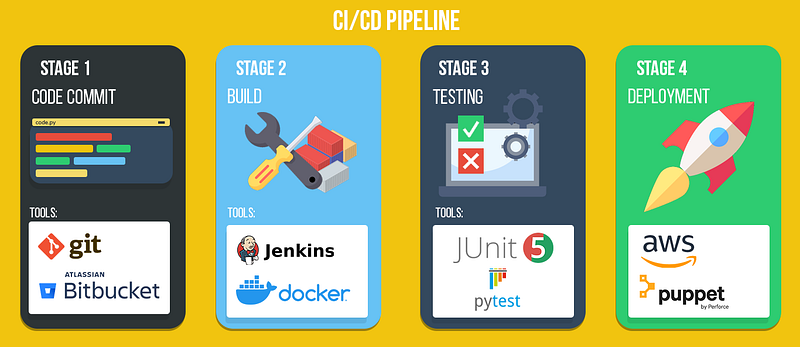
A pipeline is a sequence of actions triggered to progress our new code through our software delivery stages. A typical pipeline will go through steps such as building, testing, and deployment to staging and production environments.
Visualization of an example pipeline below:
What are the benefits of CI/CD?
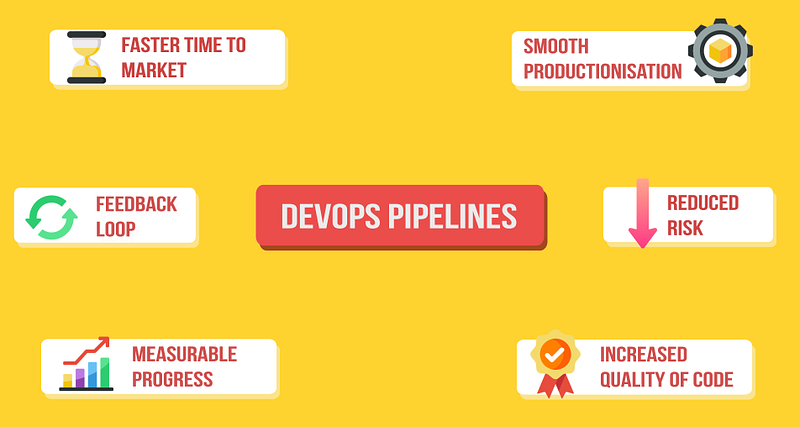
- Faster time to market — New features can be launched faster and problems fixed quickly. Being able to push swiftly and confidently means we can respond to trends as they emerge.
- Smooth Productionisation — Adding automation for builds makes steps repeatable and consistent, making us more efficient.
- Reduced Risk — Testing with unit tests and pre-production environments means we can validate our code and find and fix bugs quickly.
- Feedback Loop — Shipping regular but more minor updates allow opportunities to experiment and compare using A/B testing or deploying new versions over time.
- Increased quality of code — Automated testing ensures consistency and that all our code works efficiently and with fewer bugs.
- Measurable Progress — Many tools available that provide our CI/CD also can provide valuable metrics such as test coverage, build times, and defect rates.
Considerations when building a pipeline
Code reviews
Code reviews are essential as so many deployments are happening, and the assurance of a second pair of eyes on any given change is instrumental. This can often catch bugs and inefficiency/best practices that our automated testing might not pick up.
Containerise the Environment
Our priority should always be to containerize our whole environment. This can help us in various ways, including scalability, packaging, easier deployments, and debugging. Setting this up before any pipelines will make the development process much more manageable. It allows you to focus on a container-by-container basis rather than tackling the whole application simultaneously.
We can also use tools like Docker to run many of our build automation tasks for us.
Test-driven development
Test-driven development (TDD) is a methodology focusing on writing tests to specify what our code achieves before any development work is done. This can come with numerous benefits, such as higher quality code, better documentation, and a more modular development process. While this approach reduces our time to market, using our automated tests will ensure new features can be developed quickly with high assurance.
Comparisons and use of metrics
One of the main advantages of integrating a CI/CD pipeline is that we can regularly incorporate a large volume of small changes. To ensure we can make the most of this, implementing a monitoring tool such as ELK or Prometheus would ensure we can track the value of a given change.
Rollback changes
Although CI/CD pipelines aim to reduce our likelihood of implementing bugs, we can reduce risk further by having an easy-to-use backout procedure. Ideally, with a single button click, we can roll back to the previous state if something goes wrong.
Proactively monitor your CD pipeline.
As much as we’d like to set up our pipeline and it works forever, changes to our environments over time or unpredictability can cause our CI/CD to break. To ensure this, we should actively monitor our pipelines to ensure they are working as expected. Effective pipelines should always be giving the same output for any given input.
Tools
Listed below are the essential tools for any given category, depending on how complex your application will depend on how many of these you would want to implement.
This is not an extensive list but a fairly representative catalog of the primary categories and my personal favorites.
- Containerisation — Docker & Kubernetes, Docker Swarm, Nomad
- CI/CD — Jenkins, Gitlab, Bamboo, Travis CL
- Cloud — AWS, Azure
- Testing — JUnit, Pytest, Robot Framework
- Version Control — Git, Github, Bitbucket, Gitlab
- Build — Gradle, Maven
- Configuration Management & Automation — Puppet, Chef, Terraform, Ansible, Vagrant, Saltstack
- Monitoring — Prometheus, ELK
Thanks for reading. Don’t forget to Clap if you’ve enjoyed!
I regularly post articles on DevOps articles exclusively on Medium — If you would like to read more, I recommend checking out the stories below.
If you liked this article and you’re not a member, consider supporting me and thousands of other writers by signing up for a membership and get unlimited access to content from Medium’s fantastic writers. Your membership directly supports me with a portion of your fee and won’t cost you more.