
Monitoring User Access in Django with Django-Login-History2
Django-login-history2 simplifies the process of recording login timestamps, IP addresses, user agents, and other relevant data.

Django, a high-level Python web framework, has revolutionized web development with its philosophy of rapid development and clean, pragmatic design.
Built by experienced developers, it takes care of much of the hassle of web development, enabling developers to focus on writing their apps without needing to reinvent the wheel.
It’s known for its robustness, scalability, and versatility, making it a popular choice for building a wide range of web applications, from small-scale projects to large, complex systems.
In the realm of web applications, security, and user management are paramount.
One critical aspect of this is tracking user login history.
By monitoring when and how users access an application, developers can gain valuable insights into user behavior, detect potential security breaches, and ensure compliance with data protection regulations.
User login history is not just a tool for security; it also provides a foundation for improving user experience by understanding usage patterns.
Amidst this backdrop enters django-login-history2, an extension specifically designed for Django applications.
This package serves as a powerful tool to effortlessly track and manage user login activities.
It simplifies the process of recording login timestamps, IP addresses, user agents, and other relevant data, providing an easy-to-integrate solution for Django projects.
With django-login-history2, developers can enhance their application’s security posture and gain deeper insights into their user base.
What is Django-Login-History2?
Django-Login-History2 is a specialized Django extension designed to simplify the tracking and management of user login activities within Django-based web applications.
This tool adeptly captures and records critical login data, providing a comprehensive overview of user access patterns.
Key functionalities
- Login Timestamps: Records the exact time and date of each user login attempt.
- IP Address Tracking: Logs the IP address from which a user logs in, offering valuable insights into the geographical distribution of users and helping in identifying suspicious activities.
- User Agent Recording: Captures the user agent of the device used for logging in, which is essential for understanding the types of devices and browsers users are employing.
- Additional Data Capture: Beyond these basics, it can store other pertinent information like login status (successful or failed), session duration, and more.
Features and Benefits
- Ease of Integration: Designed to complement Django’s existing framework, it can be quickly added to any Django project with minimal configuration.
- Enhanced Security: By providing detailed login histories, it aids in the early detection of unauthorized access attempts and potential security breaches.
- User Behavior Insights: The detailed login data helps in analyzing user behavior, which can be crucial for improving user experience and service planning.
- Compliance and Reporting: The tool assists in meeting regulatory compliance requirements related to user data management and can be used to generate reports for audit purposes.
- Customization and Flexibility: Django-Login-History2 allows for customization to meet specific project needs, making it versatile for a wide range of applications.
Setting Up Django-Login-History2
Setting up django-login-history2 in your Django project is a straightforward process.
Here’s a step-by-step guide to help you install and configure it efficiently.
Installation
At the time of writing, v0.0.2 on PyPip seems to have some packaging problems and doesn’t install the package correctly.
On the root folder of your project (the same that contains the manage.py file), you can run:
git clone https://github.com/riquedev/django-login-history2.git/
mv .\django-login-history2\django_login_history2\ .\django_login_history2\
Updating Django Settings
After installation, you need to update your Django project settings. Open your settings.py file and add django_login_history2 to your INSTALLED_APPS like this:
INSTALLED_APPS = [
    # ... other installed apps
    'django_login_history2',
]
Step 3: Database Migration
Since django-login-history2 stores login data in your database, you need to create the necessary database tables. Run the following commands to apply migrations:
python manage.py migrate
Tips for Optimal Setup
- Consistent Database Migrations: Ensure that you regularly run migrations whenever you update the package or change its settings.
- Performance Considerations: For high-traffic sites, monitor the database performance, as recording login history can increase database write operations.
- Security of Data: Always ensure that the login history data is secure and accessible only to authorized personnel, given its sensitivity.
- Regular Updates: Keep the package updated to benefit from the latest security patches and features.
Using Django-Login-History2
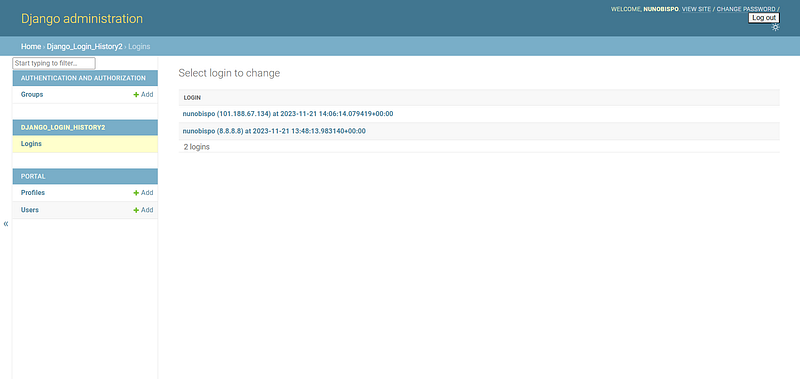
Using Django-Login-History2 is straightforward, after installing and adding it to the installed apps, it is up and running and no additional information is required.
To see the login history, simply go the the Django Admin of your application, and you will see something similar to this:
Use Cases for Django-Login-History2
These real-world applications of django-login-history2 highlight its versatility and effectiveness across different industries and scenarios.
Enhanced Security Monitoring in E-Commerce Platforms
E-commerce platforms, which handle a high volume of user transactions and sensitive data, can significantly benefit from django-login-history2.
By tracking login activities, the platform can detect unusual patterns, such as logins from different geographical locations in a short time, which might indicate account takeovers or fraudulent activities.
This proactive monitoring helps in quickly addressing security concerns, thereby protecting user accounts and maintaining trust.
Compliance and Auditing in Financial Applications
Financial applications, governed by strict regulatory requirements like GDPR or HIPAA, need to maintain detailed records of user access for compliance and auditing purposes.
Django-login-history2 facilitates this by providing comprehensive logs of user login activities.
These logs can be crucial during audits, offering clear evidence of the application’s adherence to security and data protection standards.
User Behavior Analysis in Content Platforms
For content platforms like news websites or educational portals, understanding user engagement is key.
By utilizing django-login-history2, these platforms can analyze login trends and patterns, helping them to identify peak usage times, most active user segments, and preferred devices or browsers.
This information is invaluable for tailoring content strategies and improving user experience.
Intrusion Detection in Corporate Intranets
Corporate intranets often contain sensitive company information.
Django-login-history2 aids in setting up an additional layer of security by monitoring login patterns.
Any unusual login attempt, such as logins at odd hours or from unknown locations, can be flagged for further investigation, thus acting as an early warning system against potential internal or external threats.
Conclusion
In this article, you have explored the pivotal role of django-login-history2 in enhancing the security and management of Django-based web applications.
You delved into its core functionalities, which include detailed tracking of login timestamps, IP addresses, user agents, and other critical data, making it an indispensable tool for developers focused on robust user authentication and security protocols.
The importance of tracking user login history in web applications cannot be overstated. It not only bolsters security but also offers critical insights for improving user experience and operational efficiency.
In conclusion, Django-login-history2, with its comprehensive features and ease of use, emerges as an invaluable asset for Django developers. It empowers developers to maintain a secure and user-friendly environment, ultimately contributing to the creation of reliable and trustworthy web applications.
Thank you for reading and I will see you on the Internet.
Follow me on Twitter: https://twitter.com/DevAsService
Check out my website at: https://developer-service.io/
Check out other articles that might interest you:
If you want to stay updated when I post a new article, you can sign up for my free newsletter!


