
4 Ways to Mock Backend Responses in Angular
Learn 4 different ways to mock backend responses in Angular and pick the solution that best fits your needs.
In this article, we will demonstrate how to mock backend responses in Angular. We will study 4 different ways to mock server responses by using:
- the
- an
HttpInterceptor, - the In-memory Web API, or
- the json-server package.
In the process, we will present the cons & pros of each solution and summarize them in a table. Finally, we will highlight when it’s best to use each solution.
Let’s get started!
The of function (RxJs)
This is the simplest and quickest way to mock backend responses. We temporarily replace the request with the data itself.
Normally, we use an HttpClient to perform the request, which returns an observable. In this solution, we use the of function to convert the data into an observable.
@Injectable({
  providedIn: 'root'
})
export class PandaService {

  public getPandas(): Observable<Panda[]> {
    return of(PANDAS);
  }
}
We do this to keep the return type unchanged and minimize the overall changes required. Once we subscribe to the returned observable, we will get the mock data.
Unfortunately, “quickest” doesn’t always equal “best”. What if we want to mock multiple requests? This becomes tedious very fast.
Even worse, what if these requests are dispatched from different services? Then we would have to modify multiple files, which means multiple files to check when undoing the changes.
There has to be a better way!
HttpInterceptor
In one of our previous articles, we studied interceptors extensively. One of the use cases we covered was mocking http responses.
In this solution, we leave the request and service intact.
@Injectable({
  providedIn: 'root'
})
export class PandaService {
  constructor(private http: HttpClient) {}

  public getPandas(): Observable<Panda[]> {
    return this.http.get<Panda[]>('api/pandas');
  }
}
Instead, we create an HttpInterceptor to intercept the flow of requests and responses. In our case, we want to replace the response to a request.
@Injectable()
export class MockBackendInterceptor implements HttpInterceptor {

  private readonly MOCK_RESPONSE = of(
    new HttpResponse({
      status: 200,
      statusText: 'OK',
      body: PANDAS
    })
  ).pipe(delay(300));

  intercept(request: HttpRequest<any>, next: HttpHandler) {
    if (request.method === 'GET' && request.url.endsWith('/pandas')) {
      return this.MOCK_RESPONSE;
    } else {
      return next.handle(req);
    }
  }

}
Lastly, we register the interceptor in the providers array of the AppModule.
@NgModule({
  // ...
  providers: [
    {
      provide: HTTP_INTERCEPTORS,
      useClass: MockBackendInterceptor,
      multi: true
    }
  ]
})
export class AppModule {}
The changes are now grouped in a file. We can also unregister the interceptor from a single point by commenting out the respective line in the providers array.
But now there may be another problem. Imagine having to mock multiple HTTP requests from multiple services. Then we would either need multiple interceptors or a very long list of if-else-if blocks.
Can we do better?
In-memory Web API
Another way to mock backend responses in Angular is by using the In-memory Web API. This solution requires the installation of a module.
We install the In-memory Web API package with the following command:
npm install --save-dev angular-in-memory-web-apiNote that this shouldn’t be used in production. Hence, the --save-dev parameter.
Then, we import the HttpClientInMemoryWebApiModule in our AppModule.
@NgModule({
  imports: [
    HttpClientModule,
    // Intercepts HTTP requests and returns simulated server responses.
    // Remove it when a real server is ready to receive requests.
    HttpClientInMemoryWebApiModule.forRoot(InMemoryDataService, {
      dataEncapsulation: false
    })
  ],
  // ...
})
export class AppModule {}
We don’t have to make any changes to our original PandaService.
@Injectable({
  providedIn: 'root'
})
export class PandaService {
  constructor(private http: HttpClient) {}

  public getPandas(): Observable<Panda[]> {
    return this.http.get<Panda[]>('api/pandas');
  }
}
The request’s URL should have the format: base/collectionName. So, in the previous snippet, we declare that the collection name will be pandas.
Next, we create the InMemoryDataService and override the createDb method.
@Injectable({
  providedIn: 'root'
})
export class InMemoryDataService implements InMemoryDbService {
  createDb() {
    return { pandas: PANDAS };
  }
}
The property’s name to which we assign the mock data must be a case-sensitive match with the collection name, hence the { pandas: PANDAS }. Returning just { PANDAS } would generate an error!
That’s it! The HttpClientInMemoryWebApiModule will intercept the api/pandas request and return the mock response.
All changes are in a single file. And we can deactivate the solution from a single point. We simply remove or comment out the import in AppModule’s imports array when a real server is ready to receive requests.
Well, we still need to create that extra service and write some code.
json-server
The last solution is using the json-server package to create a mock backend. This solution doesn’t require any changes in our code.
We also get to choose to install and run locally, or not to install anything and run online. Be aware that the online option comes with limitations*.
Both options require the creation of a db.json file that configures how the mock backend will respond to each endpoint call.
We will demonstrate how to run this locally.
Firstly, we install the json-server package with the following command:
npm install -g json-serverThen, we create the db.json file at the root of our application:
{
  "pandas": [
    {
      "id": 1,
      "name": "Bao Bao",
      "sex": "F",
      "birthDate": "23/08/2013",
      "currentLocation": "Wolong National Nature Reserve"
    },
    ...
  ]
}
If we run json-server --watch db.json, we get the following messages:
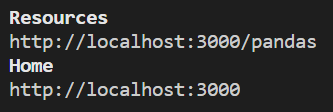
There are two problems with this. The original request is localhost:4200/api/pandas, while our mock endpoint is localhost:3000/pandas.
The first issue is the port. The second issue is the mismatch due to the /api part.
We solve the first issue by using a proxy. We create a proxy.conf.json file at the root of our application:
{
  "/api": {
    "target": "http://localhost:3000"
  }
}
In the angular.json file, we add the key-value pair "proxyConfig": "proxy.conf.json" to the options of the serve target:
...,
"serve": {
  ...,
  "options": {
    "proxyConfig": "proxy.conf.json"
  }
},
...
To solve the second issue, we need to map /api/pandas to /pandas. To do this, we create a routed.json file at the root of our application:
{
  "/api/*": "/$1"
}
Now we can finally run our server:
json-server --watch db.json --routes routes.jsonThat’s it! The requests will be mapped and proxied to our mock backend, and thus receive mock responses.
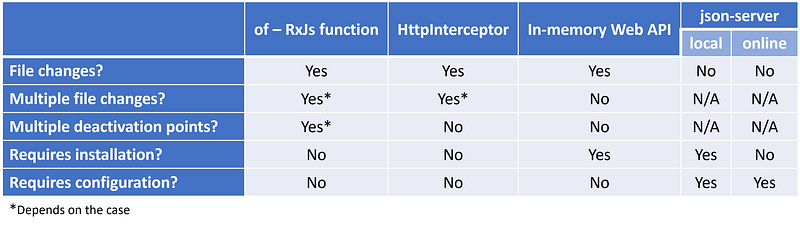
Below we provide a summary table with the cons and pros of each solution. Pick the solution that best meets your needs, depending on your case.
You can find the complete source code in this GitHub repository.
Note that we include all solutions in this repository. So, you will need to comment out a few lines to keep a single solution active.
Conclusions
There are a couple of ways to mock backend responses in Angular. We presented four of them. Regardless of the solution, we need to provide the data. The difference is in the details.
Use the of function (RxJs) if you need to mock a simple request or two.
Use an HttpInterceptor if you need to mock more requests, but not that many.
Use the In-memory Web API if you need to mock multiple requests, but want to keep changes in your code to a minimum.
Use the json-server package if you don’t want to modify your code at all, but you are ok with creating some configuration files.
I hope you enjoyed this article and that you’ve learned something new. If you did, subscribe to my newsletter for more content like this.
Thanks for reading. Stay tuned for more.
More content at PlainEnglish.io. Sign up for our free weekly newsletter. Follow us on Twitter, LinkedIn, YouTube, and Discord.
Interested in scaling your software startup? Check out Circuit.


