
MLOPS: deployment of an ML model with Docker on Cloud Run (GCP) and Efficient Monitoring.
Introduction
The deployment of machine learning models offers various approaches, but in this article, we will focus on deploying a model using Docker on the Google Cloud platform: Cloud Run and Container Registry.
Initially, we will conduct the training of a classification model followed by the selection of the best model based on criteria evaluating predictive performance.
Once the optimal model is chosen, we will create a Flask API with get and post decorators.
The next step takes us into the Docker universe. We will deploy the API and our model within Docker, creating a Docker image. Subsequently, we will deploy this Docker image to Google Cloud Platform (GCP), making the Container Registry our valuable artifact and leveraging Cloud Run to execute the Docker container.
Finally, we will delve into the monitoring aspect of the model in production, encompassing data quality, data drift, and model drift.
Training classification model
For our case study, we are training a classification model for loan eligibility that predicts whether a loan is to be given or refused for a customer.
The data and code (including notebooks) are on my GitHub, which you can find at the following link: https://github.com/ramou2023/deployment-ML-model-with-Docker
The raw data includes the target variable we are trying to predict, which is loan_status with its two categories (loan given, loan refused), along with several other columns for each client.”
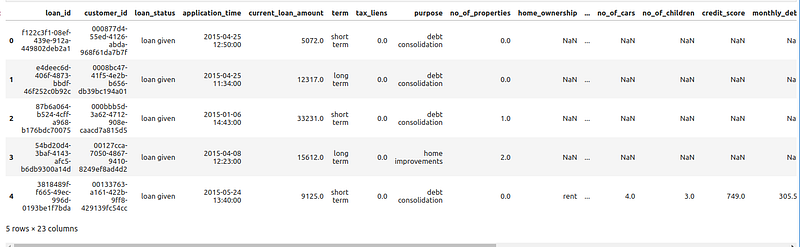
A comprehensive data cleaning, data processing, and data splitting process has been carried out to prepare the data for model training. This involved meticulously cleaning the dataset, processing it to handle missing values or outliers, and splitting it into appropriate subsets for training and evaluation. These preparatory steps ensure that the data is in optimal condition to facilitate effective learning by the model. Below is an excerpt from the data processing code:
def preprocess_data(df:pd.DataFrame, mode:str, job_id:str=None, rescale=False, ref_job_id:str=None) -> pd.DataFrame:
    """
    Pre-process data and save preprocessed datasets for later use.
    :param df: DataFrame
    :param mode: str, 'training' or 'inference'
    :param job_id: str, job_id for the preprocessed dataset
    :param rescale: bool, whether to rescale data.
    :param ref_job_id: str, job_id of the last deployed model. Usefull when doing inference.
    :return: DataFrame
    """
    assert mode in ('training', 'inference')

    if mode=='training':
        assert config.TARGET in df.columns, f"{config.TARGET} not in {df.columns}"

    df.columns = list(map(str.lower, df.columns))
    initial_size = df.shape[0]
    df = df[df["customer_id"].notnull() & df["loan_id"].notnull() & df["loan_status"].notnull()]
    if mode=='training':
        df["loan_status"] = df["loan_status"].str.lower()
    if df.shape[0] != initial_size:
        print(f"[WARNING] Dropped {initial_size - df.shape[0]} rows with null values in (customer_id, loan_id, loan_status)")

    df = enforce_datatypes_on_variables(df, cat_vars=config.CAT_VARS, num_vars=config.NUM_VARS)

    df = engineer_variables(df)

    if mode=='training':
        # split train and test data before encoding categorical variables and imputing missing values
        train_df, test_df = split_train_test(df, config.TEST_SPLIT_SIZE, method=config.SPLIT_METHOD)
        train_df = encode_categorical_variables(train_df, mode="training", purpose_encode_method=config.PURPOSE_ENCODING_METHOD, job_id=job_id)
        train_df = impute_missing_values(train_df, method="basic", mode="training", job_id=job_id)
        if rescale:
            train_df = rescale_data(train_df, method=config.RESCALE_METHOD, mode="training", columns=num_vars + engineered_vars["numerical"])
        helpers.save_dataset(train_df, os.path.join(config.PATH_DIR_DATA, "preprocessed", f"{job_id}_training.csv"))
        preprocess_data(test_df, mode="inference", job_id=job_id, ref_job_id=job_id)
    else:
        # if mode is infer, no need to split train and test data
        test_df = encode_categorical_variables(df, mode="inference", purpose_encode_method=config.PURPOSE_ENCODING_METHOD, job_id=ref_job_id)
        test_df = impute_missing_values(test_df, method="basic", mode="inference", job_id=ref_job_id)
        if rescale:
            test_df = rescale_data(test_df, method=config.RESCALE_METHOD, mode="inference", columns=num_vars + engineered_vars["numerical"])
        helpers.save_dataset(test_df, os.path.join(config.PATH_DIR_DATA, "preprocessed", f"{job_id}_inference.csv"))
After this data processing step, we have a training and testing sample that we will use to train the models and evaluate their performance.
We will:
- Train multiple models: randomForest, gradientBoosting, …
- Select the best model based on: auc >= 0.7 and abs(auc_train — auc_test) <= 0.1"
##### train.py methods #####
def train(train_dataset_filename:str=None, test_dataset_filename:str=None, job_id="", rescale=False):
    """
    Train a model on the train dataset loaded from `train_dataset_filename` and test dataset loaded from `test_dataset_filename`
    :param train_dataset_filename: str
    :param test_dataset_filename: str
    :param job_id: str
    :param rescale: bool, if true, scaled numerical variables used
    :return: None
    """
    if train_dataset_filename==None:
        train_dataset_filename = os.path.join(config.PATH_DIR_DATA, "preprocessed", f"{job_id}_training.csv")
    if test_dataset_filename==None:
        test_dataset_filename = os.path.join(config.PATH_DIR_DATA, "preprocessed", f"{job_id}_inference.csv")
    tdf = helpers.load_dataset(train_dataset_filename)
    vdf = helpers.load_dataset(test_dataset_filename)
    helpers.check_dataset_sanity(tdf)
    helpers.check_dataset_sanity(vdf)

    predictors = config.PREDICTORS
    target = config.TARGET
    if rescale:
        for col in predictors:
            if f"{config.RESCALE_METHOD}_{col}" in tdf.columns:
                tdf[col] = tdf[f"{config.RESCALE_METHOD}_{col}"]
            if f"{config.RESCALE_METHOD}_{col}" in vdf.columns:
                vdf[col] = vdf[f"{config.RESCALE_METHOD}_{col}"]

    rf = RandomForestClassifier(n_estimators=100, max_depth=10, random_state=config.RANDOM_SEED)
    gb = GradientBoostingClassifier(n_estimators=100, max_depth=10, random_state=config.RANDOM_SEED)
    X, Y = tdf[predictors], tdf[target]
    report = dict()
    models = dict()
    for cl, name in [(rf, "rf"), (gb, "gb")]:
        print("[INFO] Training model:", name)
        cl.fit(X, Y)
        t_pred = cl.predict(X)
        v_pred = cl.predict(vdf[predictors])
        t_prob = cl.predict_proba(X)[:, 1]
        v_prob = cl.predict_proba(vdf[predictors])[:, 1]
        report[f"{name}_train"] = performance_report(Y, t_pred, t_prob)
        report[f"{name}_test"] = performance_report(vdf[target], v_pred, v_prob)
        models[name] = cl

    model_name = select_model(pd.DataFrame(report), metric=config.MODEL_PERFORMANCE_METRIC, model_names=list(models.keys()))
    report["final_model"] = model_name
    print('[INFO] model(model name): {}'.format(models[model_name]))
    helpers.save_model_as_pickle(models[model_name], f"{job_id}_{model_name}")
    helpers.save_model_as_json(report, f"{job_id}_train_report")
    return report

def pick_model_and_deploy(job_id, models, df, metric="auc", predictors=config.PREDICTORS, target=config.TARGET)->str:
    """
    Among all `models`, select the model that performs best on df and mark it for deployment.
    :param job_id: str, job id.
    :param models: list of key-value items {"job_id": <str>, "purpose_to_int: <str>, "missing_values": <str>, "prediction_model": <>, "train_report": <str>}
    :param df: pd.DataFrame, test dataset
    :param metric: str, metric used to select the best model.
    :param predictors: list, predictors to use.
    :param target: str, target to use.
    :return: str
    """
    assert len(models) > 0, "`models` cannot be empty"
    if len(models)==1:
        print("True")
        model_name = models[0]["model_name"]
        helpers.persist_deploy_report(job_id, model_name)
        return model_name
    cols = set(predictors).difference(set(df.columns))
    assert cols == set(), f"{cols} not in {df.columns}"
    score = 0
    m_idx = 0
    print("True__")
    for i, m in enumerate(models):
        print(i, m)
        y_true = df[target]
        y_pred = m["model"].predict(df[predictors])
        y_prob = m["model"].predict_proba(df[predictors])[:, 1]
        r = performance_report(y_true, y_pred, y_prob)
        if r[metric] > score:
            score = r[metric]
            m_idx = i
    helpers.persist_deploy_report(job_id, models[m_idx]["model_name"])
    return models[m_idx]["model_name"]
Once the best model is selected, we will save the model in .pkl format, along with all the transformations/processings applied (such as handling missing values, purpose_to_init) on the data in json format for reuse on new data. Here are the various models saved in the ‘models’ folder (see GitHub repository).
print("Deloyment Report Sample")
pprint(json.load(open("../models/deploy_report.json", "r")))

Deloyment Report Sample
{'job_id': '12196ecaa65e4831987aee4bfced5f60',
 'missing_values': '12196ecaa65e4831987aee4bfced5f60_missing_values_model.pkl',
 'prediction_model': '12196ecaa65e4831987aee4bfced5f60_rf.pkl',
 'purpose_to_int': '12196ecaa65e4831987aee4bfced5f60_purpose_to_int_model.json',
 'train_report': '12196ecaa65e4831987aee4bfced5f60_train_report.json'}
We now have our trained models. The next step will be to create a Flask API and deploy the model on Docker.
Creating a Flask API
We have implemented the Flask API, starting with a ‘ping’ function stating its ‘ok’ status and the current timestamp. A simple GET request to this route allows us to verify if everything is working smoothly. I have created a ‘predict’ function that includes data preparation, where the ‘preprocess_data’ function ensures that input data is aligned with the model’s requirements. Finally, our pre-trained models come into play, generating reliable predictions from the provided data. Therefore, the decorators @app.route(“/ping”, methods=[“GET”]) and @app.route(‘/predict’, methods=[‘POST’]) are used to specify the routes and HTTP methods associated with each function (ping() and predict()).
The API code is located in the following file: app.py.
from flask import Flask, render_template, request, redirect, url_for, flash, jsonify
import pandas as pd
import json
import os
import pickle
import datetime


from src import config
from src import inference
from src import helpers
from src import preprocess


app = Flask(__name__)

@app.route("/ping", methods=["GET"])
def ping():
    return jsonify({"status": "ok", "datetime": str(datetime.datetime.now())})


@app.route('/predict', methods=['POST'])
def predict():
    #X = request.json.get('X')
    X = request.json
    if X is None:
        return jsonify({'error': 'No input data provided'})
    if not isinstance(X, list):
        return jsonify({'error': 'Input data must be a list of key-value items'})
    X = pd.DataFrame(X)
    if "loan_id" not in X.columns:
        return jsonify({'error': 'Input data must contain a loan_id column'})
    ref_job_id = helpers.get_latest_deployed_job_id()
    X = preprocess.preprocess_data(X, mode="inference", rescale=False, ref_job_id=ref_job_id)
    r = inference.make_predictions(X, predictors=config.PREDICTORS)
    # r = X[config.PREDICTORS].to_dict(orient="records")
    return jsonify(r)

if __name__ == '__main__':
    app.run(host='0.0.0.0')
To launch the API, simply execute the following code in the terminal:
Python ./app.py
Here is the interface of the Flask API, accessible at the following link: http://172.17.0.2:5000/ping
To obtain the prediction for an individual client or a set of clients, we will invoke the predict method of the API using the following code:
Individual :
curl -X POST -H "Content-Type: application/json" -d '{"X": [{"loan_id": "f122c3f1-08ef-439e-912a-449802deb2a1", "customer_id": "000877d4-55ed-4126-abda-968f61da7b7f", "application_time": "2015-04-25 12:50:00", "current_loan_amount": 5072.0, "term": 0, "tax_liens": 0.0, "purpose": 0.7819976076555024, "no_of_properties": 0.0, "home_ownership": 1.0, "annual_income": 71612.92039867109, "years_in_current_job": -1, "months_since_last_delinquent": 34.75272558571097, "no_of_cars": 2.4906058474831707, "no_of_children": 1.5016577916206169, "credit_score": 1350.696131862289, "monthly_debt": 941.2245734097075, "years_of_credit_history": 18.56094864837705, "no_of_open_accounts": 11.02874083006733, "no_of_credit_problems": 0.1453120289418148, "current_credit_balance": 15439.198372022913, "max_open_credit": 40776.35718592965, "bankruptcies": 0.1057353089406309, "application_date": "2015-04-25", "application_year": 2015, "application_month": 4, "application_week": 17, "application_day": 25, "application_season": 2, "current_credit_balance_ratio": 0.0}]}' http://127.0.0.1:5100/predictSet Of clients provided in data.json :
curl -X POST -H "Content-Type: application/json" --data @input_data.json http://127.0.0.1:5100/predictHere is the result of the prediction response from the API :
{"loan_id":"f122c3f1-08ef-439e-912a-449802deb2a1","prediction":"loan given"}Creating a Docker image and containerization
We will now deploy the API on Docker and create an image. To do this, we need to install Docker. Here is the link that describes the installation of Docker: https://docs.docker.com/engine/install/
Once Docker is installed, you need to create a Dockerfile where you will put the instructions to build our Docker image. You need to specify the Python image that you will use. Python images for Docker are available at the following link: https://hub.docker.com/_/python
#The base image  : the official Python image with version
FROM python:3.10.12

#Copie the entire content of the current folder (where the Dockerfile is located) to the /usr/ML/dags directory inside the Docker image. It's moving the local files into the image.
COPY . /usr/ML/dags

#Listen on port 5000 at runtime.
EXPOSE 5000

#sets the working directory inside the container to /usr/ML/dags
WORKDIR /usr/ML/dags

#Install the required libraries
RUN pip install -r requirements.txt

#container start up command
CMD python app.py
Build the Docker image from the Dockerfile
During this step of the process, we create the custom Docker image using the Dockerfile generated in the previous step, and then we launch the container. It is necessary to navigate to the terminal in the directory where all the files are located. In the terminal, the docker build command is used to build the Docker image from the Dockerfile :
docker build -t machine_learing_app .
After executing all the commands in the Dockerfile and building the final image from it, we are ready to start the container to run our Machine Learning application.
docker container run -p 5000:5000 machine_learing_app
Once the container is launched, we can access the application via the link : http://172.17.0.2:5000/ping
You can also view the list of containers currently running with thew command: docker ps
docker ps

CONTAINER ID   IMAGE               COMMAND                  CREATED       STATUS       PORTS                                       NAMES
cb895b83d6ae   machine_learing_app   "/bin/sh -c 'python …"   7 hours ago   Up 7 hours   0.0.0.0:5000->5000/tcp, :::5000->5000/tcp   elegant_perlman
You can also stop the running containers with the following command:
docker kill <CONTAINER ID>Deploy the created Docker image on Cloud Run (GCP).
To deploy our Docker image on the cloud, we need to configure the GCP SDK, which allows us to access and manage our cloud resources via the command line (using the CLI interface). You can find detailed instructions on configuring the SDK and CLI on my blog at: https://readmedium.com/google-cloud-platform-gcp-pipline-for-data-ingestion-from-local-machine-to-gcp-storage-9324f30654b2?sk=ab5519d7288824ce00bf90aadbab49d8
Once the SDK and CLI configuration is complete, we need to connect the service account with the Google Cloud SDK using the key associated with our project on GCP mlops : mlops-415622-ceaa3370ed61.json.
To do this, you must run the following two command lines in the shell.
## GOOGLE_APPLICATION_CREDENTIALS
export GOOGLE_APPLICATION_CREDENTIALS="/home/../mlops-415622-ceaa3370ed61.json"
## Activating services
gcloud auth activate-service-account [email protected] --
key-file=/home/../mlops-415622-ceaa3370ed61.json --project=mlops
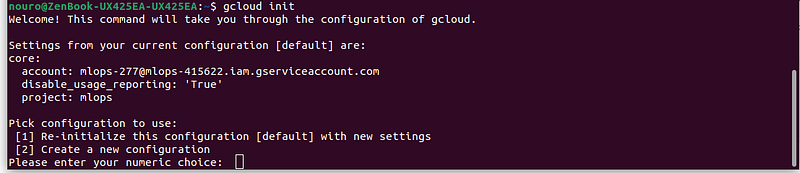
To complete the CLI connection with GCP, you need to run gcloud init and follow the instructions:
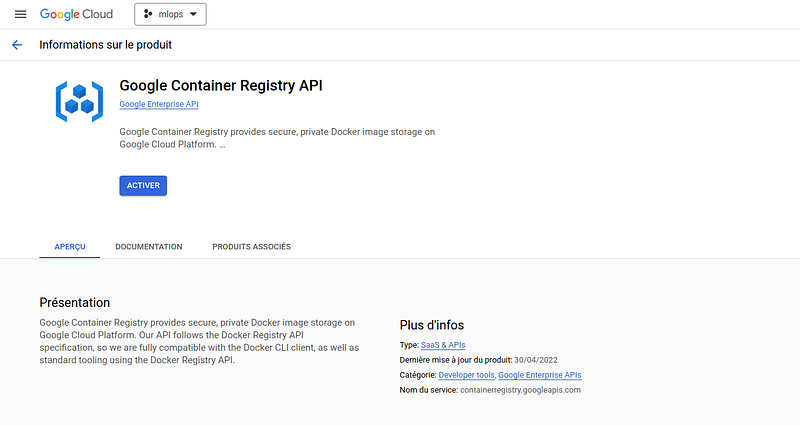
Google Container Registry
We will push our Docker image to Container Registry, which is a Google service used to store and manage Docker container images.
Before pushing our image, we will display the list of created Docker images:
docker image ls
REPOSITORY          TAG       IMAGE ID       CREATED         SIZE
machine_learing_app latest    78398039a87c   18 hours ago    1.98GB
apache/airflow      latest    b1e0c8feaaf6   5 weeks ago     1.42GB
hello-world         latest    d2c94e258dcb   10 months ago   13.3kB
The instructions mentioned in the shell commands below show how to push the Docker image to Container Registry :
## Create a tag for our Docker image
docker tag machine_learing_app  eu.gcr.io/mlops-415622/machine_learing_app

## Connect Docker and gcloud
gcloud auth configure-docker

## To push and send the Docker image to Container Registry
docker push eu.gcr.io/mlops-415622/machine_learing_app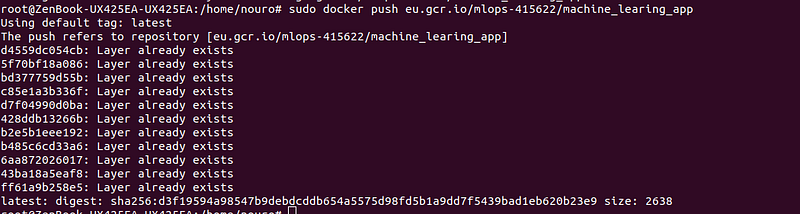
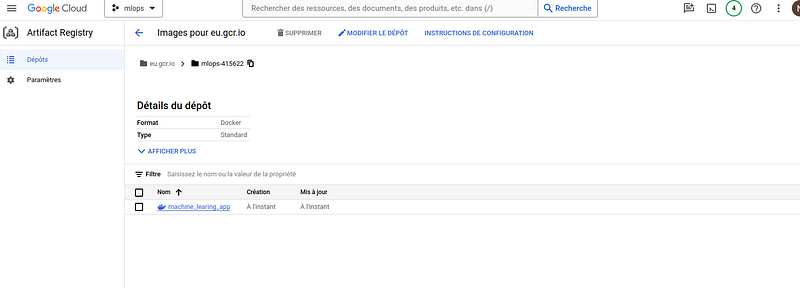
If everything is executed successfully, you can see our Docker image on the GCP console in Container Registry:
Google Cloud Run
To deploy Docker images from Container Registry/Artifact Registry, we use Cloud Run. To do this, we follow the instructions provided in the following code:
gcloud beta run deploy mlopsapi --image eu.gcr.io/mlops-415622/machine_learing_app --region europe-west9 (Paris) --platform managed --allow-unauthenticated --quiet --port 5000
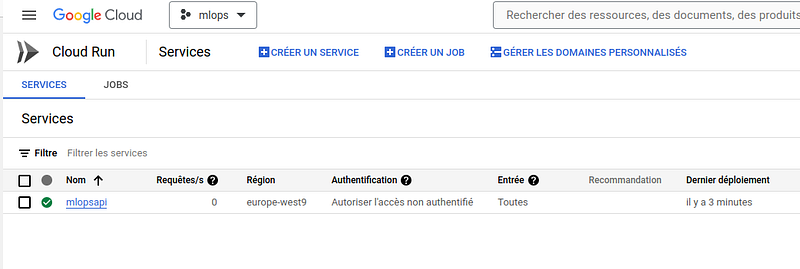
Once deployed, we can see our container, which is a running instance of a Docker image, on the console :
The link to our Flask API is : https://mlopsapi-hqddjkd4yq-od.a.run.app/ping
To make predictions, we will use the following commands by calling the URL of our application deployed on Cloud Run : https://mlopsapi-hqddjkd4yq-od.a.run.app/predict
curl -X POST -H "Content-Type: application/json" --data @input_data.json https://mlopsapi-hqddjkd4yq-od.a.run.app/predict{"loan_id":"d440525b-986e-4cd7-a62f-32c328cab94f","prediction":"loan given"},
{"loan_id":"acdfe31f-397a-4d83-a677-0f501f4c8a38","prediction":"loan refused"}Monitoring the Model in Production
It is important to regularly check the models in production as well as the data used for training or prediction. Therefore, it is necessary to have an automated monitoring system that can alert to any significant change impacting the prediction performance of the models. So, there is first a data quality check to be done for any new data, also a data drift to analyze the data distribution, and finally a model drift check.
Data quality check
Depending on the data processing pipeline before being input into a model, data may originate from multiple sources with diverse formats. Formats can evolve over time, fields may be renamed, and new categories may be introduced. Any of these alterations can have a notable impact on the performance of the model.
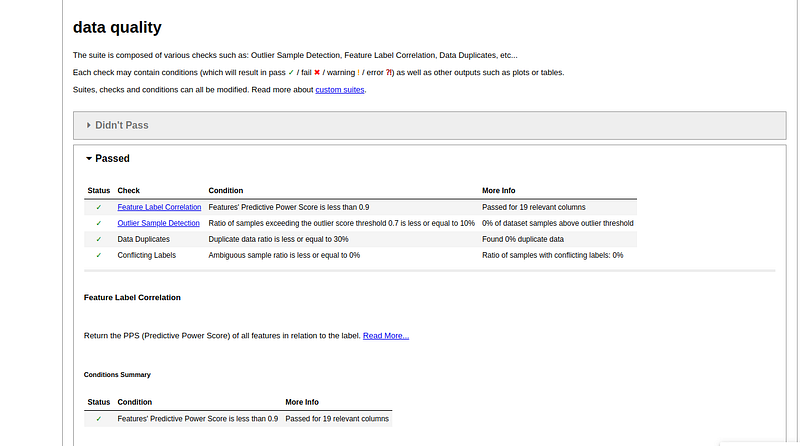
To alert in case of modification, I have defined a set of conditions to check and validate the data quality. To do this, I used the deepchecks library, and the above code contains all the defined conditions for checking data quality.
from deepchecks.tabular import Dataset
from deepchecks.tabular import Suite
from deepchecks.tabular.checks import WholeDatasetDrift, DataDuplicates, NewLabelTrainTest, TrainTestFeatureDrift, TrainTestLabelDrift
from deepchecks.tabular.checks import FeatureLabelCorrelation, FeatureLabelCorrelationChange, ConflictingLabels, OutlierSampleDetection
from deepchecks.tabular.checks import WeakSegmentsPerformance, RocReport, ConfusionMatrixReport, TrainTestPredictionDrift, CalibrationScore, BoostingOverfit
def check_data_quality(df:pd.DataFrame, predictors:list, target:str, job_id:str):
    """
    checks for data quality.
    A report will be saved in the results directory.
    :param df: dataframe to check
    :param predictors: predictors to check for drifts
    :param target: target variable to check for drifts
    :param job_id: job ID
    :return: boolean
    """
    features = [col for col in predictors if col in df.columns]
    cat_features = [col for col in config.CAT_VARS if col in df.columns]
    dataset = Dataset(df, label=target, features=features, cat_features=cat_features, datetime_name=config.DATETIME_VARS[0])
    retrain_suite = Suite("data quality",
        DataDuplicates().add_condition_ratio_less_or_equal(0.3), #Checks for duplicate samples in the dataset
        ConflictingLabels().add_condition_ratio_of_conflicting_labels_less_or_equal(0), #Find samples which have the exact same features' values but different labels
        FeatureLabelCorrelation().add_condition_feature_pps_less_than(0.9), #Return the PPS (Predictive Power Score) of all features in relation to the label
        OutlierSampleDetection(outlier_score_threshold=0.7).add_condition_outlier_ratio_less_or_equal(0.1), #Detects outliers in a dataset using the LoOP algorithm
    )
    r = retrain_suite.run(dataset)
    try:
        r.save_as_html(f"{config.PATH_DIR_RESULTS}/{job_id}_data_quality_report.html")
        print("[INFO] Data quality report saved as {}".format(f"{config.PATH_DIR_RESULTS}/{job_id}_data_quality_report.html"))
    except Exception as e:
        print(f"[WARNING][DRIFTS.SKIP_TRAIN] {traceback.format_exc()}")
    return {"report": r, "retrain": r.passed()}
Here is an example of data quality on a new dataset:
dq_chk1 = check_data_quality(df1, predictors=config.PREDICTORS, target=config.TARGET, job_id=job_id1)print(dq_chk1)
{'report': data quality, 'retrain': True}The result of data quality shows that all the conditions defined in our case are met :
Data drift check
In the real world, data is constantly evolving. Changes may arise from shifts in business behavior, such as a company expanding into a new region, introducing new products, facing new market competitors, adapting to social trends, or responding to global events impacting various industries. These changes can impact the distribution of data, rendering the data used in previous training sessions less relevant to the evolving business landscape.
Data drift occurs when the probability distribution P(X) of input features changes over time, stemming from alterations in data structure or real-world shifts.
Concept drift occurs when the probability distribution P(Y|X) of the output changes over time. This can result from changes in data structure or shifts in real-world data, leading to a sustained impact on prediction quality. An illustrative example is in Digital Marketing, where the common metric CTR (Click-Through Rate) can undergo significant changes due to new competition. Concept drift can manifest gradually, suddenly, in blips, or recurrently.
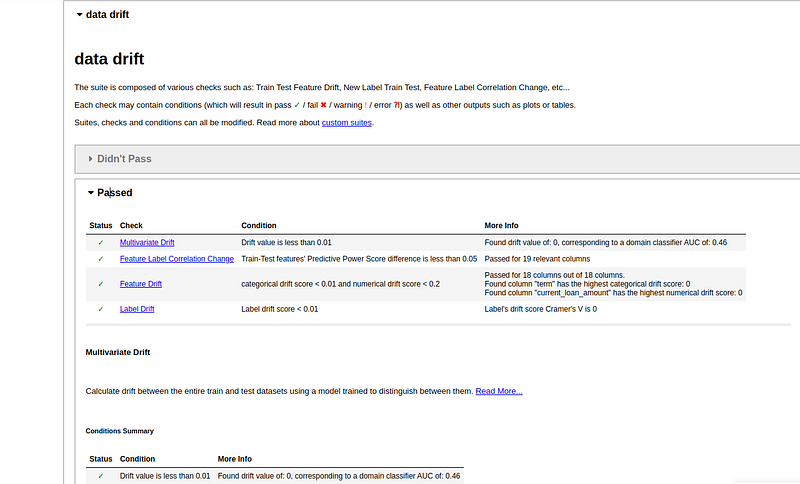
For data drift as well, I used the deepchecks library and defined the conditions which are specified in the following code. The output for this following function will be retrain the model or not :
def check_data_drift(ref_df:pd.DataFrame, cur_df:pd.DataFrame, predictors:list, target:str, job_id:str):
    """
    Check for data drifts between two datasets and decide whether to retrain the model.
    A report will be saved in the results directory.
    :param ref_df: Reference dataset
    :param cur_df: Current dataset
    :param predictors: Predictors to check for drifts
    :param target: Target variable to check for drifts
    :param job_id: Job ID
    :return: boolean
    """
    ref_features = [col for col in predictors if col in ref_df.columns]
    cur_features = [col for col in predictors if col in cur_df.columns]
    ref_cat_features = [col for col in config.CAT_VARS if col in ref_df.columns]
    cur_cat_features = [col for col in config.CAT_VARS if col in cur_df.columns]
    ref_dataset = Dataset(ref_df, label=target, features=ref_features, cat_features=ref_cat_features, datetime_name=config.DATETIME_VARS[0])
    cur_dataset = Dataset(cur_df, label=target, features=cur_features, cat_features=cur_cat_features, datetime_name=config.DATETIME_VARS[0])

    suite = Suite("data drift",
        NewLabelTrainTest(),
        WholeDatasetDrift().add_condition_overall_drift_value_less_than(0.01), #0.2
        FeatureLabelCorrelationChange().add_condition_feature_pps_difference_less_than(0.05), #0.2
        TrainTestFeatureDrift().add_condition_drift_score_less_than(0.01), #0.1
        TrainTestLabelDrift().add_condition_drift_score_less_than(0.01) #0.1
    )
    r = suite.run(ref_dataset, cur_dataset)
    retrain = (len(r.get_not_ran_checks())>0) or (len(r.get_not_passed_checks())>0)

    try:
        r.save_as_html(f"{config.PATH_DIR_RESULTS}/{job_id}_data_drift_report.html")
        print("[INFO] Data drift report saved as {}".format(f"{config.PATH_DIR_RESULTS}/{job_id}_data_drift_report.html"))
    except Exception as e:
        print(f"[WARNING][DRIFTS.check_DATA_DRIFT] {traceback.format_exc()}")
    return {"report": r, "retrain": retrain}
Here’s an example of a new data df2 that is checked by datadrift:
dd_1_2 = check_data_drift(ref_df=df1, cur_df=df2, predictors=config.PREDICTORS, target=config.TARGET, job_id=job_id2)
dd_1_2['report']
retrain: FalseIt emerges that we’re going to train the model because there’s no data drift.
Model drift
Model drift occurs when the predictive power of the last trained model deteriorates over time when applied to any new dataset. This deterioration is typically a result of changes in data or data drift. In other scenarios, it could also be attributed to a model that hasn’t been adequately stabilized against bias or overfitting. In our present context, we will assume that the model was sufficiently stabilized during training. I have defined some conditions on the model’s performance to check if there is a model drift or not.
def check_model_drift(ref_df:pd.DataFrame, cur_df:pd.DataFrame, model:BaseEnsemble, predictors:list, target:str, job_id:str):
    """
    Using the same pre-trained model, compare drifts in predictions between two datasets and decides whether to retrain the model. A report will be saved in the results directory.
    :param ref_df: Reference dataset
    :param cur_df: Current dataset
    :param model: Pre-trained model. Only scikit-learn and xgboost models are supported.
    :param predictors: Predictors to check for drifts
    :param target: Target variable to check for drifts
    :param job_id: Job ID
    :return: boolean
    """
    ref_features = [col for col in predictors if col in ref_df.columns]
    cur_features = [col for col in predictors if col in cur_df.columns]
    ref_cat_features = [col for col in config.CAT_VARS if col in ref_df.columns]
    cur_cat_features = [col for col in config.CAT_VARS if col in cur_df.columns]
    ref_dataset = Dataset(ref_df, label=target, features=ref_features, cat_features=ref_cat_features, datetime_name=config.DATETIME_VARS[0])
    cur_dataset = Dataset(cur_df, label=target, features=cur_features, cat_features=cur_cat_features, datetime_name=config.DATETIME_VARS[0])

    suite = Suite("model drift",
        #For each class plots the ROC curve, calculate AUC score and displays the optimal threshold cutoff point.
        RocReport().add_condition_auc_greater_than(0.7),
        #Calculate prediction drift between train dataset and test dataset, Cramer's V for categorical output and Earth Movers Distance for numerical output.
        TrainTestPredictionDrift().add_condition_drift_score_less_than(max_allowed_categorical_score=0.1)
        )
    r = suite.run(ref_dataset, cur_dataset, model)
    retrain = (len(r.get_not_ran_checks())>0) or (len(r.get_not_passed_checks())>0)
    try:
        r.save_as_html(f"{config.PATH_DIR_RESULTS}/{job_id}_model_drift_report.html")
        print("[INFO] Model drift report saved as {}".format(f"{config.PATH_DIR_RESULTS}/{job_id}_model_drift_report.html"))
    except Exception as e:
        print(f"[WARNING][DRIFTS.check_MODEL_DRIFT] {traceback.format_exc()}")

    return {"report": r, "retrain": retrain}
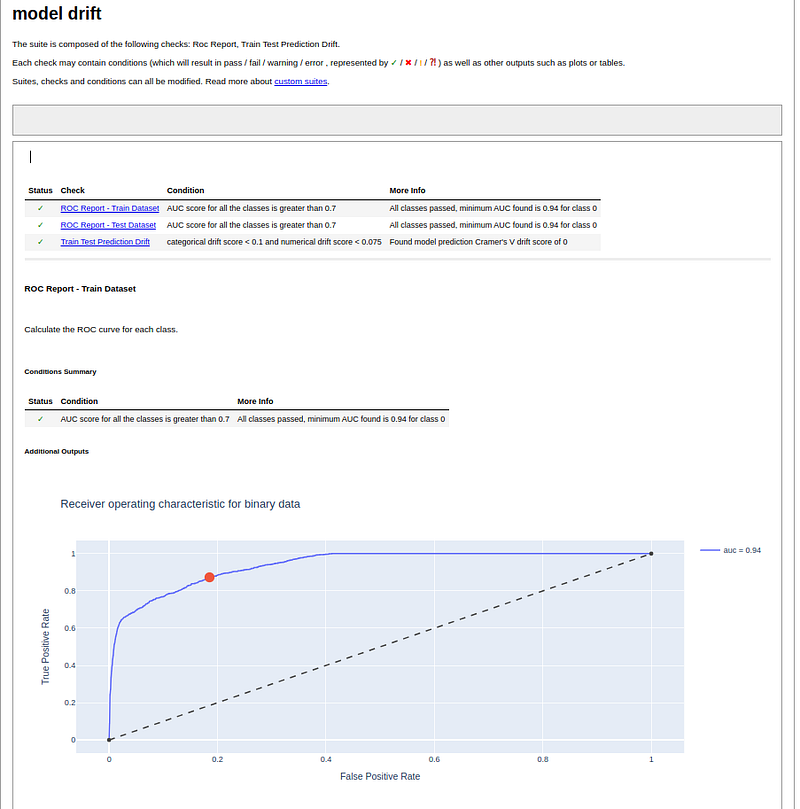
The result of the model check on the following example :
md_1_2 = check_model_drift(ref_df=vdf1, cur_df=vdf2, model=pred_model, predictors=config.PREDICTORS, target=config.TARGET, job_id=job_id2)is presented in the graph below:
Finally, to better manage monitoring ( data quality, data drift,and model drift) and track it on a daily basis, it is necessary to use an orchestration tool like AIRFLOW to send ALERTS.


