tic Istio side car injection. First we define the deployment and service for Kubernetes:</p>
<figure id="b15b">
<div>
<div>
<iframe class="gist-iframe" src="/gist/pklinker/2c8b910dce6046c570f3599d78f81cec.js" allowfullscreen="" frameborder="0" height="undefined" width="undefined">
</div>
</div>
</figure></iframe></div></div></figure><p id="f8dd">Notice that our service is named <b>capitol-info</b> and runs on port 5500. The service name is important because that is how the API gateway will reach this microservice. Once the service is configured, we will add an Istio gateway and virtual service to expose <i>part </i>of the API to north-south traffic. Below is the virtual service configuration:</p>
<figure id="d139">
<div>
<div>
<iframe class="gist-iframe" src="/gist/pklinker/4c22f6da60b44b454bcf1780cf4d550f.js" allowfullscreen="" frameborder="0" height="undefined" width="undefined">
</div>
</div>
</figure></iframe></div></div></figure><p id="d37f">The capitol-info virtual service shows that we are only opening up the <i>getCapitol</i> REST operation to north-south traffic, not the insert capability defined by the <i>addCapitol</i> REST operation. Therefore, the <i>addCapitol</i> REST operation is protected from outside calls, but not from calls by other microservices within the service mesh. We will examine locking down the service in the next article in this series.</p><p id="420c">After applying the configurations in Kubernetes, we can look into the Kiali dashboard where we can see the capitol-info service running:</p><figure id="7e7c"><img src="https://cdn-images-1.readmedium.com/v2/resize:fit:800/1*wsHB-r67fzZbW5k0lyybvQ.png"><figcaption>Kiali dashboard showing the capitol-info service deployed</figcaption></figure><p id="6108">We can test the service by navigating, in a web browser, to the REST API at <a href="http://localhost/getCapitol/France">http://localhost/getCapitol/France</a>:</p><figure id="1004"><img src="https://cdn-images-1.readmedium.com/v2/resize:fit:800/1*QMohrTGgAgAPclRVnTH5LA.png"><figcaption>JSON response from our capitol-info REST call</figcaption></figure><p id="ab4b">We see Paris returned as a JSON response from the capitol-info microservice. Recall that we won’t be able to reach <a href="http://localhost/getCapitol/France">http://localhost/addCapitol/</a> because we did not create a virtual service route to it. Instead we want to put this operation exclusively behind an API gateway.</p><h1 id="8541">Capitol-client Microservice</h1><p id="23e5">With the capitol-info microservice up and running, we can now create the client. The client will have two web pages hosted by NGINX, one to query for capitols, and one to add a capitol city:</p><figure id="64bd"><img src="https://cdn-images-1.readmedium.com/v2/resize:fit:800/1*RO7p38wlHzGp1JWdbl0aPg.png"><figcaption>Query for a capitol</figcaption></figure><figure id="35d4"><img src="https://cdn-images-1.readmedium.com/v2/resize:fit:800/1*ptBjgP1hKJCQn_L4YFeUdw.png"><figcaption>Add a new capitol</figcaption></figure><p id="d7f2">To create these pages, we need to configure NGINX to host the web pages and create an API Gateway to our back end capitol-info microservice. Of course, if this was a legacy application, these would already be extant. Because we want to do service-to-service communications through the Istio Envoy sidecar, we don’t simply want to redirect calls from the client website to the back end service. Rather, we want to create an API gateway and allow the gateway to invoke the services on our behalf, thus enabling service-to-service calls. NGINX provides an API gateway under the <i>/capitolservice </i>path in the web client. When calls to the web client are invoked with this path, the NGINX gateway proxies the call to the capitol info service. To do this we create a proxy_pass entry in the nginx.conf configuration file as show below:</p>
<figure id="4592">
<div>
<div>
<iframe class="gist-iframe" src="/gist/pklinker/3dab4bb6b7984661c2f438e4ee7127f1.js" allowfullscreen="" frameborder="0" height="undefined" width="undefined">
</div>
</div>
</figure></iframe></div></div></figure><p id="e339">Note that the server of the upstream /<i>capitolservice/</i> proxy is not a host name but a service name in Kubernetes. If you were migrating an API gateway, this would need to be changed. Istio, like NGINX, provides traffic management, therefore you will need to determine how you want to handle this. However, if you don’t hand off traffic management to Istio, you will not be able to realize its full benefits.</p><p id="ab67">With this proxy in place, if we create a URI with <i>/capitolservice</i> in the path, NGINX will invoke the call on
Options
the upstream service, appending everything after the <i>/capitolservice/</i> to the call.</p><p id="fecc">The next step is create the web pages, <i>QueryCapitol.html</i> and <i>AddCapitol.html</i>, shown above. For brevity’s sake, we will show the core logic from the <i>QueryCapitol.html </i>page, as seen below.</p>
<figure id="a63b">
<div>
<div>
<iframe class="gist-iframe" src="/gist/pklinker/2d7b2b811afec82ddd9f55418c0149b7.js" allowfullscreen="" frameborder="0" height="undefined" width="undefined">
</div>
</div>
</figure></iframe></div></div></figure><p id="f0b3">This code takes in a country name (line 2), passes it to an AngularJS function (line 11). The AngularJS code will invoke the API gateway (line 12). The NGINX gateway will convert the request from <a href="http://localhost/capitolservice/getCapitol/France">http://localhost/capitolservice/getCapitol/</a>{name} to http://capitol-info/getCapitol/{name} and make the HTTP GET call. The addCapitol functionality follows the same logic, but uses a HTTP POST operation.</p><p id="8acf">Once we have developed the client functionality, we create the Kubernetes and Istio configurations. As with the capitol-info microservice, we create the Kubernetes Service and Deployment descriptors as show below:</p>
<figure id="3095">
<div>
<div>
<iframe class="gist-iframe" src="/gist/pklinker/fe5071e4f8b7a8769ff84f5a03144470.js" allowfullscreen="" frameborder="0" height="undefined" width="undefined">
</div>
</div>
</figure></iframe></div></div></figure><p id="11ac">For the Istio configuration, we give the client an ingress gateway and virtual service for routing. The ingress gateway is the standard port 80 (web) gateways, so we will focus on the virtual service starting with the capitol service as shown in the virtual service definition below:</p>
<figure id="761b">
<div>
<div>
<iframe class="gist-iframe" src="/gist/pklinker/358415219a07ac51282f56e427cc696c.js" allowfullscreen="" frameborder="0" height="undefined" width="undefined">
</div>
</div>
</figure></iframe></div></div></figure><p id="9abb">The capitol client virtual service shows that we are opening up the API gateway found under <i>/capitolservice</i>, as well as the HTML pages found under<i> /info.</i></p><p id="d605">Once we apply the above configurations to our Kubernetes cluster, we should be able to go in to Kiali and see the deployment and connections.</p><figure id="6abb"><img src="https://cdn-images-1.readmedium.com/v2/resize:fit:800/1*-9xRiqTHXPWedhT2slNVNA.png"><figcaption>Both the capitol-client and capitol-info microservices are reachable from outside of the service mesh</figcaption></figure><p id="cd3e">Because we have an API gateway that can make calls to the capitol-info REST interface, through the service mesh, we can remove the Istio routes to the capitol-info micro service. To do this, we delete the ingress gateway and virtual service. Now, if you look in the Kiala graph below you can see there’s no longer a route to the capitol-info microservice from the ingress gateway (the line still exist but the route icon has vanished from that service).</p><figure id="084a"><img src="https://cdn-images-1.readmedium.com/v2/resize:fit:800/1*8vV4a2RZQ62Tyh-qJ3DOsw.png"><figcaption>With the capitol-info VS route removed only the capitol-client microservice is reachable from outside of the service mesh</figcaption></figure><p id="a3ef">If we were to query the capitol-client microservice directly from our desktop (localhost) we will now get an error because the virtual service no longer exists to route the request.</p><figure id="3cb9"><img src="https://cdn-images-1.readmedium.com/v2/resize:fit:800/1*Jzq_ijYlAmXsjtnxCbVVkw.png"><figcaption>The capitol-info microservice is no longer directly reachable from outside of the service mesh.</figcaption></figure><p id="e5ba">Because we have the NGINX API gateway, however, we are able to reach the capitol-info microservice functionality by using that gateway, as shown below:</p><figure id="f496"><img src="https://cdn-images-1.readmedium.com/v2/resize:fit:800/1*nk7Srr4lr3B04tWiJTy6IA.png"><figcaption>The capitol-info microservice can still be reached through the NGINX API gateway.</figcaption></figure><h1 id="5f92">Conclusion</h1><p id="02b0">In this article, we showed how business logic can be extracted from a legacy monolithic application and placed behind a restful API using the Spring Boot Controller and Service Class pattern. We also showed that existing gateway APIs can be maintained and used within an Istio service mesh. The next article in this series will show how to use Istio authorization policies to further lockdown these services.</p></article></body>
Migrating Legacy APIs into an Istio Service Mesh
When talking to customers about microservices, one of the concerns I frequently hear is how to handle legacy application migration. Organizations need clear and easy paths to migrate their existing functionality into a service mesh. Because the universe of legacy systems is so varied, including monolithic custom middleware, databases, web servers, etc., this article will focus on API gateways and RESTful services because they can take advantage of many of the features of a service mesh.
In my previous article, I showed how to build and deploy a simple Java Spring Boot-based microservice into Istio. In this article, I will build on the concepts from that article to demonstrate migrating legacy applications into Istio. We will create a simple mesh of two microservices: an NGINX-based client microservice providing an API gateway and website; and a Java Spring Boot back end microservice providing data services to the client. Many systems already have API gateways, so this demonstrates a way to bring those legacy APIs into a service mesh while maintaining the API gateway. There are also a large number of legacy monolithic Java applications that have discrete chunks of logic that could be extracted, containerized, and turned into a microservice. For a sample capability, these services work together to provide the ability to look up the capitol of a country, state or province, as well as to insert a new capitol city.
Architecture
Let’s start by looking at the target architecture, as shown in the diagram below:
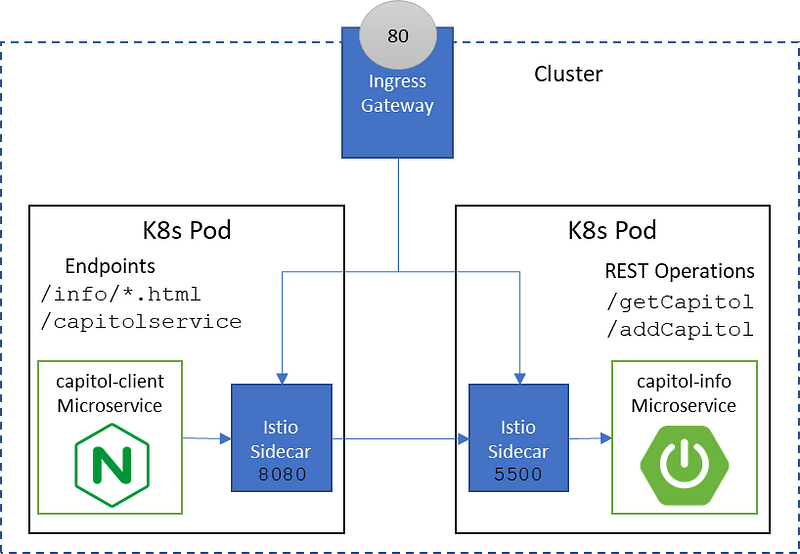
Capitol-client microservice and capitol-info microservice running in an Istio service mesh
The web client microservice, called “capitol-client”, is written in AngularJS and runs in NGINX. It also provides an NGINX API gateway to the back end microservice. The back end microservice, called “capitol-info”, has query and insert capabilities into a database of capitol cities. The capitol-info service is implemented in Java using Spring Boot providing a RESTful API. To hold the cities, it uses an JSONDB embedded database for persistence. The endpoints exposed by these microservices are:
/info/* — static web pages hosted by NGINX on the capitol-client microservice
/capitolservice/ — NGINX API gateway on the capitol-client microservice
/getCapitol & /addCapitol — REST API implement in Java on the capitol-info microservice
Capitol-info Microservice
The capitol-info microservice provides a REST API to query for capitol cities and to insert new capitol cities. To implement this microservice, we use the standard Spring Framework Controller and Service model. The Controller defines the REST API as shown in the code below.
The controller maps a GET operation called getCapitol and a POST operation called addCapitol to the implementation provided by the service class. If this were a legacy migration, the service class is where we would place the code extracted from the monolith. These operations are implemented in the CountryInfoService Java class, where they interface to an embedded JSON database holding the city information. For example, a simplified version of the getCapitol implementation looks like:
In the above code, we search the database for the capitol name based on the country name and then build a JSON response.
As in the previous Spring Boot example, this service is packaged as a self-executing jar and bundled into a Docker image. The image is then pushed to Docker Hub, to make it available to Kubernetes during deployment. Once the image packaging is complete, we need to create the Kubernetes and Istio configurations. We will also be using automatic Istio side car injection. First we define the deployment and service for Kubernetes:
Notice that our service is named capitol-info and runs on port 5500. The service name is important because that is how the API gateway will reach this microservice. Once the service is configured, we will add an Istio gateway and virtual service to expose part of the API to north-south traffic. Below is the virtual service configuration:
The capitol-info virtual service shows that we are only opening up the getCapitol REST operation to north-south traffic, not the insert capability defined by the addCapitol REST operation. Therefore, the addCapitol REST operation is protected from outside calls, but not from calls by other microservices within the service mesh. We will examine locking down the service in the next article in this series.
After applying the configurations in Kubernetes, we can look into the Kiali dashboard where we can see the capitol-info service running:
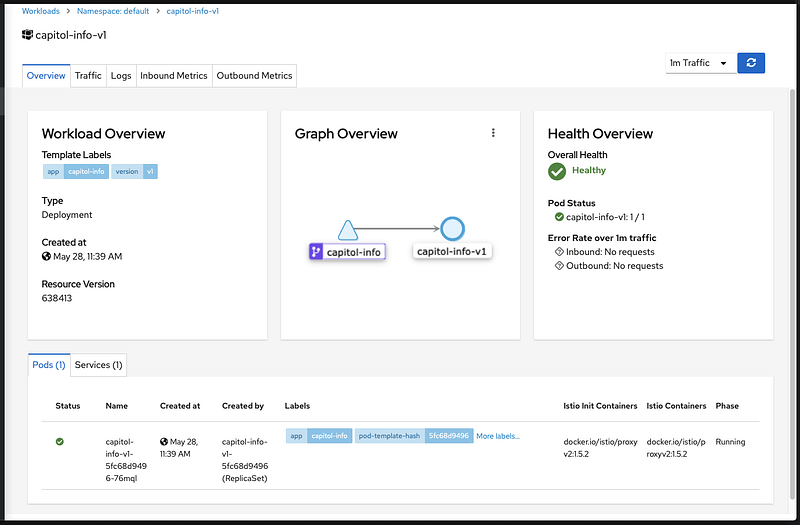
Kiali dashboard showing the capitol-info service deployed
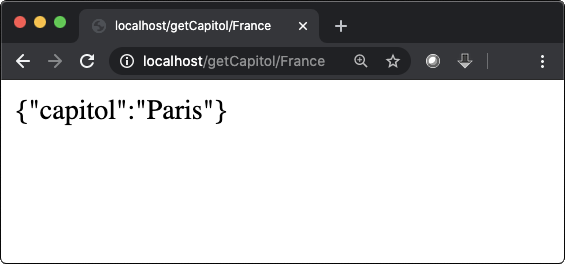
We see Paris returned as a JSON response from the capitol-info microservice. Recall that we won’t be able to reach http://localhost/addCapitol/ because we did not create a virtual service route to it. Instead we want to put this operation exclusively behind an API gateway.
Capitol-client Microservice
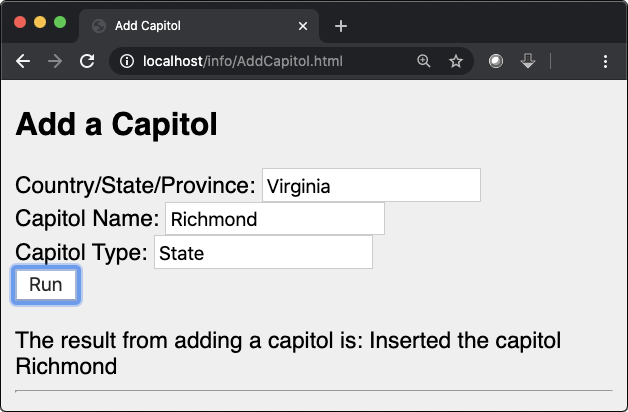
With the capitol-info microservice up and running, we can now create the client. The client will have two web pages hosted by NGINX, one to query for capitols, and one to add a capitol city:
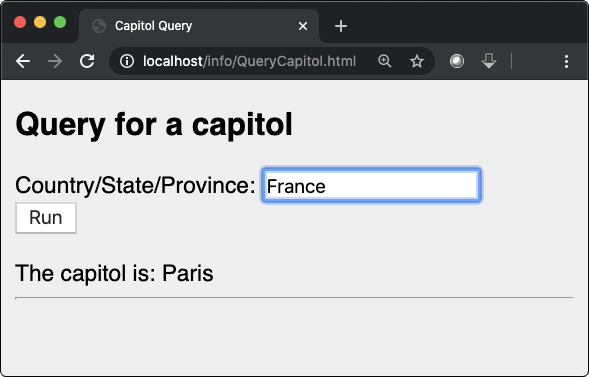
Query for a capitolAdd a new capitol
To create these pages, we need to configure NGINX to host the web pages and create an API Gateway to our back end capitol-info microservice. Of course, if this was a legacy application, these would already be extant. Because we want to do service-to-service communications through the Istio Envoy sidecar, we don’t simply want to redirect calls from the client website to the back end service. Rather, we want to create an API gateway and allow the gateway to invoke the services on our behalf, thus enabling service-to-service calls. NGINX provides an API gateway under the /capitolservice path in the web client. When calls to the web client are invoked with this path, the NGINX gateway proxies the call to the capitol info service. To do this we create a proxy_pass entry in the nginx.conf configuration file as show below:
Note that the server of the upstream /capitolservice/ proxy is not a host name but a service name in Kubernetes. If you were migrating an API gateway, this would need to be changed. Istio, like NGINX, provides traffic management, therefore you will need to determine how you want to handle this. However, if you don’t hand off traffic management to Istio, you will not be able to realize its full benefits.
With this proxy in place, if we create a URI with /capitolservice in the path, NGINX will invoke the call on the upstream service, appending everything after the /capitolservice/ to the call.
The next step is create the web pages, QueryCapitol.html and AddCapitol.html, shown above. For brevity’s sake, we will show the core logic from the QueryCapitol.html page, as seen below.
This code takes in a country name (line 2), passes it to an AngularJS function (line 11). The AngularJS code will invoke the API gateway (line 12). The NGINX gateway will convert the request from http://localhost/capitolservice/getCapitol/{name} to http://capitol-info/getCapitol/{name} and make the HTTP GET call. The addCapitol functionality follows the same logic, but uses a HTTP POST operation.
Once we have developed the client functionality, we create the Kubernetes and Istio configurations. As with the capitol-info microservice, we create the Kubernetes Service and Deployment descriptors as show below:
For the Istio configuration, we give the client an ingress gateway and virtual service for routing. The ingress gateway is the standard port 80 (web) gateways, so we will focus on the virtual service starting with the capitol service as shown in the virtual service definition below:
The capitol client virtual service shows that we are opening up the API gateway found under /capitolservice, as well as the HTML pages found under /info.
Once we apply the above configurations to our Kubernetes cluster, we should be able to go in to Kiali and see the deployment and connections.
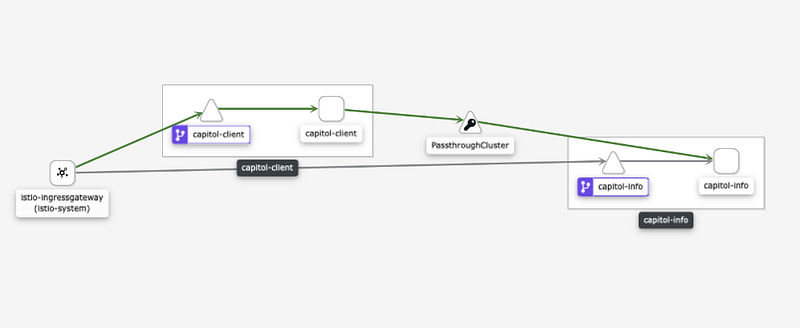
Both the capitol-client and capitol-info microservices are reachable from outside of the service mesh
Because we have an API gateway that can make calls to the capitol-info REST interface, through the service mesh, we can remove the Istio routes to the capitol-info micro service. To do this, we delete the ingress gateway and virtual service. Now, if you look in the Kiala graph below you can see there’s no longer a route to the capitol-info microservice from the ingress gateway (the line still exist but the route icon has vanished from that service).
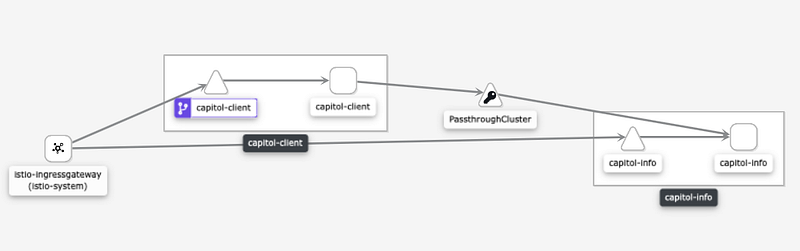
With the capitol-info VS route removed only the capitol-client microservice is reachable from outside of the service mesh
If we were to query the capitol-client microservice directly from our desktop (localhost) we will now get an error because the virtual service no longer exists to route the request.
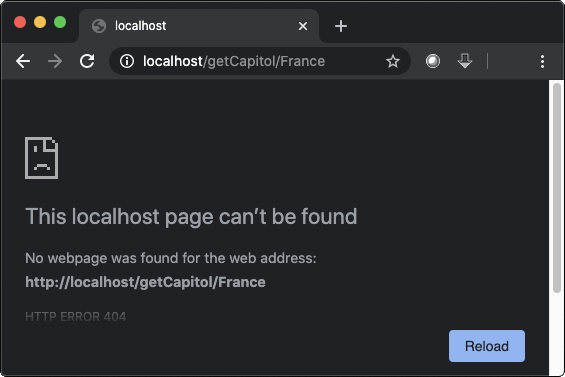
The capitol-info microservice is no longer directly reachable from outside of the service mesh.
Because we have the NGINX API gateway, however, we are able to reach the capitol-info microservice functionality by using that gateway, as shown below:
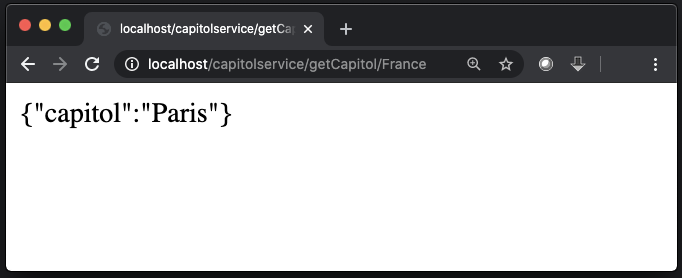
The capitol-info microservice can still be reached through the NGINX API gateway.
Conclusion
In this article, we showed how business logic can be extracted from a legacy monolithic application and placed behind a restful API using the Spring Boot Controller and Service Class pattern. We also showed that existing gateway APIs can be maintained and used within an Istio service mesh. The next article in this series will show how to use Istio authorization policies to further lockdown these services.