avatarJohn E Hall

Free AI web copilot to create summaries, insights and extended knowledge, download it at here

4177

Abstract

that represent the specific text term.</p><h2 id="da74">THE INFLUENCER (ARTIST FILTERED) CATEGORY</h2><p id="d4bc">Within this object we find artists, illustrators, painters, photographers, fashion designers, architects and famous people that have a specific style. We can start to understand the style by seeing the visual they represent which can become an influence for the Midjourney bot.</p><figure id="60b6"><img src="https://cdn-images-1.readmedium.com/v2/resize:fit:800/1*QBqQinB33PiWi1td8aHyCQ.png"><figcaption>Capacities Object — Influencer</figcaption></figure><h2 id="b262">PARAMETERS THAT AFFECT THE IMAGE</h2><p id="8482">In addition to the text prompts there are a number of parameters that affect the image creation. These are the control mechanisms that instruct how an image should be generated. As an example, a few of the key parameters include:</p><ul><li><b>aspect ratio</b> — the shape and composition of the image generated</li><li><b>stylize </b>— affects the artistic influence the bot uses</li><li><b>chaos</b> — controls how varied unusual results will be</li><li><b>quality</b> — affects how much time the bot takes to generate the image</li><li><b>weird</b> — introduces quirky and offbeat qualities</li></ul><p id="e1a7">The full set of parameters can be found at:</p><div id="78f8" class="link-block"> <a href="https://docs.midjourney.com/docs/parameter-list"> <div> <div> <h2>Midjourney Parameter List</h2> <div><h3>Parameters are added to a prompt to change how an image generates. Parameters can change an image's aspect ratios…</h3></div> <div><p>docs.midjourney.com</p></div> </div> <div> <div style="background-image: url(https://miro.readmedium.com/v2/resize:fit:320/0*mlNdpInadRh4MG16)"></div> </div> </div> </a> </div><h2 id="c1da">DATABASE TO DECONSTRUCT THE PROMPT</h2><p id="650b">I developed a custom database that enabled a successful prompt to be deconstructed into various text terms (on right) and also enabled a new prompt to be generated by selecting various text terms (left column).</p><p id="a8e6">To capture the growing list of terms in each text term category the following functions and structure was used in the database:</p><p id="382b"><b>Deconstructing a prompt:</b></p><ul><li>Selection of text within the active prompt, command to add to library</li></ul><p id="79f0"><b>Constructing a prompt:</b></p><ul><li>Selection of parameters to be used in the prompt</li><li>Selection of text terms from the library to include for new prompt calculation</li><li>Generate new Midjourney prompt by concatenating text terms</li><li>Storage of resulting image generated by Midjourney</li></ul><figure id="ea30"><img src="https://cdn-images-1.readmedium.com/v2/resize:fit:800/1*Gg4EViGSyTjcZ-mkOC7cNg.png"><figcaption>database for collecting text prompts</figcaption></figure><p id="aae7">A database is a great way to build this prompt Knowledge Base because it is fully programmable and enabled scraping the terms from the prompt and then enabled the term to be classified within the appropriate category.</p><p id="69c8"><b><i>Note that there are endless ways to organize this structure and this approach is not meant to be taken as the only way or best way. The structure and examples presented are from my observations in a paid subscription within the public spaces of MidJourney.</i></b></p><h2 id="5459">PROMPT PROPERTY STRUCTURE FOR CAPACITIES</h2><p id="193a">Now that we have a database structure needed to store prompt texts, with text term categories, we need to get that structure into <a href="https://capacities.io">Capacities</a>.</p><p id="5223">Each object structure includes the simple property structure of:</p><ul><li>Title (default)</li><li>Tags</li><li>Content</li></ul><p id="8e53">One object created is called PROMPT_CONSTRUCT that adds all of the other objects within its object definition as a single property.</p><p id="e9c5">These properties include:</p><figure id="1c69"><img src="https://cdn-images-1.readmedium.com/v2/resize

Options

:fit:800/1*PO34vh7-HMUlyjSfyxpXdg.png"><figcaption>PROMPT_CONSTRUCT object properties defined</figcaption></figure><p id="4923">In the PROMPT_CONSTRUCT record view there is a cover image for the Midjourney generated image along with all of the selected object texts that are used to create the Midjourney prompt.</p><p id="44ee">In the below record view the lighting text term is open for selection from the possible records stored within the lighting object. Each selected object has corresponding values that can be selected from a dropdown.</p><p id="d726">I have set most object fields to ‘hide when empty’ so they can be selected for use as needed, which keeps the interface focused.</p><figure id="c390"><img src="https://cdn-images-1.readmedium.com/v2/resize:fit:800/1*FsmSM_PrYTT730Ctcn1HiA.png"><figcaption></figcaption></figure><h2 id="4765">CREATING THE AI ASK SUMMARY NARRATIVE PROMPT</h2><ul><li>An AI narrative prompt can be generated by having an open record which is used as context. Select an open text area at the bottom of the record and then call the ‘Ask AI’ command by typing ‘/’ and ‘ask ai’.</li><li>In the new AI ASK chat window select one of the ‘+ Add’ commands.</li></ul><figure id="f07d"><img src="https://cdn-images-1.readmedium.com/v2/resize:fit:800/1*rcKftzdA0mMp93otlz8gmQ.png"><figcaption></figcaption></figure><ul><li>The text command that is entered is <b><i>‘create a single paragraph narrative prompt for Midjourney using the properties in this record’</i></b></li><li>The resulting AI Prompt (below) can then be copied to Midjourney to create the image along with the necessary parameters.</li></ul><p id="1b51">The AI generated Prompt with added parameters:</p><ul><li><b><i>As the midday sun reached its zenith, a weary traveler found herself on a winding road, her eyes fixed on an old barn nestled amidst a picturesque landscape. The weathered wood of the barn exuded a sense of history, its aging facade telling stories of generations past. In front of the barn stood an imposing vintage tractor, its rusty exterior a testament to years of hard work. The golden hour morning lighting cast a warm glow on the scene, illuminating the remarkable textures of the barn and highlighting the vibrant colors of the surrounding fall foliage. Intrigued by the blending of human craftsmanship and the beauty of nature, the traveler couldn’t help but pause to admire the harmonious coexistence of the man-made and the organic, pondering the stories that lay behind this serene mid-journey scene. </i>— v 5.2 — c 75 — s 750</b></li></ul><h2 id="438e">VIEWING A WALL VIEW OF PROMPTS WITH IMAGES</h2><p id="d363">Capacities can create an excellent view of Midjourney prompts along with the resulting image. An example of this looks like:</p><figure id="34ce"><img src="https://cdn-images-1.readmedium.com/v2/resize:fit:800/1*BHWfHrCGfTuM7WjHx-U2bg.png"><figcaption>Capacities wall view of Midjourney prompts</figcaption></figure><h2 id="db22">ONE THING YOU MUST DO IS LEARN THE STYLES</h2><p id="0677">To create the kind of art in your imagination there are a ton of style terms based on art styles, artists, photographers and others that are important to understand and experiment with. For example terms like <b>Caricature Rococo Surrealism, Bathsheba geometric sculpture, Cyber Silverpoint Impressionism, Dadaism and Alebrijes </b>will create some beautiful images. Adding the ‘weird’ parameter can make things get pretty crazy.-</p><p id="9105">In a follow up article I will test variations to the selected texts and generated AI prompts as well as variations in style and parameters.</p><p id="37b1">I hope this article provides the basis of a useful method to help generate prompts and images and store the results within Capacities!</p><p id="093b"><b>Thank You for reading and for your support!! If you enjoyed this article please consider a Clap or more (1–50). Thank you!</b></p><p id="89ad"><a href="/@john.e.hall">john.e.hall — Medium</a></p><p id="0c8a">Join Medium today, read all my stories and support the writers:</p><p id="7033"><a href="/@john.e.hall/membership">https://medium.com/@john.e.hall/membership</a></p></article></body>

Midjourney Text Prompts Deconstructed and AI Narrative Prompt Reconstruction

Prompt Reverse Engineering and Management in Capacities
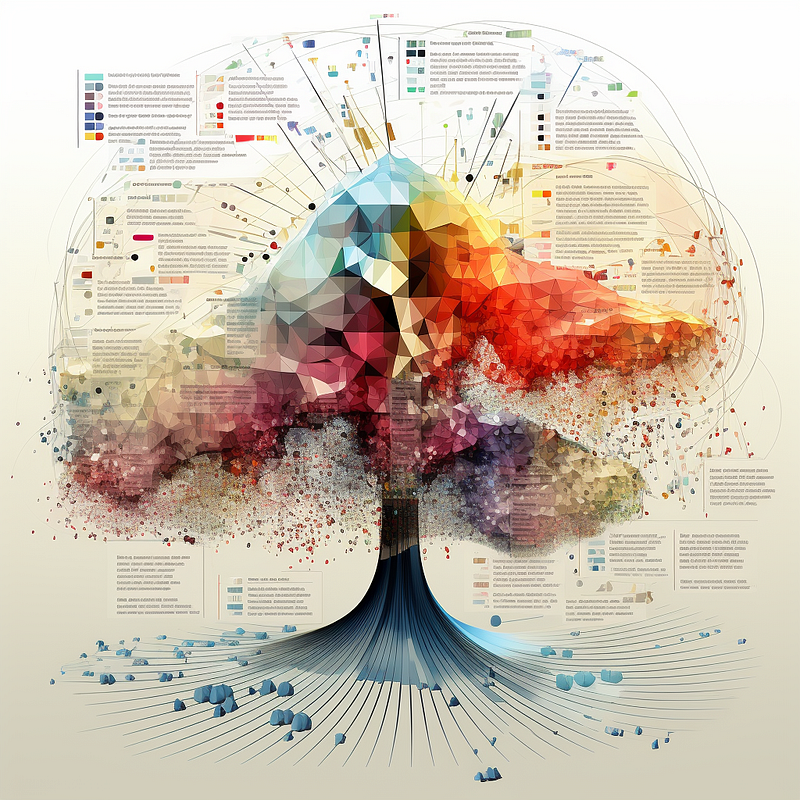
image courtesy author rendered in MidJourney

In this article I will describe how I ultimately create a Midjourney narrative prompt through a library of text prompts and a summary AI function.

APPROACH FOR CREATING AN AI NARRATIVE PROMPT

  • I first deconstruct Midjourney and store normalized text prompts within associated categories.
  • I then use the various combinations of texts stored in a database to construct a prompt for Midjourney. This allows me to change one text prompt to a different style. As an example, in the lighting category I changed ‘moonlight’ to ‘golden hour sunrise’ lighting and recreated the image.
  • I then store all of the text variations within Capacities and use the built-in AI function to consider the selected texts to create a summary of the record which becomes the narrative prompt. This prompt is then sent back to Midjourney.

GETTING STARTED WITH MIDJOURNEY PROMPTS

Image generation success in Midjourney (MJ) largely depends on selecting and combining the right text prompts or narrative text for the desired effect, along with a little luck.

For the background on getting started with prompts there is a great article by Michael King on the journey to construct a successful prompt. Another great article that explores a range of text prompts is written by Christie C. on medium. There are many complexities of prompting that can also affect the generated image such as multi-prompting, described in this article by Geeky Animals.

If you want to explore the depth and variety of articles in Medium it can be followed in Midjourney Topics.

MIDJOURNEY PROMPT STYLES

The prompt style I focus on in this article is the exploratory method of narrative style. This style has become popular with version 5 because the MJ parser has a better ability to understand language than previous versions.

To understand and generate a narrative prompt I first started with deconstructing Midjourney prompts. I realized quickly that the scope of possible variables and terminology is extensive. I attempted to classify the different types of prompt attributes so they could be reconstructed into a new narrative prompt.

I began by storing each text prompt term into a database for reference.

PROMPT TEXT TERM CATEGORIES

I then started by breaking down the prompt structure and storing individual meaningful text terms in a database. The text term categories I considered are:
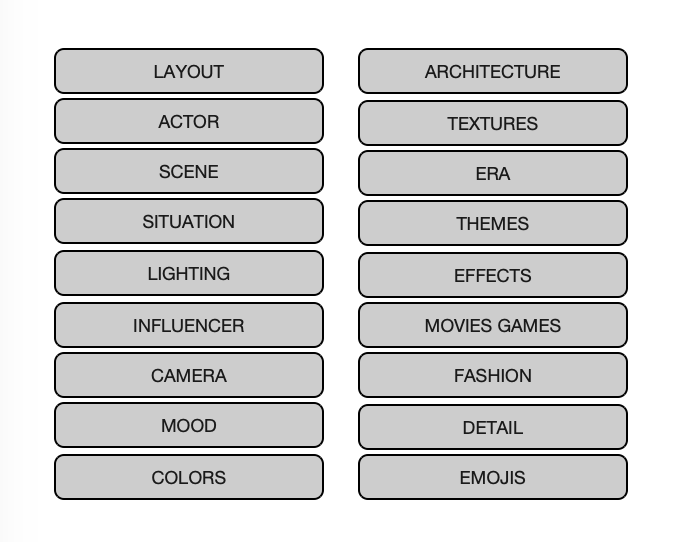
text type categories

Each text term category contains an extensive set of text terms determined from the deconstruction of prompts. For example, the LIGHTING text term category contains the text terms:
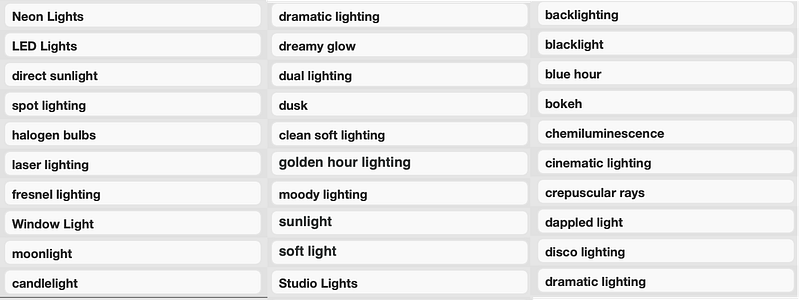
prompt text terms for LIGHTING

Each of these text terms has a specific meaning in photography and is recognized by the Midjourney bot as the type of lighting to use in generating the image.

Each of the text term categories will have a set of text terms and associated images that represent the specific text term.

THE INFLUENCER (ARTIST FILTERED) CATEGORY

Within this object we find artists, illustrators, painters, photographers, fashion designers, architects and famous people that have a specific style. We can start to understand the style by seeing the visual they represent which can become an influence for the Midjourney bot.
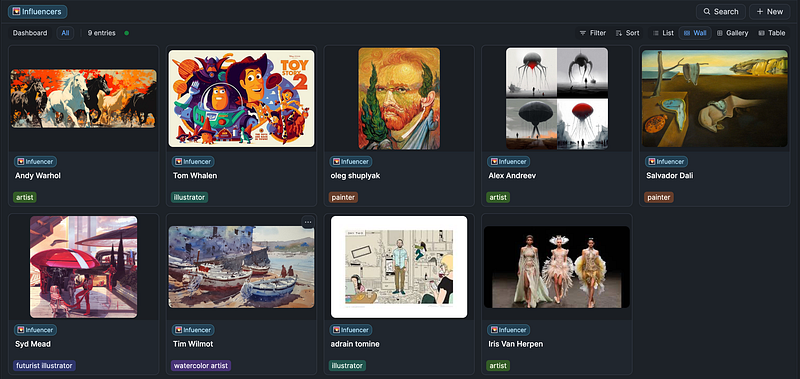
Capacities Object — Influencer

PARAMETERS THAT AFFECT THE IMAGE

In addition to the text prompts there are a number of parameters that affect the image creation. These are the control mechanisms that instruct how an image should be generated. As an example, a few of the key parameters include:

  • aspect ratio — the shape and composition of the image generated
  • stylize — affects the artistic influence the bot uses
  • chaos — controls how varied unusual results will be
  • quality — affects how much time the bot takes to generate the image
  • weird — introduces quirky and offbeat qualities

The full set of parameters can be found at:

DATABASE TO DECONSTRUCT THE PROMPT

I developed a custom database that enabled a successful prompt to be deconstructed into various text terms (on right) and also enabled a new prompt to be generated by selecting various text terms (left column).

To capture the growing list of terms in each text term category the following functions and structure was used in the database:

Deconstructing a prompt:

  • Selection of text within the active prompt, command to add to library

Constructing a prompt:

  • Selection of parameters to be used in the prompt
  • Selection of text terms from the library to include for new prompt calculation
  • Generate new Midjourney prompt by concatenating text terms
  • Storage of resulting image generated by Midjourney
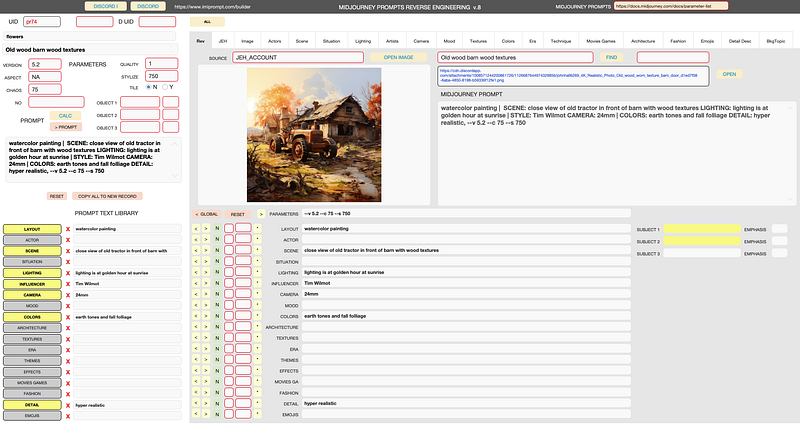
database for collecting text prompts

A database is a great way to build this prompt Knowledge Base because it is fully programmable and enabled scraping the terms from the prompt and then enabled the term to be classified within the appropriate category.

Note that there are endless ways to organize this structure and this approach is not meant to be taken as the only way or best way. The structure and examples presented are from my observations in a paid subscription within the public spaces of MidJourney.

PROMPT PROPERTY STRUCTURE FOR CAPACITIES

Now that we have a database structure needed to store prompt texts, with text term categories, we need to get that structure into Capacities.

Each object structure includes the simple property structure of:

  • Title (default)
  • Tags
  • Content

One object created is called PROMPT_CONSTRUCT that adds all of the other objects within its object definition as a single property.

These properties include:
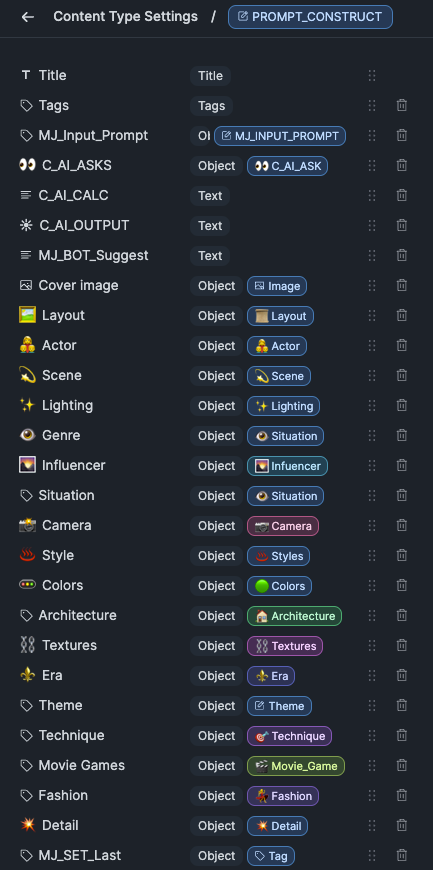
PROMPT_CONSTRUCT object properties defined

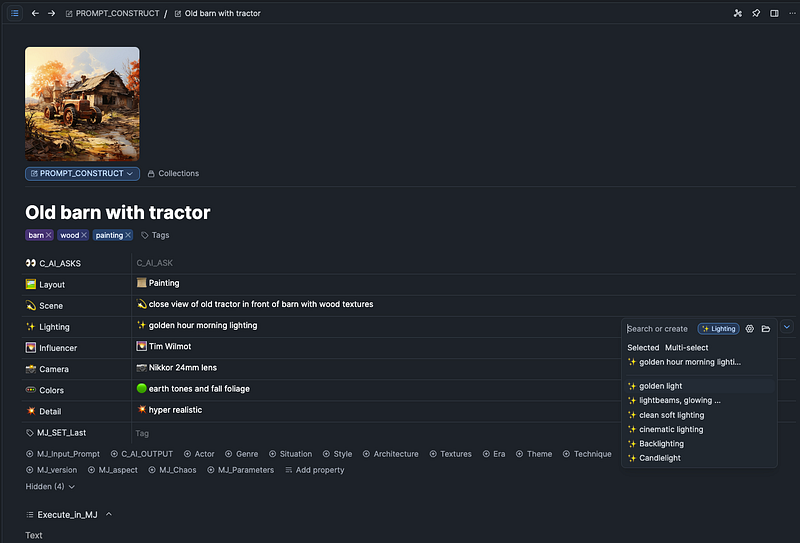
In the PROMPT_CONSTRUCT record view there is a cover image for the Midjourney generated image along with all of the selected object texts that are used to create the Midjourney prompt.

In the below record view the lighting text term is open for selection from the possible records stored within the lighting object. Each selected object has corresponding values that can be selected from a dropdown.

I have set most object fields to ‘hide when empty’ so they can be selected for use as needed, which keeps the interface focused.
CREATING THE AI ASK SUMMARY NARRATIVE PROMPT

  • An AI narrative prompt can be generated by having an open record which is used as context. Select an open text area at the bottom of the record and then call the ‘Ask AI’ command by typing ‘/’ and ‘ask ai’.
  • In the new AI ASK chat window select one of the ‘+ Add’ commands.
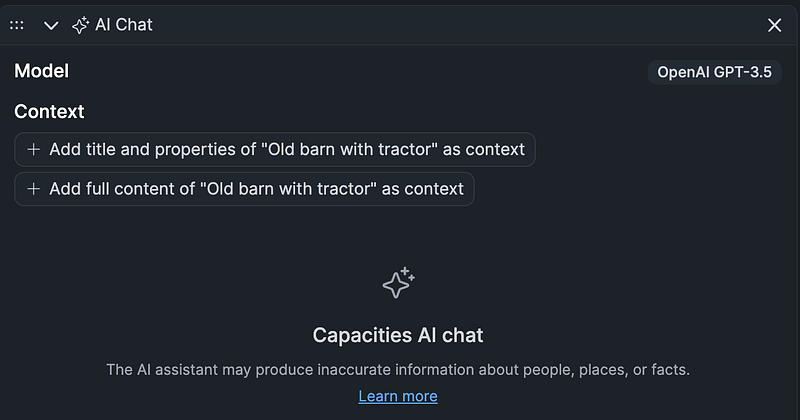
  • The text command that is entered is ‘create a single paragraph narrative prompt for Midjourney using the properties in this record’
  • The resulting AI Prompt (below) can then be copied to Midjourney to create the image along with the necessary parameters.

The AI generated Prompt with added parameters:

  • As the midday sun reached its zenith, a weary traveler found herself on a winding road, her eyes fixed on an old barn nestled amidst a picturesque landscape. The weathered wood of the barn exuded a sense of history, its aging facade telling stories of generations past. In front of the barn stood an imposing vintage tractor, its rusty exterior a testament to years of hard work. The golden hour morning lighting cast a warm glow on the scene, illuminating the remarkable textures of the barn and highlighting the vibrant colors of the surrounding fall foliage. Intrigued by the blending of human craftsmanship and the beauty of nature, the traveler couldn’t help but pause to admire the harmonious coexistence of the man-made and the organic, pondering the stories that lay behind this serene mid-journey scene. — v 5.2 — c 75 — s 750

VIEWING A WALL VIEW OF PROMPTS WITH IMAGES

Capacities can create an excellent view of Midjourney prompts along with the resulting image. An example of this looks like:
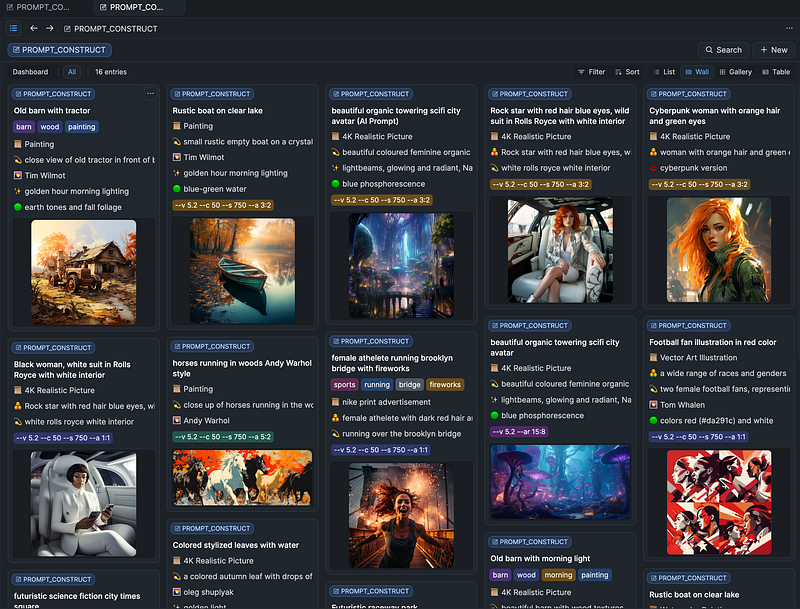
Capacities wall view of Midjourney prompts

ONE THING YOU MUST DO IS LEARN THE STYLES

To create the kind of art in your imagination there are a ton of style terms based on art styles, artists, photographers and others that are important to understand and experiment with. For example terms like Caricature Rococo Surrealism, Bathsheba geometric sculpture, Cyber Silverpoint Impressionism, Dadaism and Alebrijes will create some beautiful images. Adding the ‘weird’ parameter can make things get pretty crazy.-

In a follow up article I will test variations to the selected texts and generated AI prompts as well as variations in style and parameters.

I hope this article provides the basis of a useful method to help generate prompts and images and store the results within Capacities!

Thank You for reading and for your support!! If you enjoyed this article please consider a Clap or more (1–50). Thank you!

john.e.hall — Medium

Join Medium today, read all my stories and support the writers:

https://medium.com/@john.e.hall/membership

Midjourney
Artificial Intelligence
Art
Prompt
Prompt Engineering
Recommended from ReadMedium