
Microservice Implementation using Spring Cloud with Docker: Netflix Stack
Discovery server, API gateway ZUUL, ribbon, inter-services communication and docker
Microservices is an architectural design for building a distributed application using containers. Microservices get their name because each function of the application operates as an independent service. This architecture allows for each service to scale or update without disrupting other services in the application.

In this article, I will explain and implement bellow points
- What are microservice and their importance?
- Comparison between monolithic architecture and microservice architecture
- How Netflix stack (Eureka, ZUUL, Ribbon, etc) are the life saviour in our case?
- Details level descriptions of Netflix technology stack
- Describe and implement our proposed microservice architecture (service discovery, API gateway routing, and load balancing, inter microservice communication, and their load balancing, etc)
- Verify how microservices are connecting, how load balancing occurring based on data.
- Describe codebase and share code
Prerequisite : Before starting this article you need knowledge of docker, MongoDB, and spring boot. To do this you can check these articles
Infrscture architecture
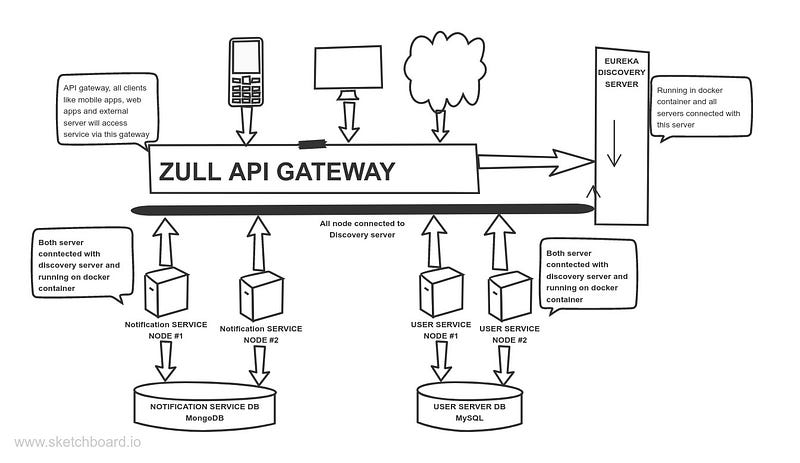
Our applications business logic is given bellow
- User service is responsible for registering our customers. After successful registration user service will call the notification service for sending notification.
- User service has N number of instances. Here we will show examples for two instances and both are connected with the MySQL database. Both are deployed in the docker container.
- Notification service stores notification data into MongoDB database. User service calls this service after customer registration. It has also an N number of instances and we will give example for two instances. Both instances are also running on docker containers.
- MySQL and MongoDB both databases are running into the docker container.
Monolithic architecture
Monolithic architecture is considered to be a traditional way of building applications. A monolithic application is built as a single and indivisible unit. Usually, such a solution comprises a client-side user interface, a server side-application, and a database. It is unified and all the functions are managed and served in one place.
Traditional monolithic architecture is given bellow
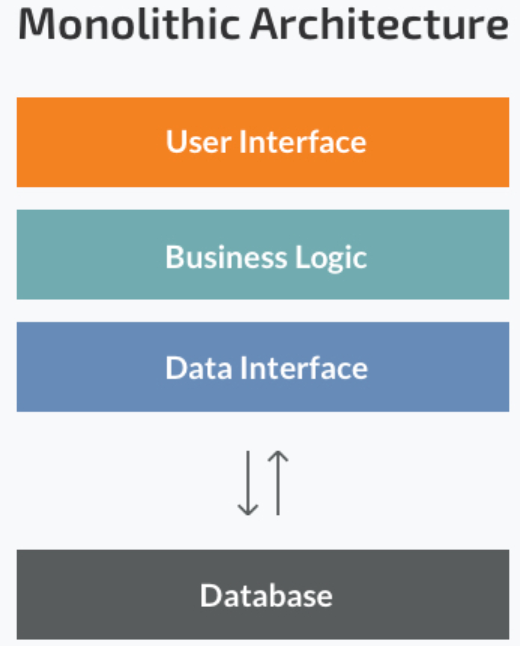
Normally, monolithic applications have one large codebase and lack modularity. If developers want to update or change something, they access the same code base. So, they make changes in the whole stack at once.
Limitations of monolithic architecture are given bellow
- Tight coupling between components, as everything is in one application
- The Integrated Development Environment can become overloaded, and size may also slow down startup time
- You must redeploy the entire application on each update.
- Every element is closely related and dependent on the others, so it is difficult to change to new or advanced technology, language, or framework
- The impact of a change is usually not very well understood which leads to doing extensive manual testing.
- Monolithic applications can also be difficult to scale when different modules have conflicting resource requirements.
- Another problem with monolithic applications is reliability. Bug in any module (e.g. memory leak) can potentially bring down the entire process. Moreover, since all instances of the application are identical, that bug will impact the availability of the entire application.
- Monolithic applications have a barrier to adopting new technologies. Since changes in frameworks or languages will affect an entire application it is extremely expensive in both time and cost.
Microservice architecture
Microservices are a way of breaking large software projects into loosely coupled modules, which communicate with each other through simple Application Programming Interfaces (APIs).
Microservices have become increasingly popular over the past few years. They are an example of the modular architectural style, based on the philosophy of breaking large software projects into smaller, independent, and loosely coupled parts, which has gained prominence among developers for its dynamic and agile qualities in API management and execution of highly defined and discrete tasks.
In short, the microservice architectural style is an approach to developing a single application as a suite of small services, each running in its own process and communicating with lightweight mechanisms, often an HTTP resource API. - Martin Fowler
Advantages of microservice are given bellow
- all the services can be deployed and updated independently, which gives more flexibility.
- a bug in one microservice has an impact only on a particular service and does not influence the entire application. Also, it is much easier to add new features to a microservice application than a monolithic one.
- Split up into smaller and simpler components, a microservice application is easier to understand and manage. You just concentrate on a specific service that is related to a business goal you have.
- Maintenance in microservices is faster than in monolith. Smaller services are also easy to test, saving programmers time. Over time, it increases efficiency and saves money.
- Microservices are stable and most reliable. Breaking one part only affects that element, while the others remain intact. Such flexibility allows for a fast pace of development and the introduction of changes in one function without interfering with others.
- In the case of microservices, scalability is much easier because we can scale only those parts that require more resources.
- The engineering teams are not limited by the technology chosen from the start. They are free to apply various technologies and frameworks for each microservice.
- Any fault in a microservices application affects only a particular service and not the whole solution. So all the changes and experiments are implemented with lower risks and fewer errors.
Details of Netflix stack
Netflix OSS is a set of frameworks and libraries that Netflix wrote to solve some interesting distributed-systems problems at scale. With a few simple annotations, you can quickly enable and configure the common patterns inside your application and build large distributed systems with battle-tested Netflix components. The patterns provided include Service Discovery (Eureka), Circuit Breaker (Hystrix), Intelligent Routing (Zuul), and Client Side Load Balancing (Ribbon).
Service discovery (Eureka)
Service Discovery is one of the key tenets of a microservice-based architecture. Trying to hand configure each client or some form of convention can be difficult to do and can be brittle. Eureka is the Netflix Service Discovery Server and Client. The server can be configured and deployed to be highly available, with each server replicating state about the registered services to the others.
It does bellow things
- Eureka is a REST (Representational State Transfer) based service that is primarily used in the AWS cloud for locating services for the purpose of load balancing and failover of middle-tier servers.
- Service Discovery Server Netflix Eureka allows microservices to register themselves at runtime as they appear in the system landscape.
- It’s a registry where clients (your microservices) can connect to (register), making your Eureka server aware of where your microservices are located, how many there are, and if they’re healthy or not.
- Discovery Server helps to discover the service we required. When some service needs to access another service, Discovery Server provides all the endpoint details of the requested service to establish the connection.
- All of the services need to register with Discovery Server, otherwise, Discovery Server doesn’t know about that service.
Netflix Ribbon
- Netflix Ribbon is an Inter-Process Communication (IPC) cloud library. Ribbon primarily provides client-side load balancing algorithms.
- Dynamic Routing and Load Balancer Netflix Ribbon can be used by service consumers to lookup services at runtime.
- Ribbon load balancers provide service discovery in dynamic environments like a cloud. Integration with Eureka and Netflix service discovery component is included in the ribbon library
- the Ribbon API can dynamically determine whether the servers are up and running in a live environment and can detect those servers that are down
- Ribbon uses the information available in Eureka to locate appropriate service instances. If more than one instance is found, Ribbon will apply load balancing to spread the requests over the available instances.
- It provides a configurable load balancing rule. Ribbon supports RoundRobinRule, AvailabilityFilteringRule, WeightedResponseTimeRule out of the box and also supports defining custom rules
- The ribbon does not run as a separate service but instead as an embedded component in each service consumer.
- Ribbon API works based on the concept called “Named Client”. While configuring Ribbon in our application configuration file we provide a name for the list of servers included for the load balancing.
Discovery client
Every service must register with the Discovery Server. Here, our user service and notification service both are connected with the discovery server. Here both are discovery clients. Single service may have multiple instances.
Netflix Zuul: API GATEWAY
Zuul is the front door for all requests from devices and websites to the backend of the Netflix streaming application. As an edge service application, Zuul is built to enable dynamic routing, monitoring, resiliency, and security.
Routing is an integral part of a microservice architecture. For example, users may call for user service for user information or call notification service to get the latest notifications. Zuul is a JVM-based router and server-side load balancer by Netflix.
- Edge Server Zuul is (of course) our gatekeeper to the outside world, not allowing any unauthorized external requests to pass through.
- Zuul also provides a well-known entry point to the microservices in the system landscape.
- Zuul uses Ribbon to look up available services and routes the external request to an appropriate service instance.
- We don’t need to worry about Client-Side-Load-Balancing, Zuul is doing the Load-Balancing by using Ribbon.
- Zull also connected with the discovery server.
Zuul gives us a lot of insight, flexibility, and resiliency, in part by making use of other Netflix OSS components:
- Hystrix is used to wrap calls to our origins, which allows us to shed and prioritize traffic when issues occur.
- The proxy uses Ribbon to locate an instance to forward to via discovery, and all requests are executed in a hystrix command, so failures will show up in Hystrix metrics, and once the circuit is open the proxy will not try to contact the service.
How Netflix stack helps us in our architecture
Suppose our project is a monolithic application. Single project and a single database. The main bottlenecks of our project will be a single database. It will take a large time for the database to read and write during large traffic.
In our proposed microservice architecture NetFlix stack can solve our problem. Here we will break down user service and notification service with two different databases. Both services are independent based on their business and technology. User service is using RDBMS but notification service is using the NoSQL database.
Now both services are connected with the discovery server using Netflix client. For pick hour we can scale our instances using Docker or Kubernetes based on our traffic. After running the application, it will automatically connect with our discovery server.
Workflow is given bellow
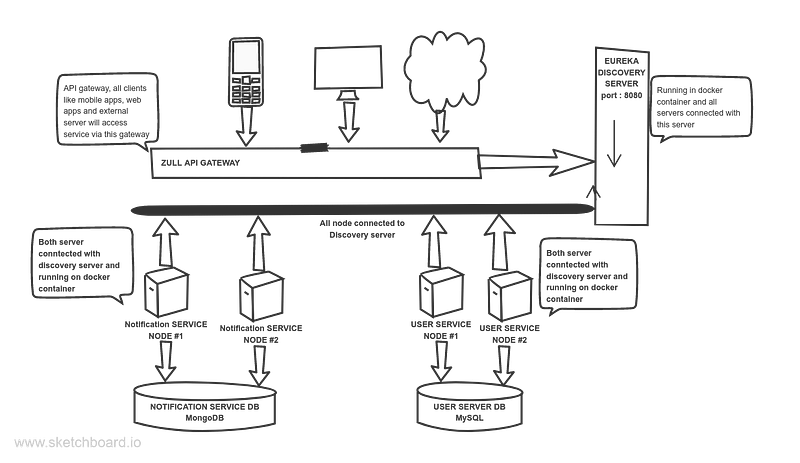
The connected components on the discovery server are given bellow

- The top of the software is the discovery server. First, it runs and it will be ready to accept connection requests from Netflix clients. Discovery servers IP and port will be used by clients as discovery servers with default zone.
- User service and notification services both have two instances each. After starting of instance both will connect with the discovery server with its own IP and port. This is mainly a socket connection between client and server. Both instances may be in the same machine or different machines with different IP addresses.
- User service sometimes calls notifications service. But notification service has two instances. What instance will call? Netflix solved this problem using an interesting way. Each client has a different client id. Here, the user service id is USER-SERVICE and the notification service id is NOTIFICATION-SERVICE
- During service to service, calling ribbon plays an important role. It has all registries and the availability of each available node of the target service. It will take one instance based on a defined load balancing algorithm and a call based on service id.
- after the startup of the Zuul API gateway, it will connect with the discovery server as a client. All external components like mobile apps, web apps, external servers will call to Zuul gateway. It is public fetching service. Zuul will redirect requests to a specific server based on API patterns. Here ribbon will also provide service instances and balance client-side loads.
Implementation of our architecture
In our architecture, there are below databases
- Mysql database: For user service. You can run your database on docker or run it on your local machine. you will get DB scripts into the project folder.
- MongoDB database: For notification service. You can run your database on docker or run it on your local machine.
We have four projects in this architecture
- Discovery server
- User service
- Notification service
- ZUUL API gateway
Their implementation is given bellow
Discovery server (Eureka)
Here is the build.gradle file
Here, the only important part is Netflix eureka server dependency. Here spring cloud version is also important.
application.yml file is given bellow
Here, it is running on 8080 port, and the context path is discovery-server. Eureka instance name is discoveryServer
The application file is given bellow
Here, using EnableEurekaServer annotations will act as a discovery server.
Dockerfile is given bellow
After building the jar by Gradle clean build you have to build a docker image and run the container from that docker image. Its command is given bellow
docker image build -t discovery-server .
 docker run -d -p 8080:8080 -it api-gateway
Here, the discovery server is running on 8080 port. Access URL is given below
http://localhost:8080/discovery-server/
After running all of the instances like API gateway, user service, and notification service, the discovery server will be like below
The docker containers are given bellow

Here, in the registry, it is showing the application id-wise availability zones, instance count.
Suppose API-GATEWAY has one and only one availability zone and its status is UP and running. It is running on 7070 port.
5aea8561aa5c:api-gateway:7070 here, left side is docker container id. If it connected with a physical machine then it will show the machine name.
For NOTIFICATION-SERVICE it has two instances in the registry. If a request from the client comes to API gateway for access URL api/notification-service/ then ribbon get two instances and after that, it will pick one of instance based on load balancing algorithms
For USER-SERVICE it has three instances connected. two from the docker container and one from the physical machine. Clients' requests will be distributed among the connected instances by ribbon.
Discovery server ping connected instances periodically, if consequent ping failed for an instance it will show a notification. Also after a new client instance connected it will automatically show here.
That's it, your discovery server is ready.
Notification service
The build.gradle file for notification service is given bellow
Here the main dependency is Netflix eureka client, actuator, and MongoDB
The application.yml file is given bellow
Here, it has some parts. The first part is adding the application name. Here notification-service is named. It will be added as the discovery server’s id.
The second part for connections with the MongoDB database. here MongoDB port is 27017. Also denoting server will run on 6060 port
In another part, it is showing the discovery server. here default zone will be the discovery server's URL. also you must enable registerWithEureka and fetchRegistry.
The application class is given bellow
Here, EnableDiscoveryClient annotation makes it a discovery client.
It has some fancy API like save notification and fetch notification for load balancer testing. In each response, I am adding a field notificationServer that is actually the machine information. If the application is running in a physical machine then its name and for docker container then container id. Here is the API list
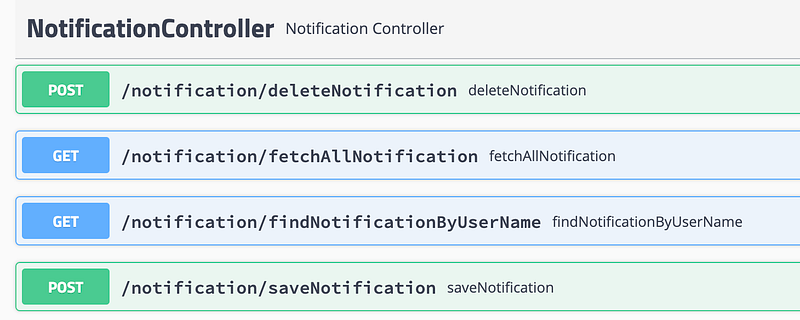
Suppose for saving notification, request and response is given bellow
In this API, notification data is saving in the MongoDB database and returning back that request with notificationServer parameter. This API will call by user-service during user registration.
I am not showing implementation codes here. You can check it from the GitHub repository.
The docker file is given bellow
After building the jar, you can create a docker image and run that image using a docker container. Here is the simple commands
docker image build -t notification-service .
docker run -d -e SERVER_PORT=6060 -p 6060:6060 -it notification-service
docker run -d -e SERVER_PORT=6061 -p 6061:6061 -it notification-service
Here, building docker image with tag notification-service and running docker container from image tag for port 6060 and 6061
User service
The build.gradle file is given bellow
Here main dependencies are Netflix eureka client, MySQL database, c3p0 connection pooling, and actuator.
The application.yml file is given bellow
Here, the application name is user-service, connecting with MySQL database with port 3406. The application server port is 9090
In another part, it is showing the discovery server. here default zone will be the discovery server’s URL. also you must enable registerWithEureka and fetchRegistry.
The application class is given bellow
Here, EnableDiscoveryClient annotation makes it a discovery client.
Here we are initializing a bean for RestTemplate. And it is annotated with @LoadBalanaced. What does it mean?
Spring Netflix Eureka has a built-in client-side load balancer called Ribbon.
Ribbon can automatically be configured by registering RestTemplate as a bean and annotating it with @LoadBalanced. When this user service tries to access notification service then Ribbon will automatically balance the load among all connected servers. Here, the notification service has two instances and the ribbon by default load-balancing algorithm is round-robin.
Here are some fancy APIs integrated for testing the application. API list is given bellow
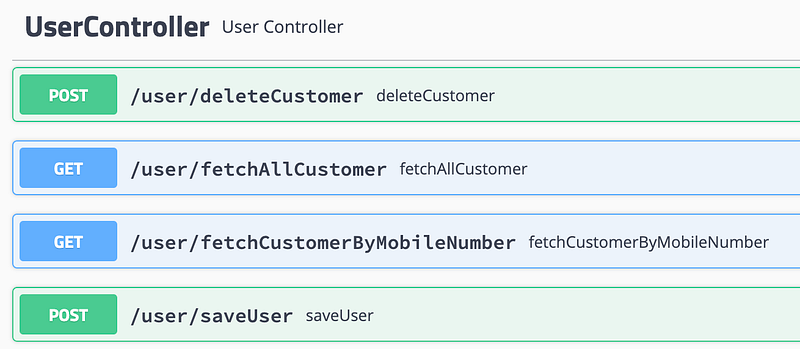
For example, for saving users we first save users' data to MySQL database, and after that user, service call the notification service. Code is given bellow
The actual notification service URL is given bellow
http://localhost:6060/notification/saveNotificationHere, check notification servers calling URLs carefully. Here API pattern is
HTTP://SERVICE-ID/EXTRA_URL_PATHHere, we are not using any IP address or domain name to call the target notification server. We are calling with the service-id. During calling restTemplate is already LoadBalanced and ribbon will find the best instance based on the load balancing algorithm.
Here, is a sample of two customer registration request and response data
Here, check carefully, for each request notification response → notification server is changing. That means it is redirecting to connected different instances.
The Docker file is given bellow
After building the jar you can build a docker image and run your container in bellow way
docker image build -t user-service . docker run -d -e SERVER_PORT=9090 -p 9090:9090 -it user-service
docker run -d -e SERVER_PORT=9091 -p 9091:9091 -it user-service
docker run -d -e SERVER_PORT=9092 -p 9092:9092 -it user-serviceZUUL API gateway
The build.gradle file is given bellow
Here, the Netflix eureka client is for connecting with the discovery server. Netflix zuul is for API gateway. You need actuator dependency because by this dependency discovery server will check the health of the instance.
Now the application.yml file is like bellow
This file has different parts
- Application identity: The spring application name is the identity of this application. Here identity is the
api-gateway - Service registry: Eureka's client service URL will accept the discovery server URL. Here it is connecting from which server, it also should add otherwise in AWS ec2 deployment and docker deployment may create a problem
- API gateway: It is adding the
zuulprefix as API. For routing, it is adding two services. user-service and notification-service with their path and service id. Using service id ribbon will fetch available instances from eureka and redirect the request. hystrixandribbonconfigurations
Application file
Here, the annotations are doing all. No more code is required.
Dockerfile of this project is given bellow
After building the jar you need to just bellow docker command for build jar and run the container from the docker image
docker image build -t api-gateway .
docker run -d -p 7070:7070 -it api-gateway
Here, running the container on 7070 port.
User service access via API gateway:
User service actual URL is like bellow for fetch all customer
http://localhost:9090/user/fetchAllCustomerSo the user service URL for the external client will be
http://localhost:7070/api/user-service/user/fetchAllCustomer/IP: port (localhost:7070) is for the zuul server. After /api/ prefix and user-service/ it will detect that call for the user service instance. Ribbon will take user-service ids instance based on load balancing algorithm. In this case, the ribbon will get 3 user service instances and it will pick one from those. Then call that’s the instance with provided API.
Here is a sample output for fetching customers via the API gateway for three consecutive requests.
Here, for each request in output IP value is changing. Because in response IP value is coming from the requested machine InetAddress. So Ribbon is calling three instances periodically.
The notification server’s URL is
http://localhost:7070/api/notification-service/notification/fetchAllNotificationThe output of notification fetch URL for two consecutive requests via API gateway is given bellow
Here, the notification server is changing for each request. That means the ribbon is fetching different instances for each request.
The codebase for this architecture
Discovery server: Check here
API gateway: check here
User service: Check here
Notification service: Check here
Here, we managed all of the Docker containers manually. In the next article, I will show how Kubernetes can help us to manage all of the containers.
Thanks for reading. happy coding


