
MemoryLayout in Swift
How big is it?
Difficulty: Beginner | Easy | Normal | Challenging
Knowing how much memory something takes up in Swift is really important. We can find that out, but we need to know something about MemoryLayout — which is great, because that’s what this article is all about!
Prerequisites:
- Be able to produce a “Hello, World!” iOS application (guide HERE)
Terminology
alignment: the way data is arranged and accessed in memory
Byte (Octet): 8-bits
size: the number of bytes to hold a type in memory
stride: the number of bytes between two elements in memory
type: A representation of the type of data that can be processed, for example Integer or String
Memory Layout
We can find out about the memory layout of Swift types using MemoryLayout, this gives us the layout, size and stride as is relevant to the MemoryLayout and the type in question.
- The size of a type tells you how many bytes it takes to hold that type in memory.
- The stride of a type tells you how far apart each instance of the type is in memory.
- The Alignment of a type is the maximal alignment of all its’ fields
A type’s stride must be greater or equal to the size of the same (as we shall see). The measurement of these is always in bytes
Size, stride and alignment for Booleans
We can create a very simple object in Swift, and that object can contain Booleans since each boolean is always one byte in Swift.
MemoryLayout<Bool>.size // 1
MemoryLayout<Bool>.stride // 1
MemoryLayout<Bool>.alignment // 1
The alignment is 1 since a Bool can start at any address, the size is 1 as a boolean is 1 byte, and it has a stride of 1 as we are only dealing with a single Bool here.
The minimal example
We can create a very simple object in Swift, and that object can contain Booleans since each boolean is always one byte in Swift.
Therefore we can set up the following struct with just two properties, both of which are Bools.
Represented by the first two bytes
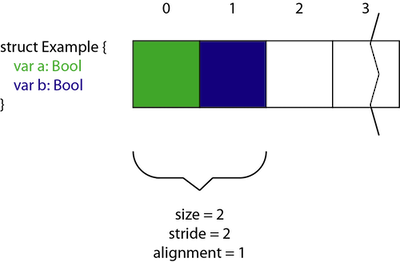
The size is the addition of the two bytes.
To understand stride and alignment I think we will need some, shall we say more interesting examples.
Calculating Stride
Stride is not the same as size, which we can make clear by showing the values for an empty type.
The Case with a Size of Zero
MemoryLayout<())>.size // 0
MemoryLayout<()>.stride // 1
MemoryLayout<()>.alignment // 1
This may be a surprise. That means that the size of the memory is zero, but each instance has 1 byte avaliable (which is given by stride). This makes sense as if not we would be rewriting multiple objects onto each other.
Stride determines the gap between elements, that will always be greater or equal to the size of an object.
Since our first Example above is so small (and just contains those 1-byte booleans) size and stride is the same since (jumping ahead) alignment is incredibly important.
But let us take another example that you might store; that of a small business storing products and whether they are sold or not (for simplicity this uses types with fixed length, Int32 and Bool)
In Swift Int32 is 4 bytes long, which is not too surprising (perhaps), and Bool is of course (consistent with the example above) 1 byte.
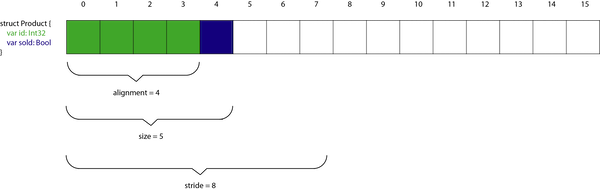
Stride represents the distance between two (or more!) Product objects.
That is, if we want to have two Product objects in memory we would have the following:
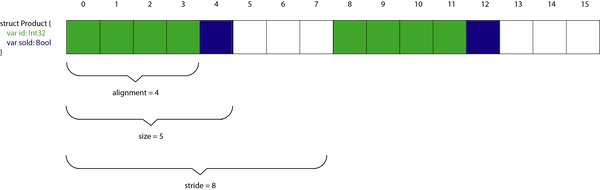
Which means there are 3 bytes placed between the first product and the second product. The reason for this is alignment, which is explained in the next section of this article.
Calculating Alignment
The theory
Memory is generally byte addressable and arranged sequentially.
Our memory is arranged in 4-bytes, and it is economical to read all 4 bytes in one memory cycle. In order to take advantage, memory is arranged in a span of banks which can be read in a single memory cycle.
An example of a poorly aligned structure:

This would require two memory cycles to retrieve the object — clearly this is something we want to avoid.
So our initial example of a Product looks like the following:
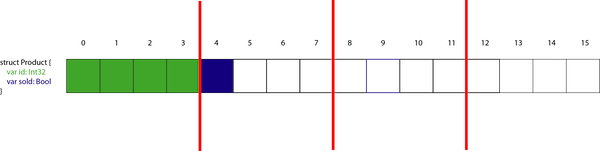
This is nice, since each part of our product is nicely within the byte limit.
So let us look a another example.
This one is simple, if we just reverse the properties in the Product struct we get a different result. The Boolean comes first, and to prevent the Int32 being spread across two bytes there is some padding:
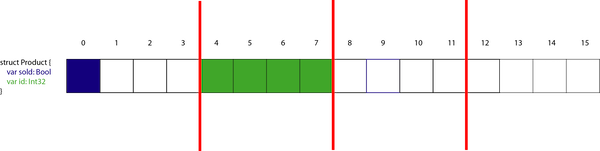
This gives us the following results:
size = 8 stride = 8 alignment = 4
An Example with different size and stride values
We can change the product to have a returned boolean (this must be a shop with multiple returns to require this).
Now the order of the struct is important, and has been chosen with care here:
As before, a Bool is 1 byte and Int32 is 4 bytes.
Let us look at the picture of the memory now:
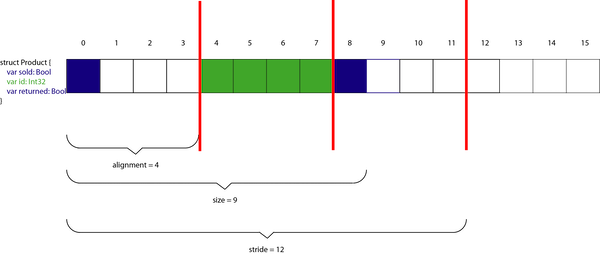
Alignment is the byte length we are aligned to, that is 4 (since the largest element of our struct is 4 bytes long). The size is the maximal length of the components and the stride is the total length of the struct (that is, where the next parallel struct would need to start).
An Example with different size and stride values
I’ve chosen NSString for this struct as an NSString is 8 bytes rather than the 16 for String.
In any case the following is true of the Struct:
So we would expect the 8 bytes of the NSString to be first, and because it is 8 bytes and the longest element of this to make the alignment 8. The total length of a Person will be the 8 bytes of the NSString added to the 4 bytes of an Int32; this makes the total of 12.
Let us see the diagram:
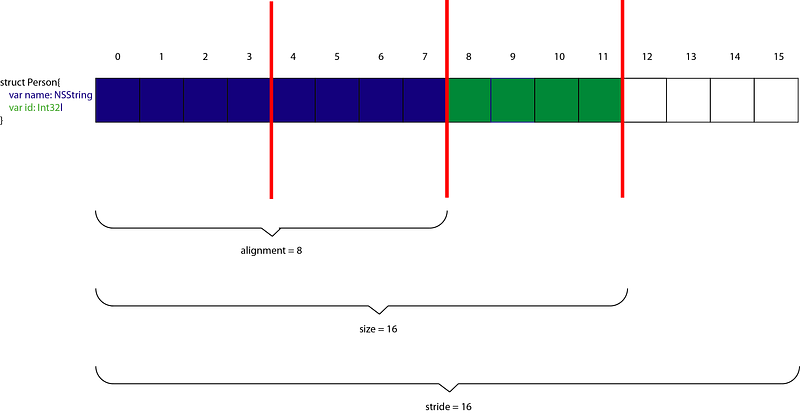
Why would stride be 16?
The answer to that is that is you can only fit one Person into this 16 byte memory — so the next parallel object would need to start at byte 16.
Classes
An example with a Class
Instead of producing a struct we can use a class.
Using the same person example as above (but with a class, and initializing the variables so we don’t have to write an initializer):
And…everything is 8 bytes.
Why Is everything 8 bytes?
Because class is a reference type rather than a value type, the class is a reference rather than an object. All references are 8 bytes so, ok everything is 8 bytes.
The size of a class object
For classes the the size of a reference which would be 8 bytes (on a 64-bit machine), and not the size of actual objects on the heap.
The actual size of a class
Objective-C has a function class_getinstanceSize(_:) that returns the size instance of a class
Since the metadata for a class is 16 bytes alone (and of course each Bool is 4 bytes) the total for the example below is 24 bytes.
The example? Here you go:
Conclusion
I always wanted to get some understanding of how much memory Swift is actually using under the hood. MemoryLayout has been a great help in this, and I’m really happy to share the adventure with you — and I hope you enjoyed reading the article.
Any questions? You can get in touch with me HERE
Extend your knowledge
- Apple have created documentation for MemoryLayout HERE


