
Medium’s New ‘Listen’ Feature can Help You Become Better Writers
And Readers
Do you see that ‘listen’ button above this title?
Press on it and see what happens.

Magic!
Medium’s new ‘listen’ feature has made my reader-writer lifestyle easier. I am on it like a dog to a bone🤣
I suggest you try it:
- If you’re having a hard time getting through reading all the articles you saved in your reading list.
- If you want a cheat sheet way to correct your typos and grammatical errors.
With my ADHD it's very difficult to stay focused when I read. I get distracted and bored easily. With this ‘listen’ feature, it not only reads the content for you it highlights what it’s reading so you can focus on what is being said.
You can find it at the top of every article. It has a stop, pause, rewind and a forward button too. The forward button I find very useful to pass the automated voice reading the actual ‘http’ links to other articles.

What I don’t like about this feature
- Reading ‘https://’ links is one of the things I find annoying about this feature.
- Also, as you may have just noticed, it doesn’t read the ‘1,2,3’ numbers of listicles. If you are listening to this right now, see what it did there with the commas?…annoying.
- When listening to an automated voice may take away the pop and personality of the author. Reading with your own inner voice helps readers connect with the authors.
Going Mobile
Personally, I believe its best to read without the distraction of doing other things. But if you a going to listen to music anyway, why not listen to an audio of something you can learn from too. It’s an option.
Do you have AirPods or Bluetooth on your device?
You can use your blue tooth to blast an article on your stereo and rock out to inspiring words.
You can listen while you are driving, washing dishes or doing whatever. I have stopped what I’m doing to run over to pause JUST so I can reread and highlight a sentence the authors wrote that resonated with me.
Disclaimer: Don’t read and drive. Listen and drive:)
Highlights
If you want to highlight a sentence, I suggest you pause the audio ‘listen’ feature first. If you don’t, the listen feature continues to highlight what it's reading to you and it will be difficult for you to highlight what you wanted.
Besides, it’s good to stop and pause for a second to really think about what jumped out at you in a story your reading. It’s a way for you to listen to your inner voice and angel guides.
Back story
The first time I noticed the ‘listen’ feature, I was reading an article on how to get into a fat-adapted state(a genius way to lose weight). I always saw the “add audio” button in my drafts of new stories but ran into glitches. One time, after pressing the “publish with audio” button in my drafts, my entire story I’ve written for a full 20 minutes disappeared and I freaked out. After that, I have ignored that ‘audio’ button and saw it as a potential mini heart attack.
I thought, how lucky Dr. Mehmet Yildiz is that he can add this feature to all his articles and I can’t; But low and behold, I noticed it again in Julius Evans’s comment to me. My reaction was:
Whoa….. first of all
How the HELL did you do that listen feature!?
Amazing
And of course, since I’m a bad speller and my drafts are often riddled with typos and mistakes. I went back into my response to fix errors and noticed I had that ‘listen’ feature too!…you all do, it’s a new feature.👏
You can find it at the top of every article.
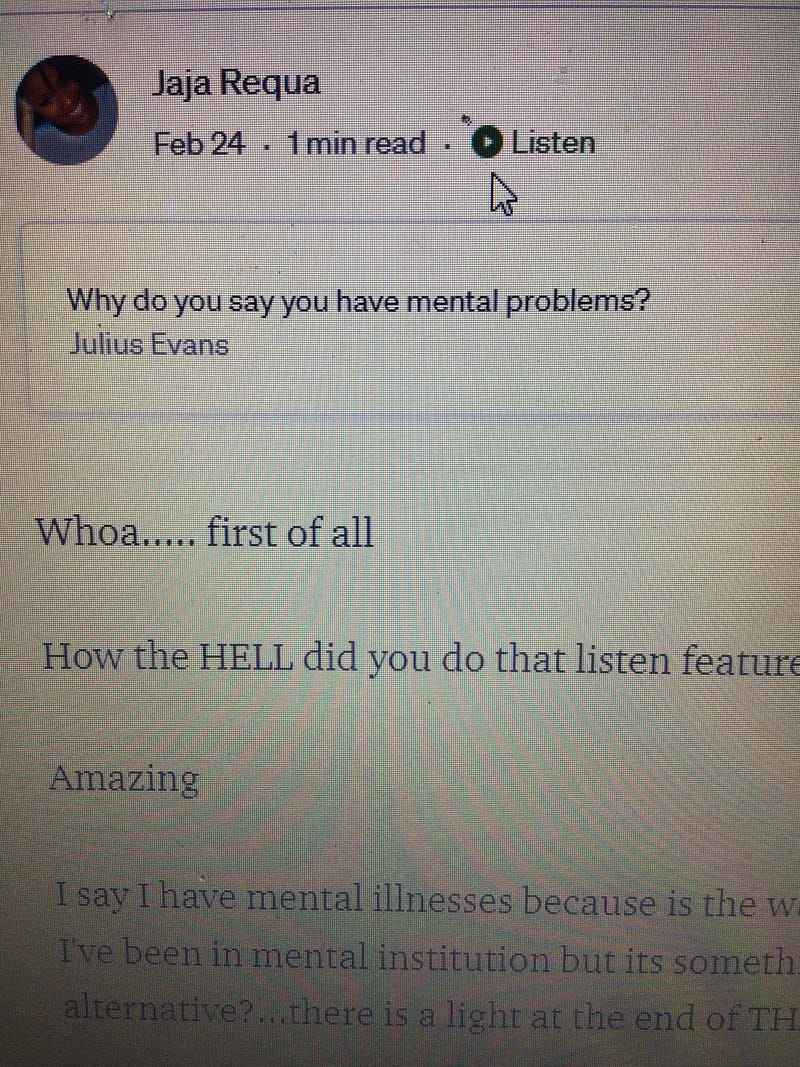
Oh, ha ha happy day!
I went on a ‘Listen’ feature reading spree and read my follower's stories. Then I read my own latest article and to my horror noticed typos and improper use of punctuations. I quickly fixed it.
I LOVE this new Medium’s new ‘Listen’ feature. It can help you become better writers and readers.
More advice for writers
PS: I forgot to mention that the listen feature only works in published stories. This sucks, because I mostly notice my mistakes AFTER it’s been published. No worries, ILLUMINATION Publication accepts already published stories!
Read more about submitting already published articles here:
You can self-publish, listen and fix your mistakes before submission. It’s what I did to fix the 10 million and 1 mistakes I’ve discovered after I published. Thank GOD no one read it before I fixed them.
However, something cool happened when I listened to my articles. I got more ideas about topics I didn’t mention prior to listening to my piece. For instance, I mentioned what I don’t like about this ‘listen’ feature after I published it. Moving my laptop with me to make coffee gave me the idea to add a ‘mobile’ section to this article too.
Feel free to read my stories using this new ‘listen’ feature. It’ll make your life so much easier.
Thanks for reading….or listening.
Try out the ‘listen’ feature and tell me what you think.
More from me
Funny fact: The automated voice pronounces my name as ‘Ya Ya’ it’s actually pronounced ‘Jah Jah’…I speak more about the origin of my name in my bio. Also, it seems that the automated voice doesn't know how to pronounce the past tense word “read”….that’s because English words are fucked up sometimes. The past tense of the word ‘read’ is pronounced ‘red’🤣…see how it says dot, dot, dot?
Annoying.
Here are more writing tips from my reading list:
(turn off the ‘listen’ feature here…if you want to)
Fun Fact: In the above reading list, I spelled the word ‘Insestuous’ wrong and didn’t realize it until JUST now after using the ‘listen’ feature. This reading list has been up for 3 months and no one told me!…or no one noticed either. LOL
FYI: Help a sista out, please send a private note if you see typos or grammatical mistakes in my pieces. I need all the help I can get!
*Here’s how to send private notes:
2-minute political rant- My newest story:
- Disclaimer: I’m not a ‘Trump supporter’…I’m just willing to see all the angles.


