
Medium Tips and Tricks You Never Thought About: Was that story curated? What Time was it published?
Interesting things that I learned from Medium over 18 months

Curation and Earning Money from Medium
Like it or not there is a very low ratio of Curators to writers on Medium, so unless you write about Medium, or about how to make money or run a business, or how to earn from your writing, or you are lucky enough to get accepted into a Medium-run Publication, or to publish a topic for the mass audience at the right time that the right curator is reading new story titles, your Stories may not be curated often or earn you much.
To see what’s being curated, you can:
- Go to the Topics pages by clicking on “More” which is the last option in the “bar” or strip at the top right of your Medium homepage, or by clicking on “Customize your interests” under your Avatar, then on “Topics.”
- Visit my Publication “Curation Matters” to follow the curated stories of individual writers.
- If a story that you’re wondering if it was curated or not is NOT in a Publication (meaning that it was “self-published” or the writer hit Publish and it shows on their Medium Profile page only), have a look at the top left of the Story page, to see if there is a Topic Name there.
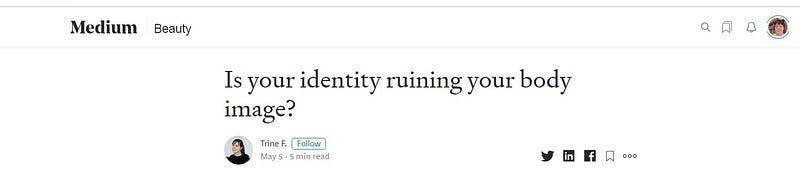
If you go to the story above Is your identity ruining your body image? you will see “Beauty” at the top left near the word Medium. This means it was curated under the Topic “Beauty”.
You will know when a Story HAS been put into a Publication because that will be pretty clear, with the Publication’s homepage banner and name at the top of the Story page, plus at the bottom will be the logo and the name of the Publication that the story is in.
See: https://readmedium.com/how-to-stop-feeling-overwhelmed-8ee98fb6fd8b
NOW, if a Story IS in a Publication and is curated, the Topic name does not show on the story page! This is just how it works, so if you really must know if a story was curated or not, you can probably try some other method.
JULY 2020 UPDATE it looks like since I wrote this article, things have changed. Maybe all stories published and eligible for distribution have a tentative Topic allocated to them now! In other words, the source code snippet as shown below now no longer indicates that a story has been curated. 😲
4. Look at the source code behind a Medium story, using Chrome, if you think that a story may have been curated.
Right-click anywhere on a Story page then left-click on View Page Source. Do a search on “Tag”.
If you do this for my first curated story “How to Stop Feeling Overwhelmed”, after the Tag names, you will see “Topic:Self”.
If in the source code, the word Topic appears after the Tags, it indicates that the article has been curated.
A little peek behind the scenes will show if a story has been curated or not.
As curated stories shown on the Topics pages are always being updated, you may not find a story title of a Story that you are wondering about, on a Topic page, as the titles will fast disappear of the Topic homepage and if the story you are interested in was published a few days ago, well good luck with scrolling down a Topics page to look for it.
Perhaps someone reading this may construe looking at the source code as “spying”, but hey, source code exists, and if you know what to look for, it may help answer some of your questions.

Search and You will find yourself still looking for a Story
To earn more from Medium you have to not only publish many stories but must promote or market your stories, or write block-busters that the masses would be interested in.
However, I advocate strongly that part of the reason for new writers to Medium not having their stories widely read is that:
New readers searching upon a Tag for a Medium article to read, will come up with the top 10 articles, rather than with the latest articles.
While other blogging / writing platforms show the latest dated articles by default and show more than a measly 10 articles on the search page, I find Medium’s Search function to be cumbersome and unhelpful.
You have to drill down by choosing a Year, then a Month, then a Day, then select “Latest” in order to see recent writing by new writers.
It is a shame that Medium doesn’t have a better Search function but leaves it to writers, some of whom may not have large networks of friends and acquaintances, to promote their content, WHEN they have the technology to have a really great Search function.
If you want to know what I think about Medium’s Search function and would like Medium to improve its Search function, please sign the Petition below.
Finding the Time that a Story was published
- If you published a story on your own “timeline” or profile page, or in your own Medium publication, you should note what time you publish it.
- If you submit your story to a privately-run Medium Publication and have your Email notifications turned on, you will receive an email with a date and a time for the publication date and time of your story.
- You can look at the source code of any published story in Medium and find the time published in Unix Epoch Time.
If you go to the source code of a Medium story using the Chrome browser and search upon FIRSTPUBLISHEDAT you will see a long string of numbers which you can copy.

In this case, the Unix timestamp / Epoch time is:
1556553386399
Go to a Time Zone converter, such as the one below, and paste in the numbers and select the Time Zone for your location to see the time the story was published in YOUR time-zone.
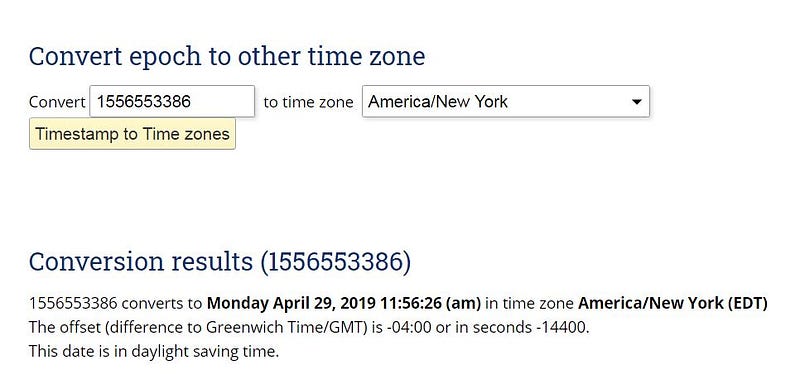
In this example, for my curated story “How to Stop Feeling Overwhelmed” I copied the long string of numbers and pasted it in with America/New York in the time zone box.
Abracadabra! This resulted in information that this story was published on Monday 29th April 2019 just before midday noon in the US.A. EST !!
No, I don’t live in the USA but I like to see what time in the U.S.A. that my stories appear in Publications, because Medium is an American-based company; and I figure that a huge number of writers and readers on Medium are in the United States!
Why would you want to see the TIME that a story was published? Well, you may be obsessed with data, as I am 😃 or you may wonder if the Day and Time of publication of stories has a bearing on what happens (such as does it influence the readership evidenced by the number of Claps).
Creating your own Publication
Having your own Medium Publication has its highs and lows. Once again if your stories are not found a lot then your Publication may flounder.
Some writers create a Publication just to showcase or collate their own stories, and some have a Publication with other writers invited to contribute. I run 3 Medium Publications. The Titles of Publications which a person runs, can be seen at the top of the person’s Profile page, in their Bio.
The creativity and beauty of crafting and adding and choosing content and its display, and of encouraging writers to add to my Publications, and the excitement of a unique Publication with Newsletters and Stats available, have been big draw-cards to me.
As I love technical writing and can almost write in my sleep (and I’m still waiting to be discovered to contribute toward someone’s hopes or dreams by helping them with an awesome writing task they have), I recently wrote a very comprehensive 3 part series on how to create a Medium Publication.
I am happy with having attained my goal, that of sharing visual guidelines which can be read “stand-alone”, meaning without even thinking about creating your own Medium Publication……so that the reader can muse or ponder over whether creating and running their own Medium Publication is for them or not.
Here’s the landing page for the series!
https://medium.com/lockdown-peaceful-space-live-love-learn/medium-tips/home .
Last but not least, if you are a quadruple Virgo (with 4 planets in Virgo) or if you are just fascinated by statistics, you may be interested in the following long but worthwhile article that I wrote about the Medium Enhanced Stats add-on or extension for Chrome.
You can get the Unix Epoch Time for the dates and times published of your own Medium stories from the output from the Medium Enhanced Stats add-on.
The MES is used with the Chrome browser, and outputs an Excel document, with tons of super great information. It was developed by Tomas Trajan whom I am very grateful to for developing and sharing it, as it is an awesome tool for Medium writers who love stats. 😃
You may need to expand the column which has “firstPublishedAt” (double-click the margin so the E+ 12 expands to show the entire string of numbers) as shown in the screenshot at the top of the page below! ( made you look, didn’t I )
If you enjoyed this article or got some use from it, please share it or at least show that you appreciate it. That way I will have the encouragement to keep sharing my amazing discoveries on Medium. haha