
Medium Formatting
Medium Profile Page
Changing your Medium URL, profile picture, bio, display name, pinning a Medium post to the top of your profile, and more!
Your Medium profile page consists of information publicly linked to your account as a reader or a writer.
Medium only allows you to make very small changes to your Medium profile. Because Medium writers have few ways to promote themselves consistently across multiple pages, it is critical that all writers take the time to fill out their profile.
Similarly, Medium only displays a number of special badges or icons on a writer’s profile, so taking the time to achieve/activate these various badges can go a long way toward establishing credibility on the profile.
Your profile includes the following details:
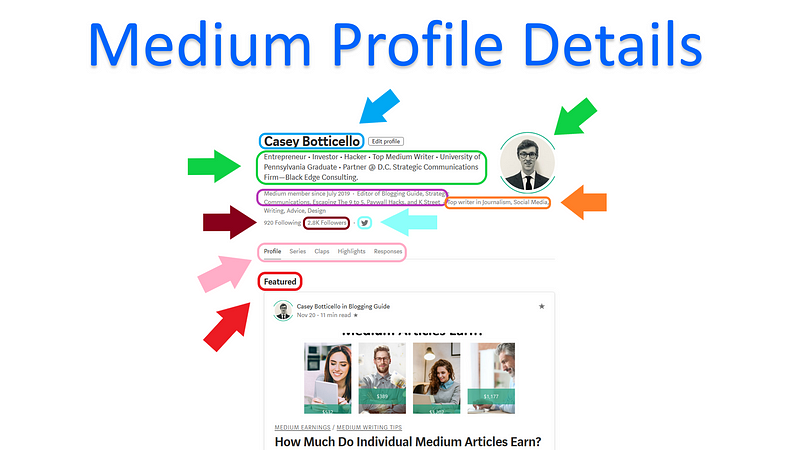
- Profile picture
- Short bio
- Linked social media accounts
- Lists of people you follow and who follow you
- Publications you edit
- Top Writer badges
- Featured Post
- All highlights, claps, responses or any series you created
- Username
The bolded items in the list above are the main features that writers should be paying attention to (and the features they can easily edit, themselves).
Key Profile Details:
- Display Name — Ideally, use your real name as your display name (the name at the top of your profile). You can change your display name, at any time, without needing Medium's approval. Your display name can be up to 25 characters long.
- Bio — Your bio is arguably the most important part of your Medium profile. While there are many ways to write a profile bio, some of the things authors typically include are goals/purpose of writing on Medium, job/professional description, a witty description, key words related to the topics you write about, or a hyperlink. If you have a product (such as a book) or a business you want to promote, including the URL link in your description can be an effective way to generate traffic.
- Profile Picture — Medium allows you to upload a single profile picture. It can be a picture of anything, but most writers typically use a photo of themselves.
- Social Media Links — You can link your Twitter account to your Medium profile. This can be another great way to drive traffic to an external source.
- Featured Article — You can feature one story at the top of your profile page. That story will show up in a separate section before all your latest articles. If you don’t set a featured story yourself, your most recent Partner Program story (if you’ve published any) will be automatically moved to the featured slot. You can replace it at any time by featuring any other story of your choice.
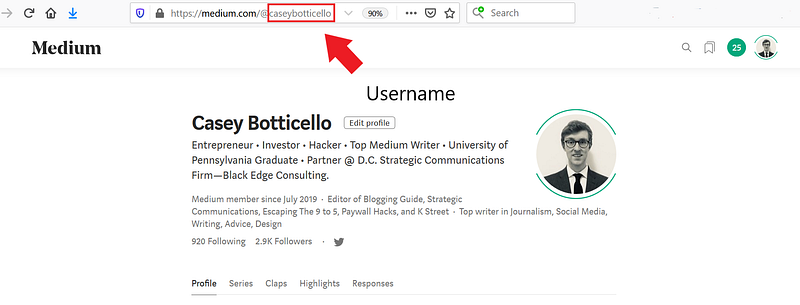
- Username — Your username is visible in your profile page URL, as well as on all your post URLs, provided that those posts are not published in any publication. When you change your username your existing posts will be re-directed when people visit old URLs, but your profile will not automatically re-direct. You should update any links to it from other places. Additionally, any previous at-mentions of your name or username will still work and link to your profile page. Generally, I would suggest using your name as your username, as it makes it easier for other writers to mention you.
Sample Medium Username URL Format: www.medium.com/@username
Additional Notes About Medium Profile Pages:
- You cannot add Top Writer badges yourself to your Medium profile. Medium awards them to writers who post frequently in a given topic.
- Medium lists Top Writer badges and publications edited, by rank and number of followers, respectively.
- You can use special characters and symbols in your Medium profile.

Thanks for reading this article! Leave a comment below if you have any questions. Be sure to sign up for the Blogging Guide newsletter, to get the latest tips, tricks, and news about writing on Medium and to join our Facebook group, Medium Writing, to share your latest Medium posts and connect with other writers.
If you liked this article, here are some other articles you may enjoy:

Casey Botticello is a partner at Black Edge Consulting. Black Edge Consulting is a strategic communications firm, specializing in online reputation management, digital marketing, and crisis management. Prior to founding Black Edge Consulting, he worked for BGR Group, a bipartisan lobbying and strategic communications firm.
Casey is the founder of the Cryptocurrency Alliance, a Super PAC dedicated to cryptocurrency and blockchain advocacy. He is a graduate of The University of Pennsylvania, where he received his B.A. in Urban Studies.
You can connect with him on LinkedIn, Twitter, Facebook, or by visiting his website, Blogging Guide.


