avatarCasey Botticello

Free AI web copilot to create summaries, insights and extended knowledge, download it at here

2993

Abstract

our story to be sent to the publication’s editor. The editor will be responsible for publishing your draft.</p></blockquote><figure id="c684"><img src="https://cdn-images-1.readmedium.com/v2/resize:fit:800/1*Tlqjsipd3ZdF-keoTtWHfA.png"><figcaption></figcaption></figure><p id="7ea2">If this is the case, select the publication that you want to add your article to and you will see the following message:</p><figure id="f0b2"><img src="https://cdn-images-1.readmedium.com/v2/resize:fit:800/1*AqQnWIQ16ohvII0SPXERuQ.png"><figcaption></figcaption></figure><p id="b745">Click the <b>submit </b>button to submit your article to a publication for review.</p><p id="3680"><b>If you are the owner or editor of a publication, you will see the following message:</b></p><figure id="3120"><img src="https://cdn-images-1.readmedium.com/v2/resize:fit:800/1*eLYhNDbhWsUCPsvlQ4LhTg.png"><figcaption></figcaption></figure><p id="8d1e">This signifies that you can add an article to a publication and it will be auto-approved for publication (because you are the owner or editor).</p><p id="062f">Select the publish button.</p><figure id="a1b4"><img src="https://cdn-images-1.readmedium.com/v2/resize:fit:800/1*uDp9bZ-aJHnmhBxYO6gyaQ.png"><figcaption></figcaption></figure><p id="2f36">You can also remove your article from any publication. Simply click the three dots icon (⋯) and then click the <b>remove story from publication</b> button.</p><figure id="326d"><img src="https://cdn-images-1.readmedium.com/v2/resize:fit:800/1*jkInTJikIAU3rgBSlJ6uGg.png"><figcaption></figcaption></figure><h1 id="c368">Notes About Adding Articles to Medium Publications</h1><ul><li>You can only have an article published in one Medium publication at a time.</li><li>Publication editors typically decide with a few days whether to publish a story or not. If it has been longer than 3 days, I would suggest submitting your article to another publication.</li><li>While you can remove your article from any publication at any given time, note that the editors of that publication will receive an email message notifying them:</li></ul><figure id="a311"><img src="https://cdn-images-1.readmedium.com/v2/resize:fit:800/1*wH4JF8_vC5ZaP9mj9QWGbA.png"><figcaption></figcaption></figure><p id="af61"><a href="undefined">Casey Botticello</a></p><figure id="5f44"><img src="https://cdn-images-1.readmedium.com/v2/resize:fit:800/1*yxZs_V4qKTyOtgwmCpL28g.png"><figcaption></figcaption></figure><p id="0037"><i>Thanks for reading this article! Leave a comment below if you have any questions. Be sure to sign up for the <a href="http://bit.ly/MBG-Footer-1"><b>Blogging Guide newsletter</b></a>, to get the latest tips, tricks, and news about writing on Medium and to join our Facebook group, <a href="http://bit.ly/Medium-Facebook-Group-Footer-Link"><b>Medium Writing</b></a>, to share your latest Medium posts and connect with other writers.</i></p><div id="d9dc" class="link-block"> <a href="https://bloggingguide.substack.com

Options

"> <div> <div> <h2>Blogging Guide</h2> <div><h3>Learn How to Make Money Writing Online | Medium · Substack · Amazon KDP · Social Media Marketing · SEO · Building a…</h3></div> <div><p>bloggingguide.substack.com</p></div> </div> <div> <div style="background-image: url(https://miro.readmedium.com/v2/resize:fit:320/0*5gut5KQDVF_FVCuc)"></div> </div> </div> </a> </div><h2 id="55cd">If you liked this article, here are some other articles you may enjoy:</h2><div id="082e" class="link-block"> <a href="https://readmedium.com/medium-bullet-points-numbered-lists-and-custom-lists-e48a8a45b4a7"> <div> <div> <h2>Medium Bullet Points, Numbered Lists, and Custom Lists</h2> <div><h3>How to add bulleted, numbered, and custom lists to a Medium story</h3></div> <div><p>medium.com</p></div> </div> <div> <div style="background-image: url(https://miro.readmedium.com/v2/resize:fit:320/1*6D4oRBtv4xApGEubkBmBwg.png)"></div> </div> </div> </a> </div><div id="7d79" class="link-block"> <a href="https://readmedium.com/medium-page-separator-6c4190a70d4c"> <div> <div> <h2>Medium Page Separator</h2> <div><h3>How to insert the Medium page separator (the horizontal ellipsis)</h3></div> <div><p>medium.com</p></div> </div> <div> <div style="background-image: url(https://miro.readmedium.com/v2/resize:fit:320/1*qFqjgB5JtDX1cpW5Zt-j2w.png)"></div> </div> </div> </a> </div><figure id="0e12"><img src="https://cdn-images-1.readmedium.com/v2/resize:fit:800/1*WVlPA9DlzNCkryxXqGVxcg.png"><figcaption></figcaption></figure><p id="87fc"><b>Casey Botticello</b> is a partner at Black Edge Consulting. Black Edge Consulting is a strategic communications firm, specializing in online reputation management, digital marketing, and crisis management. Prior to founding Black Edge Consulting, he worked for BGR Group, a bipartisan lobbying and strategic communications firm.</p><p id="c43e">Casey is the founder of the Cryptocurrency Alliance, a Super PAC dedicated to cryptocurrency and blockchain advocacy. He is a graduate of The University of Pennsylvania, where he received his B.A. in Urban Studies.</p><blockquote id="2458"><p><i>You can connect with him on <a href="https://www.linkedin.com/in/caseybotticello/"><b>LinkedIn</b></a>, <a href="https://twitter.com/caseybotticello"><b>Twitter</b></a>, <a href="https://www.facebook.com/groups/mediumwriting"><b>Facebook</b></a>, or by visiting his website, <a href="https://www.bloggingguide.org"><b>Blogging Guide</b></a>.</i></p></blockquote></article></body>

Medium Add Article To Publication

How to submit your story draft (or published article) to a Medium publication
Source: Casey Botticello of Blogging Guide

Medium does not make publishing your articles in publications nearly as easy as it should be.

Luckily, there are a number of resources such as Smedian which help bridge the gap between new writers and editors of existing publications.

However, once you have been approved as a writer for a publication, many Medium users are left wondering:

How Do I Add My Article to a Publication?

This article provides a quick overview of how to do this.

Adding an Article to a Publication

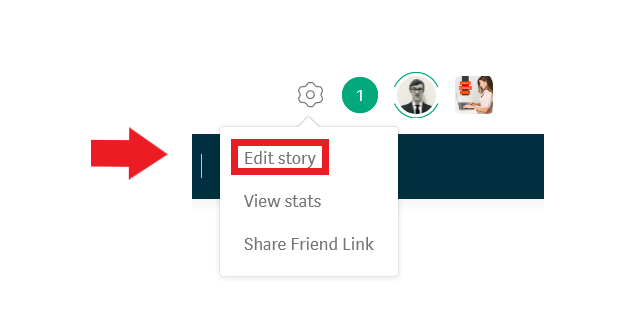
Step 1.

If your article is already published, click the edit icon (gear icon) at the top right of your article, and then select the edit story button.

Note: If your article is still a draft (has not been published) you can skip this step.
Step 2.

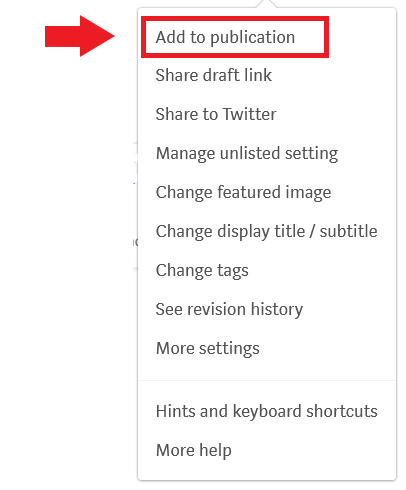
Click the three dot icon (⋯) and select the add to publication button from the drop down menu.
Step 3.

You will now see a list of publications. These are all the publication that you are an approved writer for or are publication where you are the editor/owner.
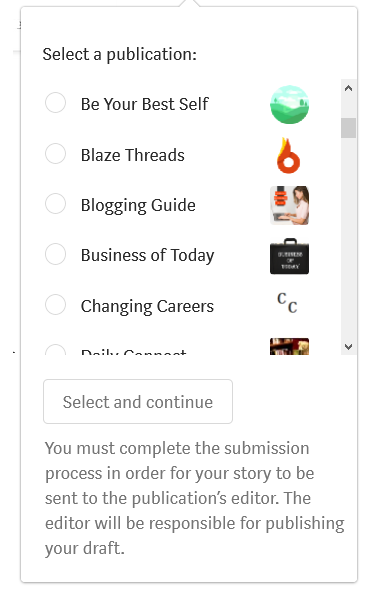
If you are an approved writer, you will see the following message:

You must complete the submission process in order for your story to be sent to the publication’s editor. The editor will be responsible for publishing your draft.
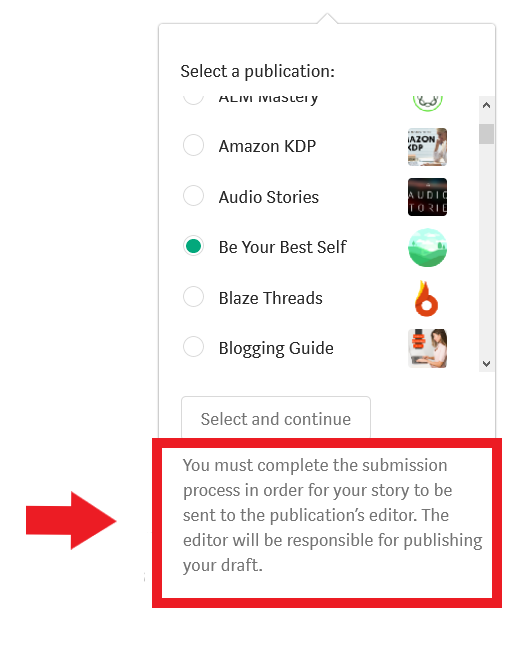
If this is the case, select the publication that you want to add your article to and you will see the following message:
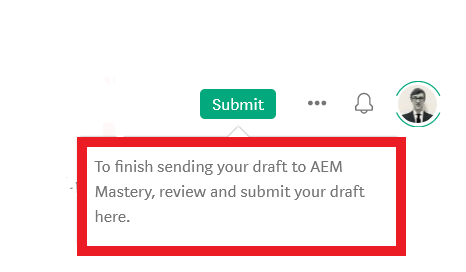
Click the submit button to submit your article to a publication for review.

If you are the owner or editor of a publication, you will see the following message:
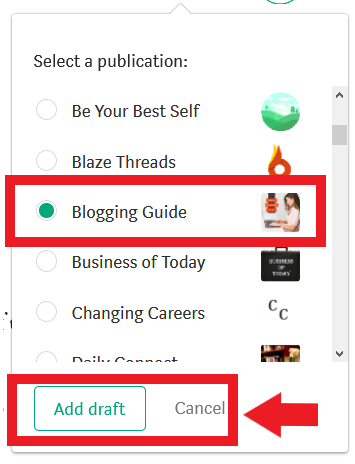
This signifies that you can add an article to a publication and it will be auto-approved for publication (because you are the owner or editor).

Select the publish button.

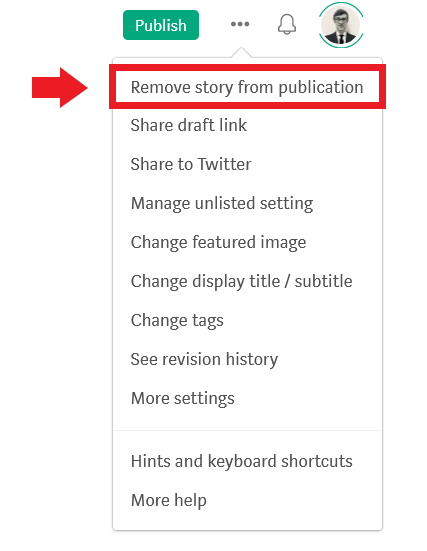
You can also remove your article from any publication. Simply click the three dots icon (⋯) and then click the remove story from publication button.
Notes About Adding Articles to Medium Publications

  • You can only have an article published in one Medium publication at a time.
  • Publication editors typically decide with a few days whether to publish a story or not. If it has been longer than 3 days, I would suggest submitting your article to another publication.
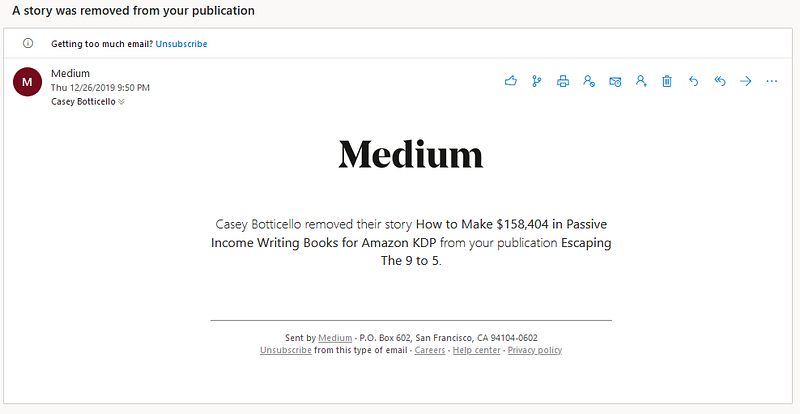
  • While you can remove your article from any publication at any given time, note that the editors of that publication will receive an email message notifying them:
Casey Botticello

Thanks for reading this article! Leave a comment below if you have any questions. Be sure to sign up for the Blogging Guide newsletter, to get the latest tips, tricks, and news about writing on Medium and to join our Facebook group, Medium Writing, to share your latest Medium posts and connect with other writers.

If you liked this article, here are some other articles you may enjoy:

Casey Botticello is a partner at Black Edge Consulting. Black Edge Consulting is a strategic communications firm, specializing in online reputation management, digital marketing, and crisis management. Prior to founding Black Edge Consulting, he worked for BGR Group, a bipartisan lobbying and strategic communications firm.

Casey is the founder of the Cryptocurrency Alliance, a Super PAC dedicated to cryptocurrency and blockchain advocacy. He is a graduate of The University of Pennsylvania, where he received his B.A. in Urban Studies.

You can connect with him on LinkedIn, Twitter, Facebook, or by visiting his website, Blogging Guide.

Medium
Publication
Format
Draft
Writing
Recommended from ReadMedium
avatarConnie Song
Becoming a Poet

Free verse

1 min read