
Medium 101: All You Need to Know
Everything I wish I knew when I started writing here

When I began writing on Medium a couple of years ago, I felt empowered yet disoriented. I was amazed that I had found a platform where it was so easy to create content, but I felt uninitiated, like a kindergartner on the first day of school. Because I didn’t know the rules, I hesitated to publish anything. Instead, I just perused the work of other writers, working up my courage while getting acclimated.
If you’re feeling gun-shy about publishing on Medium, this article is for you. These are the tips I’ve learned along the way to earning $5,000 from my Medium stories, becoming a “Top Writer” in several topics, and building my following from zero to over 4,300 people.
These are the things I wish I knew when I started writing on Medium.
How to Publish Your First Story
*Note: If you’ve already published your first story, skip this section.
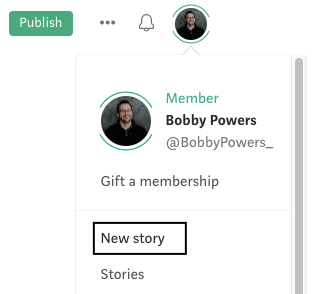
Publishing on Medium is even easier than publishing on a blog-style tool like WordPress. To start your first draft, click on the picture of yourself in the upper right corner of Medium and select “New Story.”
Many beginning writers make one of two mistakes when they begin writing on Medium:
- They hesitate to publish anything because they’re too scared or perfectionistic.
- They publish everything, using Medium like their own personal journal: “Here’s what’s on my mind today!”
Both are bad. Success lies between these two extremes.
If you find yourself in the first camp and you’re hesitant to click “Publish” because it seems scary, remember that Medium is a low-stakes writing platform. It’s a place where thousands of writers test their wings. Perfection is not expected, and perfectionism will only hold you back in your writing career. If you want to be a writer, you need to write and you need to publish.
If you find yourself in the second camp, buy yourself a nice Moleskine journal to record your personal thoughts and daily ramblings. Don’t use Medium as your outlet for that type of material. You want to establish a reputation as someone whose content is worth reading, and you can only do that by respecting the craft and respecting the “Publish” button.
Find the happy medium of publishing content that is worthwhile yet not perfect. Nothing ever will be. Treat your work with dignity so others will do the same.
How to Make Your Writing Look Professional
Formatting is important for any writing because it sends an implicit signal to the reader that you know what you’re doing and you’ll make their job of reading as easy as possible.
I’d argue that formatting is even more important on Medium than it is on other platforms. Why? Because many readers use the Medium app on their mobile devices, and long blocks of uninterrupted text will tell their readers to go elsewhere.
For most writing on Medium, use short paragraphs. Short paragraphs, bullet points, large headers, and block quotes signal to skim-readers that your work is worth a deeper plunge. Short paragraphs say, “Come on in, the water’s fine!”
But don’t abuse this principle. No one wants to read a story full of one-sentence paragraphs. Intermix paragraphs of one, two, three, and four sentences. Vary your sentence length as well.
Medium offers a wealth of formatting options to help your writing look clean and professional. Highlighting any text in your story draft will bring up this useful formatting panel:

Here are a few pointers for using those formatting options, in order from left to right within the formatting panel:
Bold: Use this sparingly. It’s sometimes useful to draw attention to words, such as what I’m doing with these bullet points. But writers who overuse this function come off as screaming for attention.
Italics: Use for book titles or emphasizing specific words.
Link: If you’re including any information that needs to be cited back to another source, insert a hyperlink. You can also link to other stories you’ve written that provide further detail about a topic.
Heading: Use for section headers within your story.
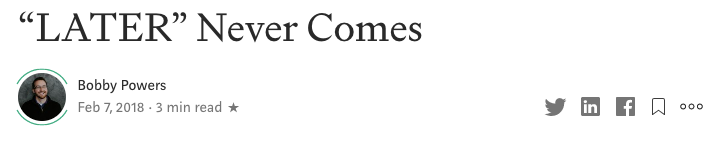
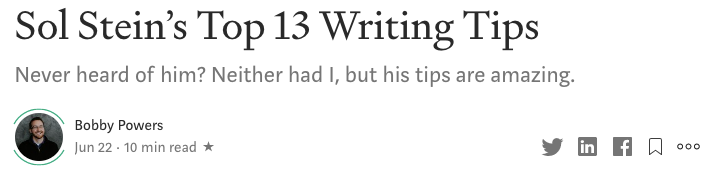
Subheading: Use for subheaders within your story. This subheading tool is also how you can add a subtitle for your story at the top of the page. Before I knew what I was doing on Medium, I published my early stories with cryptic titles and no subtitles (like the first screenshot shown below), which didn’t encourage readers to click into my stories. Now I’ve begun to include a subtitle on every story, which gives my readers a better expectation of what they can expect when reading that article (see second screenshot below).
Quotes: Within the formatting panel, click the quote mark icon once to create a blockquote. If you click the quote mark icon a second time, your quote will be converted into a pull quote. The two quote features are intended for different things, as described below.
This is a blockquote. Use blockquotes when quoting large sections of another writer’s material.
This is a pull quote. Use this feature when you want to repeate and accentuate something you’ve said elsewhere in your article (i.e., your own words).
Drop caps: This formatting tool converts the first letter of the paragraph into a large capital letter (as used in this paragraph). Generally, I’d recommend avoiding this feature. Some publications use drop caps in their stories, but most publications prefer for you to not use them.
Private notes: This is the final feature in the formatting panel. You can leave notes for yourself or for editors (if you’re working with a publication). Publication editors and readers also sometimes use this feature to submit questions or comments about your story.
Those are the features within the formatting panel. You can find more information about the formatting panel on this Medium help page.
Medium also offers several other tools for adding material into your story.
As you’re working on a story draft, you’ll notice a small “+” sign on the left side of the writing panel. You can click that plus sign to access more options, as depicted below:

Here are some tips for using those options, in order from left to right:
Add an image: You can use pictures, graphs, and charts to complement your story and share information in a more visual way. Just make sure that any images you use are not copyrighted. Using copyrighted images without obtaining the necessary rights or permission is not only disrespectful to the creator of that image, but it will also prevent your story from being “curated” on Medium, a topic I’ll explain later in this story. Sites like Unsplash, Pexels, and Pixabay are great places to access free high-quality images.
Search for an image in Unsplash: As mentioned above, Unsplash is a great place to find free images. Medium actually has a partnership with Unsplash that makes it easy for writers to use Unsplash images. Just click on the magnifying glass button and type in a few search terms to find an appropriate image for your story. Be careful with this tool, though. Many other writers use the same tool and type in the same search words, which means the same images get used and abused within Medium posts. You may want to go deep into the search results to find lesser-used images.
Add a video: You can copy and paste URLs from YouTube, Vimeo, Vine, and other platforms into Medium. Actually, you don’t even need to click the video button to do that. Just start a new paragraph, paste the URL into your post, then click “Enter.” Medium will automatically format the video into your post.
Add an embed: Similar to adding a video, you embed other content like tweets directly into Medium. Just click on the embed tool in the toolbar (<>) or copy and paste the URL into a new paragraph, then click “Enter.”
Add a new part: Clicking this button adds a new section break, as shown below this paragraph. This feature is useful when you want to split up your text and give readers a brief pause before the next section.
How to Build an Audience
I was amazed when I saw writers with 10K, 20K, 50K, or even 100K followers on Medium. How in the world did they amass such a large following? Three reasons:
- They came to the party early
- They publish a freaking ton of content
- They’re really good at what they do
Nearly every writer on Medium with an audience over 20K followers is someone who has been writing on Medium since the platform launched. Those writers’ successes were initially fueled by the fact that they were writing here before anyone else. Plus, they now have so much content on Medium that they’re still benefiting from content they wrote years ago.
If you’re starting out on Medium right now, you won’t be able to compete on that first bullet point, but you can compete on the other two. It’s not too late. Medium’s traffic continues to grow, and you can benefit from that.
The biggest writers on Medium are those who publish a ton of content. Many of them publish new posts every day, and some even publish new content multiple times per day. They’re beasts. And because they write so much, they also continue to get better and better at what they do.
Writing great content is the best way to build an audience on Medium, but there are other things you can do to get your name out there. Read other people’s content and leave comments when you find an article that you love. Clap for stories that taught you something new. Become a true part of the community. Don’t expect to just come here and take, take, take. Find ways to give, give, give.
Another great way to build an audience is to get your content in front of more people, which is the focus of the next section.
How to Reach More People with Your Stories
Loosely stated, there are three possible audiences for you to reach on Medium:
- Your own followers: Your new stories automatically get pushed to anyone who is following you. Whether you have one follower or 1,000, those people will receive your content in their Medium homepage, emails, etc.
- Publication follower: This is one of the most complicated aspects of Medium. Within Medium are hundreds of “publications” that each have their own following. You’ve likely stumbled across some of them already, like Better Marketing (this publication), Forge, GEN, The Startup, and The Writing Cooperative. Each publication has its own batch of followers, and those followers receive new stories from that publication. If you get added as a writer for a specific publication, then any stories you write for that publication will get pushed out to their audience, amplifying the number of people you can reach with your story.
- Medium curation: Curation is part of Medium’s secret sauce. Similar to how artists on Spotify can be “playlisted” (added to a popular playlist that will generate more plays for their song), stories from Medium writers can get “curated” into topics (Writing, Creativity, Work, Leadership, etc.). Medium employs a mix of algorithms and humans to determine which stories are high quality and deserve to be seen by more readers. Those curated stories are then served up to readers who follow those topics within Medium. When readers first join Medium, they’re asked which topics they like to read. If someone selects “Writing,” they’ll get curated recommendations from Medium about writing. Those curated stories will show up in readers’ Medium homepages, email newsletters, and topic pages. Medium curates both self-published and publication stories, so there’s no need for you to publish in a publication in order to get curated (although it does seem to help).
Each of the three audiences listed above is different, and there’s no telling how much traffic you’ll get from any one of them. Although individual writers’ experiences vary, here’s how I’ve always thought about the size of the audiences in Medium, related to how many people I can reach with a story:
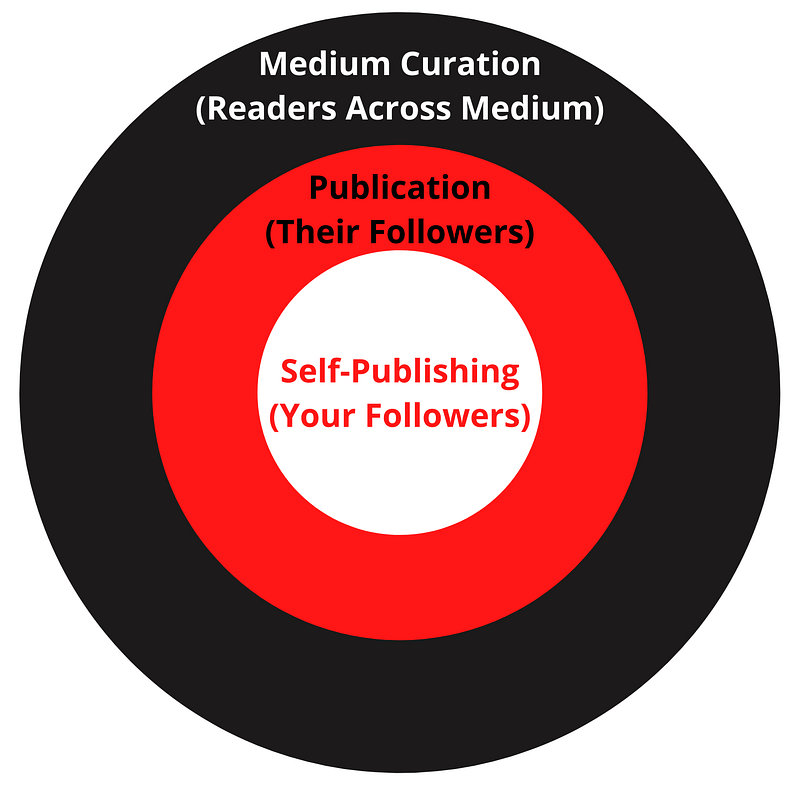
In other words, my personal rule of thumb is that stories published in a publication tend to get more traffic than self-published stories, and that curated stories, whether or not they’re in a publication, tend to get the most traffic. And remember: regardless of whether you self-publish your story or publish it within a publication, your story can be curated either way.
Publications and curation are the two biggest things I get questions about from new writers on Medium. To help bring these ideas to life, let’s look at a few specific examples.
Example 1: Self-publishing
These stories go to Audience #1 listed above (your own followers)
Let’s say you just published your first Medium story. You didn’t know anything about publications yet, so you just clicked the “Publish” button and self-published your story. Boom! That story is now available on Medium. Your followers will now potentially see that story, and there’s an outside shot that other readers may stumble upon it if they type in the correct search terms. But overall, very few people will see that story. And that’s okay! After all, it was just your first story, and you’re enjoying the process of writing.
Example 2: Publishing for a publication
These stories go to Audience #1 and #2 listed above
Now, for your second story, let’s say that you write an article about creating a marketing team from scratch for a startup company. Before you click “Publish” on this second story, you find out that there are publications like Better Marketing that specialize in marketing stories, and they’re currently accepting new writers.
After reading Better Marketing’s publication guidelines, you think your story could be a good fit for what they like to publish. You fill out a form applying to write for that publication, and they accept you. Now you can publish stories for Better Marketing, but every story still has to be reviewed by their team before it goes live.
You go back into your story draft and click the three dots in the upper right corner, then select “Add to publication.”
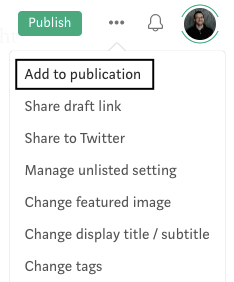
Because Better Marketing has added you as a writer, you now have the option of submitting your story directly to them.
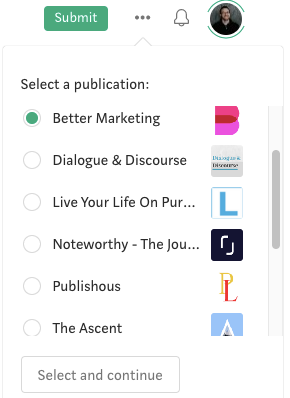
Now that you’ve decided to submit your story to a publication, you won’t be able to click “Publish” to immediately launch your story. You’ll instead need to “Submit” your piece to Better Marketing, and their editors will decide whether they’d like to accept your story into their publication. If your story is accepted by them, you’ll receive an email that looks something like this:
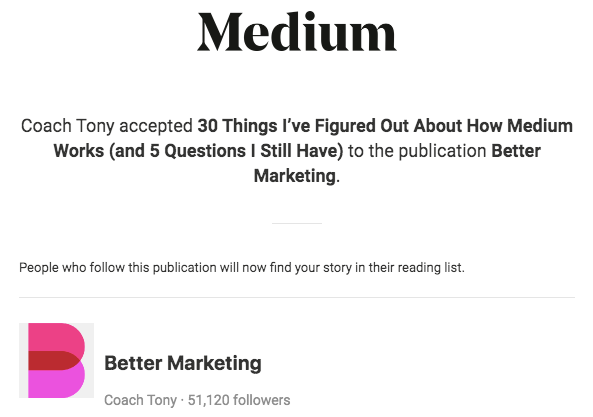
Now that your story has been accepted by Better Marketing, it will not only go out to your followers (Audience #1, as described above), but will also go to Better Marketing’s thousands of followers (Audience #2).
Example 3: Self-publishing an article that later gets curated
These stories go to Audience #1 and #3 listed above
Medium is always on the lookout for great content, and they want that great content to be seen by as many people as possible.
To help more readers see the best stories, Medium employs a team of at least 25 curators who review stories and curate the best content to distribute to more people. Any story that is high quality and follows Medium’s curation guidelines has the potential to be curated.
Let’s say you decide to self-publish your third story, and Medium curates it into two topics: Writing and Creativity. If that happens, you’ll receive an email that looks like this:
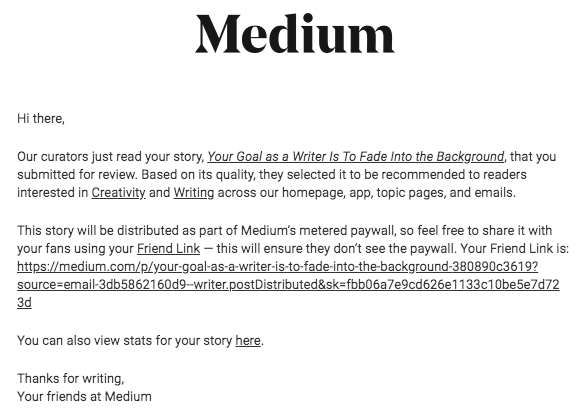
Yay! Now your story will be seen by more people, which will also likely generate more followers for you.
Example 4: Publishing in a publication and getting curated
These stories go to all three audiences listed above
If you publish a story within a publication and that story is also selected by Medium’s curators, then you are simultaneously reaching all three audiences:
- Your own followers
- That publication’s followers
- Medium curation (anyone who follows that topic on Medium)
Generally, these are the types of stories that get the most traffic.
How to Make Money Writing on Medium
Medium offers two types of content:
- Free content
- Paywalled content
Anyone can read the free stories on Medium. But readers who are interested in reading all of Medium’s content must pay $5 per month (or $50 per year) to become a Medium member. That’s a slamming deal, so many people pay for the membership.
Medium gives a portion of every reader’s $5 monthly membership to writers. Any author who wants can sign up for the Medium Partner Program, which is an opportunity to be paid for your stories within Medium.
When you publish any story, you get to choose whether you want the story to be eligible for payment. In order to make money from a story, you must publish it behind Medium’s “paywall,” meaning that only paying members can see that story.
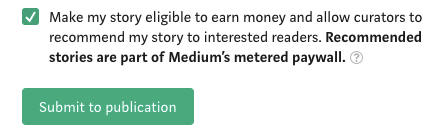
There are two exceptions to the Medium paywall:
- All users are entitled to read up to three paywalled stories per month even if they haven’t paid for a Medium membership.
- Writers can share a “friend link” with people to allow them to read that story for free.
You may be wondering: why would anyone publish a story and not check the box for earning money from the Medium Partner Program (MPP)?
Well, because non-paywalled stories can be seen by anyone (not just paying members), you could make the argument that those stories could get more traffic. Some authors think they get more traffic and build their writing reputation by publishing free stories. I haven’t necessarily seen that to be the case, but every writer’s situation and audience is different.
Before October 28, 2019, Medium paid authors based upon “reader engagement,” which was primarily based upon claps (any reader can clap up to 50 times for a story to show how much they enjoyed the story), but also supposedly incorporated stats like reader comments and reading time.
On October 28, 2019, Medium changed its MPP model to instead pay based upon reading time. What this new model means is that you make money based upon how much people actually read your stuff, not just how many people click into a story, clap for it, and don’t finish it. This weeds out some of the writers who were previously trying to game the system.
Medium’s stance has always been that quality matters. If you write great content, they want to pay you for it. And in the grand scheme of things, they pay pretty well. In a single month, I make about 100 times the amount of money that I used to make in a full year from affiliate links on my blog.
And every month, Medium publishes the highest amount earned for the month and what percentage of people made over $100. Here are the figures for May 2020:
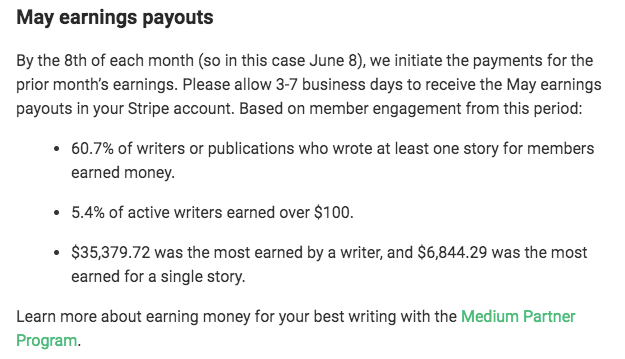
You can definitely make money on Medium, but never lose sight of the purpose of writing. Don’t do it for money. Do it because you love it. Do it because you have something to say. Do it because you can’t not do it.
I feel blessed to have found a writing home on Medium, and I hope this article helped you feel a bit more home here too.
The writing community on Medium has given me a lot, and I’d love to give back any way I can. Let me know in the comments if I can help you with any questions you have, or feel free to email me.
Best of luck, courageous writer!