
Mastering ERC20 on Polkadot with Rust vs Solidity: A Comprehensive Guide
If you can’t read this article because of the firewall, go here to read it for free.
Dive into the world of multi-chain smart contracts and start your journey in Rust by learning about ink! and Substrate.
This article is your first step to getting into the Polkadot ecosystem. We’ll guide you through three transformative sections: starting with the essentials of setting up your Rust environment, advancing through the ins and outs of ink! smart contract development, and culminating with a hands-on project where you’ll build your own Substrate-based ERC20 smart contract.
Content
- Installation and first steps
- Introduction to ink! and Substrate
- Implement an ERC20
Installation & first steps
It’s well known that the best way to learn a new language is by building something, so we are going to build a simple smart contract to learn the basic parts of Rust smart contracts.
This first part will also compare each of the Rust contract elements with its Solidity equivalent, seeking for better understanding by comparing it with something you might already have seen before.
In order to start building we are going to set up our environment by installing the pre-requisites.
Let’s start then with the installation
Installing Rust
curl — proto ‘=https’ — tlsv1.2 -sSf https://sh.rustup.rs | sh
1) Proceed with installation (default)
2) Customize installation
3) Cancel installation
> 1
To configure your current shell, run:
source "$HOME/.cargo/env"
rustc --version
You can keep your Rust installation up to date with the latest version by running:
rustup update
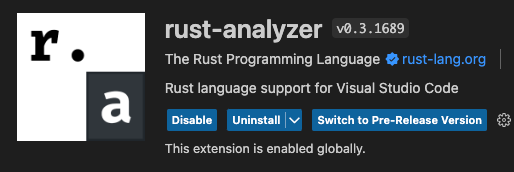
Install the rust-analyzer extension on VS code
Cargo
When you install Rust with rustup, the toolset includes cargo among others. You also get Cargo, the Rust package manager, to help download Rust dependencies and build and run Rust programs.
Cargo new
cargo new hello_worldcd hello_world
code .Build a simple Smart Contract
Now, let’s start with the part where we learn Rust by converting a Smart Contract written in Solidity
// SPDX-License-Identifier: MIT

pragma solidity 0.8.19;


contract SimpleStorage {
    uint256 myFavoriteNumber;

    struct Person {
        uint256 favoriteNumber;
        string name;
    }
    Person[] public listOfPeople;

    mapping(string => uint256) public nameToFavoriteNumber;

    function store(uint256 _favoriteNumber) public {
        myFavoriteNumber = _favoriteNumber;
    }

    function retrieve() public view returns (uint256) {
        return myFavoriteNumber;
    }

    function addPerson(string memory _name, uint256 _favoriteNumber) public {
        listOfPeople.push(Person(_favoriteNumber, _name));
        nameToFavoriteNumber[_name] = _favoriteNumber;
    }
}
What’s the Rust equivalent of a “contract” declaration in Solidity?
In Rust, there isn’t a direct equivalent to Solidity’s contract keyword since Rust is a general-purpose programming language, whereas Solidity is designed specifically for smart contract development on the Ethereum blockchain.
However, when developing blockchain applications in Rust, one typically uses a struct to encapsulate data and an impl block to define methods operating on that data, somewhat similar to a Solidity contract.
Here’s a simplified version of the solidity smart contract above to illustrate:
pub struct SimpleStorage {
    my_favorite_number: u64,
}

impl SimpleStorage {
    pub fn new() -> Self {
        SimpleStorage {
            my_favorite_number: 0,
        }
    }

    pub fn store(&mut self, favorite_number: u64) {
        self.my_favorite_number = favorite_number;
    }

    pub fn retrieve(&self) -> u64 {
        self.my_favorite_number
    }
}SimpleStorageis defined as astructinstead of acontract.- The
storeandretrievemethods are defined within animplblock associated withSimpleStorage. - We added a
newmethod as a constructor, which is a common pattern in Rust. pubindicates that the function is public->is the equivalent ofreturnsin Solidity
Where are the State variables from Solidity in Rust?
As you can notice my_favorite_number has been moved from the main block or impl.
In Rust, the impl block is used for defining methods associated with a particular struct, enum, or trait. These methods can operate on instances of the struct (or enum), and can access and modify their fields.
Here are some of the elements placed outside the
implblock:
- Struct and Enum Definitions: The actual definitions of structs and enums are placed outside of any
implblock. - Function Definitions: Standalone functions that are not associated with a particular struct or enum are defined outside of any
implblock. - Constant Definitions: Constants can also be defined outside of
implblocks. - Use Statements: Import statements (
use) are placed outside ofimplblocks. - Module Definitions: If you’re organizing your code into modules, the
modkeyword and module definitions go outside ofimplblocks.
And here is what goes inside the
implblock:
- Method Definitions: Methods, which are functions that can operate on an instance of the struct or enum, are defined inside the
implblock. They always have aself,&self, or&mut selfparameter, which refers to the instance they are operating on. - Associated Function Definitions: Functions that are related to the struct or enum but do not operate on an instance of it are defined inside the
implblock but do not take aselfparameter. Thenewfunction, which is often used as a constructor, is a common example of an associated function.
which takes me to the next questions
How and when to use `&mut self`, `&self`, or `self` in the Rust?
In Rust, self, &self, and &mut self are used within method signatures in an impl block to specify how the method accesses the data of the struct it's associated with.
Here's a breakdown:
self:
- Ownership Transfer: When a method has
selfas its first parameter, it takes ownership of the instance. This means that the instance can no longer be used after the method is called unless the method returns the instance. - Usage: This is typically used for methods that transform
selfinto something else and where it makes sense for the original instance to be consumed.
We want to show you now both how would
selfbe used and what would be the equivalent in Solidity:
impl SimpleStorage {
    // ... other methods ...

    pub fn total_people(self) -> usize {
        let total = self.list_of_people.len();
        // self will be dropped at the end of this method
        total
    }
}
In Solidity, the equivalent to Rust’s self is this. However, Solidity doesn't have the concept of consuming a contract instance like in Rust.
contract SimpleStorage {
    // ... other members ...

    function totalPeople() public view returns (uint256) {
        return listOfPeople.length;
    }
}
We hope providing this kind of examples is helping understand it. Let’s continue.
&self:
- Immutable Borrow: When a method has
&selfas its first parameter, it borrows the instance immutably. This means that the method can read the data in the instance, but cannot modify it. - Usage: This is used for methods that need to access the data of the instance but do not need to modify it.
This is easier seen in the example:
pub fn retrieve(&self) -> u64 {
    self.my_favorite_number
}
&mut self:
- Mutable Borrow: When a method has
&mut selfas its first parameter, it borrows the instance mutably. This means that the method can read and modify the data in the instance. - Usage: This is used for methods that need to modify the instance.
pub fn store(&mut self, favorite_number: u64) {
    self.my_favorite_number = favorite_number;
}
Well done guys, first part is complete, now you have been able to build and understand this smart contract in Rust:
pub struct SimpleStorage {
    my_favorite_number: u64,
    list_of_people: Vector<Person>,
    name_to_favorite_number: near_sdk::collections::LookupMap<String, u64>,
}

pub struct Person {
    favorite_number: u64,
    name: String,
}

impl SimpleStorage {
    pub fn new() -> Self {
        Self {
            my_favorite_number: 0,
            list_of_people: Vector::new(b"list_of_people".to_vec()),
            name_to_favorite_number: near_sdk::collections::LookupMap::new(b"name_to_favorite_number".to_vec()),
        }
    }

    pub fn store(&mut self, favorite_number: u64) {
        self.my_favorite_number = favorite_number;
    }

    pub fn retrieve(&self) -> u64 {
        self.my_favorite_number
    }

    pub fn add_person(&mut self, name: String, favorite_number: u64) {
        let person = Person {
            favorite_number,
            name: name.clone(),
        };
        self.list_of_people.push(&person);
        self.name_to_favorite_number.insert(&name, &favorite_number);
    }
}
Introduction to ink! and Substrate
Let’s now introduce ink! and Substrate and set up our environment so that we can create a project and dive more into Rust and ink! syntax.
What exactly are ink! and Substrate?
ink! is designed specifically for developing smart contracts to run smoothly on Substrate-based blockchains.
Substrate boasts a runtime module known as the Contracts Pallet, creating the perfect playground for your ink! smart contracts.
With ink!, your smart contracts are compiled into WebAssembly, or Wasm, making them ready for action on the Substrate stage.
Once you’ve perfected your smart contract, deploy it on any Substrate-based blockchain with the Contracts Pallet enabled, and voila, your decentralized solution is live!
Installation
Time to run the following commands on your terminal:
brew install protobuf
Then, add the nightly release and the nightly WebAssembly (wasm) targets your development environment by running the following commands:
rustup update nightly
rustup target add wasm32-unknown-unknown --toolchain nightly
Next on the list of commands to complete the installation part is:
brew install cmake
Create a project
Before we create a new project we need to install the latest version of cargo-contract:
cargo install --force --locked cargo-contract --version 2.0.0-rc
And now, let’s create our incrementer project by running:
cargo contract new incrementer
By default, the template lib.rs file contains the source code for the flipper smart contract with instances of the flipper contract name renamed incrementer.
Replace that with the contract provided below and we will start analyzing its parts.
#![cfg_attr(not(feature = "std"), no_std)]

#[ink::contract]
mod incrementer {

    #[ink(storage)]
    pub struct Incrementer {
        value: i32,
    }

    impl Incrementer {
        #[ink(constructor)]
        pub fn new(init_value: i32) -> Self {
            Self { value: init_value }
        }

        #[ink(constructor)]
        pub fn default() -> Self {
            Self {
                value: 0,
            }
        }

        #[ink(message)]
        pub fn inc(&mut self, by: i32) {
           self.value += by;
        }

        #[ink(message)]
        pub fn get(&self) -> i32 {
            self.value
        }
    }
}
So far from the first steps section you know about the way the struct,impl and the functions inside the impl incrementer are declared.
Now, what is there new for you on this code?
Let’s analyze the new elements:
Modules
As you can notice the mod incrementer with its tag (we will talk about those in a moment) is used to declare a module, which is a way to organize code into separate units within a contract.
Important fact about using modules. Modules in Rust also serve as privacy boundaries. By default, items in a module are private and can only be accessed from within the module.
Two constructors
In Rust and consequently in ink!, having multiple constructors is a way to provide different initialization pathways for a structure, and it’s not a matter of overriding but rather overloading. Here’s how it works:
When deploying the smart contract, you would choose which constructor to call based on the initialization behavior you desire.
When deploying the contract, you could choose to call either Incrementer::new(some_value) if you want to initialize value with some_value, or Incrementer::default() if you want value to be initialized to 0.
Return value
Did you notice anything different in the line where the get() function returns the value?
Take a look at the line self.value. It doesn’t use the ; at the end of the line.
If the last expression in a function does not have a semicolon, Rust treats it as the return value.
Attributes
Attributes in Rust are a form of metadata used to add additional information to modules, crates, or items such as functions, structs, and enums.
ink! utilizes custom attributes to provide a domain-specific interface for smart contract development. For example:
#[ink(storage)]is used to denote the primary storage struct of the contract#[ink(constructor)]for constructors#[ink(message)]for callable contract methods
These ink!-specific attributes are an essential part of writing smart contracts in ink!, providing a clear and structured way to define contract behaviors.
Implement an ERC20
Now we will be learning how to implement an ERC20 token on Polkadot and any Substrate-based Blockchain in Rust by converting a Solidity ERC20 contract.
We’re going to be as descriptive as possible from all the code presented, providing Solidity examples to help understand what it is all about.
Let’s start!
Let’s consider this simplified ERC20 contract written in Solidity (for the sake of this exercise, we will not use OpenZeppelin’s library):
// SPDX-License-Identifier: MIT
pragma solidity ^0.8.0;

contract SimpleERC20 {
    // Total token supply
    uint256 public totalSupply;
    // Mapping from owner to number of owned tokens
    mapping(address => uint256) public balances;

    constructor(uint256 _initialSupply) {
        totalSupply = _initialSupply;
        // Assign the initial supply to the contract deployer
        balances[msg.sender] = _initialSupply;
        emit Transfer(address(0), msg.sender, _initialSupply);
    }

    // Returns the total token supply
    function totalSupply() external view returns (uint256) {
        return totalSupply;
    }

    // Returns the account balance for the specified owner
    function balanceOf(address _owner) external view returns (uint256) {
        return balances[_owner];
    }
}
And such a contract looks like this implemented in Rust with ink!
#![cfg_attr(not(feature = "std"), no_std)]

#[ink::contract]
mod erc20 {
    use ink::storage::Mapping;

    /// Create storage for a simple ERC-20 contract.
    #[ink(storage)]
    pub struct Erc20 {
        /// Total token supply.
        total_supply: Balance,
        /// Mapping from owner to number of owned tokens.
        balances: Mapping<AccountId, Balance>,
    }

    impl Erc20 {
        /// Create a new ERC-20 contract with an initial supply.
        #[ink(constructor)]
        pub fn new(total_supply: Balance) -> Self {
            let mut balances = Mapping::default();
            let caller = Self::env().caller();
            balances.insert(caller, &total_supply);

            Self {
                total_supply,
                balances,
            }
        }

        /// Returns the total token supply.
        #[ink(message)]
        pub fn total_supply(&self) -> Balance {
            self.total_supply
        }

        /// Returns the account balance for the specified `owner`.
        #[ink(message)]
        pub fn balance_of(&self, owner: AccountId) -> Balance {
            self.balances.get(owner).unwrap_or_default()
        }
    }
}
We will now start adding elements to the ERC20 Rust contract comparing them with the Solidity way of writing it for better understanding.
Transfer Tokens
We will start by implementing the transfer function to the contract.
The public transfer function calls a private transfer_from_to() function.
Because this is an internal function, it can be called without any authorization checks.
However, the logic for the transfer must be able to determine whether the from account has tokens available to transfer to the receiving to account.
We will see this in detail in a moment.
Add an Error declaration to return an error
/// Specify ERC-20 error type.
#[derive(Debug, PartialEq, Eq, scale::Encode, scale::Decode)]
#[cfg_attr(feature = "std", derive(scale_info::TypeInfo))]
pub enum Error {
/// Return if the balance cannot fulfill a request.
   InsufficientBalance,
}
#[derive(Debug, PartialEq, Eq, scale::Encode, scale::Decode)]:
- These are derived attributes that automatically generate trait implementations for the
Errorenum. Debug: Allows for the formatting of theErrorenum for output, useful for debugging.PartialEq: Enables comparison ofErrorenum variants for equality.Eq: Indicates that all comparisons are reflexive, symmetric, and transitive, which is a requirement for some collection types.scale::Encodeandscale::Decode: These traits are from theparity-scale-codeclibrary, which is used for encoding and decoding data in Substrate-based blockchains. They allow for the encoding and decoding of theErrorenum to and from byte representations.
2. #[cfg_attr(feature = "std", derive(scale_info::TypeInfo))]:
- This is a conditional compilation attribute that only applies the
derive(scale_info::TypeInfo)attribute if thestdfeature is enabled. Thescale_info::TypeInfotrait provides type information at runtime, which can be useful for various purposes like metadata inspection.
3. pub enum Error:
- This declares a public enumeration named
Error.
4. InsufficientBalance:
- This is a variant of the
Errorenum, representing a specific error case where a balance is not sufficient to fulfill a request.
By creating this Error enum, you can return a Result type from your functions where the Err variant contains an Error::InsufficientBalance whenever there's an attempt to perform an operation that requires a balance larger than available.
Here’s how you could translate the provided Rust Error enum to Solidity using custom errors:
// SPDX-License-Identifier: MIT
pragma solidity ^0.8.4;

contract ERC20 {
    error InsufficientBalance();

    // ... rest of your code ...

    function transfer(address to, uint256 amount) public {
        require(balances[msg.sender] >= amount, "Insufficient balance");
        // Alternatively, you could use:
        // if (balances[msg.sender] < amount) revert InsufficientBalance();

        balances[msg.sender] -= amount;
        balances[to] += amount;
    }

    // ... rest of your code ...
}
Add a Result return type to return the InsufficientBalance error.
/// Specify the ERC-20 result type.
pub type Result<T> = core::result::Result<T, Error>;
By defining this type alias, you create a shorthand for referring to core::result::Result types that use your Error enum for error results. This makes your contract code shorter and more readable whenever you want to use this Result type.
In practical terms, this allows you to write function signatures like fn my_function() -> Result<MyType> instead of fn my_function() -> core::result::Result<MyType, Error>, which is less verbose and clearer.
Within the context of your ERC-20 contract, this Result<T> type would be used to indicate the success or failure of contract methods, with Error providing information on any errors that occurred.
Add the transfer() public function
#[ink(message)]
pub fn transfer(&mut self, to: AccountId, value: Balance) -> Result<()> {
   let from = self.env().caller();
   self.transfer_from_to(&from, &to, value)
}
-> Result<()>indicates that this function returns aResulttype, with an empty tuple()as the success type. If the function succeeds, it returnsOk(()), and if it fails, it returnsErr(Error)whereErroris the error type defined earlier in your contract.let from = self.env().caller();retrieves the address of the caller (i.e., the entity initiating the transaction) and stores it in a variable namedfrom.self.transfer_from_to(&from, &to, value)calls a separate function namedtransfer_from_towith the sender's address, the recipient's address, and the amount to transfer as arguments.
Here’s how you could translate the given ink!
transferfunction to Solidity:
function transfer(address to, uint256 value) public returns (bool) {
    address from = msg.sender;
    return _transferFromTo(from, to, value);
}
Add the transfer_from_to() private function
fn transfer_from_to(
   &mut self,
   from: &AccountId,
   to: &AccountId,
   value: Balance,
) -> Result<()> {
    let from_balance = self.balance_of(*from);
    if from_balance < value {
        return Err(Error::InsufficientBalance)
    }

    self.balances.insert(&from, &(from_balance - value));
    let to_balance = self.balance_of(*to);
    self.balances.insert(&to, &(to_balance + value));
    Ok(())
}- Getting the Sender’s Balance:
let from_balance = self.balance_of(*from);
2. Checking for Sufficient Balance:
if from_balance < value { return Err(Error::InsufficientBalance) }
3. Updating the Sender’s Balance:
self.balances.insert(&from, &(from_balance - value));
4. Getting the Recipient’s Balance and Updating It:
let to_balance = self.balance_of(*to);self.balances.insert(&to, &(to_balance + value));
5. Returning Success:
Ok(())
In Solidity, a similar function to
transfer_from_tocould be written as aninternalfunction
function _transferFromTo(address from, address to, uint256 value) internal returns (bool) {
    require(balances[from] >= value, "Insufficient balance");
    balances[from] -= value;
    balances[to] += value;
    emit Transfer(from, to, value);
    return true;
}
What are * and & used for?
The * operator in Rust is used for dereferencing pointers, in this case, it's dereferencing a reference. In the line let from_balance = self.balance_of(*from);, the *from is dereferencing the from reference to get the actual value that from is pointing to.
In Rust, when you have a reference to a value and you want to access the actual value, you need to dereference the reference using the * operator.
The balance_of function likely requires an AccountId value, not a reference to an AccountId (&AccountId). By writing *from, you are providing the actual AccountId value to the balance_of function, instead of a reference to it.
Here’s a simplified illustration:
fn main() {
    let x = 10;         // x is an integer
    let y = &x;         // y is a reference to x
    let z = *y;         // z is now the integer value that y refers to (i.e., 10)
    println!("{}", z);  // This will print "10"
}
Add a transfer event
#[ink(event)]
pub struct Transfer {
   #[ink(topic)]
   from: Option<AccountId>,
   #[ink(topic)]
   to: Option<AccountId>,
   value: Balance,
}
The ink::topic attribute is used to indicate which fields of the event should be indexed.
Add the Transfer event to the new() constructor.
Self::env().emit_event(Transfer {
    from: None,
    to: Some(caller),
    value: total_supply,
});
Add the Transfer event to the transfer_from_to() function.
self.env().emit_event(Transfer {
   from: Some(*from),
   to: Some(*to),
   value,
});
Add the approval logic
Approving another account to spend your tokens is the first step in the third-party transfer process.
As a token owner, you can specify any account and any number of tokens that the designated account can transfer on your behalf.
Declare the Approval event using the #[ink(event)] attribute macro
#[ink(event)]
pub struct Approval {
   #[ink(topic)]
   owner: AccountId,
   #[ink(topic)]
   spender: AccountId,
   value: Balance,
}
Add an Error variant
To indicate an error if the transfer request exceeds the account allowance we include InsufficientAllowance
#[derive(Debug, PartialEq, Eq, scale::Encode, scale::Decode)]
#[cfg_attr(feature = "std", derive(scale_info::TypeInfo))]
pub enum Error {
   InsufficientBalance,
   InsufficientAllowance,
}
Add an allowances Mapping and instantiate it
Add an allowances Mapping to the storage declaration for an owner and non-owner combination to an account balance.
allowances: Mapping<(AccountId, AccountId), Balance>,
In Solidity, the equivalent of the given Rust code snippet would involve using a nested mapping or a mapping of a struct.
The more common and straightforward way is to use a nested mapping.
mapping(address => mapping(address => uint256)) public allowances;Instantiate and add the allowances Mapping in the new() constructor.
#[ink(constructor)]
pub fn new(total_supply: Balance) -> Self {
   // -- snip --

   let allowances = Mapping::default();

   Self {
       total_supply,
       balances,
       allowances
  }
}
let allowances = Mapping::default();line creates a new variable namedallowancesand initializes it with a default value by callingMapping::default().
Add the approve() function to authorize a spender account to withdraw
The approve function allows the owner (the caller of the function) to approve the spender to withdraw tokens on their behalf, up to a specified value.
#[ink(message)]
pub fn approve(&mut self, spender: AccountId, value: Balance) -> Result<()> {
   let owner = self.env().caller();
   self.allowances.insert((owner, spender), &value);

   self.env().emit_event(Approval {
     owner,
     spender,
     value,
   });

   Ok(())
}
let owner = self.env().caller();: Retrieves the address of the caller (i.e., the entity initiating the transaction) and stores it in a variable namedowner.self.allowances.insert((owner, spender), &value);: Updates theallowancesmapping with a new allowance.Ok(()): Returns anOkvariant to indicate success.
Add an allowance() function
#[ink(message)]
pub fn allowance(&self, owner: AccountId, spender: AccountId) -> Balance {
   self.allowances.get((owner, spender)).unwrap_or_default()
}
self.allowances.get((owner, spender))attempts to retrieve the value from theallowancesunwrap_or_default()is a method call on theOption<Balance>returned byget. If theOptionisSome(Balance), it will return theBalancevalue. If theOptionisNone(i.e., if there's no allowance set for the givenownerandspender), it will return a default value, which forBalancewould typically be0.
Add the transfer_from logic
The transfer_from function calls the private transfer_from_to function to do most of the transfer logic.
Add the transfer_from() function
The transfer_from function allows a caller to transfer tokens on behalf of the from account to the to account, provided the caller has a sufficient allowance.
/// Transfers tokens on the behalf of the `from` account to the `to account
#[ink(message)]
pub fn transfer_from(
   &mut self,
   from: AccountId,
   to: AccountId,
   value: Balance,
) -> Result<()> {
   let caller = self.env().caller();
   let allowance = self.allowance(from, caller);
   if allowance < value {
       return Err(Error::InsufficientAllowance);
   }

   self.transfer_from_to(&from, &to, value)?;

   self.allowances.insert((from, caller), &(allowance - value));

   Ok(())
}
Congratulations, now you’ve got your ERC20 smart contract implemented.
This is how your ERC20 should look like once completed the steps we’ve gone through.
#![cfg_attr(not(feature = "std"), no_std)]

#[ink::contract]
mod erc20 {
    use ink::storage::Mapping;

    /// Create storage for a simple ERC-20 contract.
    #[ink(storage)]
    pub struct Erc20 {
        /// Total token supply.
        total_supply: Balance,
        /// Mapping from owner to number of owned tokens.
        balances: Mapping<AccountId, Balance>,
        /// Mapping of the token amount which an account is allowed to withdraw
        /// from another account.
        allowances: Mapping<(AccountId, AccountId), Balance>,
    }

    #[ink(event)]
    pub struct Transfer {
        #[ink(topic)]
        from: Option<AccountId>,
        #[ink(topic)]
        to: Option<AccountId>,
        value: Balance,
    }

    /// Specify ERC-20 error type.
    #[derive(Debug, PartialEq, Eq, scale::Encode, scale::Decode)]
    #[cfg_attr(feature = "std", derive(scale_info::TypeInfo))]
    pub enum Error {
        /// Return if the balance cannot fulfill a request.
        InsufficientBalance,
        InsufficientAllowance,
    }

    /// Specify the ERC-20 result type.
    pub type Result<T> = core::result::Result<T, Error>;

    impl Erc20 {
        /// Create a new ERC-20 contract with an initial supply.
        #[ink(constructor)]
        pub fn new(total_supply: Balance) -> Self {
            let mut balances = Mapping::default();
            let caller = Self::env().caller();
            let allowances = Mapping::default();

            balances.insert(caller, &total_supply);

            Self::env().emit_event(Transfer {
                from: None,
                to: Some(caller),
                value: total_supply,
            });

            Self {
                total_supply,
                balances,
                allowances
            }
        }

        /// Returns the total token supply.
        #[ink(message)]
        pub fn total_supply(&self) -> Balance {
            self.total_supply
        }

        /// Returns the account balance for the specified `owner`.
        #[ink(message)]
        pub fn balance_of(&self, owner: AccountId) -> Balance {
            self.balances.get(owner).unwrap_or_default()
        }

        #[ink(message)]
        pub fn transfer(&mut self, to: AccountId, value: Balance) -> Result<()> {
            let from = self.env().caller();
            self.transfer_from_to(&from, &to, value)
        }

        fn transfer_from_to(
            &mut self,
            from: &AccountId,
            to: &AccountId,
            value: Balance,
         ) -> Result<()> {
             let from_balance = self.balance_of(*from);
             if from_balance < value {
                 return Err(Error::InsufficientBalance)
             }

             self.balances.insert(&from, &(from_balance - value));
             let to_balance = self.balance_of(*to);
             self.balances.insert(&to, &(to_balance + value));

             self.env().emit_event(Transfer {
                from: Some(*from),
                to: Some(*to),
                value,
            });

             Ok(())
         }

         /// Transfers tokens on the behalf of the `from` account to the `to account
        #[ink(message)]
        pub fn transfer_from(
            &mut self,
            from: AccountId,
            to: AccountId,
            value: Balance,
        ) -> Result<()> {
            let caller = self.env().caller();
            let allowance = self.allowance(from, caller);
            if allowance < value {
                return Err(Error::InsufficientAllowance);
            }

            self.transfer_from_to(&from, &to, value)?;

            self.allowances.insert((from, caller), &(allowance - value));

            Ok(())
        }

         #[ink(message)]
        pub fn approve(&mut self, spender: AccountId, value: Balance) -> Result<()> {
            let owner = self.env().caller();
            self.allowances.insert((owner, spender), &value);

            self.env().emit_event(Approval {
                owner,
                spender,
                value,
            });

            Ok(())
        }

        #[ink(message)]
        pub fn allowance(&self, owner: AccountId, spender: AccountId) -> Balance {
            self.allowances.get((owner, spender)).unwrap_or_default()
        }
    }
}
My Web3 Security YouTube channel https://www.youtube.com/@theblockchainer lots of new types of Web3 content available for you.
Follow me on Twitter https://twitter.com/TheBlockChainer for my latest updates
Enroll in the best Smart Contract Hacking course. https://smartcontractshacking.com/?referral=bloqarl
My website theblockchainerhub.xyz/
And subscribe here on Medium to have access to all my articles all the time https://medium.com/@bloqarl/membership
References:
https://github.com/paritytech/ink-examples/blob/main/erc20/lib.rs
https://substrate.io/developers/smart-contracts/
https://github.com/Cyfrin/foundry-simple-storage-f23/blob/main/src/SimpleStorage.sol


