
Making an RTS game #9: Implementing character units and skills (Unity/C#)
On with our RTS project! Today, we’ll add the character and skill systems…
⬅️ Tutorial #8: Boosting our selection feature | TOC | Tutorial #10: Moving the camera ➡️
📕 Get the ebook and bonus material on Gumroad! 🚀 Find the code of this tutorial series on my Github!
Last week, we improved our selection feature and, in particular, we added an info panel for the currently selected unit. Now, it’s time to populate this panel with skills and use it to create even more units!

For now, we only have building units — but remember that we prepared our class hierarchy in previous tutorials so it is easy to add character units. Today, we’ll add these character units, plus we’ll start a basic skills system that allows us to produce one of those character units in our House building.
Implementing character units
General info about character units
As we discussed a few weeks ago, characters are one of the possible unit subtypes. So just like we used inheritance and polymorphism for buildings, we’re going to do the same for characters.
Both buildings and characters:
- have a cost in game resources
- may have a production of game resources
- have healthpoints
- are matched to a game object to display them in the 3D scene
- will have levels and optionally skills
On the other hand, only character units can move (buildings are fixed on the ground) and buildings are built directly by the player while characters are “produced” by buildings. All of this means that data is going to be very similar between characters and buildings but behaviour (i.e. the managers) will vary.
Setting up the scripts
The recent article on “Polymorphism, take 2!” was a nice opportunity to recall the three important scripts associated with units:
- the data script (e.g.
UnitData): it's a Scriptable Object that allows us to create assets - those assets are the possible types of buildings or characters in the game (pure data with no actual instantiation yet) - the instance script (e.g.
Unit): the data associated with a particular instance of a unit type, with all the values that are specific to this instance - the manager script (e.g.
UnitManager): this script is in charge of handling the lifecycle and behaviour of the unit after it has been created (how it responds to the selection mechanism, the evolution of the placement mode for buildings...)
We need to do the same for characters and create the three corresponding scripts: CharacterData, Character and CharacterManager. At the moment, all of them are really simple - it's mainly about inheriting the proper class and calling some parent constructors or methods if need be!
Adding a character unit asset
We can now access the Create > Scriptable Objects > Character menu and create a new character asset. Let’s name it “Soldier” and edit some basic info:
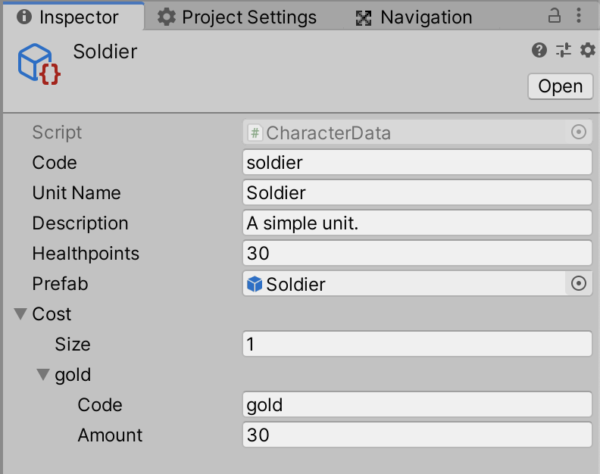
We can also create a little prefab (a cube as usual) and assign it in the asset’s prefab field.
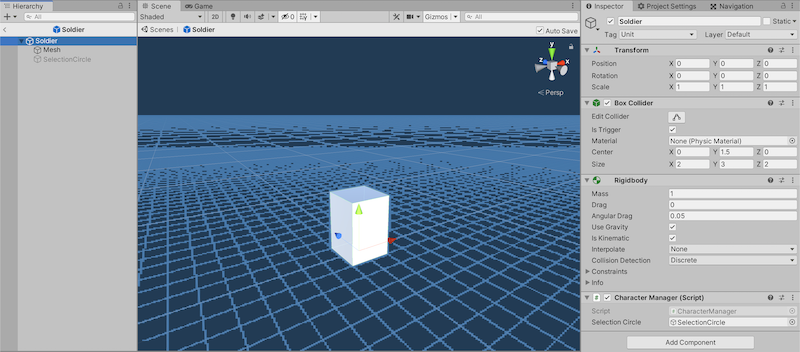
Tadaa — we’ve just added our first character unit! :)
Implementing skills
In most RTS games, your units have specific abilities, or skills, that the player can use actively, i.e. by clicking on a button somewhere. Sometimes, units can also have passive abilities — skills that run continuously in the background and are executed regularly at a given rate. All of those skills are usually a particular trait of each unit even though some might be shared between two or more unit types.
Skills are also going to rely on Scriptable Objects for data and a manager script, but we don’t need to “instantiate” them as we do with units. This means that we only need a SkillData Scriptable Object class (to create our skills assets) and a SkillManager class to handle the skill behaviour once in-game.
Preparing the data class and a skill asset
A skill has some basic info like a unique code, a display name and a description. It also has a cast time and a cooldown time: the “cast time” is the time it takes to actually trigger the ability (basically after clicking on it you’ll have to wait X seconds for the skill to actually be cast) and the “cooldown time” is the time it takes to recharge the ability and have it ready to be cast again (after it has been triggered, you have to wait X seconds for the skill to be ready again). It will also have a sprite to show in the UI (even though it’s empty for now).
Note: ultimately, our skills will also have a specific sound for when they are cast and perhaps some visual/particle effect. Because it’s always cool to have fireballs dancing around when you’re playing with your mage! ;)
The two most important fields of a skill asset are:
- an optional reference to some unit data asset in case it is supposed to draw values from some set of assets (for example, when “producing a unit”, we need a reference to the unit we’ll produce in order to instantiate the right one in the end)
- a skill type to determine what to do with all the skill data
To control the various skill types we have, we can use an enumeration (or enum). An enum is a finite list of options that one can draw items from without any risk of passing in an unrecognised value, and usually with better auto-completion from the IDE ;)
At the moment, we only have one type of skill: “INSTANTIATE_CHARACTER”. Later on, we could add an attack skill that lowers the enemy’s HP, or maybe some healing skills to restore a friend’s health… Perhaps you’ll even have fireballs, warps and teleports if you have wizards in your game?
The skill type is essential because in the Trigger() function of the skill, we need to know what action to perform; by switching on this type value, we'll know how to interpret the data and execute the proper action. Here is the code for our SkillData class with the example of the INSTANTIATE_CHARACTER skill type:
You’ll notice that the Trigger() function also takes in references to two game objects:
- the
sourceis the game object of the unit that is triggering the skill: it necessarily exists (because otherwise the non-existent unit could not be running this ability!) and it's mandatory because most skills require you to know at least the position the skill was triggered at, which is the position of the caster - the
targetis the game object the skill is triggered on, if any: it is optional because not all skills have a target
We’ll see very soon how we can create a new asset for our “unit production” skill based on this Scriptable Object template.
Adding skills to our units
To be able to associate skills with a particular unit type, we’ll need to add a new property to our units data class: the list of available skills, as a list of SkillData objects. It has to be at the UnitData level because all instances of a given unit type should share the same set of skills.
So let’s modify our UnitData class:
Now, whenever we create a new unit asset, we can add a list of skills to it… and those skills are simply other Scriptable Objects that you can drag in the inspector!
Coding up the manager class
A key feature of skills is that they take a certain amount of time to cast and they also have a cooldown time. In other words, we want to be able to wait for a while before actually applying the skill’s effect(s) and wait again before it is back to its “ready” state. In Unity, whenever you want to wait, you can use coroutines and IEnumerators.
IEnumerators are a C# variable type similar to Python's generators: they are an iterable collection that support custom collection types and don't require you to compute all elements at once. Instead, you can iterate through your collection and grab elements one by one. You "end" each iteration with a yield return.
Note: IEnumerators allow you to read through your collection but not modify it; the foreach statement relies on IEnumerators underneath, that's why if you try to remove elements from a collection you're iterating through with foreach you'll get an error when debugging your program.
Unity makes use of those IEnumerators to handle parallel processing via coroutines: contrary to usual functions that run until completion in one go, coroutines can pause at one point, return control to Unity so it can manage the rest of the code and then start back from where they left off at the next frame. All state, variable values and other parts of the execution context is saved and restored when the coroutine resumes. Coroutines are particularly useful when:
- you want to wait for a given amount of seconds before an action is run
- you want to optimize your program by reducing the frequency of some functions calls — for example, checking for enemies within range can be called every tenth of a second to lighten the load on the CPU without it being noticeable for the player
In our case, it’s the first point that’s interesting. For now, we are not going to make a fancy UI and we will simply enable or disable the skill’s button depending on whether it is ready or not — but of course in the end it would be better to have some sort of cooldown bar to show in how much time the skill will be available again ;)
Now, on each Unit instance, we'll want a list of skill managers so that we can easily cast any of these skills from any of our instantiated units - and we have a TriggerSkill() method to easily transfer the call:
Remember that in all of these initialisation and proxy methods, we have to make sure we transfer the current source and target properly ;)
A skill example: unit production
To better understand the skills system, we will jump in and implement a crucial skill in our game: the ability some units have of “producing” other units.
We now have a character asset, the Soldier, and a Scriptable Object for our skills assets. All of this lets us create very easily a new skill, “Produce a Soldier”:
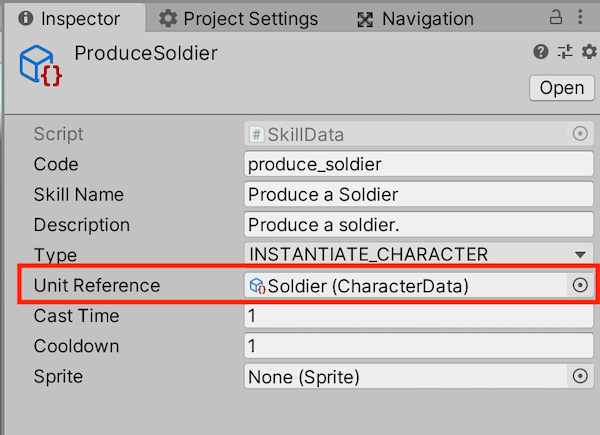
Then, we can add this skill to our House building asset in its list of skills:
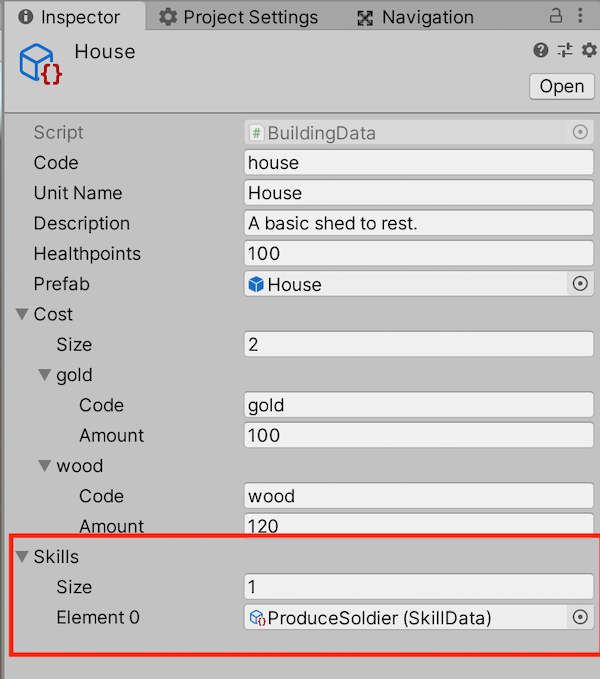
And now, we’ll update our UIManager class to display buttons for each skill in the selected unit panel we created last time:
Finally, we need to make sure that clicking on this UI panel doesn’t deselect our unit; to do this, we’ll need to once again check the mouse isn’t currently hovering UI elements . We can just add this check in our UnitsSelection class, in the Update() method, and return from it immediately if it happens:
After all of this coding, here’s the result: our House building has a new skill to produce a Soldier and when we click it, after 1 second, a Soldier appears near the House! We then have to wait for 1 second before the skill is available again:
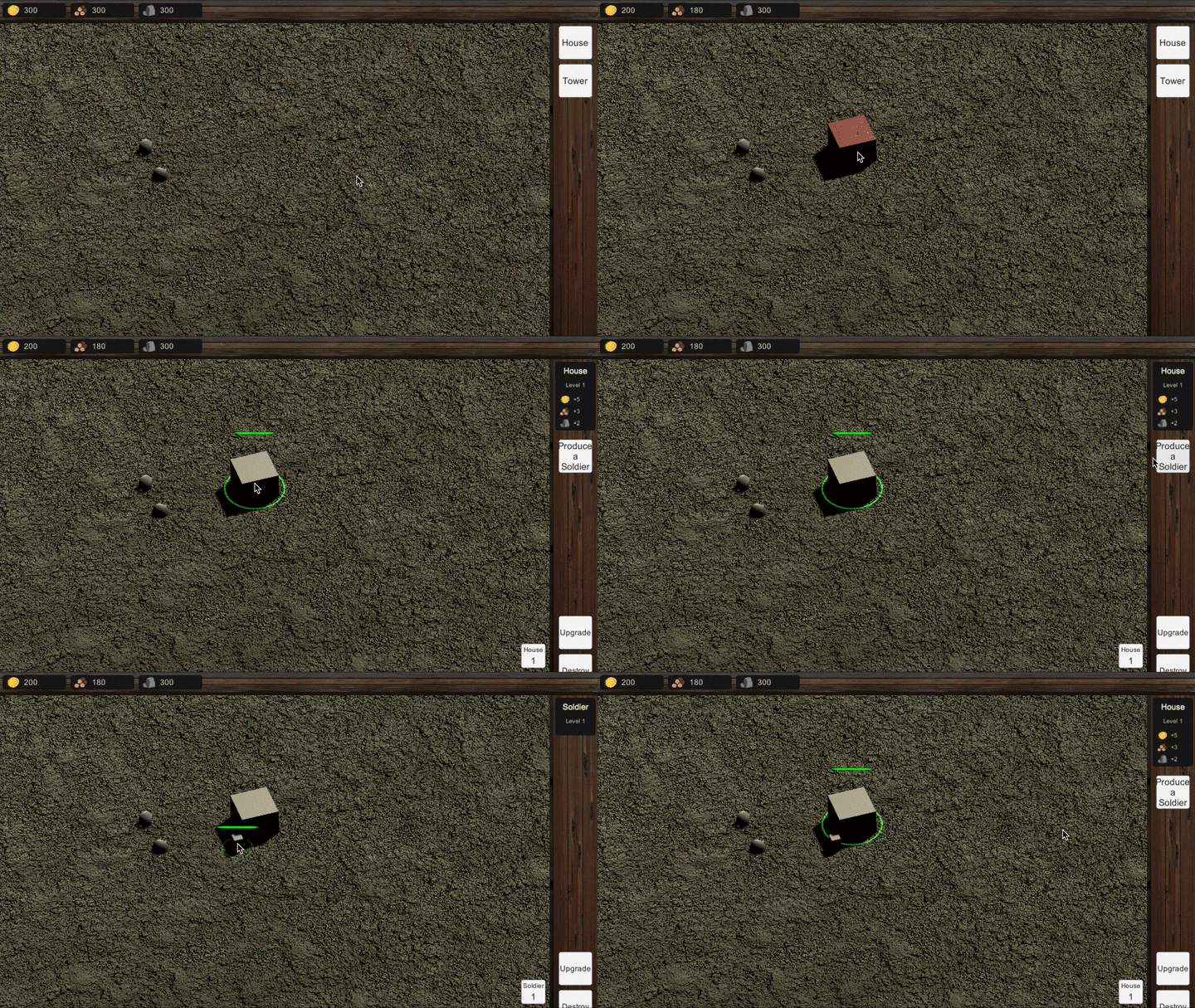
This skill isn’t perfect yet — in particular, if we produce multiple Soldier units, they’ll all be stacked on top of each other instead of being aligned next to each other. But it’s fine for now, just to introduce the skill mechanics :)
Conclusion
In this article, we’ve built upon our late class hierarchy improvements to integrate character units and a very basic skill system. Our buildings can now produce units and we can easily create lots and lots of skills to populate our assets and “stuff” our units!
This system is still very simple, though: for a real RTS game, we’d have to add more skill types, plus some visual and audio effects.
But, in the meantime, next time we’ll go back to an RTS-must-have: the flying camera that looks at the terrain from above, with its orthographic projection…
⬅️ Tutorial #8: Boosting our selection feature | TOC | Tutorial #10: Moving the camera ➡️
📕 Get the ebook and bonus material on Gumroad! 🚀 Find the code of this tutorial series on my Github!
If you liked this article, you can find more blog posts about tech, AI and programming on my website :)


