Tools
Major Medium Extension Update. Nearly There
And you get a new feature, and you get a new feature, and you…
Before you read this article, please be advised that the extension has now been launched. Check it out here:
Ok, it may not be as major if you’d set your expectations to the subtitle, but my upcoming update for my Chrome extension has some nifty new features. At least, that’s what I tell my wife. I should really go to bed now, so I will only be sharing some screenshots.
Be warned: I got some pretty lousy humour in here. Groaning aloud is allowed. And due to all the screenshots I can’t properly format this story to make it a more enjoyable reading experience. Actually sorry about that.
Obviously, I found a little bug while taking the screenshots. And there’s some cleanup to do. I do think my code is a little bit prettier now. If you’re into that kind of geeky stuff: just a tad, don’t expect wonders. What I am trying to say, I got some work to do before I can release this update into the wild.
If you don’t know what I am talking about, check out my extension here:
Now on to the updates, shall we? I’m saving the best for last. Can’t wait? Scroll down to about a bit lower than the middle. Or just read everything if you find these instructions too hard to follow.
Now Showing More Details
When you now take a look at the stats of a specific post, you get some more information about its Distributed-status. Currently I support a couple. Take a look at the screenshots.

My Guilty Pleasure has never been reviewed. And as I understand it, it will never rise to glory by being distributed. Nothing much to feel guilty about, I guess.
For those wondering, this is what you see when
curationStatus = ”CURATION_STATUS_NOT_REVIEWED"
Too technical? That’s what she said. Let’s move on.

Now, this post is more interesting. It’s been published recently. It still has a chance of being reviewed.
My best conjecture is that if a story is not reviewed within a certain span of time, that it will automatically change the status to Not Reviewed. ̶H̶o̶w̶ ̶m̶a̶n̶y̶ ̶d̶a̶y̶s̶?̶ ̶W̶e̶ ̶n̶e̶e̶d̶ ̶m̶o̶r̶e̶ ̶d̶a̶t̶a̶.̶
̶S̶i̶n̶c̶e̶ ̶t̶h̶i̶s̶ ̶i̶s̶ ̶o̶n̶l̶y̶ ̶a̶ ̶w̶o̶r̶k̶i̶n̶g̶ ̶h̶y̶p̶o̶t̶h̶e̶s̶i̶s̶,̶ ̶I̶ ̶a̶m̶ ̶s̶h̶o̶w̶i̶n̶g̶ ̶t̶h̶e̶ ̶n̶u̶m̶b̶e̶r̶ ̶o̶f̶ ̶d̶a̶y̶s̶ ̶t̶h̶e̶ ̶a̶r̶t̶i̶c̶l̶e̶ ̶h̶a̶s̶ ̶b̶e̶e̶n̶ ̶p̶u̶b̶l̶i̶s̶h̶e̶d̶.̶ ̶I̶n̶ ̶t̶h̶e̶ ̶f̶u̶t̶u̶r̶e̶ ̶I̶ ̶c̶o̶u̶l̶d̶ ̶p̶r̶o̶b̶a̶b̶l̶y̶ ̶a̶d̶d̶ ̶t̶h̶e̶ ̶d̶a̶y̶s̶ ̶l̶e̶f̶t̶.̶
Fun fact: yesterday, I needed my sleep, so instead of finishing this round of screenshots, I dragged myself into bed. Now, the next morning, when I check the page, I see that the status has been changed to Not Distributed. It seems that that is the magic threshold for the automatic change in status.
I am not sure when and how to implement the days left feature.So, let’s get technical for a minute:
curationStatus = "CURATION_STATUS_PENDING"
The message is shown when the above is true in the code. I take the difference of the First Published Date and the current date to show the number of days that have passed.
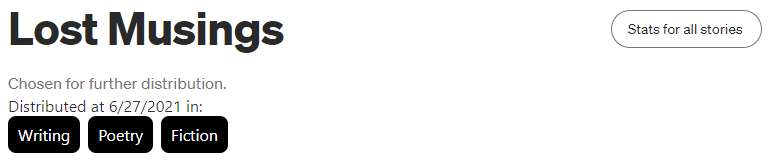
I have lost my musings writing the code for this. It was horrible. I gave up and worked on something else to clear my head. But I got there in the end. I am not too happy with how it looks. It’s in better shape than my rambling in the post, probably. Feedback on how to improve the aesthetics is much appreciated.
So, what is going on here?
I show when the story was distributed. That’s also shown in the graph of your views, but since this can fall out of the graph’s time range, I thought it nice to include it here.
A future update might include how long it took for a story to become distributed.
But the juice is in the little black boxes. Let me explain something first:
- Authors put Tags to their posts.
- Medium applies Topics to Distributed stories
I am only showing the Topics, not the tags. That’s the only information I can access on the page. And, frankly, the only information I want to show.
Notice that Medium decided to distribute this story under three different topics? Did you know that these topics don’t necessarily correspond to the tags the author specified? I’ll get there soon. First technobabble.
You’re tired of technobabble already? I was just getting into it. I guess this is enough foreplay. Let’s get to real business.
Unveiling All Secrets of (Nearly) All Posts
This one was as much fun to code as it was frustrating. I did learn a lot and I managed to get the result I wanted.
It’s time to revisit a post I mentioned earlier. This is what it looks like now:
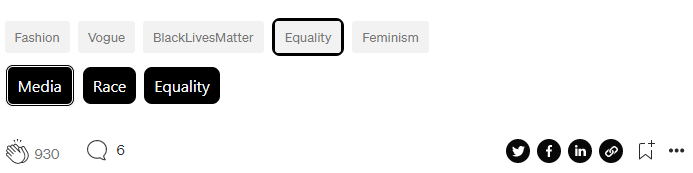
There you have it! Looks great, doesn’t it? Oh? You’re confused by all the information? I promise to provide a legend in a future update. Don’t worry. I’ll take you through it now.
The first row shows the tags (specified by the author) that normally appear below a post. I did do one change there. I highlighted a tag that happens to share a name with a topic it was distributed for.
The second row shows the topics (applied by Medium) the article was distributed in. They’re unsorted to maximize the chance of funny sentences in the topics. Media Race Equality. Poetic, isn’t it?
“Media” is the odd one out here. That’s because this is the Primary Topic! My guess is as good as yours about what that means.
I hope you’re as enthusiastic about this as I am. Let me explain why I find this thrilling: you get more information about (successful) tags used by the author, topics used by Medium. And you get to enjoy this at every post on Medium!*
*Ok, just a tiny disclaimer. This actually only works on stories that are on medium.com. If something was published to a (publication on a) custom domain, then the extension won’t do anything.
Some bonus screenshots
Nothing new here, although this might be interesting for some of you.
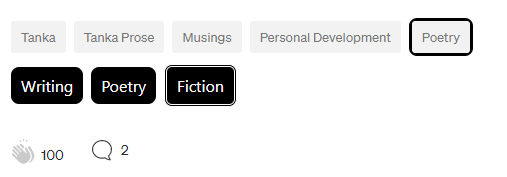
Remember that only the topics are shown on the detailed stats page? The above is what you get when you read the story. If you’re really deep-diving into tags and topics, you are one click away from the page.
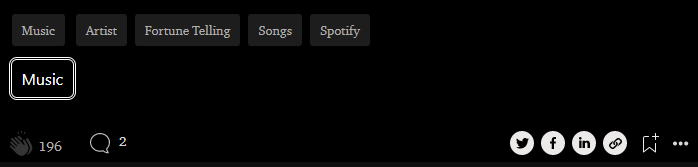
The extension looks great on custom backgrounds, like in this story. The publication this was posted in favours black. There is a slight loss of information here: the tag Music has a border. But it’s black, so you can’t see it. Ah well, can’t have everything.
When does it go live?
I have a couple of things in the code I want to tweak. This morning I fixed a bug I introduced by fixing another bug. I’d say it’s there in a couple of days.
Got feedback? Please go ahead. I don’t mind if it’s negative, constructive criticism or a wall of compliments. We’re in this to make Medium better, together.
Want to know when the new update goes live? Let me know in the comments and I’ll tag you in my next update.
Thanks for scrolling along with my little showcase. Thanks for reading and stay awesome out there!