Tools
Why Have They Gone Viral? Check With This Curation Extension
The truth is out there
Do you feel that Medium.com doesn’t provide you enough information about the stories you read? Or, do you want to deep dive into your statistics and analyze which of your stories are doing great? And you want to know why? I decided to create a chrome extension that provides you with a little more detail about your stories by showing just that little extra.
You might not be able to figure out why some stories have gone viral. And Distribution might not have anything to do with it. But if it does, this extension will make your analysis a lot easier.

Empower yourself with this chrome extension
I created a chrome extension for fun. While I was happily creating crappy code, I started to get more and more into it and both the extension and my skills have grown towards being somewhat mature. The chrome extension itself does something actually quite useful, which is a huge bonus if you do something for fun.
The statistics page
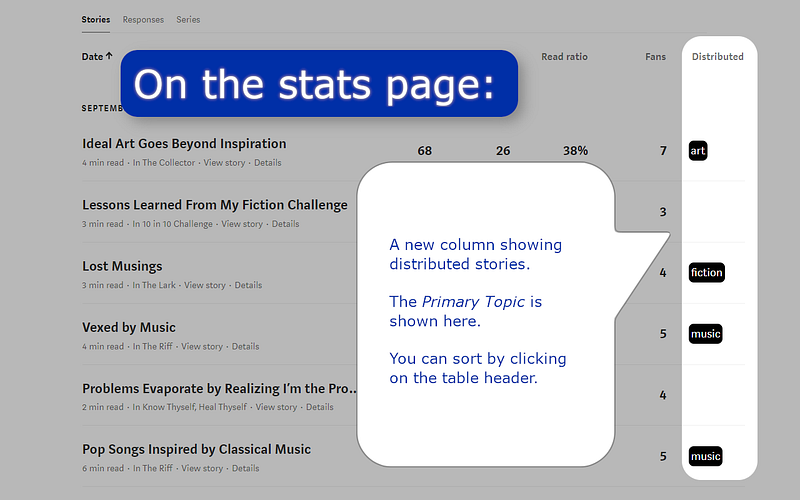
As shown in the screenshot above, the extension shows which of your stories are Chosen for Further Distribution (formerly known as Curated). No more need to click on a story to know.
The overview displays the Primary Topic, by the way. If you want to know all the topics, you need to dig a bit deeper.
To make things simple, I’ve added a summary below the table of the values in the table. I should probably note that I spent some time on ensuring compatibility with Enhanced Medium Stats and Medium Next Generation Stats.
Details for your posts
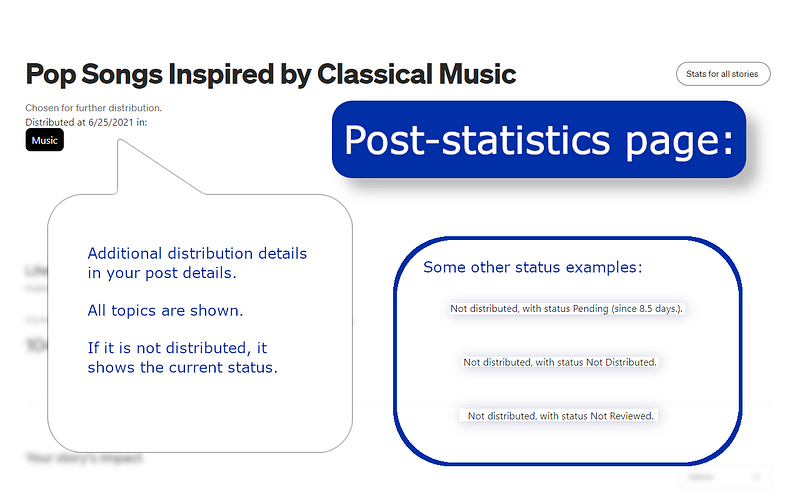
Clicking on a story from your statistics takes you to some more information about the story. I have added some additional information about the distribution status there.
Although this unlocks some more of Medium’s hidden features, the best is yet to come. So far you’ve only seen the extension in action for your own posts. Let’s try to unlock some actual potential, shall we?
Topics for All Post on medium.com
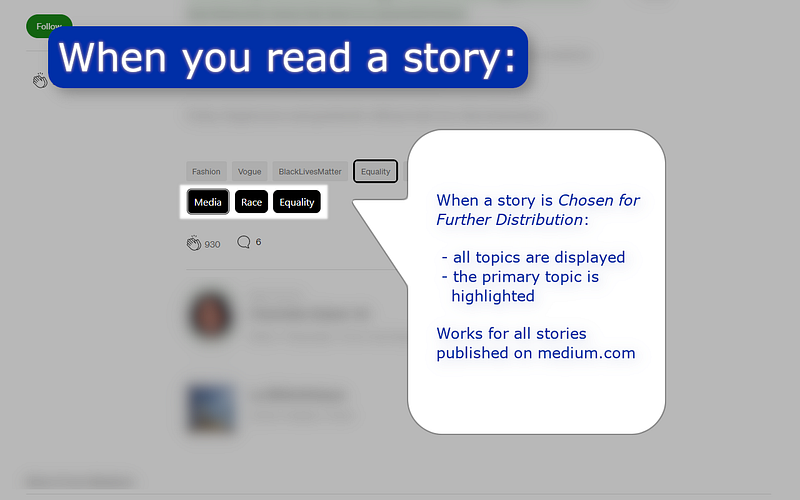
When Medium decides to distribute a story, it selects some topics to distribute it in (as an author you currently specify tags). All the tags that Medium has chosen are now shown below each article. Yes, that includes stories from other people as well!
Sadly, if something has been published to a custom domain, then the extension won’t work there. Maybe I’ll work on that in a future update.
I am really fond of this functionality. Even though I no longer try to go viral and just write whatever I want, I have found that it is good fun to run into Distributed stories and see into which topics they are filed.
What is ‘Chosen for further Distribution’?
Chosen for further Distribution is the new name Medium came up with for the status known earlier as Curated. Medium describes it as follows:
In addition to reliable relational distribution, it’s also possible for a story, writer, or publication to be recommended across additional Medium surfaces via algorithmic or human featuring — in “Your Daily Read,” for example. Editors are seeking out the best from the platform every day to promote in a variety of ways. Subject-matter experts may be featured in a topic collection. Individual stories may be requested for a Medium-owned publication. A blog may link to your story as a recommended read.
So, basically, it makes sure your story gets more exposure. For example, they are included in emails and more likely to show up in a reader’s feed.
What about the changes to tags?
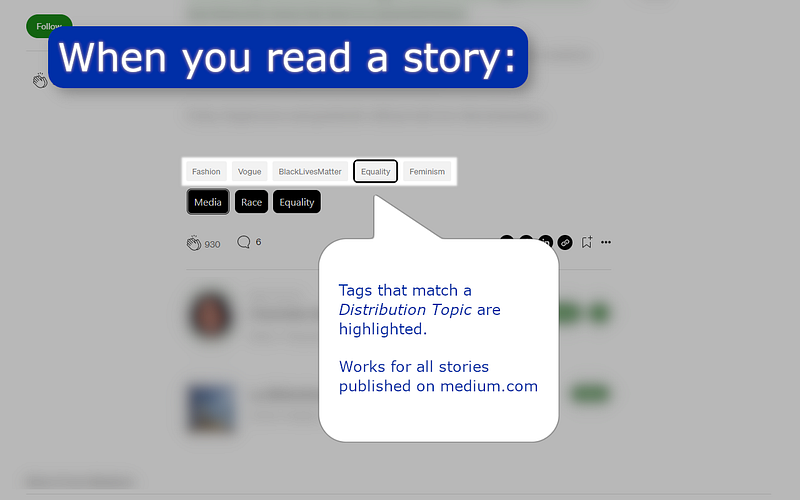
Medium recently announced that they are revamping the tag-system. So far, the extension still works fine and as expected. As soon as they implement some redesign, I will probably launch an update.
So far, I just show which tags correspond with names of topics. It’s no big deal for this extension.
Is this allowed by Medium?
Yes. I contacted our friends at Medium and asked for a thumbs up. They replied that if my development does not break their Terms of Service, that I am ok. That obviously goes for me. For you, as a user of the extension, you are bound by the Membership Terms of Service.
After carefully reading those terms, my conclusion is what I expected: I am fine to publish the service and you are fine to use it. Be advised that this is no legal advice. Use your own brain, please.
Want more? Check the release notes of version 2.1!
Where to download / How to update
You can get Medium Distributed in Stats from the Chrome Webstore. Happy downloading!
I am currently waiting for Google’s review process to finish. This usually takes less than a couple of hours. The extension is there. But with some bad luck the old version (1.1) is still there. No biggie. Updates are automatic.
If you have installed version 1.1, you don’t need to do anything. The extension will update automatically.
Currently a little over a 100 users use the extension. I hope you join the club. Now, go and write those stories and get them distributed! Stay awesome!
Tagging Llewellyn (Lou) Daniels to notify of the upcoming update.