
Machine Learning Project 11 — Whose my Neighbor? — k Nearest Neighbor

Today we will understand the k-Nearest Neighbor (kNN) classification algorithm. It is one of the most easiest algorithms.
#100DaysOfMLCode #100ProjectsInML
- Let’s say we have identified 2 categories in our dataset — say “Red Category 1” and “Green Category 2” as shown below.
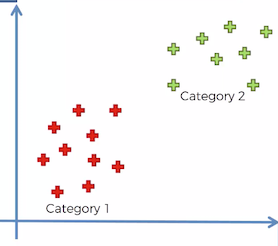
- Now let’s say we add a new data point in our dataset as shown below. So the question is — does it belong to “Red Category 1” or “Green Category 2”. How do we classify this new data point?
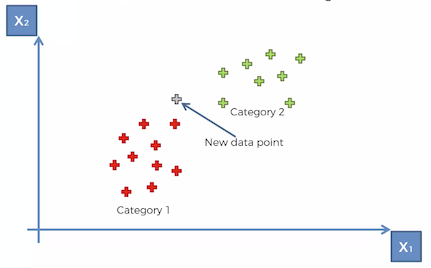
So this is where the k Nearest Neighbor (kNN) algorithm will come in to assist us. It’s a very simple algorithm.
- First we have to decide on the number of k neighbors — the most common or default value for k is 5.
- Next, we need to find the 5 nearest neighbors to this new data point based on Euclidean distance or Manhattan distance or any other. In layman’s terms, we have to find the 5 data points that are closest to this new data point. So based on the Euclidean distance, we have circled the 5 points that are closest to the new data point as shown below.
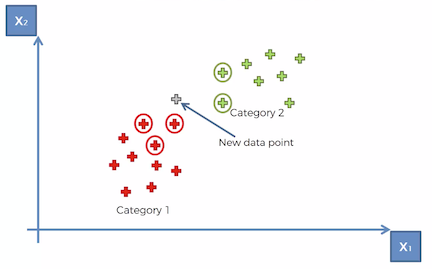
- Now once we identify these 5 closest data points — we have to count how many of those points fall in which category. So based on the diagram above, we can say that 3 points fall in “Red Category 1” and 2 fall in “Green Category 2”.
- Finally, we assign the new data point to the category that had the most points. So since in our example there are 3 points in “Red Category 1” — so we will assign the new data point to “Red Category 1” as shown below.
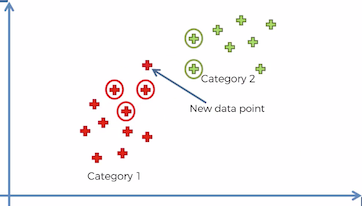
- Hence we have successfully classified the new data point using k Nearest Neighbor (kNN) classification algorithm.
Now let’s get our hands dirty and implement a project using the kNN algorithm.
Project Objective
We will use the same problem that we used in Project 10. Let’s see if we get a better accuracy with kNN compared to Logistic Regression.
We have a dataset that shows which users have purchased an iPhone. Our goal in this project is to predict if the customer will purchase an iPhone or not given their gender, age and salary.
The sample rows are shown below. The full dataset can be accessed here.
Step 1: Load the dataset
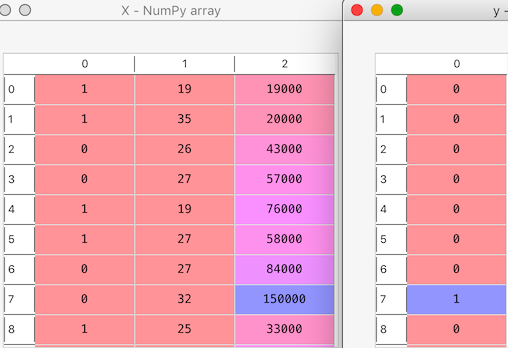
X will contain all 3 independent variables “Gender” , “Age” and “Salary”
y will contain the dependent variable “Purchased iPhone”
Step 2: Convert Gender to Number
For most machine learning algorithms, we have to convert categorical variables to numbers. Here we have the field “Gender” that has to be converted.
We will use the class LabelEncoder to convert Gender to number
Let’s look at our X and y:
Step 3: Split data into training and test set
Step 4: Feature Scaling
For k Nearest Neighbor algorithm also we have to do feature scaling. We will use Standard Scaler for this purpose.
Step 5: Fit KNN Classifier
We are going to use the KNeighborsClassifier class from sklearn.neighbors library. When we create an object of this class, it takes many parameters.
Firstly, we have to specify the number of neighbors. In our example, let’s select 5.
Then we have to define which distance method we want to use.
- For Euclidean distance we have to specify metric as minkowski and p=2
- For Manhattan distance we have to specify metric as minkowski and p=1
In this example, we will be using the Euclidean distance.
Step 6: Make Predictions
Step 7: Check Accuracy of the Predictions
In classification problems, we can compare the predicted results with the actual results using the confusion matrix.
You can read in detail about the confusion matrix in Project 10.
[[64 4]
 [ 3 29]]
Accuracy score: 0.93
Precision score: 0.8787878787878788
Recall score: 0.90625
We get an accuracy of 93%.
And only a total of 7 (4+3) incorrect predictions were made.
Conclusion
Let’s compare the results with Logistic Regression
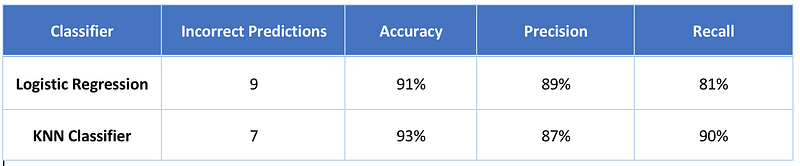
The KNN classifier has fewer incorrect predictions and hence higher accuracy score.
Hope you had fun building the KNN classifier.
You can find the full source code here.


