
Mac Studio, Apple’s Most Uninspiring Device In A Decade
Or an unattractive technology flex in Intel and AMD’s face
Jony Ive wasn’t the Apple design genius that everyone made him out to be, but he wasn’t entirely off his rocker either. Supposedly an admirer of Dieter Ram’s work, he did get several things right over the years. I mean, let’s face it, some of Apple’s products are just as iconic as Braun’s, if not even more so.
But I never considered Ive a true designer despite what him and Apple would have liked everyone to think with launching their own design book, just like Dieter’s “Less and More”. I own a copy of the latter, and I had first-hand opportunity to browse the former as well not long after it was released. The similarities are obvious, but so are the differences and Ive’s major difference to me was always the tendency of going for form over function, the sharp opposite of Dieter — a pioneer in function over form while retaining form beautifully.
As Apple started going over the many reasons why they came up with the M1 Ultra chip, and why the best fit use for it is in the Mac Studio, all the while they kept explaining who it was for, I still kept asking myself “but who is this for?!?”. Days later, I am still asking the same question, but with an additional one on my mind — “who the hell was this designed by?!?”.
It is by far the most uninspiring product I’ve seen from Apple in over a decade!
Apple’s almost singular marketing strategy was always to inspire, and believe me, it works. More often than not, Apple events leave me energised and pumped. Eager not only to try some of their new products, but to create something with them, to put them to good use. I enjoy looking at Apple products, and using Apple products. Even the buttplugged Magic Mouse — a great example of monumental error in design judgement from Ive. But still, every time I pick it up, I feel inspired to create. The Apple Studio does none of that.
While I don’t deny the technological advancement and sophistication it houses, the machine itself is akin to a day-one Photoshopper who wanted to make something taller without keeping aspect ratio in mind.
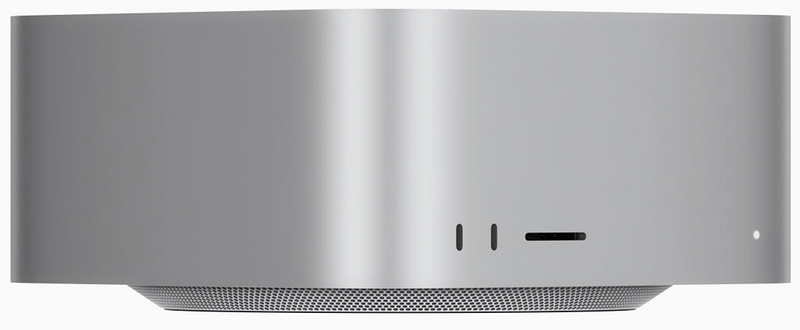
An overgrown Mac mini with a few ports in the front and very much like one of my exes, looks much better from the back, than the front!
While on its own wouldn’t be the ugliest of ducklings out there, next to the Studio Display which it was supposedly designed for, it looks like a big boring block of aluminium with weirdly spaced out connection-slots, and tiny LED. The fact that it’s a single block of extruded aluminium, makes nobody’s panties wet, if anything makes me wonder, why would that matter in a desktop computer that just sits on a desk or floor? Perhaps your cat is going to sit on it occasionally, use it as a throne, especially if it gets warm enough, but cats really aren’t heavy enough to justify the manufacturing effort (read flex).

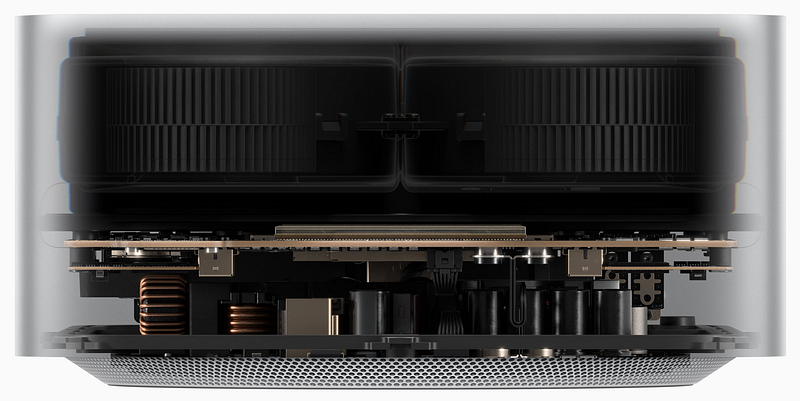
But of course, I’m a software engineer, design should be my secondary concern. Looking at the internals, on paper, this is a truly jaw-dropping device. I hear even anacondas in South America forgot to swallow for a second. It’s a beast of a device, and that’s partly the problem.
You see, Apple isn’t marketing this as the new Mac Pro. This is an entirely new product, for a segment of users who apparently exist somewhere in Apple’s research. In reality though, and according to Apple’s own stats, the Mac Studio is not only on-par with the Intel Mac Pro, but whoops its ass in orders of magnitude. And then it clicked…
The Mac Studio is an M1 gap product rather than a vision product. Apple is pulling a quick & dirty on us, to make pros happy.
Apple so far has been eerily quiet about the Mac Pro, and they also seem to have abandoned the idea of an iMac Pro or even a 27” iMac. This of course leaves hard-core professionals in the lurch because as good an M1 Max is, in a laptop shell, it isn’t exactly the most viable candidate for an Intel Mac Pro replacement. Additionally, seeing Intel’s advancements in technology — which while modest — still notable, Apple must have felt they needed to close the gap swiftly. As it stands, albeit with a butt-ugly product, Apple could claim they now have devices for all previously existing levels of needs, from casual user to hard-core AI professional and videographer. That takes the pressure off the Mac Pro while allowing them to create a product that puts on its knees every computing device out there.
But you know me, I won’t necessarily consider that a good thing. As someone highly energy-conscious, and a passionate promoter of less use of power in our day-to-day lives, while I already thought the M1 Max was an unnecessary flex, the Ultra is even more so, and whatever Apple brings with the Mac Pro will be a shameless multi-headed dragon, a Cold-War style power flex.
Attila Vago — Software Engineer improving the world one line of code at a time. Cool nerd since forever, writer of codes and blogs. Web accessibility advocate, Lego fan, vinyl record collector. Loves craft beer!


