
Lock Down Your Ideas: Password- Protected Notes in Obsidian
Keep Your Notes Safe: Obsidian for Secure Thinking

As someone who uses Obsidian a lot, I can’t help but appreciate its many features. But there’s one feature I’ve always missed, and that’s the ability to set a password to protect information on Obsidian.
Obsidian has its limits, there’s no native way of doing this, which surprised me, given the simplicity of the feature. That’s why I installed this plugin: Password Protection, by Qing Li.
I have notes from my classes (as I’m a student), and I have another vault for my articles on Medium. So it’s not super-confidential information, but still, I prefer to be the only one with access to my notes. And I think you do too.
But who are we protecting ourselves from? Well, you could imagine that your computer has been stolen, or that you’ve had your desktop hacked. In that case, the password will give you a lot of peace of mind. For me, it’s just telling myself that no one else but me can access my notes.
To set up the plugin, you will have to install it in the community plugin and enable it. Then, you’ll have to set a password to protect your notes. So you will need to go to the settings of the plugin and enable the option: Enable/Disable password protection.
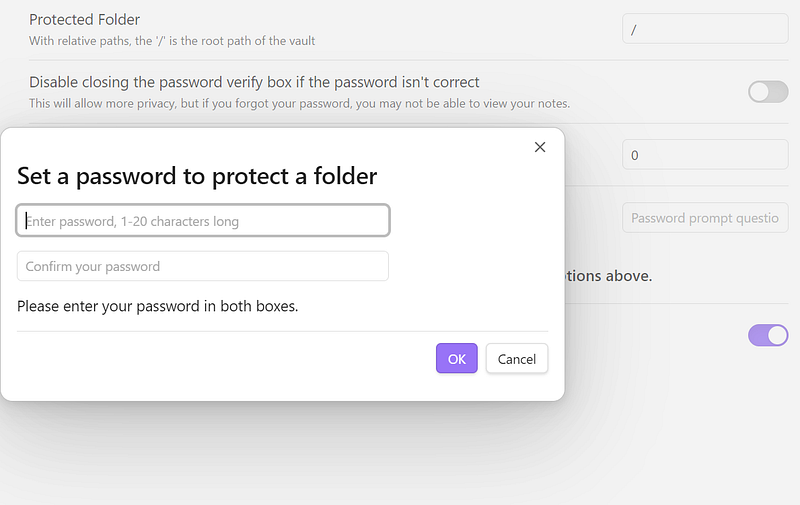
And now, each time that you want to open a note, it will ask you for the password. Note that if you enter the password for a note, you won’t have to re-enter the password another time if you open another note (unless you close Obsidian).
One downside I’ve noticed is that it requires you to enter the password when you enter a note. That means that the names of your notes are not hidden.
I find it very efficient and It doesn’t affect my productivity at all. Just insert the password and you’re good for your session! You can also change the settings if you want your session to expire so that you will need to re-enter the password every 15, 30 or 45 minutes.
The plugin is updated regularly, and one thing that I didn’t want was the encryption method. I already installed a plugin that encrypts all your notes. But the problem with this method is that it can corrupt your files (in fact, this is something that the developers warn)!
And I lost a vault by doing that. Fortunately, it wasn’t a big vault, but I didn’t want to go through the same experience again. That’s why I wanted to go for a simpler method and with less danger. All the more reason to check out this plugin!


