avatarThe OPP Editors

Free AI web copilot to create summaries, insights and extended knowledge, download it at here

2057

Abstract

s (and videos!!) feeling I must have banked against a trend.</p><p id="4528">Then understanding what might have occurred, I tried a gradual filter-out of posts and Hey Presto!! I haven’t seen a crying post for weeks, if not months. It therefore worked, so what is the secret?</p><h2 id="6e0b">Soaking up the tears</h2><p id="ce8f">Whether it’s tears, over-bearing influencers, adverts, whatever, if you’ve had enough of what you keep seeing you need to click on the three dots the top right-hand corner of the post (which is different than clicking on the post itself) and a drop down menu will appear, as below:</p><figure id="6d8d"><img src="https://cdn-images-1.readmedium.com/v2/resize:fit:800/1*YBNDmyK3Y5lSkff7Me7M5A.jpeg"><figcaption>How to Deselect LinkedIn Content You Don’t Want to See (Step 1)</figcaption></figure><p id="dfe4">Then, select the option as highlighted above, being “I don’t want to see this”, when another menu will appear, as below:</p><figure id="ee47"><img src="https://cdn-images-1.readmedium.com/v2/resize:fit:800/1*NMExWBeO4s_jugTpb8QuYQ.jpeg"><figcaption>How to Deselect LinkedIn Content You Don’t Want to See (Step 2)</figcaption></figure><p id="4b0d">From my experience, any option on this page tends to suffice. I’ve selected ‘I’m not interested in this topic’, or that ‘The post is old’ (if I’ve seen it before) and click Submit. Either way that tends to be enough to remove the post and start seeing fewer posts that are similar.</p><p id="1fb1">You may need to do this several times (2–3 was the process I used) but if done consistently and <b>WITHOUT</b> clicking on another post that you <b>DON’T WANT TO SEE</b> of the same type (otherwise suggesting to the algorithm that you do) then gradually your Newsfeed will get better (hopefully!!).</p><h2 id="d43d">Is this always bad?</h2><p id="e4c5">When you know about this it can of course be good. Not only can you fine tune your content so that you see things more relevant, you will know how the algorithm profiles your content, making you careful and aware of what

Options

to view. However there is another benefit.</p><p id="d45c">If you decide on the specific content that you do like, you can ensure that you view that content when seen in your Newsfeed, or to even search for more content similar.</p><p id="ffb3">This in turn will fill your Newsfeed with more relevant content and every time you need to pick up on a new trend, repeat that process to bring new posts and information direct of those themes.</p><p id="d465">Therefore in principle, you remain in control and you can add to this further by checking contact with former LinkedIn connections, as explained in the feature below:</p><div id="6e2b" class="link-block"> <a href="https://readmedium.com/linkedin-2023-e68abde99bae"> <div> <div> <h2>LinkedIn 2023: Ring those Bells!!</h2> <div><h3>Losing contact with connections</h3></div> <div><p>medium.com</p></div> </div> <div> <div style="background-image: url(https://miro.readmedium.com/v2/resize:fit:320/1*qfvVRwmid4IsI6MRmE3s3A.jpeg)"></div> </div> </div> </a> </div><p id="c8d5">Profiling your Newsfeed takes time and it’s not ideal for those ‘browsey few minutes’ we all grab between meetings, telephone or video calls. However, considering the vast amount of content now published online, it is one way to manage your Newsfeed accordingly.</p><p id="7170">Feel free to <a href="https://medium.com/@onpoint_48991"><b>Follow</b></a> or let’s connect on <a href="https://www.linkedin.com/in/michaelcarrighan"><b>LinkedIn</b></a> itself. Maybe see you there!</p><figure id="62b3"><img src="https://cdn-images-1.readmedium.com/v2/resize:fit:800/0*ZEnRxkMx9Awp8_f7.jpeg"><figcaption><a href="https://www.linkedin.com/in/michaelcarrighan">LinkedIn</a> | <a href="https://twitter.com/OnPointWin">Twitter</a> | <a href="https://substack.com/profile/131872747-on-point-for-sales-and-marketing">Substack</a></figcaption></figure></article></body>

SOCIAL MEDIA MASTERS

LinkedIn: No More Tears

Are you not seeing the right content?

Tired of seeing people crying on LinkedIn?? Me too, so I did something about it.

No, I didn’t look the other way or refuse sympathy, but curious why a reasonably (or very!!) resilient person like myself was seeing tears, anguish and upset on their LinkedIn Newsfeed all of the time prompted me to look deeper. The problem I discovered, was two-fold.

Picture Credit: Anna Shvets

For starters, Content Creators and businesses alike finally (FINALLY!!) realised that Emotion is a key driver for gaining attention, although in many circumstances they kind of overdid it.

For sure we sympathise, or better still, empathise with people having bad days, but it did pose a question as to why moments of despair may want to be shared on Social Media …and that’s even if all of them were genuine!!

Allowing you to make your own decision on what you may have seen, the reason why I started to see tears cascading down the screen of my laptop like waterfalls was because I mistakenly got hooked like a fish.

No, that wasn’t because I was swimming around in all of the water caused by crying (although that image did enter my head!!) but it’s because I clicked on one post like that, and then another post like it, etc.

Your Newsfeed is what YOU make it

You’re actions on LinkedIn provide an indication to the algorithm of what you’d like to see i.e. click on one crying post you’re likely to see another. Click on the next (two total) you’re likely to see three more, etc.

In fact, only wanting to use LinkedIn for professional purposes it got to a point where I genuinely saw nothing more than crying picture posts (and videos!!) feeling I must have banked against a trend.

Then understanding what might have occurred, I tried a gradual filter-out of posts and Hey Presto!! I haven’t seen a crying post for weeks, if not months. It therefore worked, so what is the secret?

Soaking up the tears

Whether it’s tears, over-bearing influencers, adverts, whatever, if you’ve had enough of what you keep seeing you need to click on the three dots the top right-hand corner of the post (which is different than clicking on the post itself) and a drop down menu will appear, as below:
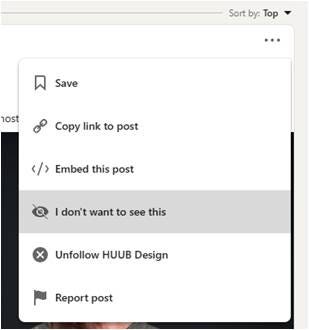
How to Deselect LinkedIn Content You Don’t Want to See (Step 1)

Then, select the option as highlighted above, being “I don’t want to see this”, when another menu will appear, as below:
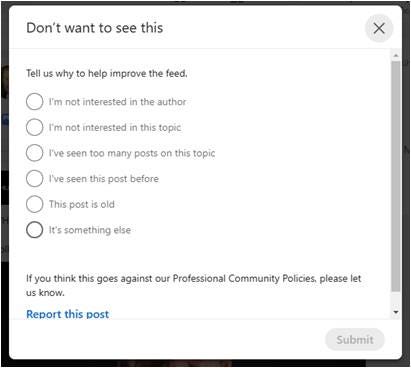
How to Deselect LinkedIn Content You Don’t Want to See (Step 2)

From my experience, any option on this page tends to suffice. I’ve selected ‘I’m not interested in this topic’, or that ‘The post is old’ (if I’ve seen it before) and click Submit. Either way that tends to be enough to remove the post and start seeing fewer posts that are similar.

You may need to do this several times (2–3 was the process I used) but if done consistently and WITHOUT clicking on another post that you DON’T WANT TO SEE of the same type (otherwise suggesting to the algorithm that you do) then gradually your Newsfeed will get better (hopefully!!).

Is this always bad?

When you know about this it can of course be good. Not only can you fine tune your content so that you see things more relevant, you will know how the algorithm profiles your content, making you careful and aware of what to view. However there is another benefit.

If you decide on the specific content that you do like, you can ensure that you view that content when seen in your Newsfeed, or to even search for more content similar.

This in turn will fill your Newsfeed with more relevant content and every time you need to pick up on a new trend, repeat that process to bring new posts and information direct of those themes.

Therefore in principle, you remain in control and you can add to this further by checking contact with former LinkedIn connections, as explained in the feature below:

Profiling your Newsfeed takes time and it’s not ideal for those ‘browsey few minutes’ we all grab between meetings, telephone or video calls. However, considering the vast amount of content now published online, it is one way to manage your Newsfeed accordingly.

Feel free to Follow or let’s connect on LinkedIn itself. Maybe see you there!

LinkedIn | Twitter | Substack
LinkedIn
Linkedin Profile
Content
Social Media
Content Creation
Recommended from ReadMedium