avatarThe OPP Editors

Free AI web copilot to create summaries, insights and extended knowledge, download it at here

1444

Abstract

id="d475">The recent trend is not just to Connect, but to request that somebody jumps onto your Profile Page and clicks the Bell icon. You’ll find this under the main picture of your Profile (that runs left to right on your LinkedIn Profile Page) on the right-hand side.</p><p id="f8fa">Once found and clicked, the Bell icon turns to dark grey, as seen below.</p><figure id="cc38"><img src="https://cdn-images-1.readmedium.com/v2/resize:fit:800/1*81-amvQdjssIDbDpy2LhIQ.jpeg"><figcaption>LinkedIn Bell icons on LinkedIn Profile Pages, turning from White to Dark Grey once selected</figcaption></figure><p id="695f">Yes, this is a cumbersome procedure to request of people and not everybody will do it (although don’t worry, techniques to help overcome this, or to at least get around it, can be discussed in future articles) but this is the best way to ensure your immediate Content is seen.</p><p id="8c91">So, if you imagine trekking in the Swiss Alps and can always hear the alpine noise of ringing bells in the distance, rest assured that somewhere close-by there is Alpine cattle.</p><p id="baca">A useful feature and the main reason why Swiss farmers attach such bells (large or small) to their herds, never to be forgotten, easy to find and then see. If you would like the same effect for your contacts, or even for yourself, you need to apply the same principle.</p><p id="2f08">Thank you for reading this feature. It is greatly appreci

Options

ated and hopeful that it’s helped and added value in some way. Feel free to <a href="https://medium.com/@onpoint_48991"><b>Follow</b></a> or let’s connect on <a href="https://www.linkedin.com/in/michaelcarrighan"><b>LinkedIn</b></a>.</p><figure id="87fb"><img src="https://cdn-images-1.readmedium.com/v2/resize:fit:800/0*8c1WcjUzBy68tIMd.jpeg"><figcaption><a href="https://www.linkedin.com/in/michaelcarrighan">LinkedIn</a> | <a href="https://twitter.com/OnPointWin">Twitter</a> | <a href="https://substack.com/profile/131872747-on-point-for-sales-and-marketing">Substack</a></figcaption></figure><p id="5286">Do you know how some people appear so popular on LinkedIn? <a href="https://readmedium.com/linkedin-2023-ii-are-popular-people-really-that-popular-89bf4485cd1e">Take a look here</a> as you might be surprised!!</p><div id="c526" class="link-block"> <a href="https://readmedium.com/linkedin-2023-ii-are-popular-people-really-that-popular-89bf4485cd1e"> <div> <div> <h2>LinkedIn 2023: Are Some People REALLY THAT POPULAR?</h2> <div><h3>Engagement Pods</h3></div> <div><p>medium.com</p></div> </div> <div> <div style="background-image: url(https://miro.readmedium.com/v2/resize:fit:320/1*O54aVw5Ey48FcF-jXDrtBw.jpeg)"></div> </div> </div> </a> </div></article></body>

SOCIAL MEDIA MASTERS

LinkedIn: Ring those Bells!!

Losing contact with connections
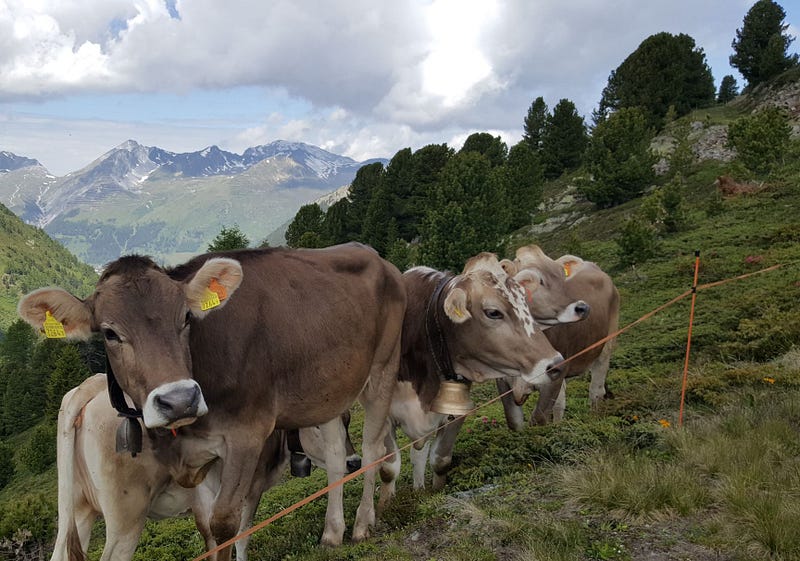
Ring those Bells!! (Picture Credit: Private Source)

You’ve been on LinkedIn for a number of years, made some great connections, moved jobs, projects, roles and a few years go by, then you wonder, why don’t I see LinkedIn updates from ‘such and such’ that I met way back when?? The answer, you need to ‘Ring their Bell’!!

Benefitting against the ever up-surging world of Digital Technology, Social Media and dare I say it, Content, the ‘Ring the Bell’ feature was introduced by LinkedIn back in 2021 to allow Users more control over their Newsfeed.

It was phased into use by staggered effect and is now available to most if not all Users, however, not everybody has come to know about it.

For sure, if you’ve connected with somebody then you may still receive updates from them when they post, however you may not receive these updates as frequently as what you would if you, you guessed it, Rang their Bell.

This can also be an issue if you would like someone to both receive and see your updates (especially if you work in Sales, Marketing or Content Management).

The recent trend is not just to Connect, but to request that somebody jumps onto your Profile Page and clicks the Bell icon. You’ll find this under the main picture of your Profile (that runs left to right on your LinkedIn Profile Page) on the right-hand side.

Once found and clicked, the Bell icon turns to dark grey, as seen below.

LinkedIn Bell icons on LinkedIn Profile Pages, turning from White to Dark Grey once selected

Yes, this is a cumbersome procedure to request of people and not everybody will do it (although don’t worry, techniques to help overcome this, or to at least get around it, can be discussed in future articles) but this is the best way to ensure your immediate Content is seen.

So, if you imagine trekking in the Swiss Alps and can always hear the alpine noise of ringing bells in the distance, rest assured that somewhere close-by there is Alpine cattle.

A useful feature and the main reason why Swiss farmers attach such bells (large or small) to their herds, never to be forgotten, easy to find and then see. If you would like the same effect for your contacts, or even for yourself, you need to apply the same principle.

Thank you for reading this feature. It is greatly appreciated and hopeful that it’s helped and added value in some way. Feel free to Follow or let’s connect on LinkedIn.

LinkedIn | Twitter | Substack

Do you know how some people appear so popular on LinkedIn? Take a look here as you might be surprised!!

LinkedIn
Social Media
Content Marketing
Business
Linkedin Marketing
Recommended from ReadMedium