avatarTeri Radichel

Free AI web copilot to create summaries, insights and extended knowledge, download it at here

3891

Abstract

resize:fit:800/1*kfLamDbiireyAm96GOvtmg.png"><figcaption></figcaption></figure><p id="cb53"><b>Caveats with this approach</b></p><p id="468d">Just because you only allow someone to deploy a CloudFormation stack with KMS in the name doesn’t mean the stack only has KMS resources in it. This is only restricting them from naming resources something else. However, in this policy, the KMS admins only have permission to manage KMS resources.</p><p id="5e60">Thinking this through, a KMS Administrator would need to assume this role to perform KMS actions. While assuming this role that user would only be allowed to do whatever that role can do. If the user can also assume another role, let’s say a role to upload files to an S3 bucket, then the permission that role has would not be available when the user assumes this role. I haven’t fully tested that — so you might want to — but that’s how it should work.</p><p id="e157">If you assigned this policy directly to a user or group, and then you assign a bunch of other policies to that user or group, now you need to think about how all the permissions work together. You also need to think about precedence, which I wrote about in this post:</p><div id="73c0" class="link-block"> <a href="https://readmedium.com/adding-conditions-to-aws-iam-policies-c30e1e687fa0"> <div> <div> <h2>Adding Conditions to AWS IAM, Resource, and Trust Policies</h2> <div><h3>ACM.17 Details of policy evaluation and adding MFA to our batch job policies</h3></div> <div><p>medium.com</p></div> </div> <div> <div style="background-image: url(https://miro.readmedium.com/v2/resize:fit:320/1*Hq6MpFeQVAzQXJbp8zriBw.png)"></div> </div> </div> </a> </div><p id="e41b"><b>Precedence</b> has to do with how all the polices assigned to a principal in AWS work together and which rules will get evaluated and applied in what order.</p><p id="ae3a">Although we are restricting the KMS administrators to only manage roles starting with the name KMS- while assuming this role and only managing KMS resources via the other permissions the role has, this doesn’t affect any other users in the account.</p><p id="16d6">As stated in the AWS documentation for CloudFormation:</p><blockquote id="4474"><p>By default, anyone with stack update permissions can update all of the resources in the stack.</p></blockquote><div id="07b8" class="link-block"> <a href="https://docs.aws.amazon.com/AWSCloudFormation/latest/UserGuide/protect-stack-resources.html"> <div> <div> <h2>Prevent updates to stack resources</h2> <div><h3>When you create a stack, all update actions are allowed on all resources. By default, anyone with stack update…</h3></div> <div><p>docs.aws.amazon.com</p></div> </div> <div> <div style="background-image: url(https://miro.readmedium.com/v2/resize:fit:320/)"></div> </div> </div> </a> </div><p id="c8dc">As explained in the above documentation it is also possible to apply policies to stacks. That topic is beyond this post and maybe something I’ll explore later.</p><p id="9979">But the bottom line is that if some other user has no restrictions on the CloudFormation stack names they can deploy, they could create a stack with a name starting with KMS that may or may not have KMS resources in it. Additionally if the user has permissions to operate on the stack they could affect any resource in the stack. Therefore, you need to understand how all of your <a href="https://readmedium.com/resource-iam-and-trust-policies-on-aws-2dd570da2b5">resource, IAM, and trust policies</a> work together within your cloud account

Options

.</p><p id="92a2">And that, my friends, is why I say you should have separate IAM administrators:</p><div id="701e" class="link-block"> <a href="https://readmedium.com/why-you-should-consider-separate-iam-administrators-d3f03710e7ec"> <div> <div> <h2>Why You Should Consider Separate IAM Administrators</h2> <div><h3>AC.25 Refactoring IAM for centralized management to reduce the cost of a data breach</h3></div> <div><p>medium.com</p></div> </div> <div> <div style="background-image: url(https://miro.readmedium.com/v2/resize:fit:320/1*qffxz-A78CoFMX4cdotOgA.png)"></div> </div> </div> </a> </div><p id="decb">As I explained earlier, security architecture is not a checklist:</p><div id="abd0" class="link-block"> <a href="https://readmedium.com/security-architecture-is-not-a-checklist-b86f1dc0aa0c"> <div> <div> <h2>Security Architecture is Not A Checklist</h2> <div><h3>ACM.14 Think like an attacker and architect accordingly</h3></div> <div><p>medium.com</p></div> </div> <div> <div style="background-image: url(https://miro.readmedium.com/v2/resize:fit:320/1*VKBd42zNr97OqzD4i4k5aA.png)"></div> </div> </div> </a> </div><p id="fbbf">It has to do with how you architect your permissions, access, authentication, and all your other security controls and how they work together. Within IAM itself the way you construct all your rules and policies affects what gaps you may have that allow people to do something they shouldn’t. Beyond that IAM has to work in conjunction with networking, encryption and all your other security controls.</p><p id="0746">In order to enforce the naming convention I’ve been writing about and realize the related security benefits we will need a holistic, comprehensive and automated approach to security policies within our cloud account. If you can do that, you’ll have resources that are properly named and it should be easier to identify anomalies and handle security events and incidents.</p><p id="a47b">Follow for updates.</p><p id="4a3a">Teri Radichel | <i>© <a href="https://2ndsightlab.com/?source=post_page---------------------------">2nd Sight Lab</a> 2022</i></p><div id="8b5f"><pre><span class="hljs-section">About Teri Radichel:

⭐️ Author: Cybersecurity Books
⭐️ Presentations: Presentations by Teri Radichel
⭐️ Recognition: SANS Award, AWS Security Hero, IANS Faculty
⭐️ Certifications: SANS ~ GSE 240
⭐️ Education: BA Business, Master of Software Engineering, Master of Infosec
⭐️ Company: Penetration Tests, Assessments, Phone Consulting ~ 2nd Sight Lab</pre></div><div id="caae"><pre><span class="hljs-section">Need Help With Cybersecurity, Cloud, or Application Security?
~~~~~~~~~~~~~~~~~~~~~~~~~~~~~~~~~~~~~~~~~~~~~~~~~~~~~~~~~~~~~</span>
🔒 Request a penetration test or security assessment
🔒 Schedule a consulting call
🔒 Cybersecurity Speaker for Presentation</pre></div><div id="5a42"><pre>Follow <span class="hljs-keyword">for</span> more stories like <span class="hljs-keyword">this</span>:

❤️ Sign Up my Medium Email List ❤️ Twitter: <span class="hljs-meta">@teriradichel</span> ❤️ LinkedIn: https:<span class="hljs-comment">//www.linkedin.com/in/teriradichel</span> ❤️ Mastodon: <span class="hljs-meta">@teriradichel</span><span class="hljs-meta">@infosec</span>.exchange ❤️ Facebook: 2nd Sight Lab ❤️ YouTube: @2ndsightlab</pre></div><figure id="faf5"><img src="https://cdn-images-1.readmedium.com/v2/resize:fit:800/0*H9Ew1KCl-29nZiPR.jpeg"><figcaption></figcaption></figure></article></body>

Limiting which CloudFormation Stacks an AWS Principal Can Update

ACM.47 Leveraging our naming conventions to allow users to only deploy and update the appropriate resources in a cloud account

~~~~~~~~~~~~~~~~~~~~~~~~~~~~~~~~~~~~~~~~~~~~~~~~~~~~~~~~~~~

⚙️ Check out my series on Automating Cybersecurity Metrics. The Code.

🔒 Related Stories: Cloud Governance | IAM | AWS Security

💻 Free Content on Jobs in Cybersecurity | ✉️ Sign up for the Email List

~~~~~~~~~~~~~~~~~~~~~~~~~~~~~~~~~~~~~~~~~~~~~~~~~~~~~~~~~~~

In the last post we considered how we could better follow the DRY (Do Not Repeat Yourself) principle by using shared code repositories:

In this post we will limit the ability for users add and update only a subset of CloudFormation stacks and learn some caveats with this approach.

KMS code refactoring

Just as I did with users and groups in earlier posts, I refactored the KMS to use functions to consistently name stacks. The code references the common functions using a source command at the top. Once that source command gets executed the functions in the external file can be called as if they are in the same file. Here I am including the common functions I wrote about in the last post.

source "../../Functions/shared_functions.sh

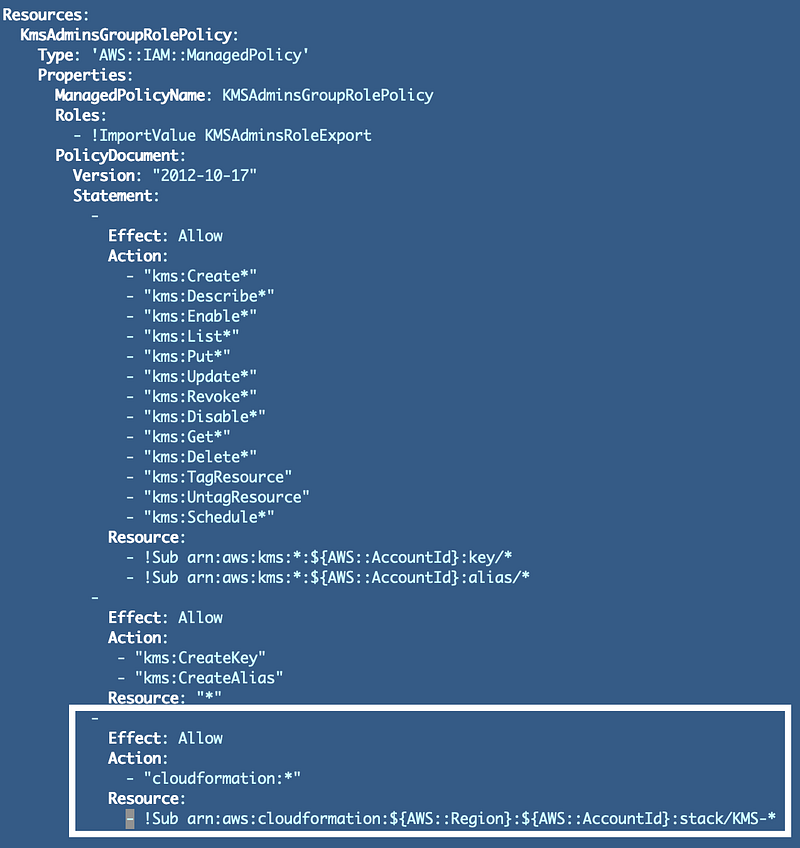
Now what I want to do is only allow the KMS administrators to create and edit stacks for KMS keys. First of all, I only allow the KMS administrators to create update, and delete keys in the policy I introduced earlier and shown below. Now that we have a naming convention for our stacks, every stack that deploys a KMS key should start with this prefix:

KMS-Key

Every stack that deploys a KMS Key Alias should look like this:

KMS-KeyAlias

Any other KMS resources would also start with “KMS-”. So what I can do is later the resource ARN for the CloudFormation permissions granted to our KMS user to end with KMS-*. That way the KMS Admins can only deploy or alter KMS stacks. In addition, the only permission the role has is to manage KMS keys. The only permissions the KMSAdmins group has is to assume the KMSAdmins role.
Caveats with this approach

Just because you only allow someone to deploy a CloudFormation stack with KMS in the name doesn’t mean the stack only has KMS resources in it. This is only restricting them from naming resources something else. However, in this policy, the KMS admins only have permission to manage KMS resources.

Thinking this through, a KMS Administrator would need to assume this role to perform KMS actions. While assuming this role that user would only be allowed to do whatever that role can do. If the user can also assume another role, let’s say a role to upload files to an S3 bucket, then the permission that role has would not be available when the user assumes this role. I haven’t fully tested that — so you might want to — but that’s how it should work.

If you assigned this policy directly to a user or group, and then you assign a bunch of other policies to that user or group, now you need to think about how all the permissions work together. You also need to think about precedence, which I wrote about in this post:

Precedence has to do with how all the polices assigned to a principal in AWS work together and which rules will get evaluated and applied in what order.

Although we are restricting the KMS administrators to only manage roles starting with the name KMS- while assuming this role and only managing KMS resources via the other permissions the role has, this doesn’t affect any other users in the account.

As stated in the AWS documentation for CloudFormation:

By default, anyone with stack update permissions can update all of the resources in the stack.

As explained in the above documentation it is also possible to apply policies to stacks. That topic is beyond this post and maybe something I’ll explore later.

But the bottom line is that if some other user has no restrictions on the CloudFormation stack names they can deploy, they could create a stack with a name starting with KMS that may or may not have KMS resources in it. Additionally if the user has permissions to operate on the stack they could affect any resource in the stack. Therefore, you need to understand how all of your resource, IAM, and trust policies work together within your cloud account.

And that, my friends, is why I say you should have separate IAM administrators:

As I explained earlier, security architecture is not a checklist:

It has to do with how you architect your permissions, access, authentication, and all your other security controls and how they work together. Within IAM itself the way you construct all your rules and policies affects what gaps you may have that allow people to do something they shouldn’t. Beyond that IAM has to work in conjunction with networking, encryption and all your other security controls.

In order to enforce the naming convention I’ve been writing about and realize the related security benefits we will need a holistic, comprehensive and automated approach to security policies within our cloud account. If you can do that, you’ll have resources that are properly named and it should be easier to identify anomalies and handle security events and incidents.

Follow for updates.

Teri Radichel | © 2nd Sight Lab 2022

About Teri Radichel:
~~~~~~~~~~~~~~~~~~~~
⭐️ Author: Cybersecurity Books
⭐️ Presentations: Presentations by Teri Radichel
⭐️ Recognition: SANS Award, AWS Security Hero, IANS Faculty
⭐️ Certifications: SANS ~ GSE 240
⭐️ Education: BA Business, Master of Software Engineering, Master of Infosec
⭐️ Company: Penetration Tests, Assessments, Phone Consulting ~ 2nd Sight Lab
Need Help With Cybersecurity, Cloud, or Application Security?
~~~~~~~~~~~~~~~~~~~~~~~~~~~~~~~~~~~~~~~~~~~~~~~~~~~~~~~~~~~~~
🔒 Request a penetration test or security assessment
🔒 Schedule a consulting call
🔒 Cybersecurity Speaker for Presentation
Follow for more stories like this:
~~~~~~~~~~~~~~~~~~~~~~~~~~~~~~~~~~~~~~~~~~~~~~~~~~~~~~~~~~~~~ 
❤️ Sign Up my Medium Email List
❤️ Twitter: @teriradichel
❤️ LinkedIn: https://www.linkedin.com/in/teriradichel
❤️ Mastodon: @teriradichel@infosec.exchange
❤️ Facebook: 2nd Sight Lab
❤️ YouTube: @2ndsightlab

Cloudformation
Stacks
Iam Policy
Cloudsecurity
Cybersecurity
Recommended from ReadMedium