avatarTeri Radichel

Free AI web copilot to create summaries, insights and extended knowledge, download it at here

5636

Abstract

.gitlab.com/ee/administration/monitoring/ip_allowlist.html"> <div> <div> <h2>IP whitelist | GitLab</h2> <div><h3>GitLab provides some monitoring endpoints that provide health check information when probed. To control access to those…</h3></div> <div><p>docs.gitlab.com</p></div> </div> <div> <div style="background-image: url(https://miro.readmedium.com/v2/resize:fit:320/)"></div> </div> </div> </a> </div><p id="71cb">I recommend that if your developer tools do not allow this, perhaps look elsewhere because it is such an important protection. Why network security is important was covered in these blog post and others.</p><div id="7942" class="link-block"> <a href="https://readmedium.com/why-you-need-a-vpc-f1e163556d82"> <div> <div> <h2>Why You Need a VPC</h2> <div><h3>ACM.65 Yes, you do really need a VPC.</h3></div> <div><p>medium.com</p></div> </div> <div> <div style="background-image: url(https://miro.readmedium.com/v2/resize:fit:320/1*60DfkgNbaI3265YA7ePBMA.jpeg)"></div> </div> </div> </a> </div><div id="a62d" class="link-block"> <a href="https://readmedium.com/lambda-networking-72e2b915f31b"> <div> <div> <h2>Lambda Networking</h2> <div><h3>ACM.50 Considering when to apply or not apply VPC networking to a Lambda function</h3></div> <div><p>medium.com</p></div> </div> <div> <div style="background-image: url(https://miro.readmedium.com/v2/resize:fit:320/1*SIBPyPOmx77b4wQGToy2pA.png)"></div> </div> </div> </a> </div><p id="c21c"><b>Adding an IP restriction in GitHub</b></p><p id="34ca">Let’s head over to GitHub and grant the IP access our GitHub repositories.</p><div id="8831"><pre>Alright <span class="hljs-keyword">a</span> brief hiatus <span class="hljs-built_in">to</span> say that I find <span class="hljs-keyword">the</span> GitHub UI <span class="hljs-keyword">a</span> bit convoluted <span class="hljs-keyword">and</span> confusing when trying <span class="hljs-built_in">to</span> <span class="hljs-keyword">switch</span> around <span class="hljs-built_in">from</span> <span class="hljs-keyword">a</span> user <span class="hljs-built_in">to</span> <span class="hljs-keyword">an</span> organization <span class="hljs-keyword">and</span> finding all <span class="hljs-keyword">the</span> <span class="hljs-literal">right</span> settings. I wish they would figure out <span class="hljs-keyword">a</span> way <span class="hljs-built_in">to</span> make this more user-friendly <span class="hljs-keyword">and</span> obvious. It<span class="hljs-string">'s not super difficult but I often find myself hunting around for things more than I do with other products and I'</span>ve used GitHub <span class="hljs-keyword">for</span> ages.</pre></div><p id="bf87">Click on your name on the top left and you should see your name, followed by your organization. Click on your organization.</p><figure id="09a4"><img src="https://cdn-images-1.readmedium.com/v2/resize:fit:800/1*TcubXxdS8dwfQk8iU79WBQ.png"><figcaption></figcaption></figure><p id="493c">Click View Organization on the left.</p><figure id="5413"><img src="https://cdn-images-1.readmedium.com/v2/resize:fit:800/1*d-V0if0ioa_0M2Hb7USVtQ.png"><figcaption></figcaption></figure><p id="8ec3">Click Settings (last on right)</p><figure id="dc45"><img src="https://cdn-images-1.readmedium.com/v2/resize:fit:800/1*D2t_dgVX15Fx8AVXfLnaEQ.png"><figcaption></figcaption></figure><p id="4101">Click on Authentication security (which doesn’t really make sense to me)</p><figure id="6d55"><img src="https://cdn-images-1.readmedium.com/v2/resize:fit:800/1*YEo1uRPUp9GZdrsjn31KVQ.png"><figcaption></figcaption></figure><p id="e048">Note this error message at the top:</p><figure id="ead0"><img src="https://cdn-images-1.readmedium.com/v2/resize:fit:800/1*jG0SpQVawPbVn7eqLqBmKA.png"><figcaption></figcaption></figure><div id="7343"><pre>That <span class="hljs-built_in">warning</span> <span class="hljs-keyword">is</span> unclear. Does this mean you can <span class="hljs-keyword">no</span> longer use IPv4 addresses? <span class="hljs-keyword">Or</span> does it mean that you can use IPv6 addresses? Because <span class="hljs-keyword">if</span> you can optionally use IPv6 <span class="hljs-keyword">then</span> your IPv4 addresses should still <span class="hljs-keyword">work</span> <span class="hljs-keyword">and</span> there will be <span class="hljs-keyword">no</span><span class="hljs-keyword">access</span> interruptions.” The host <span class="hljs-keyword">and</span> <span class="hljs-keyword">server</span> should fall back <span class="hljs-keyword">to</span> IPv4 <span class="hljs-keyword">where</span> it <span class="hljs-keyword">is</span> available <span class="hljs-keyword">if</span> properly implemented. I hope this this documentation will be updated accordingly, <span class="hljs-keyword">and</span> <span class="hljs-keyword">also</span> provide the anticipated rollout <span class="hljs-type">date</span> <span class="hljs-keyword">as</span> well so people can properly <span class="hljs-keyword">prepare</span> <span class="hljs-keyword">for</span> this change.</pre></div><div id="deda"><pre>I mentioned earlier that I will <span clas

Options

s="hljs-built_in">not</span> use IPv6 <span class="hljs-keyword">until</span> forced <span class="hljs-keyword">to</span> <span class="hljs-keyword">do</span>. I mentioned that attackers are leveraging IPv6 misconfigurations <span class="hljs-built_in">and</span> specifically <span class="hljs-keyword">when</span> they can<span class="hljs-comment">'t find any other way in. However, if GitHub forced use of only IPv6 here, then that would be the case to turn off IPv4 and start using IPv6. Right now it's not clear that IPv4 is not available and they better not lock people out of using IPv4 without better messaging than the above. The message needs to be much more explicit if that's what they are actually going to do. Something to keep an eye on.</span></pre></div><p id="b4c5">Also, I wish the management UI was organized the way this documentation is because it’s very nice and makes sense to me:</p><figure id="b291"><img src="https://cdn-images-1.readmedium.com/v2/resize:fit:800/1*7KLIEOmcq6KNAXSlDmwXmg.png"><figcaption></figcaption></figure><p id="faab">Back to the GitHub UI, scroll down to IP Allow List. As the documentation states you’ll need to enable it first of all with the checkbox at the top.</p><figure id="4781"><img src="https://cdn-images-1.readmedium.com/v2/resize:fit:800/1*vGJV9JQcibef7pqN5SMElg.png"><figcaption></figcaption></figure><p id="702a">Next add an IP with the add button at the bottom:</p><figure id="6d88"><img src="https://cdn-images-1.readmedium.com/v2/resize:fit:800/1*O_URO4vLaXozqmaMyfgSrA.png"><figcaption></figcaption></figure><p id="eec9">At the moment there seems to be a bug because when I click add I get this error message and I haven’t added an IP address yet. But anyway enter your IP address and a description if you like.</p><figure id="43b5"><img src="https://cdn-images-1.readmedium.com/v2/resize:fit:800/1*aFsGbIPWbUEtD1asvmqAmw.png"><figcaption></figcaption></figure><p id="c589">If you are only entering one IP address you don’t have to add /32 at the end like we did on AWS. It seems that a single IP or a CIDR will work here.</p><div id="9bea"><pre>One <span class="hljs-built_in">warning</span>: Make sure that you have multiple IPs <span class="hljs-keyword">set</span> up <span class="hljs-keyword">in</span> <span class="hljs-keyword">case</span> you lose <span class="hljs-keyword">access</span> <span class="hljs-keyword">to</span> one, otherwise you wont’ be able <span class="hljs-keyword">to</span> <span class="hljs-keyword">access</span> your account.</pre></div><p id="a663">Save it and that’s it. Now you should be able to access your GitHub repositories from your EC2 instance on AWS that you have given access — but no other instances on AWS or elsewhere with different IP addresses would be allowed.</p><p id="750d"><b>Using your own GitHub server for greater control</b></p><p id="c5c7">Just a note that I often recommend that if customers have the option they may want to use their own hosted GitHub server if they want more control over the security and networking. Microsoft does own GitHub after all and if you are trying to protect the IP in your software repositories that may be a concern.</p><p id="50d5">The other problem is that you might have is that you want people to use your corporate VPN to add additional encryption to traffic heading over to GitHub. There’s no way to configure a VPN on GitHub. Though you can configure access to resources behind a VPN from GitHub you can’t set up an IPSec Tunnel between your location and GitHub. As mentioned in prior posts and IPSec Tunnel will encrypt more layers of a packet than an SSL VPN or connection.</p><p id="2a05">But since I am one person, this will have to do. I’m not overjoyed with the thought of managing a GitHub server. Hopefully GitHub is doing everything on their side correctly to secure this code, including preventing insider access to your code.</p><p id="c95b">In the next post we’ll try to access to GitHub via our new firewall rules and restrictions.</p><p id="eebf">Follow for updates.</p><p id="4a3a">Teri Radichel | <i>© <a href="https://2ndsightlab.com/?source=post_page---------------------------">2nd Sight Lab</a> 2022</i></p><div id="8b5f"><pre><span class="hljs-section">About Teri Radichel:

⭐️ Author: Cybersecurity Books
⭐️ Presentations: Presentations by Teri Radichel
⭐️ Recognition: SANS Award, AWS Security Hero, IANS Faculty
⭐️ Certifications: SANS ~ GSE 240
⭐️ Education: BA Business, Master of Software Engineering, Master of Infosec
⭐️ Company: Penetration Tests, Assessments, Phone Consulting ~ 2nd Sight Lab</pre></div><div id="caae"><pre><span class="hljs-section">Need Help With Cybersecurity, Cloud, or Application Security?
~~~~~~~~~~~~~~~~~~~~~~~~~~~~~~~~~~~~~~~~~~~~~~~~~~~~~~~~~~~~~</span>
🔒 Request a penetration test or security assessment
🔒 Schedule a consulting call
🔒 Cybersecurity Speaker for Presentation</pre></div><div id="5a42"><pre>Follow <span class="hljs-keyword">for</span> more stories like <span class="hljs-keyword">this</span>:

❤️ Sign Up my Medium Email List ❤️ Twitter: <span class="hljs-meta">@teriradichel</span> ❤️ LinkedIn: https:<span class="hljs-comment">//www.linkedin.com/in/teriradichel</span> ❤️ Mastodon: <span class="hljs-meta">@teriradichel</span><span class="hljs-meta">@infosec</span>.exchange ❤️ Facebook: 2nd Sight Lab ❤️ YouTube: @2ndsightlab</pre></div><figure id="faf5"><img src="https://cdn-images-1.readmedium.com/v2/resize:fit:800/0*H9Ew1KCl-29nZiPR.jpeg"><figcaption></figcaption></figure></article></body>

Limiting Access to an AWS EIP in GitHub

ACM.102 Ensuring only authorized IP addresses can access your private GitHub repositories

~~~~~~~~~~~~~~~~~~~~~~~~~~~~~~~~~~~~~~~~~~~~~~~~~~~~~~~~~~~

⚙️ Part of my series on Automating Cybersecurity Metrics. The Code.

🔒 Related Stories: Network Security | GitHub Security

💻 Free Content on Jobs in Cybersecurity | ✉️ Sign up for the Email List

~~~~~~~~~~~~~~~~~~~~~~~~~~~~~~~~~~~~~~~~~~~~~~~~~~~~~~~~~~~

My last post explained how you can restrict SSH access on your local network to only authorized IP addresses.

Specifically, we allowed access to an EC2 instance we created in a network we deployed on AWS with CloudFormation. The networking on AWS restricts access to a specified IP address of one user connecting to an EC2 instance via SSH or RDP at the time of this writing. I might change that later. You can read everything leading up to this point here.

Now we want to protect our GitHub account and only allow specific IP addresses to access it. I’m going to show you how to do this, but keep in mind, that there’s no way to prevent the user in your AWS account to get to any other Github resource either. This is an OK solution for a single user or small company but larger organizations probably want to use a different configuration for deployment pipelines, as I discuss with customers on IANS Research consulting calls.

Protecting CloudResources with GitHub IP Allow Lists

You can add network restrictions to your GitHub account to help protect the resources in it. I am not going to tell you that it is the only thing you need to do to protect your GitHub account because there are ways around network restrictions in certain instances but they it will protect you from an attacker using your stolen credentials to get into your account — unless they have access to your network as well.

You will need an Enterprise account.
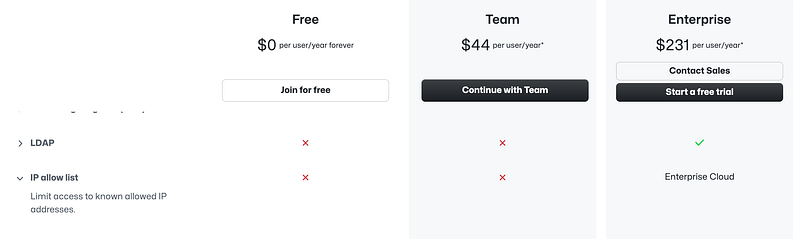
GitHub is not the only developer tool or cloud product that has these type of restrictions. You can do the same with GitLab:

I recommend that if your developer tools do not allow this, perhaps look elsewhere because it is such an important protection. Why network security is important was covered in these blog post and others.

Adding an IP restriction in GitHub

Let’s head over to GitHub and grant the IP access our GitHub repositories.

Alright a brief hiatus to say that I find the GitHub UI a bit convoluted and confusing when trying to switch around from a user to an organization and finding all the right settings. I wish they would figure out a way to make this more user-friendly and obvious. It's not super difficult but I often find myself hunting around for things more than I do with other products and I've used GitHub for ages.

Click on your name on the top left and you should see your name, followed by your organization. Click on your organization.
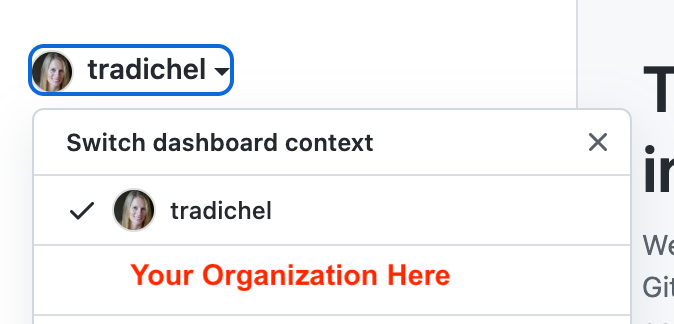
Click View Organization on the left.
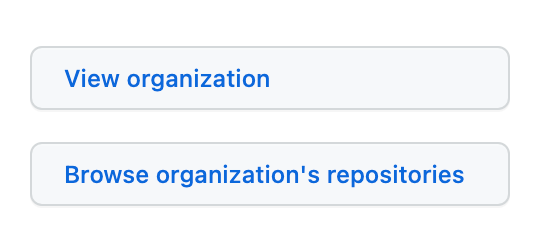
Click Settings (last on right)

Click on Authentication security (which doesn’t really make sense to me)
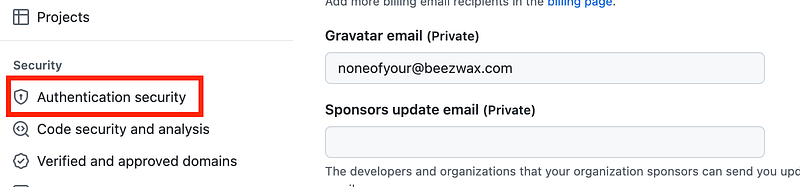
Note this error message at the top:
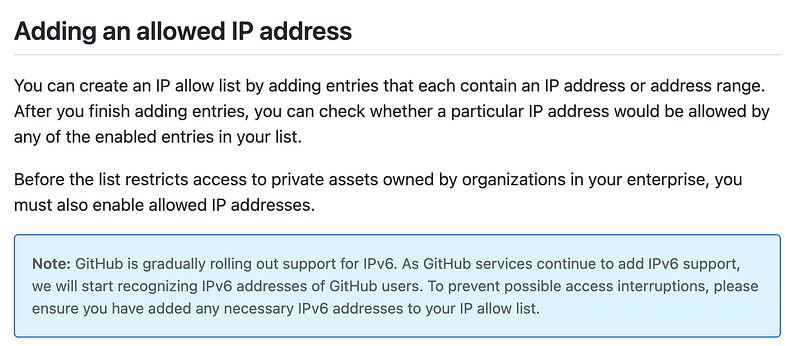
That warning is unclear. Does this mean you can no longer use IPv4 addresses? Or does it mean that you can use IPv6 addresses? Because if you can optionally use IPv6 then your IPv4 addresses should still work and there will be noaccess interruptions.” The host and server should fall back to IPv4 where it is available if properly implemented. I hope this this documentation will be updated accordingly, and also provide the anticipated rollout date as well so people can properly prepare for this change.
I mentioned earlier that I will not use IPv6 until forced to do. I mentioned that attackers are leveraging IPv6 misconfigurations and specifically when they can't find any other way in. However, if GitHub forced use of only IPv6 here, then that would be the case to turn off IPv4 and start using IPv6. Right now it's not clear that IPv4 is not available and they better not lock people out of using IPv4 without better messaging than the above. The message needs to be much more explicit if that's what they are actually going to do. Something to keep an eye on.

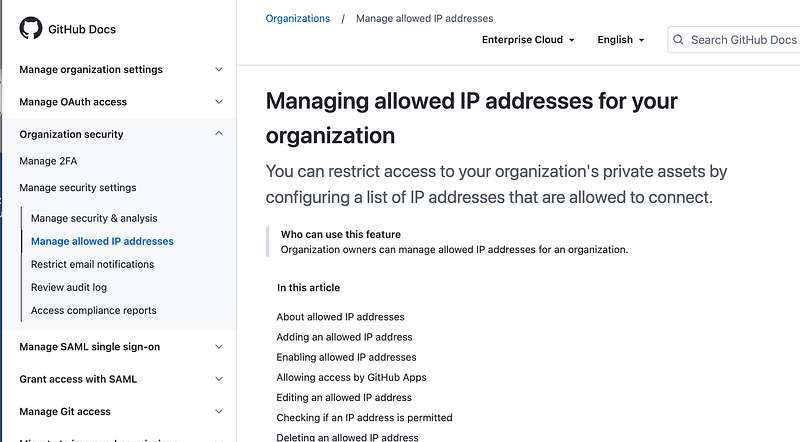
Also, I wish the management UI was organized the way this documentation is because it’s very nice and makes sense to me:
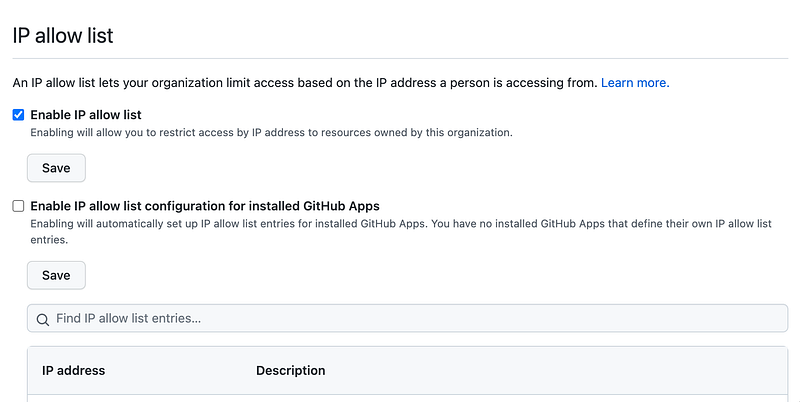
Back to the GitHub UI, scroll down to IP Allow List. As the documentation states you’ll need to enable it first of all with the checkbox at the top.
Next add an IP with the add button at the bottom:

At the moment there seems to be a bug because when I click add I get this error message and I haven’t added an IP address yet. But anyway enter your IP address and a description if you like.
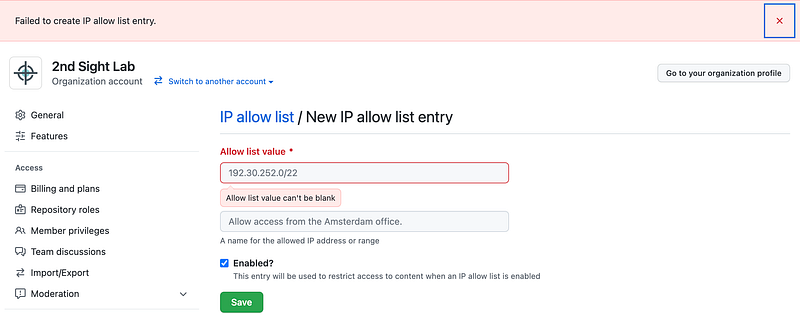
If you are only entering one IP address you don’t have to add /32 at the end like we did on AWS. It seems that a single IP or a CIDR will work here.

One warning: Make sure that you have multiple IPs set up in case you lose access to one, otherwise you wont’ be able to access your account.

Save it and that’s it. Now you should be able to access your GitHub repositories from your EC2 instance on AWS that you have given access — but no other instances on AWS or elsewhere with different IP addresses would be allowed.

Using your own GitHub server for greater control

Just a note that I often recommend that if customers have the option they may want to use their own hosted GitHub server if they want more control over the security and networking. Microsoft does own GitHub after all and if you are trying to protect the IP in your software repositories that may be a concern.

The other problem is that you might have is that you want people to use your corporate VPN to add additional encryption to traffic heading over to GitHub. There’s no way to configure a VPN on GitHub. Though you can configure access to resources behind a VPN from GitHub you can’t set up an IPSec Tunnel between your location and GitHub. As mentioned in prior posts and IPSec Tunnel will encrypt more layers of a packet than an SSL VPN or connection.

But since I am one person, this will have to do. I’m not overjoyed with the thought of managing a GitHub server. Hopefully GitHub is doing everything on their side correctly to secure this code, including preventing insider access to your code.

In the next post we’ll try to access to GitHub via our new firewall rules and restrictions.

Follow for updates.

Teri Radichel | © 2nd Sight Lab 2022

About Teri Radichel:
~~~~~~~~~~~~~~~~~~~~
⭐️ Author: Cybersecurity Books
⭐️ Presentations: Presentations by Teri Radichel
⭐️ Recognition: SANS Award, AWS Security Hero, IANS Faculty
⭐️ Certifications: SANS ~ GSE 240
⭐️ Education: BA Business, Master of Software Engineering, Master of Infosec
⭐️ Company: Penetration Tests, Assessments, Phone Consulting ~ 2nd Sight Lab
Need Help With Cybersecurity, Cloud, or Application Security?
~~~~~~~~~~~~~~~~~~~~~~~~~~~~~~~~~~~~~~~~~~~~~~~~~~~~~~~~~~~~~
🔒 Request a penetration test or security assessment
🔒 Schedule a consulting call
🔒 Cybersecurity Speaker for Presentation
Follow for more stories like this:
~~~~~~~~~~~~~~~~~~~~~~~~~~~~~~~~~~~~~~~~~~~~~~~~~~~~~~~~~~~~~ 
❤️ Sign Up my Medium Email List
❤️ Twitter: @teriradichel
❤️ LinkedIn: https://www.linkedin.com/in/teriradichel
❤️ Mastodon: @teriradichel@infosec.exchange
❤️ Facebook: 2nd Sight Lab
❤️ YouTube: @2ndsightlab

Ip Allow List
Ip White List
Github
Cloudsecurity
Eip
Recommended from ReadMedium
avatarMunidimple Muchalli
AWS GuardDuty

AWS Guard Duty

4 min read