avatarTeri Radichel

Free AI web copilot to create summaries, insights and extended knowledge, download it at here

8955

Abstract

is network test.</p><p id="cdf3">Navigate to the VPC Dashboard and create a VPC.</p><figure id="d3fd"><img src="https://cdn-images-1.readmedium.com/v2/resize:fit:800/1*3LwumxagEEzXmbjj8gaGdw.png"><figcaption></figcaption></figure><figure id="34ee"><img src="https://cdn-images-1.readmedium.com/v2/resize:fit:800/1*ZV1PfZsN6iHYc0c6Ug0QTQ.png"><figcaption></figcaption></figure><p id="29cd">Create two Lambda Subnets.</p><figure id="e067"><img src="https://cdn-images-1.readmedium.com/v2/resize:fit:800/1*pT9IP1sf682flLtWNmw9UQ.png"><figcaption></figcaption></figure><figure id="2791"><img src="https://cdn-images-1.readmedium.com/v2/resize:fit:800/1*ZAmsl-N_SAPDw31RSbr2IQ.png"><figcaption></figcaption></figure><p id="87d8">Create a Lambda Security Group with no rules.</p><figure id="2916"><img src="https://cdn-images-1.readmedium.com/v2/resize:fit:800/1*NKZSf4e7sMfD_cVLM7Y9Ww.png"><figcaption></figcaption></figure><p id="2163">Return to Lambda and edit the VPC Configuration.</p><figure id="7692"><img src="https://cdn-images-1.readmedium.com/v2/resize:fit:800/1*3wRX70xz_kvUE3R-Oy5j3Q.png"><figcaption></figcaption></figure><p id="5d8e">Choose your VPC and a subnet.</p><figure id="d28c"><img src="https://cdn-images-1.readmedium.com/v2/resize:fit:800/1*UgUwLC60z_55F1E-fNKvow.png"><figcaption></figcaption></figure><p id="b265">Note that Lambda recommends you add two subnets.</p><p id="29f4">Add the second Lambda subnet and your security group.</p><figure id="a424"><img src="https://cdn-images-1.readmedium.com/v2/resize:fit:800/1*SIBPyPOmx77b4wQGToy2pA.png"><figcaption></figcaption></figure><p id="a694">Notice that now you need Lambda role that allows the lambda function to create a network interface.</p><figure id="bf0a"><img src="https://cdn-images-1.readmedium.com/v2/resize:fit:800/1*-gHTJj0zo9lj6Gkx7CF0DA.png"><figcaption></figcaption></figure><p id="c2d5">Create a new Policy that provides the required permission. We’ll do this manually for testing purposes. Create a policy with the following policy. As it turns out you will need to grant the following permissions to a Lambda function in a VPC. I would prefer to limit this to specific resources but it’s not immediately clear how to do that. For now I will proceed with the limited actions since I don’t have many resources in this test account.</p><figure id="1d55"><img src="https://cdn-images-1.readmedium.com/v2/resize:fit:800/1*h14W30dQ2-dVElcqgjHK1g.png"><figcaption></figcaption></figure><p id="6770">Create a role for this Lambda Network Test and choose the policy we just created.</p><figure id="7d91"><img src="https://cdn-images-1.readmedium.com/v2/resize:fit:800/1*-yRafQ9JG03QASZNr0khRQ.png"><figcaption></figcaption></figure><figure id="601a"><img src="https://cdn-images-1.readmedium.com/v2/resize:fit:800/1*yNVdwGZUljeDcSR_2c9fmA.png"><figcaption></figcaption></figure><figure id="8c87"><img src="https://cdn-images-1.readmedium.com/v2/resize:fit:800/1*-BbX99P5ZmbTaRLnkyhnDw.png"><figcaption></figcaption></figure><p id="6519">Edit the general configuration of your Lambda function.</p><figure id="3eb5"><img src="https://cdn-images-1.readmedium.com/v2/resize:fit:800/1*zWvh4CzApCTgN3O5EXkLyQ.png"><figcaption></figcaption></figure><p id="17fe">Choose the role you just created.</p><figure id="fed6"><img src="https://cdn-images-1.readmedium.com/v2/resize:fit:800/1*F26WipOPuzQfQG9EJ05CbA.png"><figcaption></figcaption></figure><p id="a95d">Now you should be able to select your networking resources and apply them to your lambda function.</p><figure id="17b4"><img src="https://cdn-images-1.readmedium.com/v2/resize:fit:800/1*c8MzxeZOQN5DfrRKtBW2jg.png"><figcaption></figcaption></figure><p id="ba73">It may take a while for the network controls to finish deploying, so initially you may still be able to successfully run your Lambda function.</p><figure id="7a6d"><img src="https://cdn-images-1.readmedium.com/v2/resize:fit:800/1*IdkbMoaBQao8Y4FobdmhKw.png"><figcaption></figcaption></figure><p id="83fe">Wait for the network deployment to complete.</p><figure id="d7f3"><img src="https://cdn-images-1.readmedium.com/v2/resize:fit:800/1*-kWrcUyhIyTvD1JX3kCYwQ.png"><figcaption></figcaption></figure><p id="1cdf">Test your lambda function again. Now the function fails with a timeout.</p><figure id="a583"><img src="https://cdn-images-1.readmedium.com/v2/resize:fit:800/1*VtsvNrglbKLHzT9RdPuiNA.png"><figcaption></figcaption></figure><p id="0ca2"><b>Viewing the rejected network traffic…or not</b></p><p id="4a3f">If you want to prove that this is caused by a the inability to connect to an Internet resource, you might think that you can turn on <a href="https://docs.aws.amazon.com/vpc/latest/userguide/flow-logs.html">VPC FlowLogs</a> for your VPC and see that the request is allowed when the VPC is not configured and rejected when the VPC Is applied.</p><p id="bc17">First we will create a log group.</p><p id="4292">Go to to the CloudWatch dashboard.</p><p id="4436">Click on<b> Logs > Log groups</b> on the left, then <b>Create log group</b>.</p><figure id="2fe4"><img src="https://cdn-images-1.readmedium.com/v2/resize:fit:800/1*kpll_VtIyNAY_EBNv8R3MA.png"><figcaption></figcaption></figure><p id="e64f">Name your log group, choose 1 day (as this is temporary), and click Create. You might want to encrypt this traffic in a production environment but right now we are running a test and then we’ll delete all these resources.</p><figure id="7f2a"><img src="https://cdn-images-1.readmedium.com/v2/resize:fit:800/1*1crl22BY-fSeo62vDaX-pg.png"><figcaption></figcaption></figure><p id="a06d">Set up a role that is allowed to publish los to Flow Logs if you don’t already have one:</p><div id="77ab" class="link-block"> <a href="https://docs.aws.amazon.com/vpc/latest/userguide/flow-logs-cwl.html#flow-logs-iam-role"> <div> <div> <h2>Publish flow logs to CloudWatch Logs</h2> <div><h3>Flow logs can publish flow log data directly to Amazon CloudWatch. When publishing to CloudWatch Logs, flow log data is…</h3></div> <div><p>docs.aws.amazon.com</p></div> </div> <div> <div style="background-image: url(https://miro.readmedium.com/v2/resize:fit:320/)"></div> </div> </div> </a> </div><p id="9b45">Return to your VPC and click on Flow Logs. Click <b>Create flow log</b>.</p><figure id="3ad0"><img src="https://cdn-images-1.readmedium.com/v2/resize:fit:800/1*LMWPTgsaWx1FBYj3sT8VSQ.png"><figcaption></figcaption></figure><p id="8cd4">Add a name, choose your log group and role, and click Create flow log.</p><figure id="49e9"><img src="https://cdn-images-1.readmedium.com/v2/resize:fit:800/1*FQF-jrahAfLzT5vD_hkcrg.png"><figcaption></figcaption></figure><p id="a67a">Test your function again. Note that VPC flow logs was set to show up after 10 minutes in my case so I won’t see the logs right away. You can configure a shorter window if you want. So I waited…and waited…and waited. But the logs indicating the lambda function Internet access got rejected never showed up.</p><p id="e507">What is the security implication of this? Network administrators will not be able to tell from network logs if a Lambda function is trying to reach the Internet in a way that it should not be. Network rejects are one of the best ways to spot system compromise as I explain in my book.</p><p id="f99c">Applying a network VPC to your Lambda function does not mean that your Lambda function is in that VPC. The configuration allows that the Lambda function to access VPC resources.</p><p id="4435">How could you view the rejected network traffic? Set up a NAT and funnel your Lambda function traffic through the NAT — even if you simply reject it so you can see outbound connection attempts.</p><p id="8497"><b>Lambda function and IP Addresses</b></p><p id="6423">How can we see the IP address for a Lambda function?</p><p id="f1fa">Configure a Lambda function URL:</p><div id="681c" class="link-block"> <a href="https://docs.aws.amazon.com/lambda/latest/dg/urls-invocation.html"> <div> <div> <h2>Invoking Lambda function URLs</h2> <div><h3>A function URL is a dedicated HTTP(S) endpoint for your Lambda function. You can create and configure a function URL…</h3></div> <div><p>docs.aws.amazon.com</p></div> </div> <div> <div style="background-image: url(https://miro.readmedium.com/v2/resize:fit:320/)"></div> </div> </div> </a> </div><p id="b2d8">Create a function URL:</p><figure id="271f"><img src="https://cdn-images-1.readmedium.com/v2/resize:fit:800/1*_hnCmQM-zuA3Xplo0ACLzQ.png"><figcaption></figcaption></figure><p id="5c77">Choose none:</p><figure id="76fc"><img src="https://cdn-images-1.readmedium.com/v2/resize:fit

Options

:800/1*8j85G5o-bRrOdtFdS1MGwQ.png"><figcaption></figcaption></figure><p id="c7b3">Copy the URL off the functions page:</p><figure id="f6c5"><img src="https://cdn-images-1.readmedium.com/v2/resize:fit:800/1*VzVqY0uWYkz4NprNauXMgg.png"><figcaption></figcaption></figure><p id="5b22">Run the dig command (on Linux or Mac, use NSLookup on Windows)</p><figure id="e435"><img src="https://cdn-images-1.readmedium.com/v2/resize:fit:800/1*_iUSpfz1SzE_q3jazObkQA.png"><figcaption></figcaption></figure><p id="21bb">Our VPC doesn’t define public IP addresses. Those are provided randomly by AWS and they can change.</p><p id="194a">You can assign fixed IP addresses to network interfaces on AWS using an Elastic IP (EIP).</p><div id="6986" class="link-block"> <a href="https://docs.aws.amazon.com/AWSEC2/latest/UserGuide/elastic-ip-addresses-eip.html"> <div> <div> <h2>Elastic IP addresses</h2> <div><h3>An , or Elastic IP address is a static IPv4 address designed for dynamic cloud computing. An Elastic IP address is…</h3></div> <div><p>docs.aws.amazon.com</p></div> </div> <div> <div style="background-image: url(https://miro.readmedium.com/v2/resize:fit:320/0*embW8HDWrVBXvdah)"></div> </div> </div> </a> </div><p id="195b">If you need your Lambda function to have a specific network address you can use a NAT Gateways in conjunction with your EIP.</p><div id="9c54" class="link-block"> <a href="https://docs.aws.amazon.com/prescriptive-guidance/latest/patterns/generate-a-static-outbound-ip-address-using-a-lambda-function-amazon-vpc-and-a-serverless-architecture.html"> <div> <div> <h2>Generate a static outbound IP address using a Lambda function, Amazon VPC, and a serverless…</h2> <div><h3>Use a serverless architecture with a Lambda function to obtain a static outbound IP address.</h3></div> <div><p>docs.aws.amazon.com</p></div> </div> <div> <div style="background-image: url(https://miro.readmedium.com/v2/resize:fit:320/0*FONK6_cL-pYoEpU_)"></div> </div> </div> </a> </div><p id="4efa">You won’t be able to do that if you’re not using a VPC configuration with your Lambda function.</p><p id="3e59"><b>Keeping calls from your VPC to Lambda off the Internet</b></p><p id="bb00">Another option you can use to keep Lambda traffic off the Internet is known as a VPC endpoint. When you configure a VPC endpoint, calls made to a Lambda function within a VPC will not traverse the Internet. They will stay on the AWS backbone.</p><div id="7563" class="link-block"> <a href="https://docs.aws.amazon.com/lambda/latest/dg/configuration-vpc-endpoints.html"> <div> <div> <h2>Configuring interface VPC endpoints for Lambda</h2> <div><h3>If you use Amazon Virtual Private Cloud (Amazon VPC) to host your AWS resources, you can establish a connection between…</h3></div> <div><p>docs.aws.amazon.com</p></div> </div> <div> <div style="background-image: url(https://miro.readmedium.com/v2/resize:fit:320/)"></div> </div> </div> </a> </div><p id="58d9">You can create an endpoint policy for your Lambda function that uses IAM to limit who can invoke the function, similar to how we limited access to encrypt and decrypt with an AWS key earlier in this series.</p><p id="45c5">Resource policies are not network controls. They don’t block traffic at a lower level of the <a href="https://en.wikipedia.org/wiki/Internet_protocol_suite">TCP/IP</a> or <a href="https://en.wikipedia.org/wiki/OSI_model">OSI model</a> stack. By the time an attacker gets to your IAM controls they have traversed all those other layers. If you’ve never dissected network packets or understand how different network headers and layers work across network devices, you might not understand this distinction.</p><p id="4742">Here’s an old blog where I was working on decoding packets for a security class:</p><p id="ae42"><a href="https://websitenotebook.blogspot.com/2014/05/decoding-ip-header-example.html">https://websitenotebook.blogspot.com/2014/05/decoding-ip-header-example.html</a></p><p id="bdd1">It links to a couple of related posts:</p><figure id="9f24"><img src="https://cdn-images-1.readmedium.com/v2/resize:fit:800/1*kZPXdIxnNj1bD5kfzWSffg.png"><figcaption></figcaption></figure><p id="8b58">The majority of cloud breaches involve stolen or abused credentials, so it is best not to rely on IAM alone and use network controls wherever possible to block unwanted traffic before it reaches the application layer.</p><p id="e6ff"><b>Secure Lambda Networking</b></p><p id="2a20">If you have Lambda functions that both need access to VPC resources and the Internet you can use a NAT as mentioned above, but likely a better design would to split your architecture and Lambda functions up into those that require Internet access and those that require access to VPC resources.</p><p id="54d2">You can also front Lambda functions that require access from the Internet to be monitored by an <a href="https://aws.amazon.com/api-gateway/">API Gateway</a> and web traffic can be inspected by a <a href="https://aws.amazon.com/waf/">web application firewall (WAF)</a>. You could set up a private endpoint to allow traffic to and four specific sources.</p><p id="ca26">This was simply a test function to demonstrate how Lambda networking works, so I’ll be deleting all of this for now and moving on. But now we know that we want to employ a zero-trust network for our Lambda functions as best we can given the way Lambda functions.</p><p id="f394">I cover a lot more than networking in the next few like how an injection attack works on a lambda function, but if you want to jump ahead to how to automate your networking and more details on the above start here:</p><div id="b5e0" class="link-block"> <a href="https://readmedium.com/automate-creation-of-a-vpc-9d0e8b6bf448"> <div> <div> <h2>Automate Creation of a VPC</h2> <div><h3>ACM.60 Creating a VPC with a CloudFormation template</h3></div> <div><p>medium.com</p></div> </div> <div> <div style="background-image: url(https://miro.readmedium.com/v2/resize:fit:320/1*ZilIPBIoHpsq2zF3wNP2XQ.png)"></div> </div> </div> </a> </div><p id="b548">And because I’m still getting questions on this…</p><div id="4592" class="link-block"> <a href="https://readmedium.com/why-you-need-a-vpc-f1e163556d82"> <div> <div> <h2>Why You Need a VPC</h2> <div><h3>ACM.65 Yes, you need a VPC.</h3></div> <div><p>medium.com</p></div> </div> <div> <div style="background-image: url(https://miro.readmedium.com/v2/resize:fit:320/1*60DfkgNbaI3265YA7ePBMA.jpeg)"></div> </div> </div> </a> </div><p id="a482">Follow for updates.</p><p id="4a3a">Teri Radichel | <i>© <a href="https://2ndsightlab.com/?source=post_page---------------------------">2nd Sight Lab</a> 2022</i></p><div id="8b5f"><pre><span class="hljs-section">About Teri Radichel:

⭐️ Author: Cybersecurity Books
⭐️ Presentations: Presentations by Teri Radichel
⭐️ Recognition: SANS Award, AWS Security Hero, IANS Faculty
⭐️ Certifications: SANS ~ GSE 240
⭐️ Education: BA Business, Master of Software Engineering, Master of Infosec
⭐️ Company: Penetration Tests, Assessments, Phone Consulting ~ 2nd Sight Lab</pre></div><div id="caae"><pre><span class="hljs-section">Need Help With Cybersecurity, Cloud, or Application Security?
~~~~~~~~~~~~~~~~~~~~~~~~~~~~~~~~~~~~~~~~~~~~~~~~~~~~~~~~~~~~~</span>
🔒 Request a penetration test or security assessment
🔒 Schedule a consulting call
🔒 Cybersecurity Speaker for Presentation</pre></div><div id="5a42"><pre>Follow <span class="hljs-keyword">for</span> more stories like <span class="hljs-keyword">this</span>:

❤️ Sign Up my Medium Email List ❤️ Twitter: <span class="hljs-meta">@teriradichel</span> ❤️ LinkedIn: https:<span class="hljs-comment">//www.linkedin.com/in/teriradichel</span> ❤️ Mastodon: <span class="hljs-meta">@teriradichel</span><span class="hljs-meta">@infosec</span>.exchange ❤️ Facebook: 2nd Sight Lab ❤️ YouTube: @2ndsightlab</pre></div><figure id="faf5"><img src="https://cdn-images-1.readmedium.com/v2/resize:fit:800/0*H9Ew1KCl-29nZiPR.jpeg"><figcaption></figcaption></figure></article></body>

Lambda Networking

ACM.50 Considering when to apply or not apply VPC networking to a Lambda function

~~~~~~~~~~~~~~~~~~~~~~~~~~~~~~~~~~~~~~~~~~~~~~~~~~~~~~~~~~~

⚙️ Check out my series on Automating Cybersecurity Metrics. The Code.

🔒 Related Stories: AWS Security | Application Security | Network Security

💻 Free Content on Jobs in Cybersecurity | ✉️ Sign up for the Email List

~~~~~~~~~~~~~~~~~~~~~~~~~~~~~~~~~~~~~~~~~~~~~~~~~~~~~~~~~~~

In the last post, we took a step back to look at the overall architecture we’re trying to implement in this blog series — which is still a work in progress.

Before we start constructing the portion of our infrastructure that leverages Lambda functions we need to think about what type of security controls we might want to use. When you create a Lambda function you can run in the default configuration or add a VPC configuration.

Right from the start, I’m going to tell you that I have a disagreement with a statement in the current documentation for AWS Lambda. Specifically this statement:

Importantly, unless you are accessing services with resources in a customer VPC, there is no additional benefit to add a VPC configuration.

I’ll explain why, but first things first.

An overview of Lambda Networking

This post presumes you are familiar with an AWS VPC (Virtual Private Cloud) and basic AWS networking.

The Lambda service has it’s own VPCs in which Lambda functions run. Those VPCs are not visible to the customer. As a customer, you are counting on AWS to apply the appropriate rules to Lambda functions. It also means that AWS is monitoring the traffic associated with that VPC.

If you run Lambda functions with the default network configuration:

  • They will not be able to access anything in your VPC.
  • They will have access to and from the Internet.

You can configure VPC Controls for your Lambda functions. After you do that:

  • They will not be able to access the Internet unless you set up a NAT Instance or the AWS NAT service to act as a go-between for Internet traffic (typically only outbound).

As an alternative to a VPC you can use VPC endpoints to enable private communications between your VPC and supported AWS services.

AWS recommends that you use at least two availability zones when setting up an AWS Lambda VPC configuration. That way if one availability zone is having issues the other can handle the traffic.

You will pay more if you configure a VPC for your Lambda function:

Why security professionals care about running Lambda in a VPC

If you don’t run your functions in a VPC you won’t be able to configure IP-based firewall rules specific to those Lambda functions. For example, a good network security architecture would only allow certain IP ranges to access a database or certain IP ranges to access internal APIs or websites.

If your Lambda function has direct Internet access, it can download and install malware or code containing vulnerabilities that bypass other security scans and checks. Your deployment system rules for governing the code that is allowed to run in your production environment may be bypassed. In addition, a Lambda function may be able to exfiltrate data. See below.

If you allow your Lambda functions to run in the default VPC you won’t have access to network logs showing the network connections your Lambda functions are making. If a Lambda function is reaching out to the Internet and downloading malware, you might be able to see that in Lambda logs — if it is being logged — but your network admins will have no visibility into that traffic. If you are not aware how important network traffic is for detecting malware and cyber attacks, please read my book at the bottom of this post.

I’m not going to try to prove all of the above in the next section but I’ll get you most of the way there. I would love to play around with this more but we have other things to get done. Maybe I’ll revisit it later.

Create a function to test Lambda Networking

Create a function with the Python runtime and the default Lambda role.
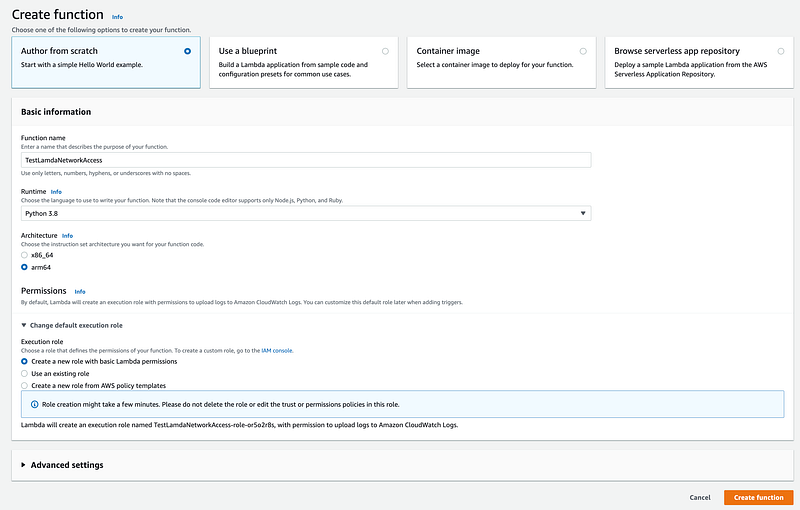
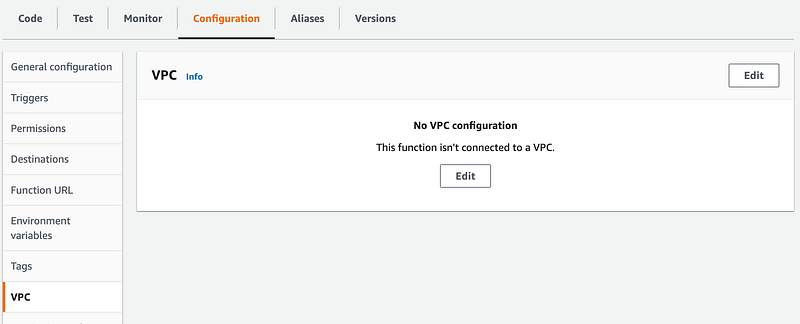
Click Configuration. Click VPC on the left.

No VPCs are configured here.
Add some code to the Lambda function to download a file from the Internet. In this case we are downloading dnspython which, if installed, might let someone make a DNS request using an alternate DNS server.
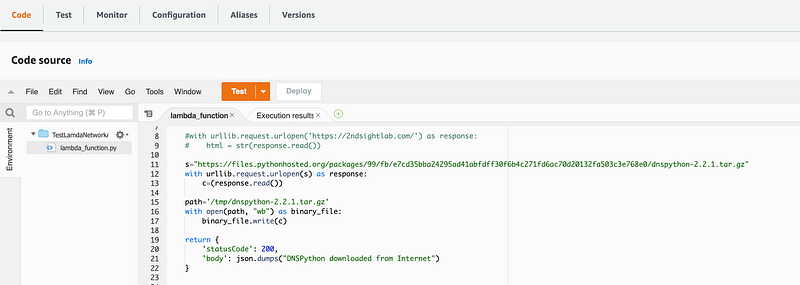
Why does using an alternate DNS matter? Malware may try to use their own DNS servers to avoid detection and avoid being blocked by DNS controls. DNS can be used as a method of exfiltration. A malicious insider or developer who is not security-conscious might add code to a Lambda function might try to install new code and take unauthorized actions.

What else might an attacker do with Internet access? Imagine a developer included a library with some malicious code in it. It might try to reach out to the Internet to send a notification and receive commands from a C2 channel hosted on a web server. A vulnerability in a web application might provide access to write code to a lambda function or use some type of relay functionality to perform data exfiltration.

Best practice would be to disallow Internet access unless it is actually required. Let’s add networking to our function and try the test again.

Create Networking for our Lambda Test

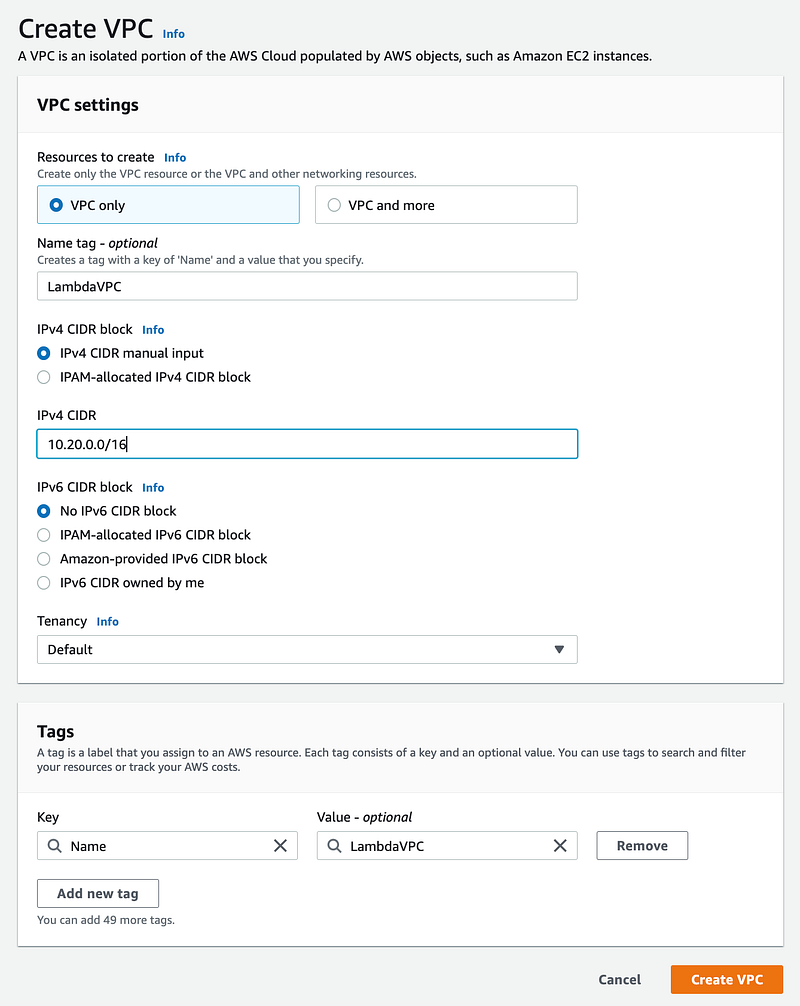
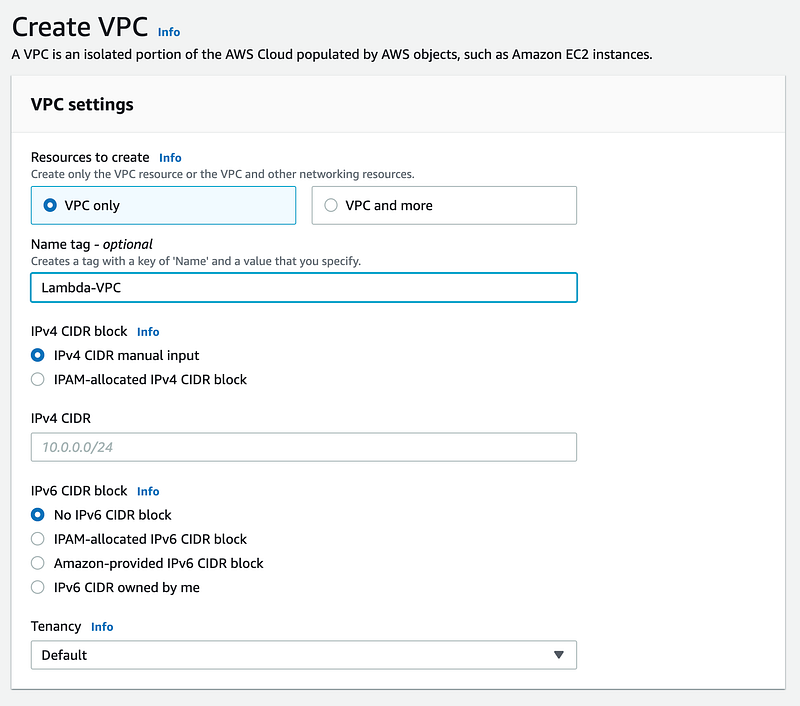
Create a Lambda VPC for this network test.

Navigate to the VPC Dashboard and create a VPC.
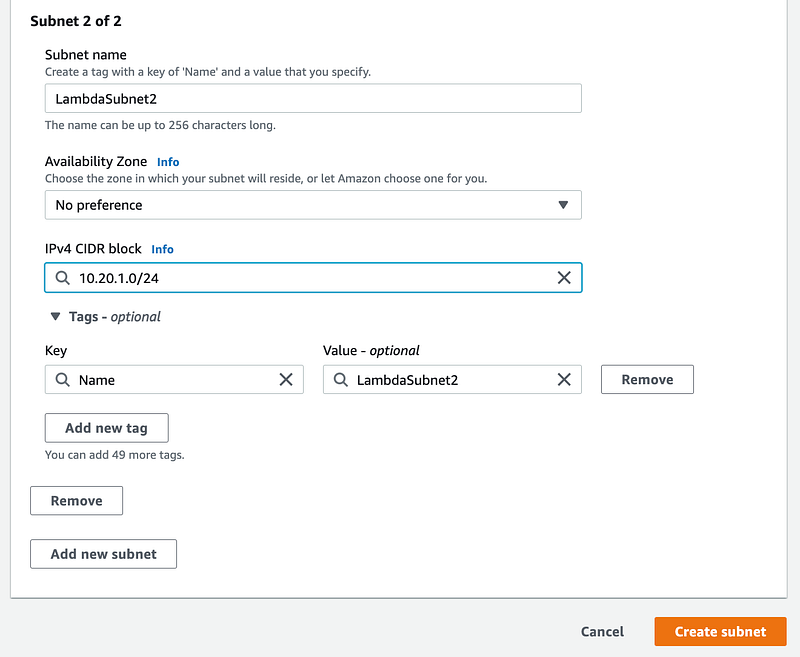
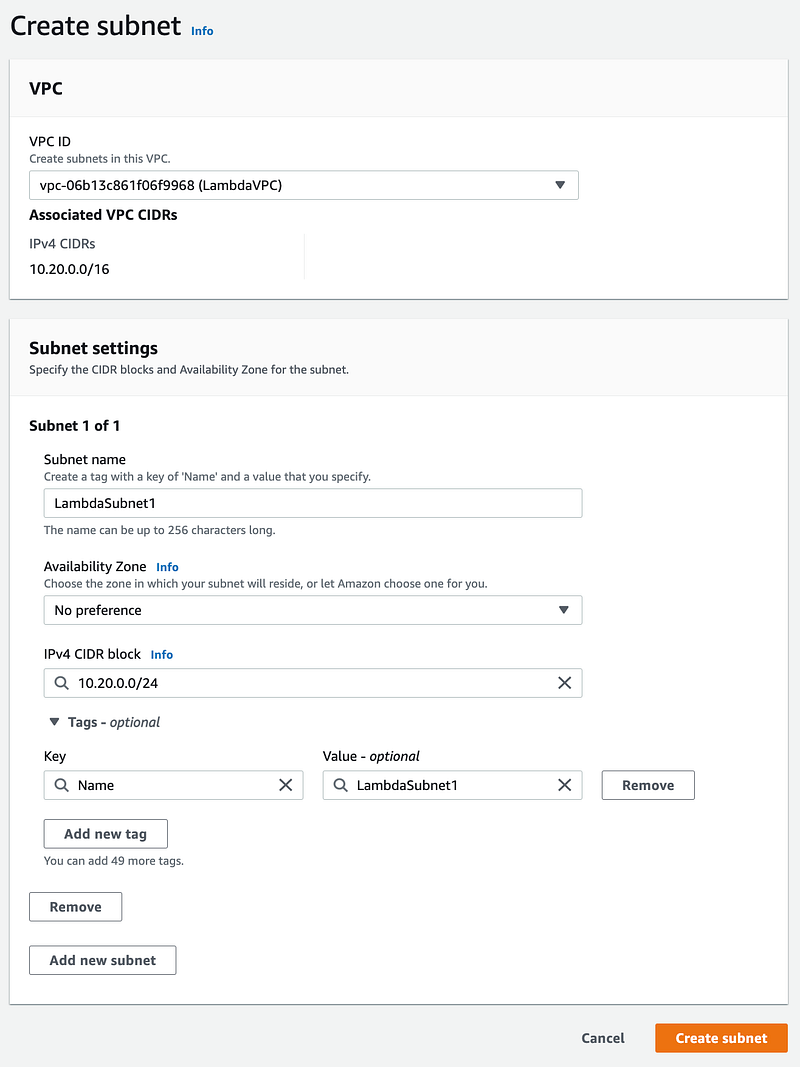
Create two Lambda Subnets.
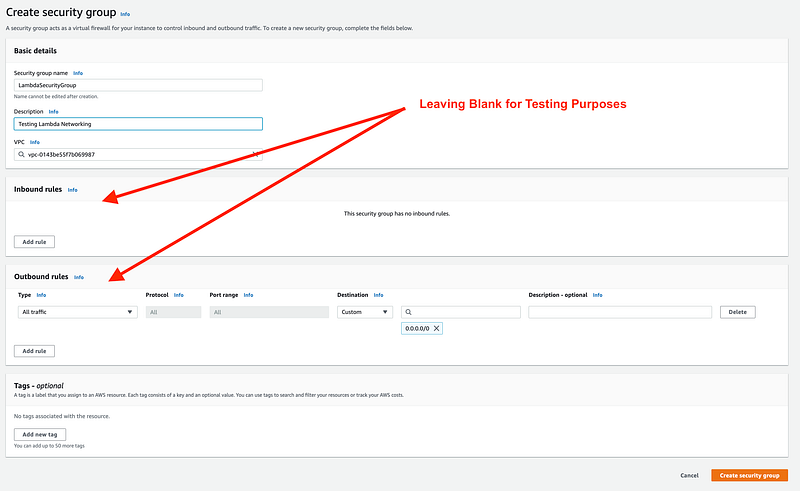
Create a Lambda Security Group with no rules.
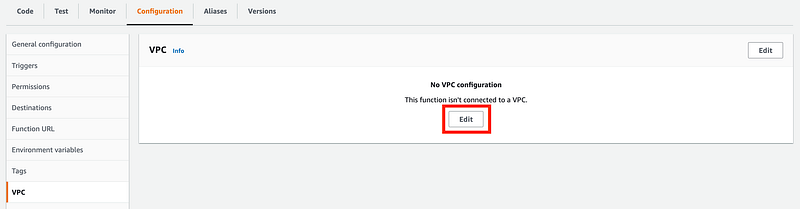
Return to Lambda and edit the VPC Configuration.
Choose your VPC and a subnet.
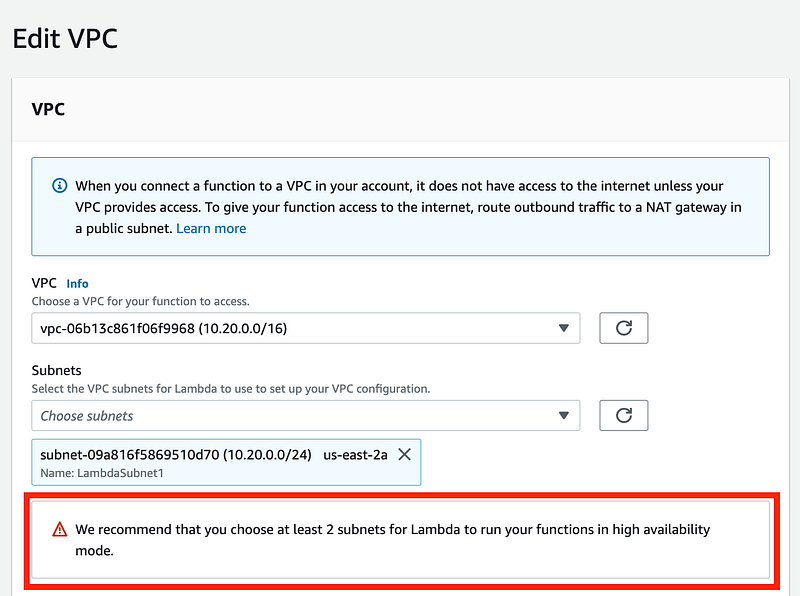
Note that Lambda recommends you add two subnets.

Add the second Lambda subnet and your security group.
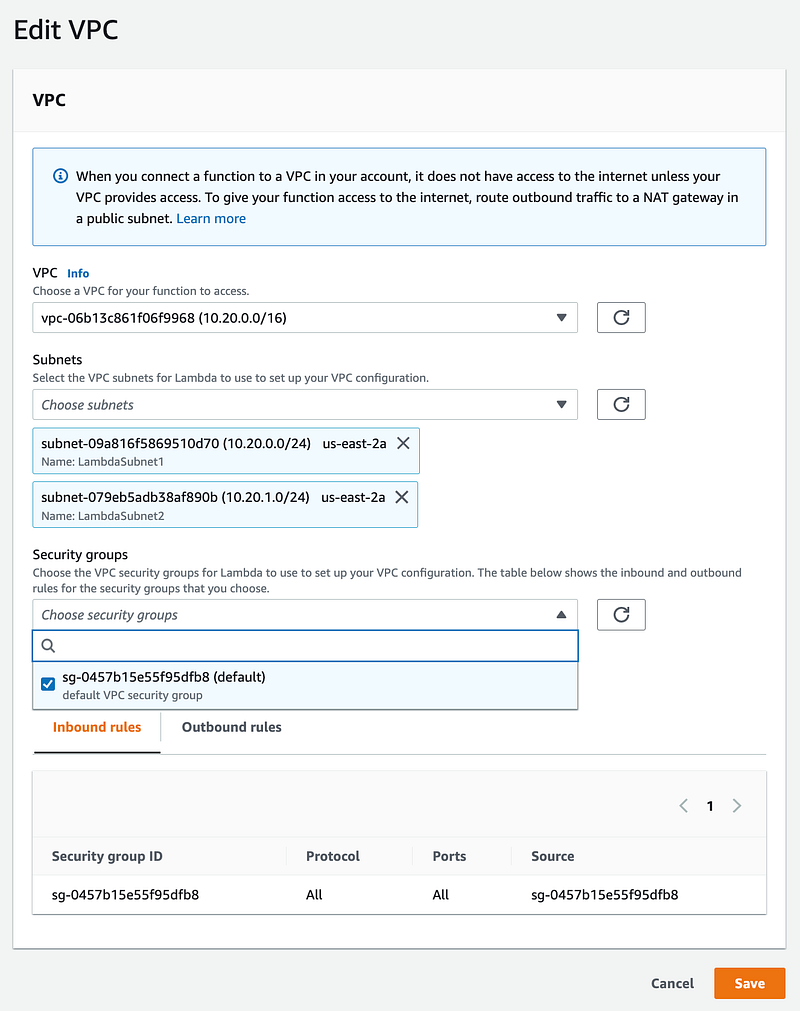
Notice that now you need Lambda role that allows the lambda function to create a network interface.

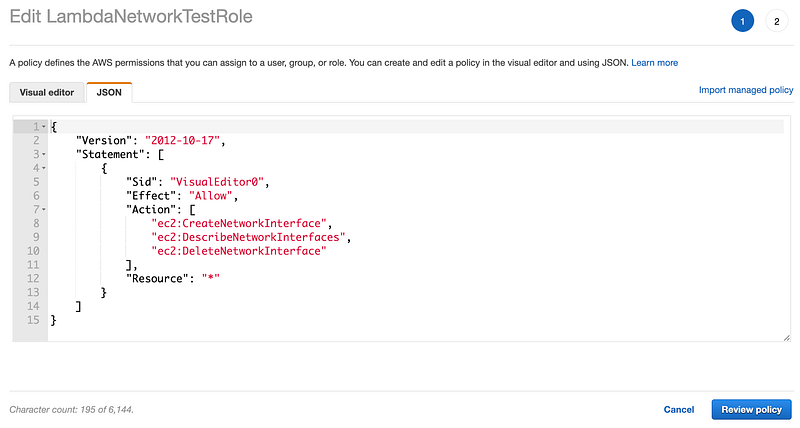
Create a new Policy that provides the required permission. We’ll do this manually for testing purposes. Create a policy with the following policy. As it turns out you will need to grant the following permissions to a Lambda function in a VPC. I would prefer to limit this to specific resources but it’s not immediately clear how to do that. For now I will proceed with the limited actions since I don’t have many resources in this test account.
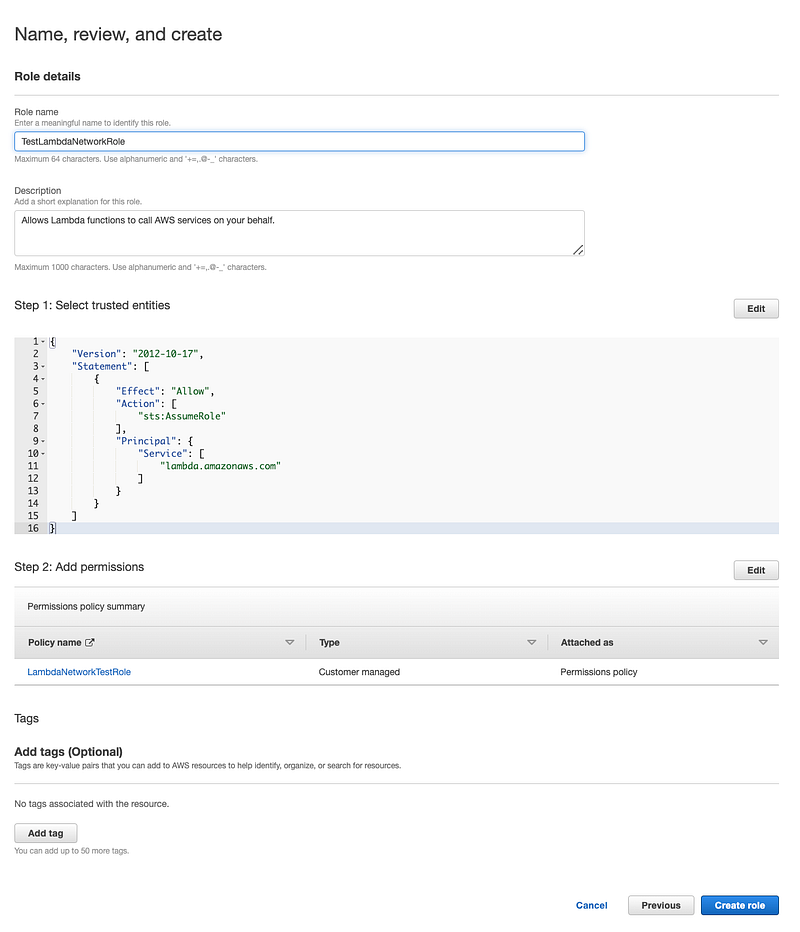
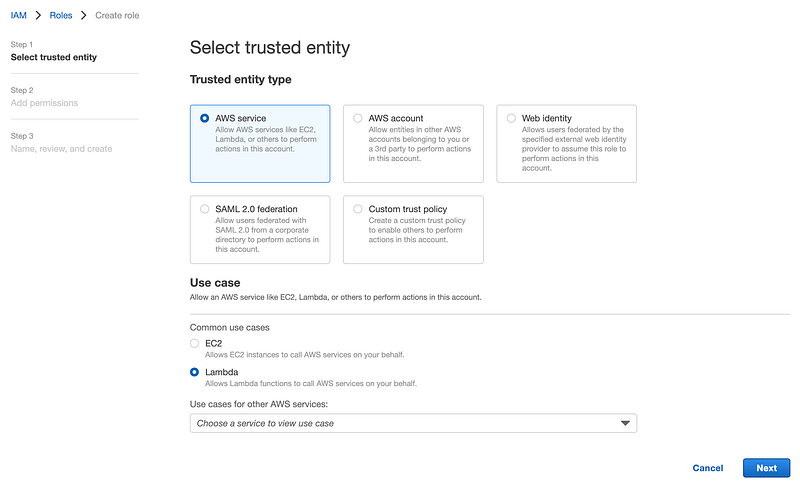
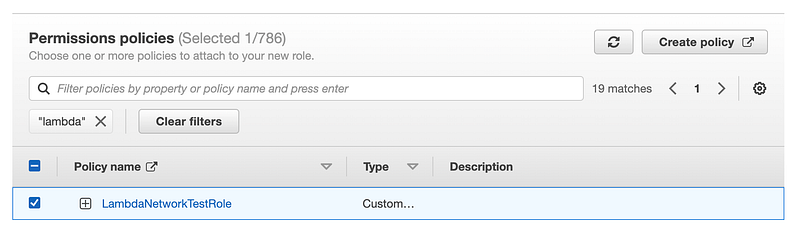
Create a role for this Lambda Network Test and choose the policy we just created.
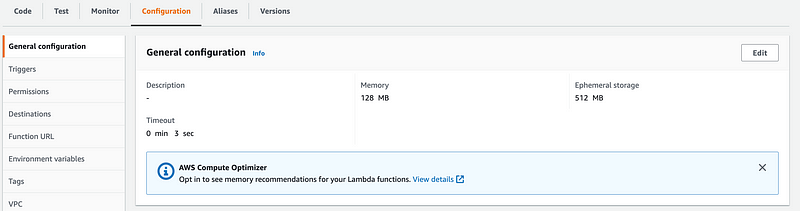
Edit the general configuration of your Lambda function.
Choose the role you just created.
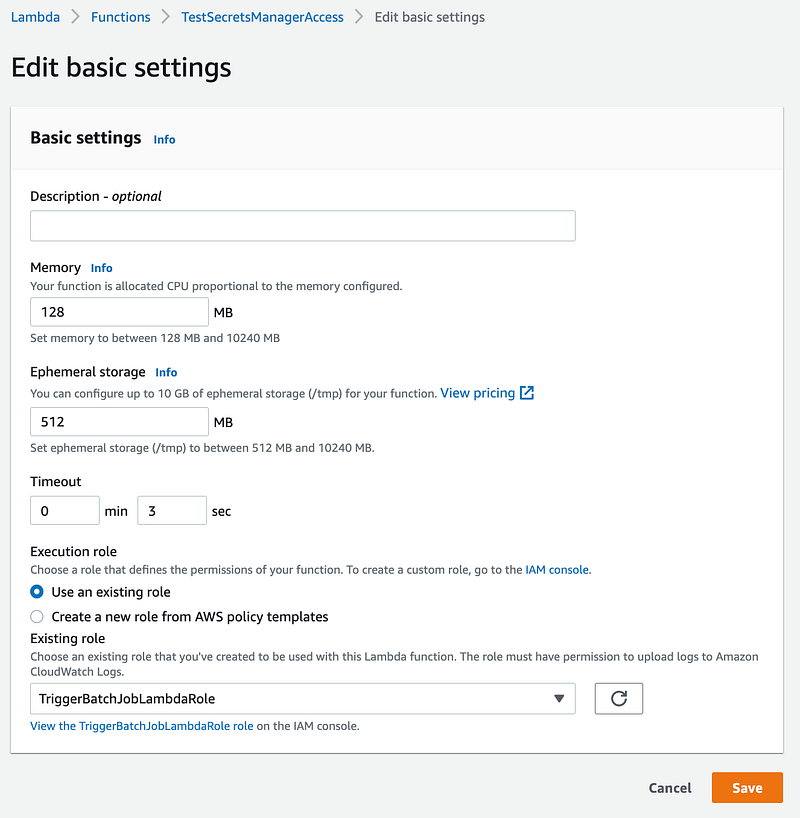
Now you should be able to select your networking resources and apply them to your lambda function.
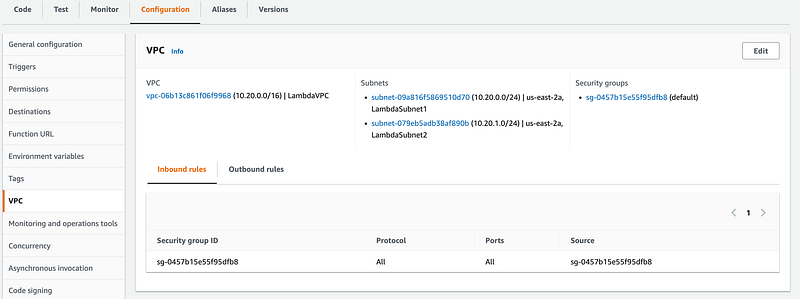
It may take a while for the network controls to finish deploying, so initially you may still be able to successfully run your Lambda function.

Wait for the network deployment to complete.

Test your lambda function again. Now the function fails with a timeout.
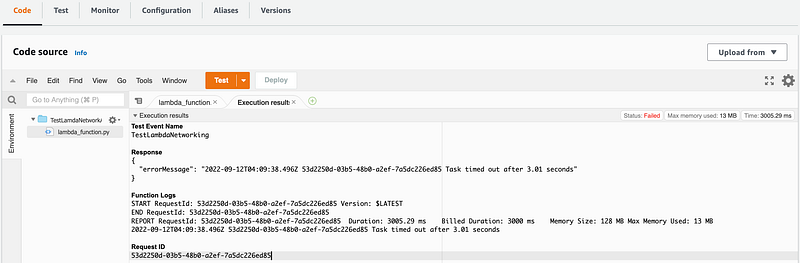
Viewing the rejected network traffic…or not

If you want to prove that this is caused by a the inability to connect to an Internet resource, you might think that you can turn on VPC FlowLogs for your VPC and see that the request is allowed when the VPC is not configured and rejected when the VPC Is applied.

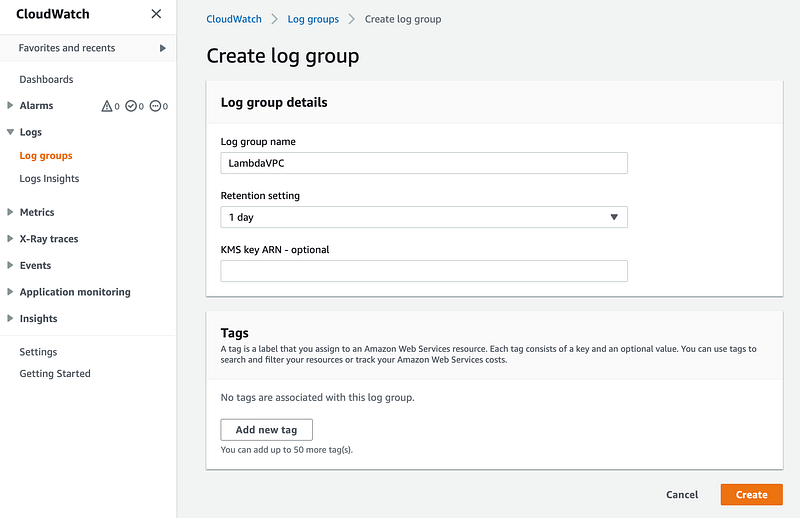
First we will create a log group.

Go to to the CloudWatch dashboard.

Click on Logs > Log groups on the left, then Create log group.
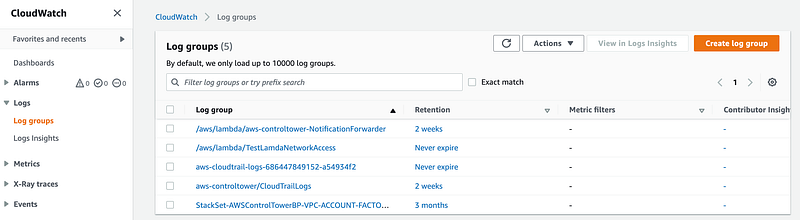
Name your log group, choose 1 day (as this is temporary), and click Create. You might want to encrypt this traffic in a production environment but right now we are running a test and then we’ll delete all these resources.
Set up a role that is allowed to publish los to Flow Logs if you don’t already have one:

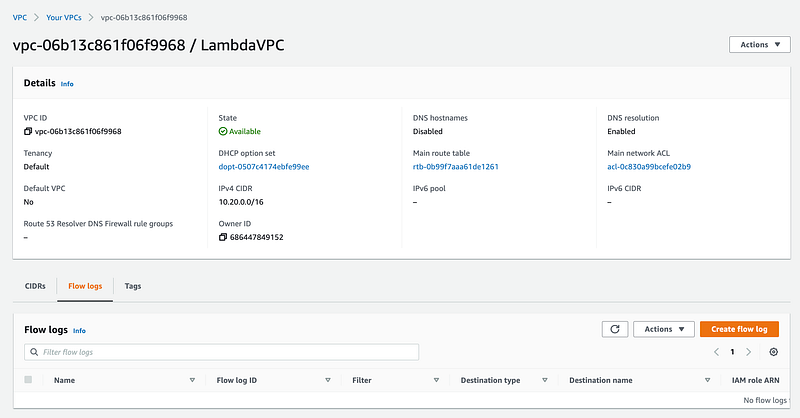
Return to your VPC and click on Flow Logs. Click Create flow log.
Add a name, choose your log group and role, and click Create flow log.
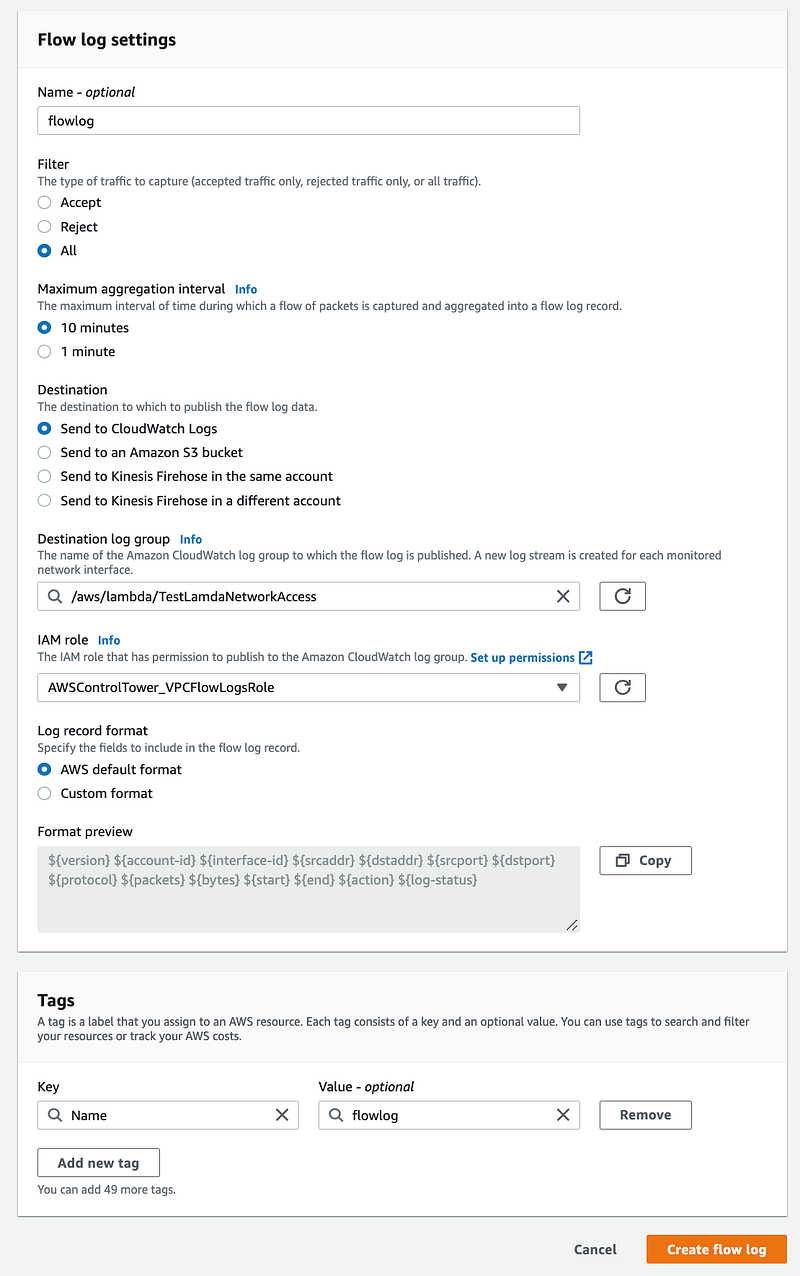
Test your function again. Note that VPC flow logs was set to show up after 10 minutes in my case so I won’t see the logs right away. You can configure a shorter window if you want. So I waited…and waited…and waited. But the logs indicating the lambda function Internet access got rejected never showed up.

What is the security implication of this? Network administrators will not be able to tell from network logs if a Lambda function is trying to reach the Internet in a way that it should not be. Network rejects are one of the best ways to spot system compromise as I explain in my book.

Applying a network VPC to your Lambda function does not mean that your Lambda function is in that VPC. The configuration allows that the Lambda function to access VPC resources.

How could you view the rejected network traffic? Set up a NAT and funnel your Lambda function traffic through the NAT — even if you simply reject it so you can see outbound connection attempts.

Lambda function and IP Addresses

How can we see the IP address for a Lambda function?

Configure a Lambda function URL:

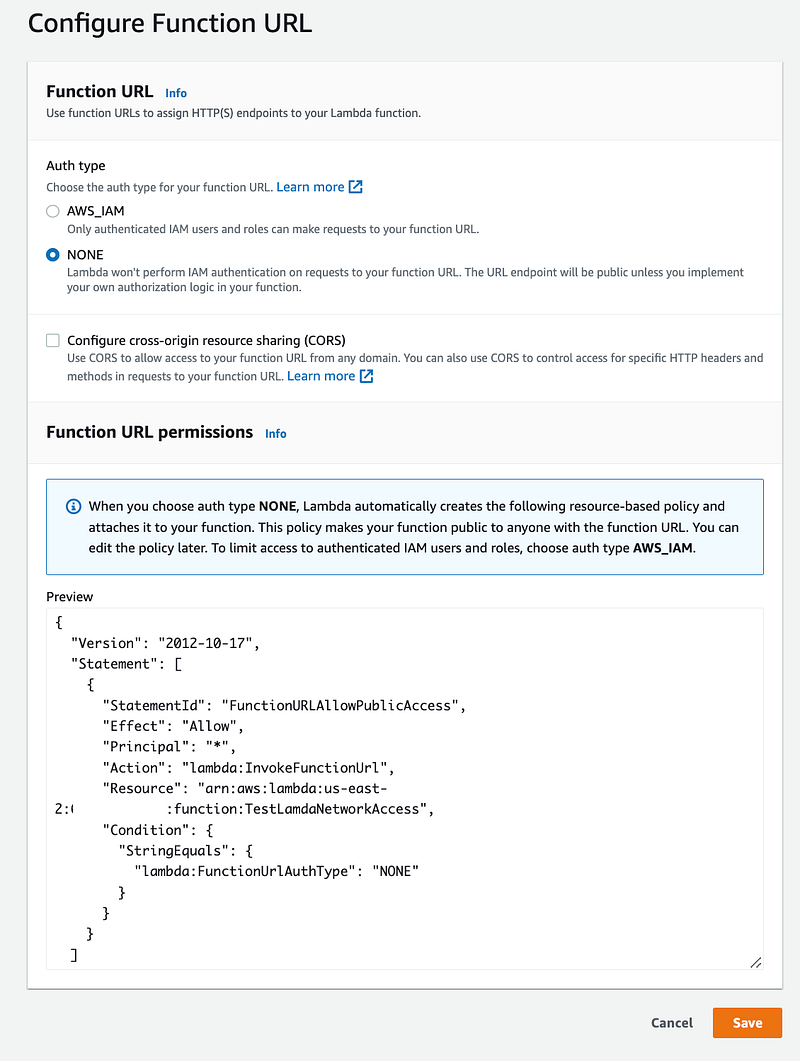
Create a function URL:
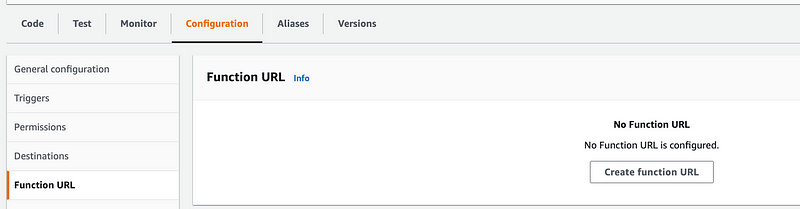
Choose none:
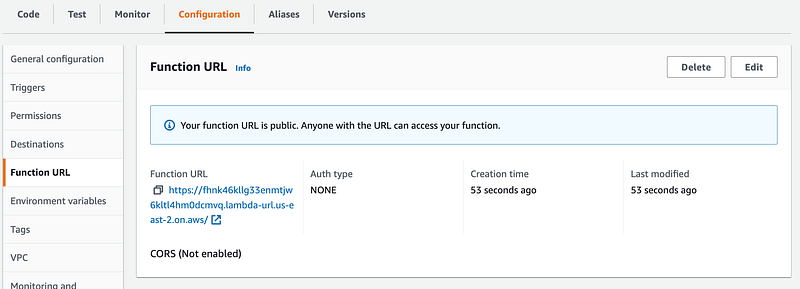
Copy the URL off the functions page:
Run the dig command (on Linux or Mac, use NSLookup on Windows)
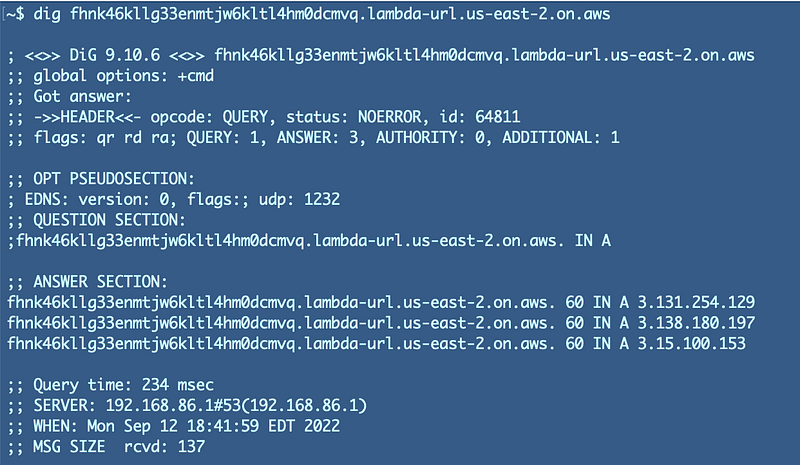
Our VPC doesn’t define public IP addresses. Those are provided randomly by AWS and they can change.

You can assign fixed IP addresses to network interfaces on AWS using an Elastic IP (EIP).

If you need your Lambda function to have a specific network address you can use a NAT Gateways in conjunction with your EIP.

You won’t be able to do that if you’re not using a VPC configuration with your Lambda function.

Keeping calls from your VPC to Lambda off the Internet

Another option you can use to keep Lambda traffic off the Internet is known as a VPC endpoint. When you configure a VPC endpoint, calls made to a Lambda function within a VPC will not traverse the Internet. They will stay on the AWS backbone.

You can create an endpoint policy for your Lambda function that uses IAM to limit who can invoke the function, similar to how we limited access to encrypt and decrypt with an AWS key earlier in this series.

Resource policies are not network controls. They don’t block traffic at a lower level of the TCP/IP or OSI model stack. By the time an attacker gets to your IAM controls they have traversed all those other layers. If you’ve never dissected network packets or understand how different network headers and layers work across network devices, you might not understand this distinction.

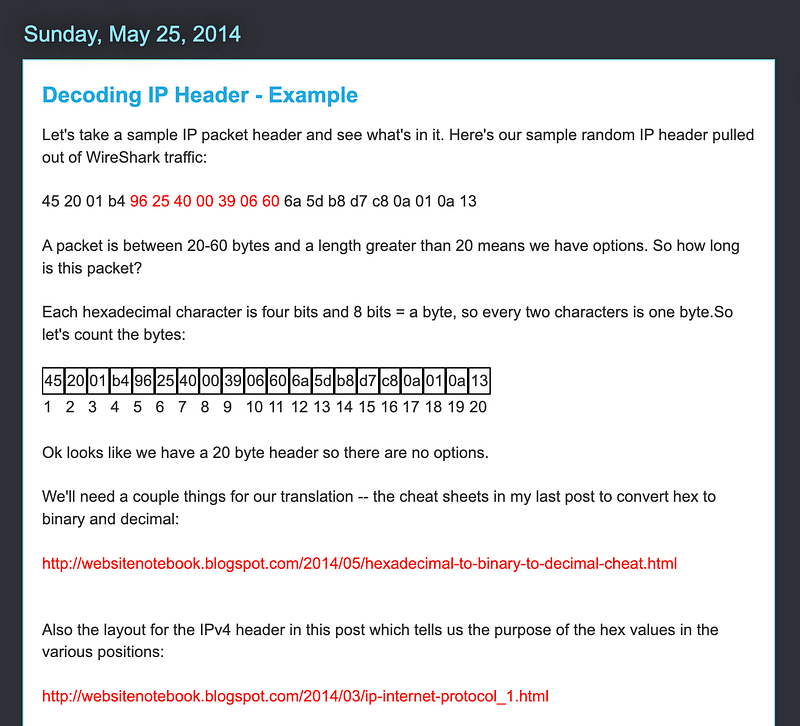
Here’s an old blog where I was working on decoding packets for a security class:

https://websitenotebook.blogspot.com/2014/05/decoding-ip-header-example.html

It links to a couple of related posts:
The majority of cloud breaches involve stolen or abused credentials, so it is best not to rely on IAM alone and use network controls wherever possible to block unwanted traffic before it reaches the application layer.

Secure Lambda Networking

If you have Lambda functions that both need access to VPC resources and the Internet you can use a NAT as mentioned above, but likely a better design would to split your architecture and Lambda functions up into those that require Internet access and those that require access to VPC resources.

You can also front Lambda functions that require access from the Internet to be monitored by an API Gateway and web traffic can be inspected by a web application firewall (WAF). You could set up a private endpoint to allow traffic to and four specific sources.

This was simply a test function to demonstrate how Lambda networking works, so I’ll be deleting all of this for now and moving on. But now we know that we want to employ a zero-trust network for our Lambda functions as best we can given the way Lambda functions.

I cover a lot more than networking in the next few like how an injection attack works on a lambda function, but if you want to jump ahead to how to automate your networking and more details on the above start here:

And because I’m still getting questions on this…

Follow for updates.

Teri Radichel | © 2nd Sight Lab 2022

About Teri Radichel:
~~~~~~~~~~~~~~~~~~~~
⭐️ Author: Cybersecurity Books
⭐️ Presentations: Presentations by Teri Radichel
⭐️ Recognition: SANS Award, AWS Security Hero, IANS Faculty
⭐️ Certifications: SANS ~ GSE 240
⭐️ Education: BA Business, Master of Software Engineering, Master of Infosec
⭐️ Company: Penetration Tests, Assessments, Phone Consulting ~ 2nd Sight Lab
Need Help With Cybersecurity, Cloud, or Application Security?
~~~~~~~~~~~~~~~~~~~~~~~~~~~~~~~~~~~~~~~~~~~~~~~~~~~~~~~~~~~~~
🔒 Request a penetration test or security assessment
🔒 Schedule a consulting call
🔒 Cybersecurity Speaker for Presentation
Follow for more stories like this:
~~~~~~~~~~~~~~~~~~~~~~~~~~~~~~~~~~~~~~~~~~~~~~~~~~~~~~~~~~~~~ 
❤️ Sign Up my Medium Email List
❤️ Twitter: @teriradichel
❤️ LinkedIn: https://www.linkedin.com/in/teriradichel
❤️ Mastodon: @teriradichel@infosec.exchange
❤️ Facebook: 2nd Sight Lab
❤️ YouTube: @2ndsightlab

Lambda
Vpc
Network Security
Cloud Security
Cybersecurity
Recommended from ReadMedium